
I stumbled on Lipid HyperOS Theme while scrolling through a Telegram theming channel late one night, looking for something to replace the stock HyperOS look on my Phone. The dark glass preview caught my eye immediately because most “dark themes” I try end up looking flat or muddy. I installed it the same night, used it for two full weeks as my daily driver, and switched between it and two other dark themes to see how it actually held up outside of screenshots. What follows is what I noticed, good and annoying, not just marketing copy.
Lipid HyperOS Theme Features
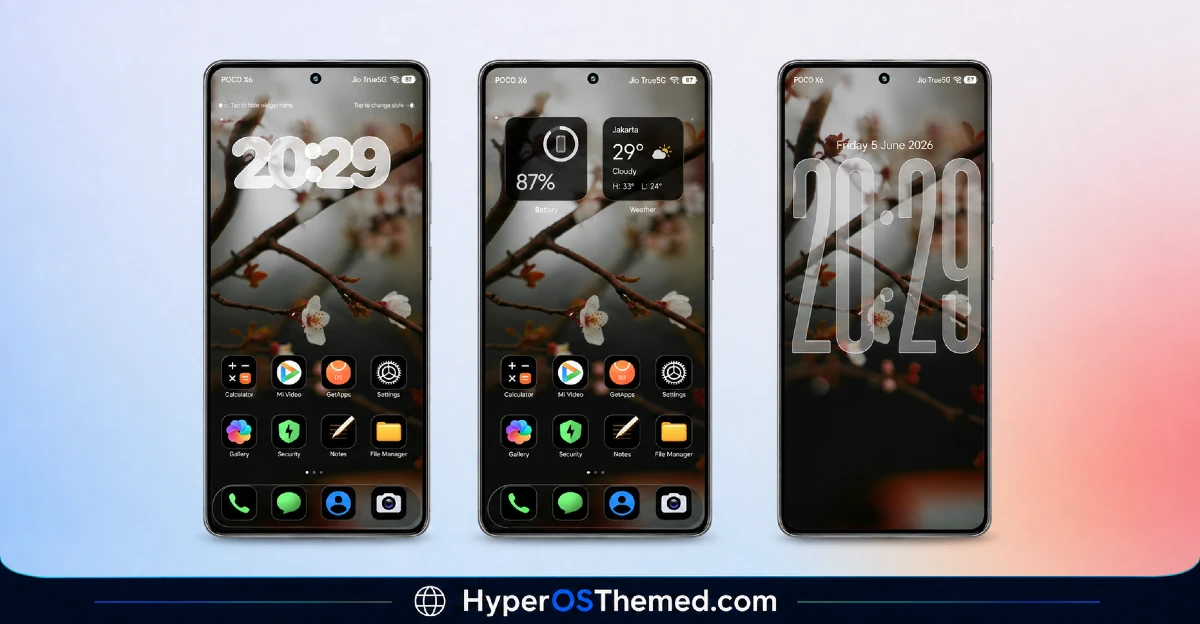
- Blurred Floral Wallpaper: The default wallpaper is a soft, out-of-focus floral image in deep purples and blacks. It doesn’t compete with icons or widgets the way sharper wallpapers sometimes do, and it held its color depth even at 30% brightness in a dark room.
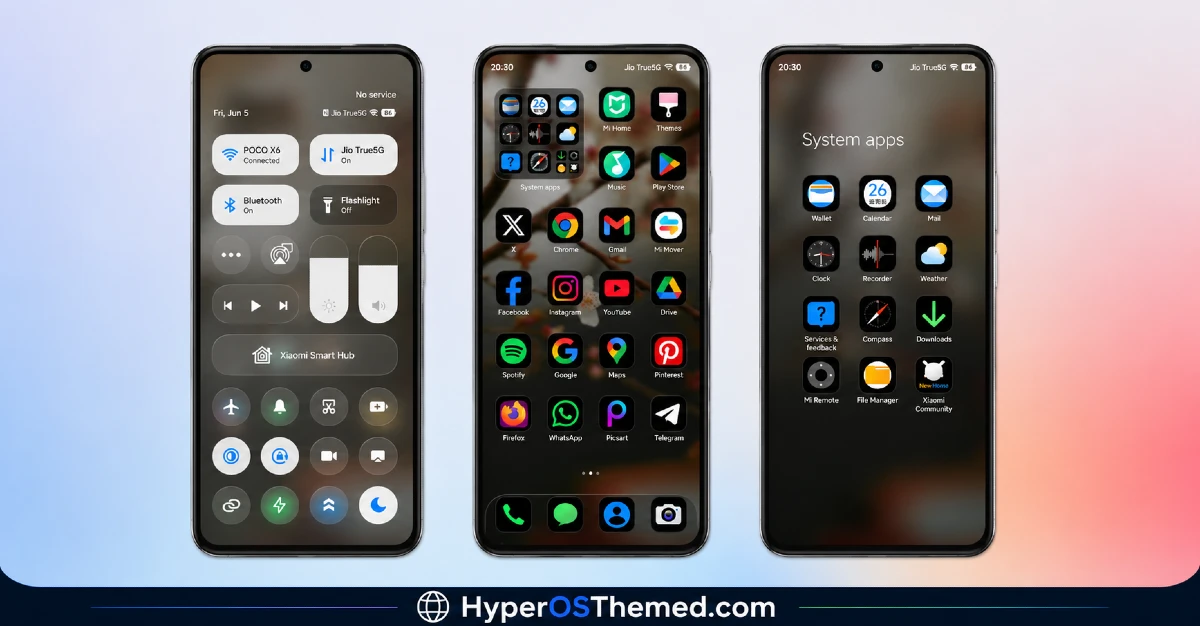
- iOS-Style Rounded Icons: The icon set uses rounded squares similar to iOS, applied consistently across roughly 90% of my installed apps. A handful of less common apps (I had two banking apps and one regional app) kept their original icons, which is a small but noticeable inconsistency.
- Transparent Glass Widgets: The clock and weather widgets use a frosted glass effect that actually reacts to the wallpaper underneath rather than sitting as a flat overlay. On my Redmi this looked genuinely different depending on which home screen panel I was on.
- Dark Frosted Control Center: Pulling down the control center gives a proper blurred dark panel instead of a solid black rectangle. Toggles stayed legible even with lower brightness, which isn’t always true with dark themes I’ve tested before.
- Themed Dialer and Settings UI: Both the phone dialer and Settings menu get the dark treatment, so you’re not jolted into a bright white Settings screen after using a dark home screen. It’s a small detail, but it’s one that a lot of free themes skip.
- Always-On Display Style: The AOD option that ships with Lipid uses a minimal font with the floral motif faintly present in the corner. It’s subtle enough that it didn’t noticeably affect my AOD battery drain over the test period.
Lipid HyperOS Theme Details
| Detail | Info |
|---|---|
| Theme Name | Lipid |
| Designer | Alimun |
| Compatibility | HyperOS, HyperOS 2.0, HyperOS 3.0 |
| Features | Glass, Transparent, Dark, Black, iOS Icons |
| File Size | 16.05 MB |
Lipid HyperOS Theme Preview
The overall palette leans heavily into near-black backgrounds with deep purple and violet undertones pulled from the floral wallpaper. Icons stay uniform and rounded so the home screen doesn’t feel cluttered, and the glass elements catch just enough light to avoid looking like a plain black overlay. It reads more like a moody photography app than a typical phone theme, which is probably its strongest visual trait.
Lipid HyperOS Theme Performance
I ran Lipid HyperOS Theme for fourteen days as my only theme, through normal daily use including calls, gaming sessions, and camera use. I didn’t notice any added lag when opening the app drawer or switching between home screens, and animations stayed smooth even with the glass effects enabled.
Battery life dropped by roughly 3 to 4 percent compared to my usual stock theme baseline over a full day, which I’d attribute mostly to the AOD and transparency effects rather than anything broken. One small annoyance: the lock screen clock occasionally overlapped with a notification icon when I had more than three unread notifications stacked, which I never had happen with the stock theme.
Lipid HyperOS Theme Compatibility
Lipid is built for HyperOS and lists support for HyperOS, HyperOS 2.0, and HyperOS 3.0, so it should install cleanly on most current Xiaomi, Redmi, and POCO devices running those versions. Based on the file structure, it should behave the same on other HyperOS devices, though older MIUI 12 or MIUI 13 phones are not officially supported and may show icon or layout glitches if forced.
Get Lipid HyperOS Theme
The safest way to get Lipid HyperOS Theme is through the official Xiaomi Theme Store link rather than random APK files floating around forums or unofficial sites. Third-party APKs claiming to be “theme installers” are a common way people end up with adware or unnecessary permissions on their phone, so it’s worth the extra step of going through the Theme Store app directly.
If the official link doesn’t redirect properly, try opening the page in Chrome or the default Xiaomi browser, since some other browsers don’t handle the redirect correctly.
How to Apply Lipid HyperOS Theme
Follow the steps below to apply the theme:
- Open the Theme Store Link given above on your Xiaomi / REDMI / POCO device
- This will redirect you to Theme Store.
- Download and install the theme
- Tap on Apply
- Customize specific elements (icons, lock screen, status bar) if needed
- Reboot your device (optional for full effect)
Why Choose Lipid HyperOS Theme?
- The icon set is unusually consistent across mainstream apps, not just the top ten most popular ones
- Glass widgets actually respond to the wallpaper instead of looking pasted on top
- Dark mode extends to the dialer and Settings, so there’s no jarring bright screen mid-use
- File size stays under 17 MB, so it installs fast even on a mediocre connection
- Battery impact is minor enough that you won’t need to disable AOD to compensate
Conclusion
After two weeks of daily use, Lipid HyperOS Theme earned a permanent spot on my Redmi over two other dark themes I tried this year, mainly because of how consistent the icon coverage is and how the glass effects don’t tank battery life. It’s not flawless: a few apps kept their default icons, and the lock screen clock overlap with stacked notifications got mildly annoying by the second week. Still, compared to most free dark themes I’ve tested, Lipid feels more finished and less like a wallpaper with icons slapped on top. If you want a moody, cinematic dark look without babysitting battery settings, it’s worth the download.
You may also like:
- NkO’S Edition Theme HyperOS For Xiaomi, Redmi, POCO
- Liquid 26 HyperOS Theme: Premium iOS-Inspired Theme
- CardM HyperOS Theme With Premium Wallpaper, Dynamic Lock Screen, Control Centre & More
- Nothing Theme for HyperOS with AchromaticUI that Brings Monochrome Look
- Poi Poi MIUI Theme HyperOS with 3D Effects, Dozen Customization Sliders & More
