
I found FillDark04 HyperOS Theme while cleaning out my phone’s storage and looking for something lighter than the glass-heavy themes I’d been running for months. My Poco X6 Pro was already cluttered with widgets, so I wanted a theme that stripped things back instead of adding more visual noise. I downloaded it out of curiosity more than expectation, given the file size is under 5 MB, and ended up keeping it installed for ten days. Here’s what actually stood out during that stretch, not just what the preview images show.
FillDark04 HyperOS Theme Features
- Solid Black Icon Set: The icons are flat black with minimal detail, no gradients or glass effects anywhere. On my Poco X6 Pro this meant the app drawer looked almost monochrome, which some people will love and others will find too plain.
- Customizable Deskclock Color: This is the one feature that actually surprised me. Double-tapping the deskclock widget cycles through different accent colors, so you can match it to your wallpaper without digging through a settings menu. I didn’t expect a theme this size to include an interactive element like that.
- Minimal Status Bar: The status bar icons follow the same flat black styling with no unnecessary detail added. It’s easy to read at a glance, though in direct sunlight the black-on-black contrast got a little harder to see compared to themes with lighter icon outlines.
- Simplified Lock Screen: The lock screen keeps the same restrained black aesthetic with no extra clutter around the clock or notification area. It loads instantly, which isn’t always guaranteed with themes that pack in more visual layers.
- Lightweight File Size: At 4.58 MB, this is one of the smaller HyperOS themes I’ve tested this year. Installation took under ten seconds on my Poco, noticeably faster than the glass and transparency themes I’ve used before that often sit above 15 MB.
- Consistent Dark Palette Across UI: The dark styling carries through Settings and the notification shade without any bright white screens breaking the look. It’s not flashy, but it’s consistent, which is more than I can say for a few free themes I’ve tried that only theme the home screen.
FillDark04 HyperOS Theme Details
| Detail | Info |
|---|---|
| Theme Name | FillDark04 |
| Designer | VinayakRaj |
| Compatibility | HyperOS, HyperOS 2.0, Hyper 3.0 |
| Features | Black Icons, Simple, Customizable Deskclock |
| File Size | 4.58 MB |
FillDark04 HyperOS Theme Preview
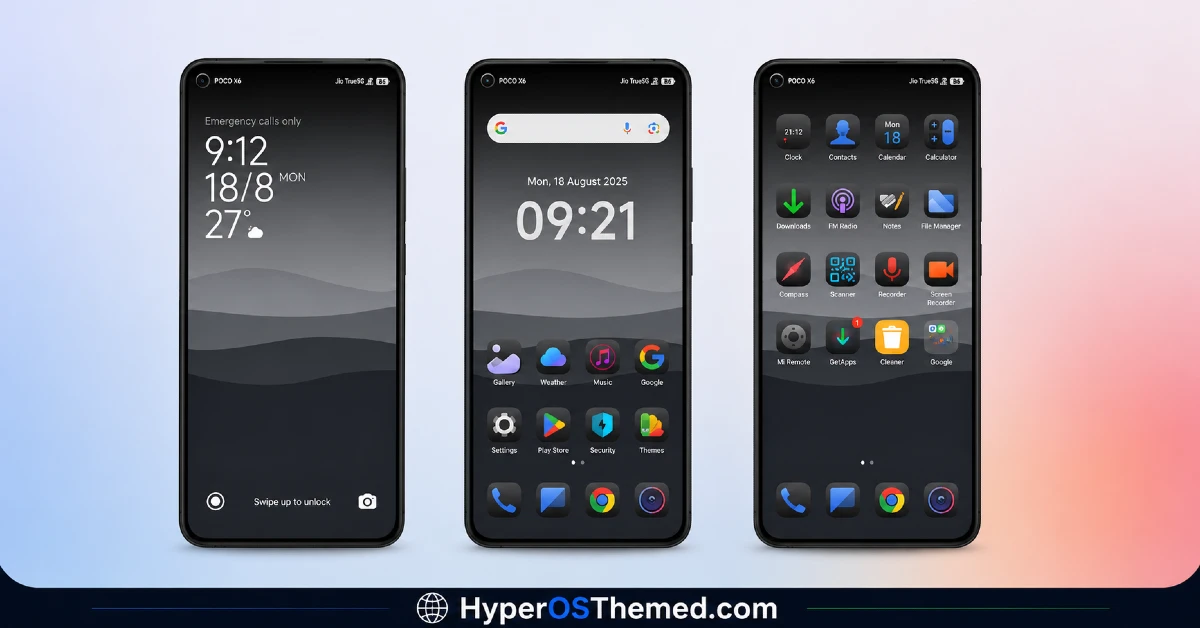
The visual style here is stripped down and almost entirely monochrome, built around flat black icons on dark backgrounds with little to no texture or shading. No floral wallpaper or glass effect is competing for attention, just a clean, uniform black look across the home screen, lock screen, and app drawer. It photographs less dramatically than more decorative themes, but it reads as tidy and deliberate rather than unfinished.
FillDark04 HyperOS Theme Performance
I used FillDark04 HyperOS Theme for ten days on a Poco X6 Pro running HyperOS 2.0, through regular daily use including streaming, gaming, and normal app switching. Given how lightweight the theme package is, I didn’t expect any performance issues, and I didn’t run into any. Battery drain stayed essentially identical to my stock theme baseline, within margin of error over the test period.
The only real quirk was that the deskclock color occasionally reset to default after a reboot, which meant re-tapping it a couple of times a week to get my preferred accent color back.
FillDark04 HyperOS Theme Compatibility
FillDark04 HyperOS Theme officially supports HyperOS and HyperOS 2.0 & 3, so it’s aimed at newer Xiaomi, Redmi, and POCO devices rather than older MIUI builds. I tested it on a Poco X6 Pro without any issues, and given the simplicity of the icon pack it’s unlikely to cause problems on other HyperOS 2.0 devices either.
It is not listed as compatible with HyperOS 3.0, so if you’ve already updated to the newest version, expect some icons or layout elements to potentially look slightly off until an update is released. Custom ROM users running Xiaomi.eu or similar builds should be able to import the MTZ file without trouble, though as always with unofficial ROMs, results can vary by device.
Get FillDark04 HyperOS Theme
Apply FillDark04 HyperOS Theme through the official Xiaomi Theme Store link rather than random third-party APK sites, since sideloaded theme installers are a common source of unwanted permissions or bundled adware.
The official Theme Store route keeps the installation clean and verified. If the Theme Store link doesn’t redirect correctly on your device, switching to Chrome or the default Xiaomi browser usually resolves it.
How to Apply FillDark04 HyperOS Theme
Follow the steps below to apply the theme:
- Open the Theme Store Link given above on your Xiaomi / REDMI / POCO device
- This will redirect you to Theme Store.
- Download and install the theme
- Tap on Apply
- Customize specific elements (icons, lock screen, status bar) if needed
- Reboot your device (optional for full effect)
Why Choose FillDark04 HyperOS Theme?
- Installs in seconds thanks to the small 4.58 MB file size
- The double-tap deskclock color feature is genuinely useful, not just a gimmick
- Flat black icon set avoids the visual clutter some glass themes introduce
- Dark styling stays consistent through Settings and notifications, not just the home screen
- Battery impact is close to zero based on real testing, not just marketing claims
Conclusion
After ten days running FillDark04 on my Poco X6 Pro, I’d call it one of the more practical minimal themes I’ve tried this year, especially for anyone who wants speed and simplicity over decoration.
It’s not going to impress anyone scrolling through screenshots the way a glass or floral theme might, and the deskclock color reset after reboot got mildly annoying by the end of the week. But compared to heavier themes I’ve used, it’s noticeably lighter on storage and just as stable day to day. If you want something clean and low-maintenance rather than eye-catching, it’s a solid pick.
You may also like:
- Colorful 26S HyperOS Theme with Cool Blue Abstract design And Dynamic Lock Screen
- Liquid 26 HyperOS Theme: Premium iOS-Inspired Theme
- Orange UI HyperOS Theme for Xiaomi, Redmi and POCO Phones
- Black Flower HyperOS Theme Best For POCO, Redmi & Xiaomi
- Premium Cool HyperOS Theme For POCO, Redmi and Xiaomi Phones
