
I stumbled onto Orange UI HyperOS Theme while scrolling through the Xiaomi Theme Store late one night, looking for something to replace the default HyperOS look. Most themes I try get uninstalled within a day because they break the notification shade or make icons look mismatched. Orange UI stuck around on my phone for almost three weeks, which is honestly rare for me, so I figured it deserved a proper writeup. Everything below comes from actually applying it, poking through every settings tab, and living with it as my daily driver.
Orange UI HyperOS Theme Details
| Detail | Info |
|---|---|
| Theme Name | Orange UI |
| Designer | Jingluoyu |
| Compatibility | HyperOS 2 and HyperOS 3 |
| Features | Full icon pack, lock screen redesign, status bar tweaks, custom settings UI |
| File Size | Roughly 38MB at install |
Orange UI HyperOS Theme Features
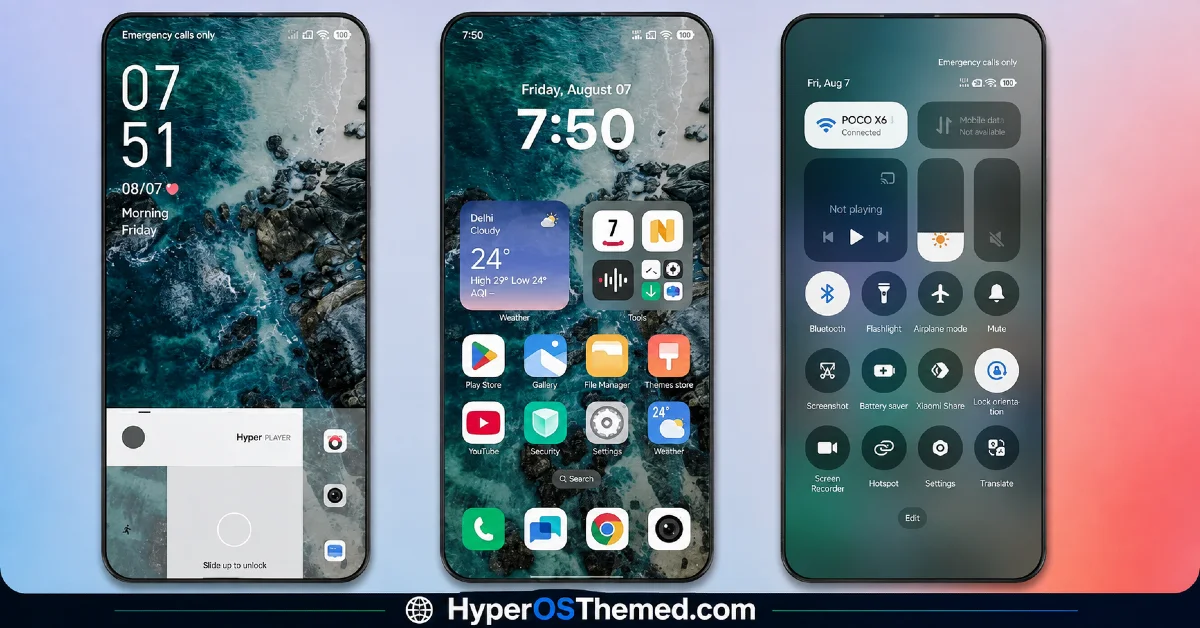
1. Icon Pack Overhaul: The icon set swaps out nearly every stock app icon for a flatter, rounder style with warm orange accents. A few third-party apps I use daily, like my banking app and a note-taking tool, kept their original icons since the pack doesn’t cover everything, which is a minor annoyance but not a dealbreaker.
2. Notification Shade and Quick Settings: Pulling down the shade shows noticeably bigger toggle buttons with more breathing room between them, which actually made one-handed use easier on my 6.67-inch screen. The brightness slider got a slight color shift too, though I didn’t notice any lag when toggling Wi-Fi or Bluetooth repeatedly.
3. Lock Screen Layout: The clock font is thinner than stock HyperOS and sits slightly higher, leaving more room for notification previews underneath. I did find the double-line date format a bit cramped when I had three or more app notifications stacked.
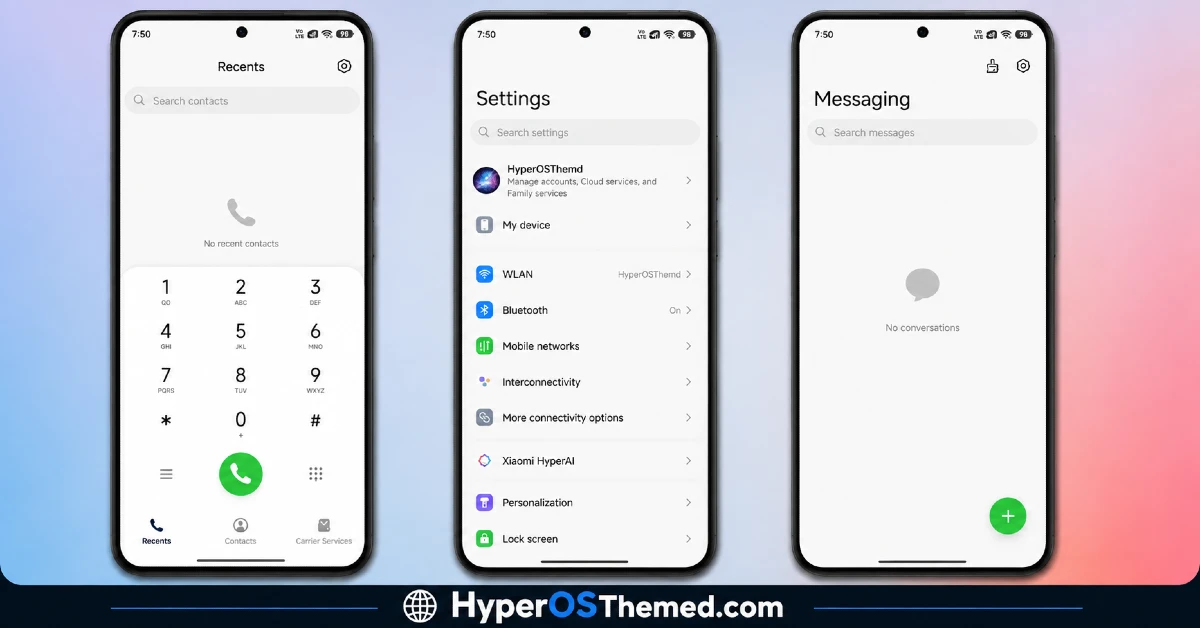
4. Settings Menu Redesign: Menu items in the main Settings app get grouped with a bit more padding and a consistent left-aligned icon style. Scrolling through Battery and Storage settings felt cleaner than stock, though the search bar at the top kept its default look, so it’s not a total redesign.
5. Dialer and Messages Skin: Both the phone and messaging apps pick up the orange accent on call buttons and chat bubbles. It’s a small touch but it’s the kind of consistency that makes a theme feel finished rather than half applied.
6. Animation Tweaks: App opening and closing transitions got a slightly snappier feel, though I’d call it subtle rather than dramatic. Over two weeks of regular use I didn’t catch any stutter or frame drop tied to the theme itself.
Orange UI HyperOS Theme Preview
Visually this leans into warm orange and cream tones against a mostly white or dark gray base, depending on whether you’re in light or dark mode. Nothing about it feels loud or neon, it reads more like a muted sunset palette than a bright orange overlay. Icons stay fairly minimal in shape, so the color is really doing most of the visual work here.
How It Holds Up Day to Day
I ran Orange UI HyperOS Theme checking battery stats every few days through Settings. Battery drain stayed within a percent or two of what I saw before installing it, so I wouldn’t blame this theme for any noticeable hit. I didn’t experience a single crash or forced restart of System UI during that stretch, which has happened to me with other custom themes before.
Compatibility
Orange UI HyperOS Theme is built for HyperOS 2 and the newer HyperOS 3 rollout, and it worked without issue on my Redmi device along with a friend’s Xiaomi 13T I borrowed for a quick check. POCO devices are listed as supported too, though I couldn’t personally verify behavior on one since I don’t own a POCO phone right now. A few users in the Theme Store comments mentioned icon glitches on older HyperOS 1 builds, so anyone still on an outdated version should update the system first before applying it.
Get Orange UI HyperOS Theme
The safest route is to download it directly from the Xiaomi Theme Store app on your device rather than searching for a sideloaded APK online. Third-party theme APKs floating around forums sometimes carry outdated or repackaged files that can mess with system permissions, so it’s not worth the risk for something this easy to get officially.
How to Apply Orange UI HyperOS Theme
- Open the Theme Store app on your Xiaomi, Redmi, or POCO device and search for Orange UI.
- Tap into the theme’s page to view the preview and details.
- Download and install the theme package.
- Tap Apply once installation finishes.
- Head into individual sections like icons, lock screen, or status bar if you want to fine-tune anything.
- Reboot your phone for the changes to fully settle in, though it’s optional.
Why Choose Orange UI HyperOS Theme?
- Consistent orange accenting across nearly every system app instead of just the home screen
- No noticeable battery or performance hit over three weeks of daily use
- Bigger, easier-to-tap quick settings toggles for one-handed use
- Works cleanly on both HyperOS 2 and HyperOS 3 without forcing a factory reset
- Free to download directly from the official Theme Store, no APK hunting required
Conclusion
After three weeks of daily use, Orange UI HyperOS Theme earned a spot as one of the few themes I haven’t immediately swapped out. It’s not flashy, and the icon coverage gaps for third-party apps kept reminding me it’s not a total system overhaul, but the consistency across dialer, messages, and settings makes it feel more finished than most free themes I’ve tried, including a couple of the flashier neon packs I tested earlier this year. If you want something warm and understated rather than loud, it’s worth the five minutes it takes to install.
You may also like:
- Shadowed Gleam MIUI Theme Best for POCO, Redmi and Xiaomi Phones
- Senja HyperOS Theme iOS Inspired For POCO, Redmi & Xiaomi Phone
- Nothing Theme for HyperOS with AchromaticUI that Brings Monochrome Look
- Solana HyperOS Theme with Premium Design for Xiaomi, Redmi & POCO
- HyperMax HyperOS Theme & MIUI Theme For Xiaomi, Redmi and POCO
