
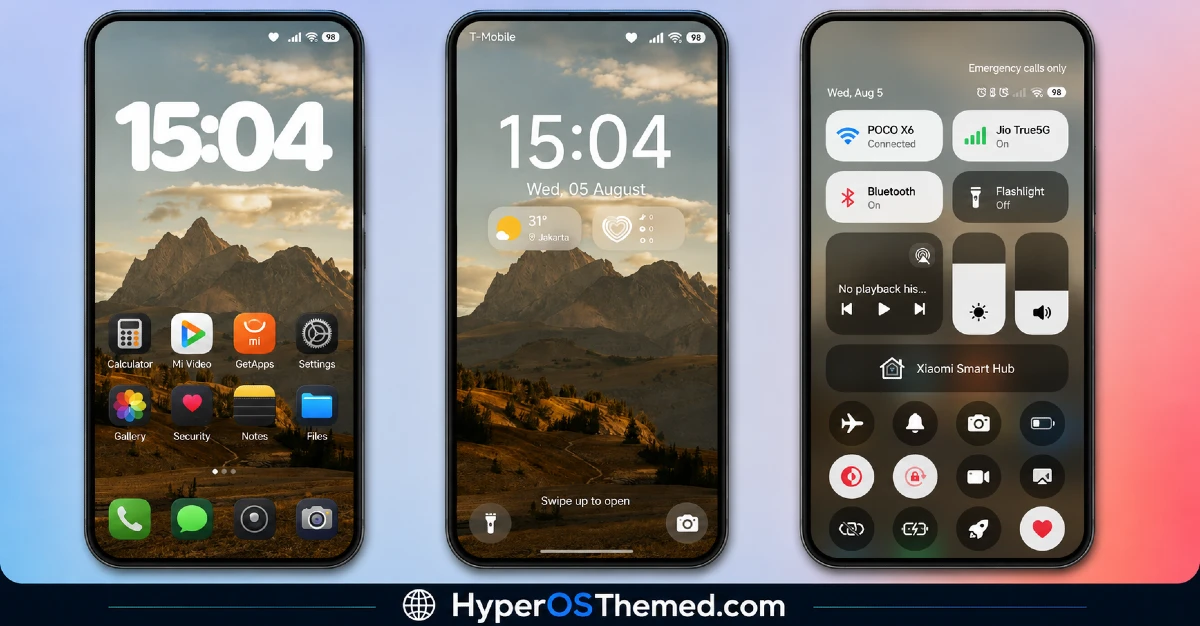
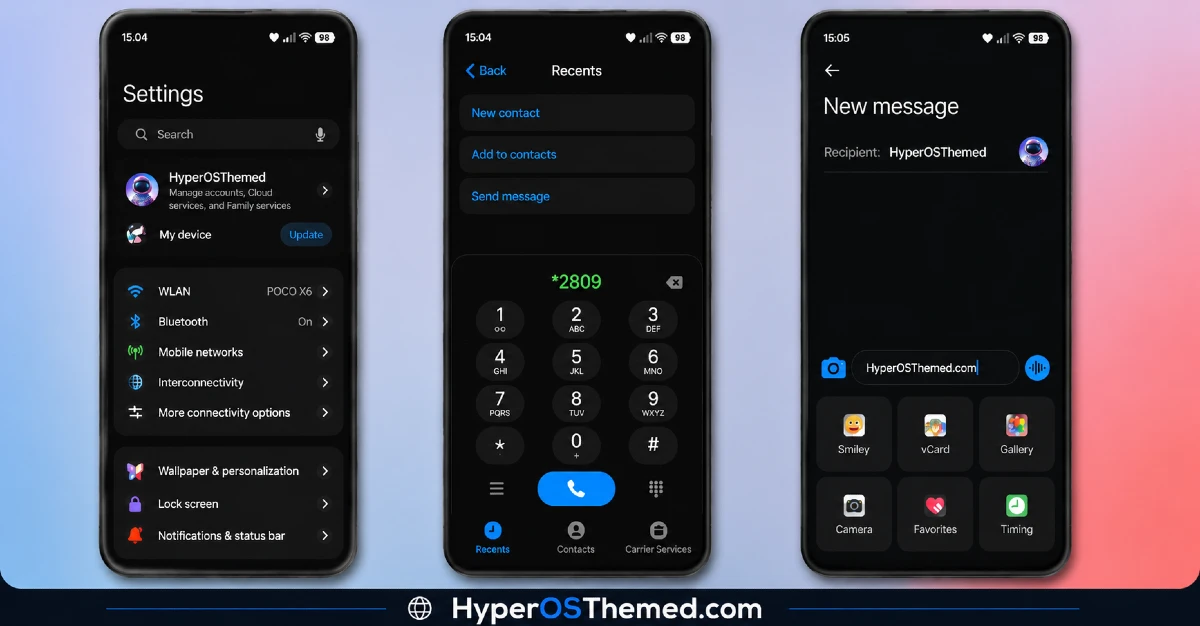
Some iOS style themes stop at the icon grid and leave everything else looking half finished. Equinox does not do that. It carries its iPhone inspired design into Settings, Messages, Contacts, and pretty much every corner of the interface you actually use, so it never feels like you switched icons but kept an Android brain underneath. Paired with a golden mountain wallpaper that looks like it belongs on a postcard, this is one of the more convincing iOS style themes available for HyperOS right now.
What Makes Equinox HyperOS Theme Worth Trying
- Full iPhone Style Interface: Rather than just reskinning icons, Equinox reworks core apps like Settings, Messages, and Contacts to actually look and feel like their iOS counterparts, which is the part most iOS style themes tend to skip.
- Golden Mountain Wallpaper: The main wallpaper features a warm, golden toned mountain landscape that sets a calm, premium mood the moment you unlock your phone.
- Minimal White Lock Screen Typography: The clock and text on the lock screen keep things simple with clean white typography, staying close to the understated look Apple devices are known for.
- Dark Theme Throughout: The whole package leans into a dark color scheme, which keeps the interface easy on the eyes and gives the golden wallpaper more room to stand out.
- Redesigned Status Bar and Icons: Icons and the status bar are rebuilt to match the iOS aesthetic, so your home screen and quick settings feel consistent with the rest of the theme.
- Stylish Always-on Display: The AOD carries the same minimal, dark design, keeping the theme’s look consistent even when your screen is mostly switched off.
Equinox HyperOS Theme Preview
Equinox HyperOS Theme Information
| Detail | Info |
|---|---|
| Theme Name | Equinox HyperOS Theme |
| File Size | 43.05 MB |
| Created By | ELEVEN |
| Server Region | Global |
| Works With | HyperOS, HyperOS 2.0, HyperOS 3.0 |
| Style | Premium, Dark, iOS |
A Quick Note on the Creator
Equinox was designed by ELEVEN. If you want to reach out with feedback or check for updates, you can find them on Telegram at @v4lentrixx.
Get the Theme
Installing Equinox HyperOS Theme Official ROM
If your phone is running the official Global Stable build of HyperOS or MIUI, follow these steps.
- Open this page using the Firefox browser on your phone.
- Tap the official Theme Store link in the download section above.
- You’ll land on a Xiaomi theme page written in Chinese, that’s normal. Tap the three dots in the top right corner and choose “Open in app.”
- This hands off to your Themes Store app, where the download starts automatically.
- Once it finishes downloading, tap Apply.
Heads up: If the Theme Store link doesn’t open properly, try switching to Chrome or your phone’s default Xiaomi browser. Some third party browsers block this redirect.
Installing Equinox HyperOS Theme on ROM Users
Running a custom build like Xiaomi.eu, MIUIRoom, or another MIUI or HyperOS based ROM? Sideload the file manually instead.
- Download the .mtz file from the link above.
- Open the Theme Store app and go to the Themes tab.
- Scroll to the bottom and tap Import.
- Select the .mtz file you just downloaded.
- Tap Apply.
Tip: Restart your phone after applying the theme. If any icon, wallpaper, or lock screen element looks slightly off right after applying, a quick restart almost always fixes it. This theme has been tested and applies cleanly with no reported issues.
Final Thoughts
Equinox earns its premium label by going further than most iOS style themes bother to. The golden mountain wallpaper gives it a distinct look right away, but it is the way core apps like Settings and Messages get reworked that really sells the iPhone feel. If you have always liked the clean, minimal side of iOS but want to stick with your Xiaomi, Redmi, or POCO device, this is one of the more complete ways to get that look without switching phones.
You may also like:
- OX BM HyperOS Theme with Premium Wallpapers, 3D Depth, Customizable, Black icons
- RAIMU JAN GATHEL HyperOS Theme with Premium Dark Yellow One UI Theme
- Shadowed Gleam MIUI Theme Best for POCO, Redmi and Xiaomi Phones
- Liquid Glass HyperOS Theme with Dialer, Settings, Messages, and Control Centre
- WEWE GOMBEL HyperOS Theme For Xiaomi, Redmi & POCO
