
WEWE GOMBEL: A Bold, Folklore-Inspired HyperOS Theme From Indonesia
Every so often, a theme comes along with a story behind it, and WEWE GOMBEL HyperOS theme has one worth telling. Named after a figure from Indonesian folklore, this theme was designed by Kang Ipak and shaped by an entire local community, and after digging into it, I found it’s one of the more genuinely distinctive releases I’ve come across recently.
What Makes WEWE GOMBEL HyperOS Theme Different
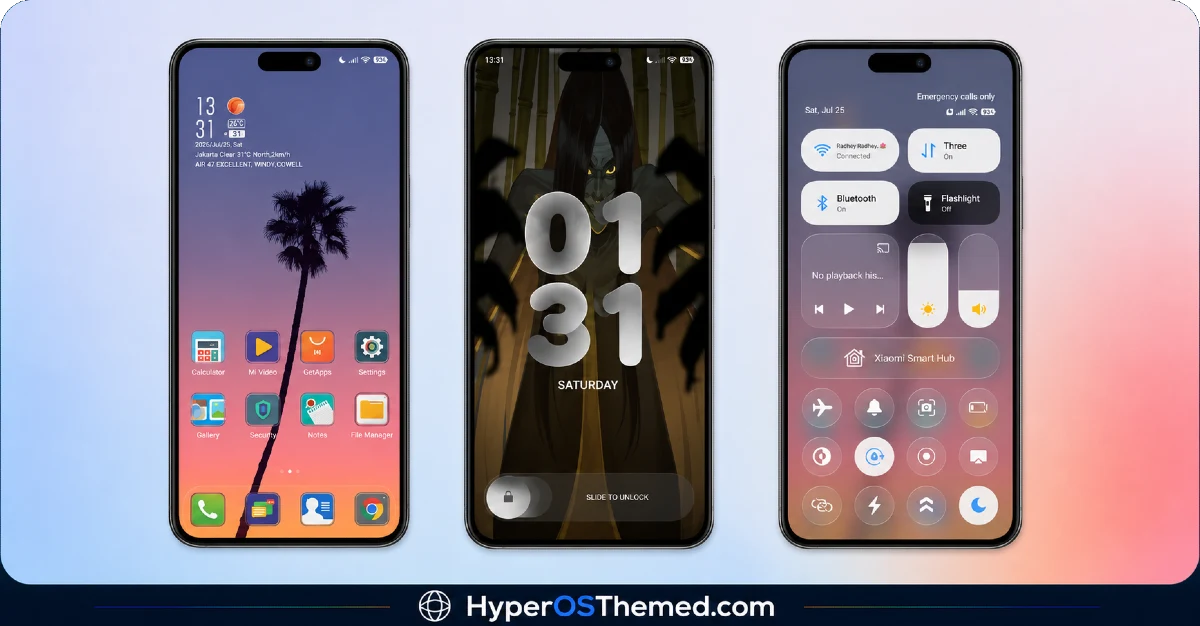
The WEWE GOMBEL HyperOS theme builds its identity around contrast, a striking sunset palm tree wallpaper welcomes you on the home screen, warm, vivid, and instantly recognizable. Then you hit the lock screen, and the mood shifts entirely. It leans into an eerie, atmospheric design inspired by Indonesian folklore, paired with bold 3D skeuomorphic clock numbers that feel almost tactile, like they belong in a physical, textured world rather than a flat digital one.
That kind of tonal shift between a bright, tropical home screen and a mysterious, folklore-driven lock screen isn’t something you see in many themes. It’s a bold creative choice, and it pays off if you’re someone who wants your phone to genuinely stand out rather than blend into the usual minimal or dark theme crowd.
WEWE GOMBEL HyperOS Theme Preview
A Theme Rooted in Community
What struck me most while reading through this release is how clearly it was shaped by a real, local community effort. Kang Ipak credited a long list of contributors and supporters from Desa Jeding Sanankulon Blitar, along with the broader MIUI Designer Indonesia community. It’s a nice reminder that a lot of these themes come from genuine passion projects, not just solo work, but people supporting each other within a local theming scene.
What You’re Getting with WEWE GOMBEL HyperOS theme
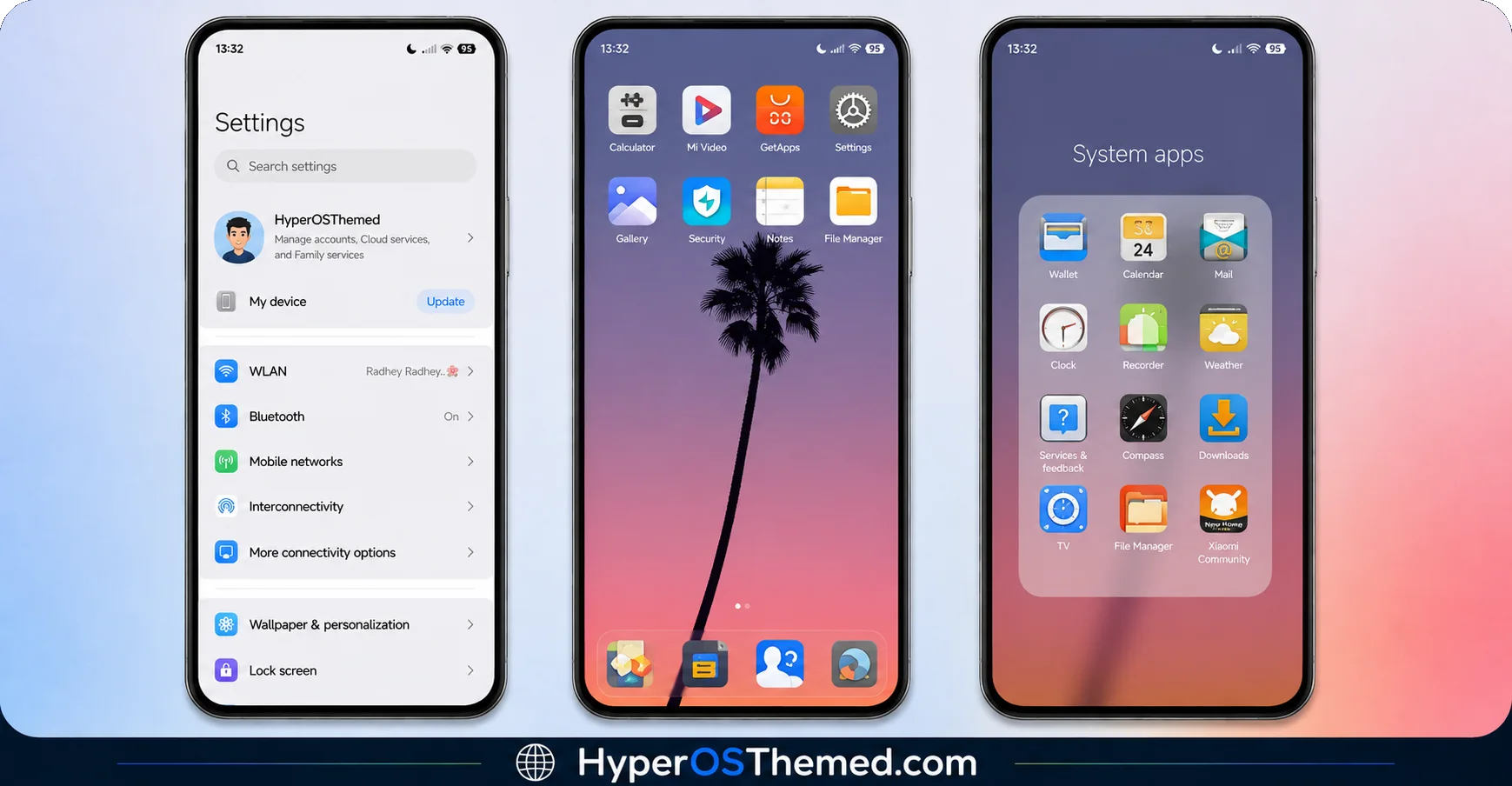
- Sunset palm tree wallpaper — vibrant and warm on the home screen
- Folklore-inspired lock screen — atmospheric, mysterious, and genuinely unique
- 3D skeuomorphic clock numbers — bold, textured typography that stands apart from flat digital clocks
- Dynamic lock screen — adds real movement rather than a static image
- Fresh icons, status bar, and Always-on Display — consistent redesign across the interface
Who Should Try WEWE GOMBEL HyperOS theme
If you love themes that take creative risks and want something that genuinely doesn’t look like anything else on your friend’s phone, the Wewe Gombel HyperOS theme is worth downloading. It’s compatible with HyperOS, HyperOS 2.0, and HyperOS 3.0, works across Xiaomi, Redmi, and POCO devices, and it’s completely free.
The designer was upfront about it too, there may still be a few bugs here and there, but that honesty is refreshing, and it doesn’t take away from how creative and distinct this release is.
WEWE GOMBEL HyperOS Theme Details
| Detail | Info |
|---|---|
| Theme Name | WEWE GOMBEL |
| File Size | 15.13 MB |
| Designer | Kang Ipak |
| Region/Server | Global |
| Compatibility | HyperOS, HyperOS 2.0, HyperOS 3.0 |
Getting the Theme
Installing WEWE GOMBEL HyperOS theme on Global Stable ROM
If your device is running the standard HyperOS or MIUI Global stable build, here’s how to install it:
- Open this page using the Firefox browser, since it handles the redirect best.
- Tap the Official Theme Store Link above.
- The page will open in Chinese, which is expected. Tap the three dots in the top right corner and select “Open in app.”
- This opens the Theme Store app, where the download will begin.
- Once it’s downloaded, tap Apply.
If the Official Theme Store Link doesn’t open properly, switch to Chrome or your phone’s default browser. Some third party browsers don’t handle this redirect correctly.
Installing WEWE GOMBEL HyperOS theme on Custom ROMs
Running a custom build like Xiaomi.eu, MIUIRoom, or similar? Here’s the manual install method using the mtz file:
- Download the WEWE GOMBEL mtz file from the link above.
- Open the Theme Store app and go to the Themes section.
- Scroll to the bottom and tap Import.
- Select the downloaded mtz file.
- Tap Apply.
One thing worth remembering: restart your device if anything looks slightly off after applying. A quick reboot usually clears it up right away. As the designer mentioned, there may be a few minor bugs still being worked out.
Final Thoughts
The Wewe Gombel HyperOS theme is a genuinely bold, culturally rooted release that takes real creative risks, and it’s stronger for it. Between the sunset palm tree home screen, that eerie folklore lock screen, and the tactile 3D clock design, Kang Ipak and the wider Desa Jeding community put together something you won’t find replicated anywhere else. If you want your phone to tell a story instead of just looking pretty, this one’s absolutely worth trying.
You May Also Like:
- Hyper Businessman HyperOS Theme: Premium Dark Theme
- Super26 HyperOS Theme iOS Style Skins For POCO, Redmi and Xiaomi Devices
- AJ Pink HyperOS Theme For Xiaomi, POCO and Redmi Phones
- Voidfall HyperOS Theme with Dark Skin and stunning 3D Depth-of-field Effects
- OX B1 HyperOS Theme with Premium Blue Glass Theme For Xiaomi, POCO & Redmi
