
OXFURY’s name has come up before on this site, and every time it does, the theme tends to deliver something genuinely polished. OX B1 HyperOS Theme continues that streak, this time built as a collaboration with masuod, and after testing it out, I can say the pairing works well together.
What Makes OX B1 HyperOS Theme Stand Out
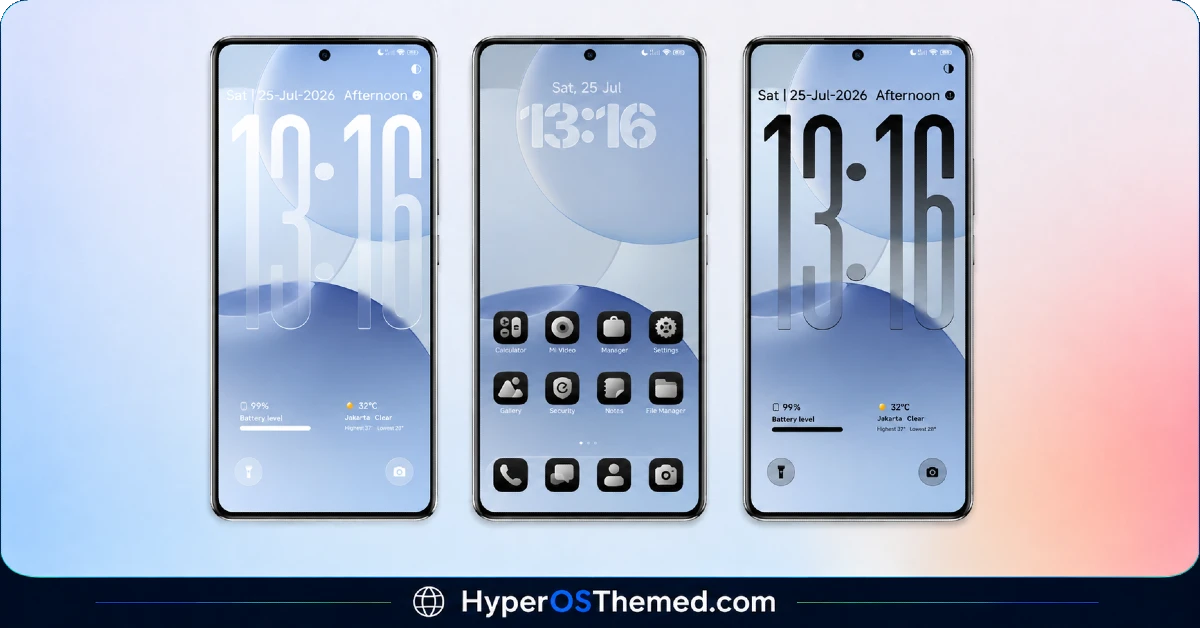
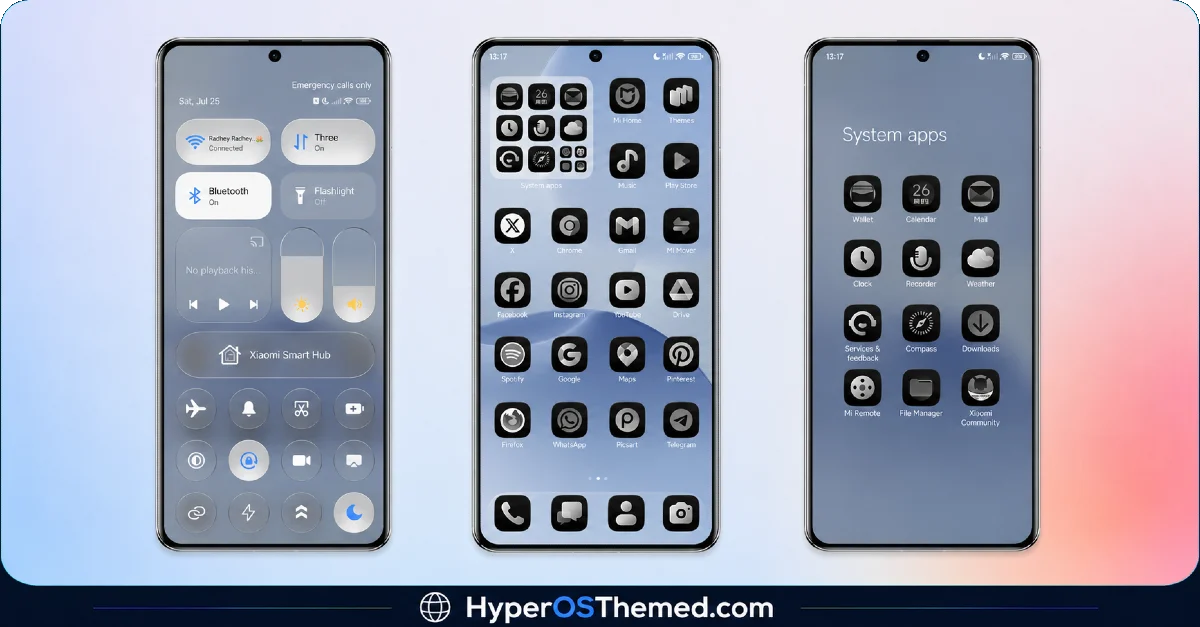
This theme leans into a striking contrast, a soft blue glass-style wallpaper paired against a clean black icon pack. It’s a combination that shouldn’t work as well as it does, cool translucent blue against sharp black icons, but the balance here feels genuinely considered rather than accidental.
The oversized dynamic lock screen clock is the centerpiece of the design. It’s bold enough to be the first thing you notice, but not so large that it crowds out the rest of the screen. Alongside it, weather and battery widgets are neatly integrated, giving you useful information at a glance rather than forcing you to dig through menus.
OX B1 HyperOS Theme preview
Light and Dark, Done Right
One detail I genuinely appreciated is the inclusion of both light and dark contrast modes. A lot of themes commit fully to one mood and leave you stuck with it regardless of your preference or the time of day. OX B1 HyperOS Theme gives you the flexibility to switch between a lighter, airier feel and a deeper, more dramatic look, both built around that same blue glass and black icon foundation.
Consistency Across the Interface
- Glass-style blue wallpaper — soft, translucent, and genuinely calming
- Clean black icon pack — sharp contrast that keeps the interface feeling modern
- Oversized dynamic lock screen clock — bold without overwhelming the rest of the screen
- Weather and battery widgets — useful info built right into the lock screen
- Light and dark contrast modes — flexibility to match your own preference
- Reworked status bar and Always-on Display — consistent with the rest of the theme’s tone
Who Should Try OX B1 HyperOS Theme
If you like the idea of a cool, glass-toned interface with the flexibility to shift between light and dark, OX B1 is a strong pick for your Xiaomi, Redmi, or POCO device. It’s compatible with HyperOS, HyperOS 2.0, and HyperOS 3.0, completely free, and light on storage at just over 15 MB.
Theme Details
| Detail | Info |
|---|---|
| Theme Name | OX B1 |
| File Size | 15.45 MB |
| Designer | OXFURY (with masuod) |
| Region/Server | Global |
| Compatibility | HyperOS, HyperOS 2.0, HyperOS 3.0 |
A Note on Respecting the Designer’s Work
Before you download, it’s worth mentioning something OXFURY and masuod were clear about, this theme is fully original work, built by them with some resources from other creators, and they’ve asked that it not be copied, re-uploaded, or modified without permission. It’s a fair ask, a lot of effort clearly went into this one, and if you’re a fan of the design, supporting the creators directly (they’ve got a donation link available) or simply crediting their work properly goes a long way.
The designers also shared where to find more of their work and how to reach out with feedback, worth following if you enjoy this style:
- More themes: t.me/englishthemesoxfury and t.me/ThemeMasuod
- Feedback channels available via Telegram
- Support the creators directly through their PayPal if you’d like to show appreciation for the work
Getting the Theme
Also Check this:- OX F2 HyperOS Theme with Glass-style UI, Smart Multi-Widget Dashboard & More
Installing on Global Stable ROM
If your device is running the standard HyperOS or MIUI Global stable build, here’s how to install it:
- Open this page using the Firefox browser, since it handles the redirect best.
- Tap the Official Theme Store Link above.
- The page will open in Chinese, which is expected. Tap the three dots in the top right corner and select “Open in app.”
- This opens the Theme Store app, where the download will begin.
- Once it’s downloaded, tap Apply.
If the Official Theme Store Link doesn’t open properly, switch to Chrome or your phone’s default browser. Some third party browsers don’t handle this redirect correctly.
Installing on Custom ROMs
Running a custom build like Xiaomi.eu, MIUIRoom, or similar? Here’s the manual install method using the mtz file:
- Download the OX B1 mtz file from the link above.
- Open the Theme Store app and go to the Themes section.
- Scroll to the bottom and tap Import.
- Select the downloaded mtz file.
- Tap Apply.
One thing worth remembering: restart your device if anything looks slightly off after applying. A quick reboot usually clears it up right away. I tested this theme myself, and it ran smoothly with no issues at all.
Final Thoughts
OX B1 HyperOS Theme brings together a cool blue glass aesthetic, sharp black icons, and genuine flexibility with its light and dark modes, all wrapped in a lightweight, well designed package. OXFURY and masuod clearly put real care into this collaboration, and it shows in the final result. If a sleek, modern look with room to adapt to your mood sounds appealing, this one’s absolutely worth downloading, just remember to respect the creators’ work if you decide to share it further.
You May Also Like:
