
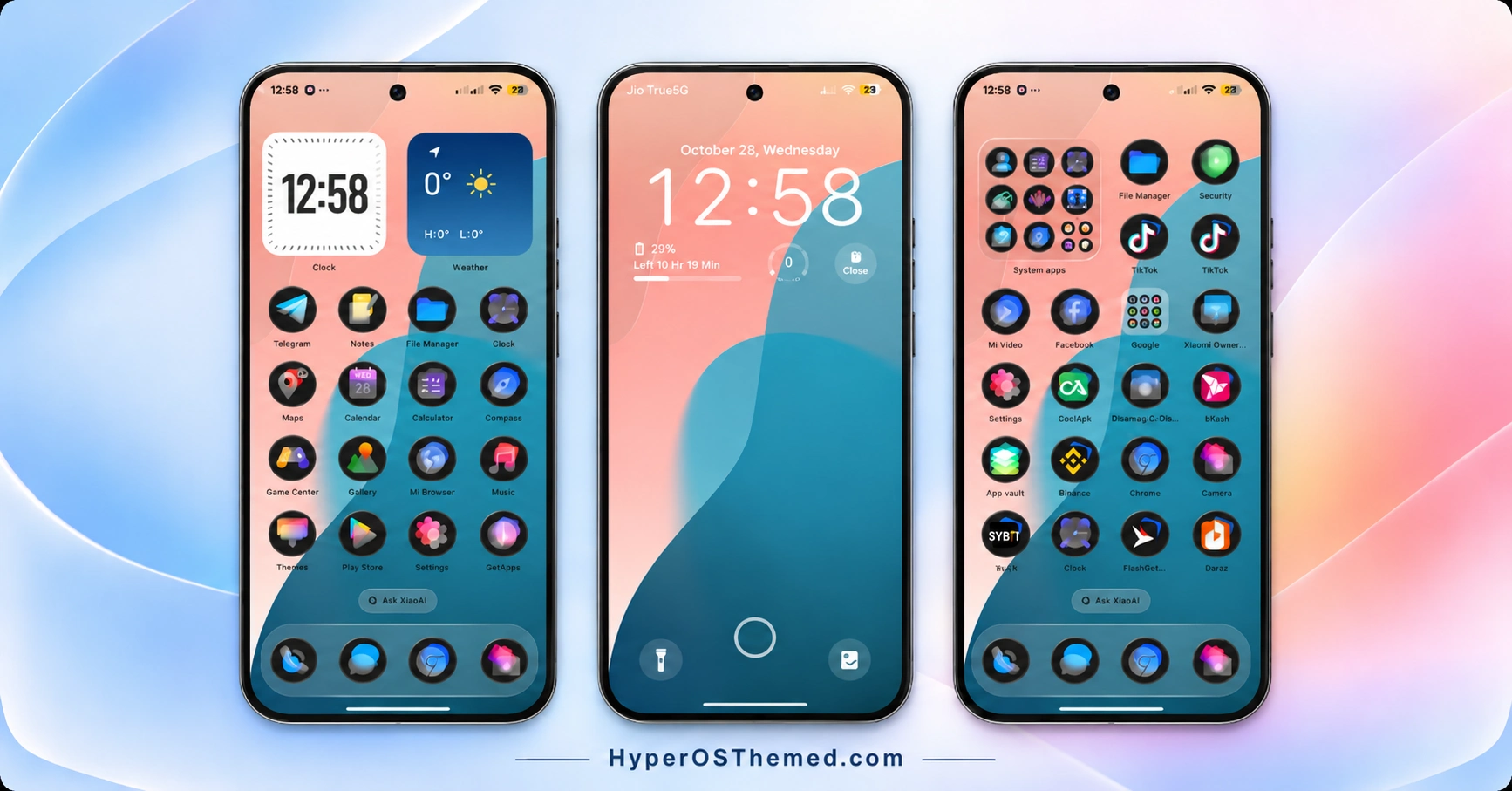
The s4u12 HyperOS Theme is designed for Xiaomi, Redmi and POCO users who enjoy a clean interface with plenty of personalisation options. Created by suhel, this theme combines soft wave-inspired wallpapers, dark translucent glass icons and a customisable lock screen to give compatible HyperOS 3 smartphones a distinctive appearance.
One of its main attractions is the built-in lock screen customiser. You can adjust clock typography, change colours, fine-tune letter spacing and control the wallpaper’s depth and blur effects. The theme also includes a wallpaper gallery featuring abstract waves, ocean sunsets, mountain scenery, floral photography and wildlife, offering several styles to choose from.
Beyond the lock screen, s4u12 HyperOS Theme features glossy dark icons and a home screen layout with digital clock and weather cards. Its shortcut customisation options let you assign actions such as opening the camera, flashlight, notes, calculator or AI Scan, with different gesture triggers. Together, these features make s4u12 an option for users who want greater control over their phone’s appearance and shortcuts.
s4u12 HyperOS Theme Key Highlights
Advanced Lock Screen Customisation
- Adjustable depth effects and wallpaper blur controls.
- Clock styles including bold, stencil, script and outline.
- Customisable font weight, letter spacing and RGB colours.
- Lock screen status cards for battery time, alarms and step counts.
- Configurable shortcuts for the camera, flashlight, notes, calculator and AI Scan.
Minimal Wallpapers and Glass Icons
- A built-in gallery with abstract waves, ocean sunsets, mountains, flowers and wildlife.
- Dark, rounded icon bases with translucent glass-style overlays.
- Custom icons for system applications and selected third-party apps.
- A clean visual style that balances soft wallpapers with darker icons.
Home Screen Widgets and Shortcuts
- Digital clock card paired with a matching weather card.
- Single-tap, double-tap and long-press gesture options for supported shortcuts.
- Personalisation controls for creating a home screen layout that suits your preferences.
s4u12 HyperOS Theme Preview
The preview screenshots showcase the theme’s lock screen customisation controls and home screen appearance. They offer a closer look at its clock settings, wallpaper styling, dark glass icons and digital information cards.
s4u12 Theme Overview
| Detail | Information |
|---|---|
| Theme Name | s4u12 |
| Designer | suhel |
| Theme Size | Approximately 92.8 MB |
| Compatibility | HyperOS 3 |
| Compatible Devices | Supported Xiaomi, Redmi and POCO smartphones |
| Main Features | Minimal wave wallpapers, dark glass icons, lock screen editor, depth and blur controls, digital clock and weather cards |
| Availability | Official Xiaomi Themes app, subject to regional availability |
Get s4u12 HyperOS Theme
Click the OFFICIAL THEME STORE LINK button below to view the s4u12 HyperOS Theme in the Xiaomi Themes app and apply it to your compatible device.
s4u12 HyperOS Theme Compatibility
The s4u12 theme is designed for HyperOS 3 on supported Xiaomi, Redmi and POCO smartphones. Compatibility with other HyperOS versions has not been established, so check your phone’s software version before applying it.
Some customisation options may also vary by device. Lock screen effects, gesture shortcuts and widgets can depend on the features supported by your phone’s system software.
How to Install s4u12 on Global Stable ROM
If your phone runs a compatible Global Stable HyperOS ROM, follow these steps to apply the theme through Xiaomi’s built-in Themes app:
- Click the “OFFICIAL THEME STORE LINK” button above.
- When prompted, select the Themes app to open the link.
- You will be redirected to the theme’s page in the Xiaomi Theme Store.
- Tap Download, wait for the download to finish, and then tap Apply to activate the theme.
- Check the lock screen, home screen and available customisation options to confirm that everything displays correctly.
Note: If any elements overlap or do not display properly after applying the theme, restart your phone. If the issue persists, leave a comment with your device model and HyperOS version for further help.
Why Choose s4u12 HyperOS Theme?
- Flexible lock screen editor: Adjust clock styles, colours, spacing, depth effects and wallpaper blur.
- Varied wallpaper collection: Choose from abstract waves, ocean sunsets, mountain scenes, flowers and wildlife.
- Dark glass icon pack: Give supported system and third-party apps a coordinated translucent appearance.
- Custom shortcuts: Configure supported actions with single-tap, double-tap and long-press gestures.
- Useful home screen cards: Pair a digital clock with a weather information card.
- HyperOS 3 compatibility: Designed for supported Xiaomi, Redmi and POCO devices running HyperOS 3.
Conclusion
The s4u12 HyperOS Theme combines minimal wave-inspired wallpapers, dark glass icons and detailed lock screen controls in one customisation package. Designed by suhel for HyperOS 3, it is worth exploring if you prefer a clean aesthetic without giving up personalisation options. Review the preview and confirm compatibility with your device before applying it.
You may also like:
NEAR HyperOS Theme with Stamp-Style Icons and a Custom 3D Lockscreen for Xiaomi, Redmi & POCO
Halloween Express HyperOS Theme with Spooky Wallpapers and a Custom Control Centre
Lake Frame HyperOS Theme with Dynamic Lock Screens and Multi-Wallpaper Designs
K-C Material HyperOS Theme: Get Material-Style Icons
Uniswap HyperOS Theme with Premium 3D Glossy Icons and AI Wallpapers
