
Looking for a new HyperOS theme to give your Xiaomi, Redmi or POCO smartphone a fresh look? The NEAR HyperOS Theme is a strong option for users who enjoy creative app icons, beautiful wallpapers, and advanced lock screen customisation. Designed by maidul, this theme combines a unique stamp-style icon pack with dramatic landscape backgrounds and a range of interface changes that make your phone look different from its default setup.
The NEAR theme features a custom lock screen with a 3D depth-style clock, where oversized digits blend visually with mountain and canyon landscapes. It also includes a wallpaper switcher with different scenes, such as rocky mountains, tropical fish, eagles, city skylines and palm-lined beaches. You can customise clock styles, adjust digit heights and manage selected lock screen indicators to create a look that suits your preferences.
Along with its lock screen features, NEAR changes the home screen and Control Centre. Serrated, postage-stamp-inspired icons give supported apps a distinctive look, while a digital header widget displays the time, seconds, date, and temperature. A translucent blue Control Centre, pill-shaped brightness and volume sliders, and customised toggle styling complete the design. The theme is designed for HyperOS 3 on supported Xiaomi, Redmi and POCO smartphones.
NEAR HyperOS Theme Key Highlights
3D Lockscreen and Customisation Controls
- Depth-style clock digits layered against dramatic landscape wallpapers.
- Multiple clock styles, including Glass, Liquid, Stencil and Outline.
- Adjustable clock digit heights and selected display indicators.
- Lock screen information for battery level, Bluetooth headset battery and weather.
- Quick-access shortcuts for the camera and flashlight.
Stamp-Border Icons and Home Screen Widget
- Serrated, postage-stamp-style app icons with colourful inner designs.
- Custom icons for system apps and selected third-party applications.
- Digital header widget featuring the time, seconds counter, date and temperature statistics.
- A coordinated visual style across the home screen and wallpaper.
Built-In Wallpaper Gallery
- Mountain and canyon landscapes.
- Tropical fish and eagle imagery.
- City skyline scenes.
- Palm beach backgrounds.
- A multi-card wallpaper switcher for changing the lock screen’s appearance.
Translucent Control Centre
- Soft-blue translucent background styling.
- Rounded toggle containers with white active-state details.
- Vertical pill-shaped brightness and volume sliders.
- Customised network, Wi-Fi and battery indicators.
NEAR HyperOS Theme Preview
The preview screenshots showcase the theme’s lock screen customisation controls, depth-style clock, stamp-border icons and redesigned Control Centre. They also provide a closer look at the different wallpaper options and the digital information widget.
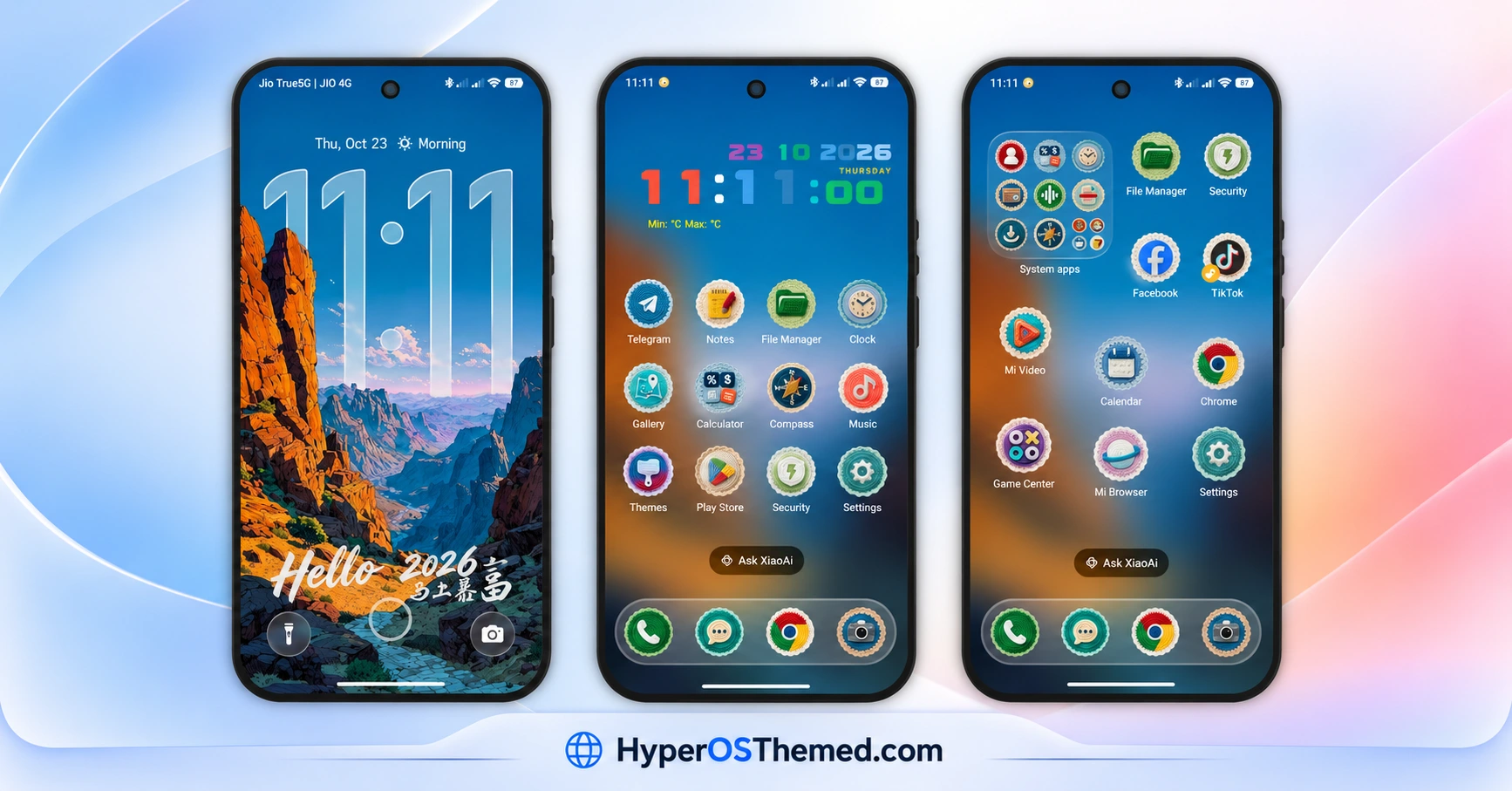
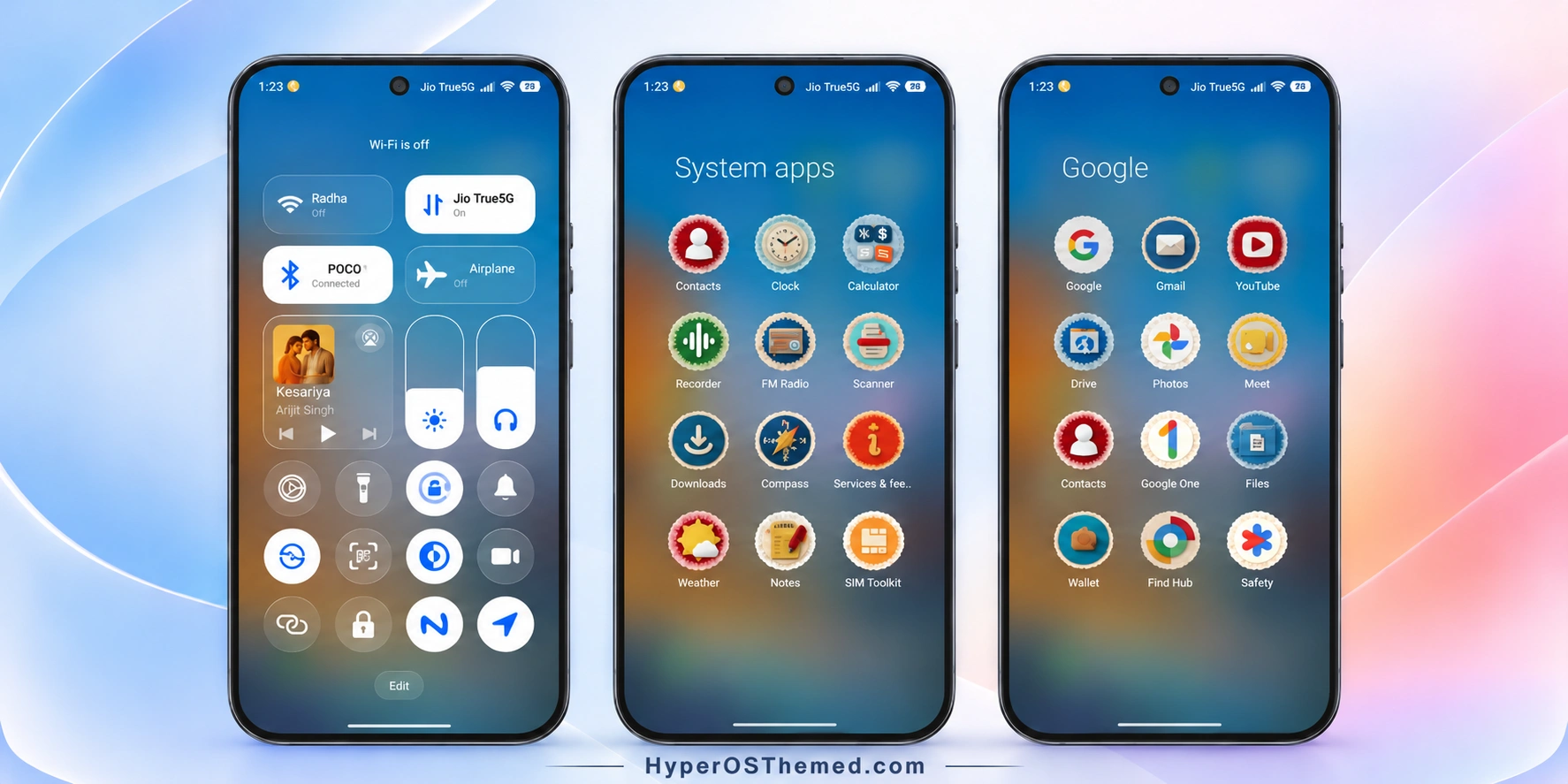
NEAR Theme Overview
| Detail | Information |
|---|---|
| Theme Name | NEAR |
| Designer | maidul |
| Theme Size | Approximately 87.2 MB |
| Region | Not specified |
| Compatibility | HyperOS 3 |
| Compatible Devices | Supported Xiaomi, Redmi and POCO smartphones |
| Main Features | 3D depth lock screen, stamp-style icons, wallpaper switcher, digital widget and translucent Control Centre |
| Availability | Official Xiaomi Themes Store app, subject to regional availability |
Get NEAR HyperOS Theme
You can look for NEAR in the Xiaomi Themes app on your compatible smartphone. Check the official listing to confirm its availability for your device and software version.
NEAR HyperOS Theme Compatibility
NEAR is designed for HyperOS 3 on supported Xiaomi, Redmi and POCO smartphones. Compatibility with other HyperOS versions has not been established here, so check your device’s software version before applying the theme.
Some customisation elements may appear differently depending on the phone model and system build. The lock screen effects, widgets and Control Centre styling may also depend on the features supported by your device.
How to Install NEAR on Global Stable ROM
If your phone runs a compatible Global Stable HyperOS ROM, follow these steps to apply the theme through Xiaomi’s built-in Themes app:
- Click the “OFFICIAL THEME STORE LINK” button above.
- When prompted, select the Themes app to open the link.
- You will be redirected to the theme’s page in the Xiaomi Theme Store.
- Tap Download, wait for the download to finish, and then tap Apply to activate the theme.
- Check the lock screen, home screen and Control Centre to make sure the theme has been applied correctly.
Note: If any elements overlap or do not display correctly after applying the theme, restart your phone. If the issue persists, leave a comment with your device model and HyperOS version for further help.
Why Choose NEAR HyperOS Theme?
- Distinctive stamp-style icons: Serrated borders give supported apps a recognisable appearance.
- Custom 3D lock screen: Layered clock effects and adjustable typography create a more personalised display.
- Multiple wallpaper choices: Switch between mountain landscapes, tropical fish, eagles, city skylines and beaches.
- Informative widgets: View time, date, temperature and selected battery information through custom interface elements.
- Translucent Control Centre: Blue-tinted panels and rounded sliders provide a coordinated system look.
- HyperOS 3 compatibility: Designed for supported Xiaomi, Redmi and POCO devices running HyperOS 3.
Conclusion
The NEAR HyperOS Theme combines stamp-border icons, a customisable 3D lock screen, varied wallpapers and a translucent Control Centre in one package. Designed by maidul for HyperOS 3, it is a compelling option for users who enjoy detailed interface customisation. Review the preview and confirm compatibility with your phone before applying it.
You may also like:
Halloween Express HyperOS Theme with Spooky Wallpapers and a Custom Control Centre
Lake Frame HyperOS Theme with Dynamic Lock Screens and Multi-Wallpaper Designs
K-C Material HyperOS Theme: Get Material-Style Icons
Uniswap HyperOS Theme with Premium 3D Glossy Icons and AI Wallpapers
S4u10 HyperOS Theme with a Stylish Lock Screen and Custom Icons
