
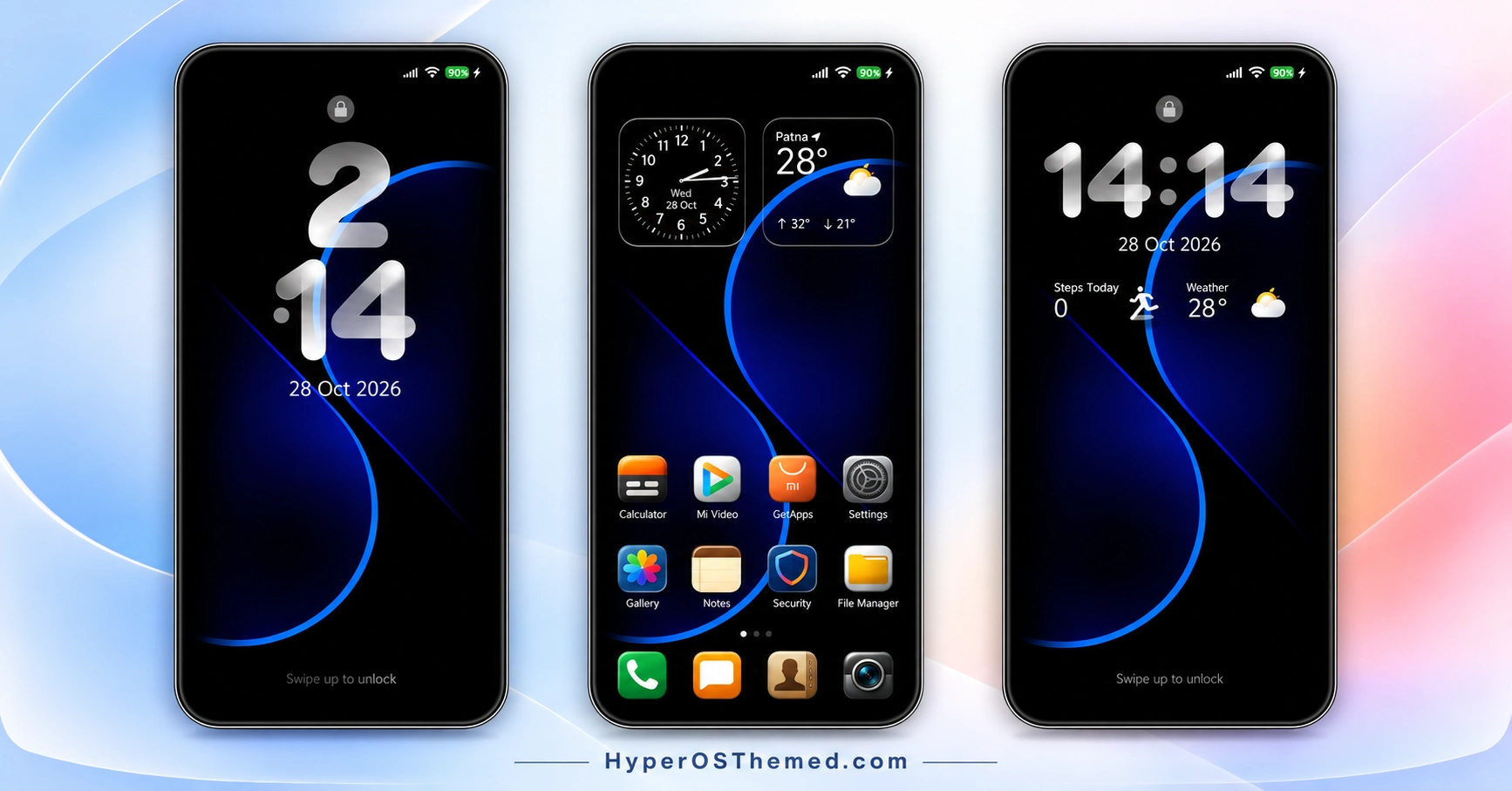
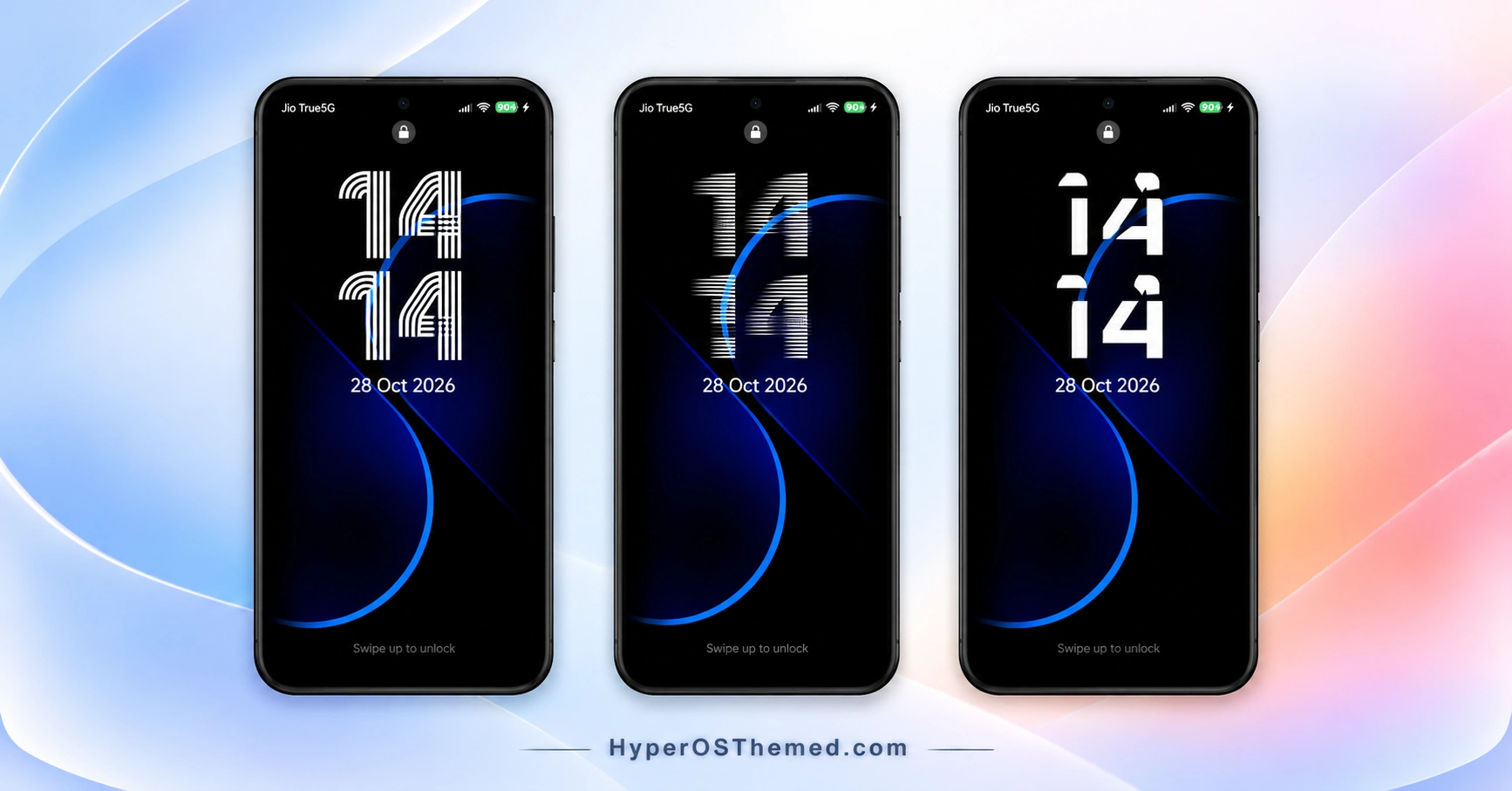
Looking for a clean, dark theme for your Xiaomi, Redmi or POCO smartphone? The TOP UI VK HyperOS Theme combines a deep black background with glowing blue curves, creating a modern appearance without making the interface look overly complicated. Designed by VK, this theme focuses on a minimal visual style, glossy light-coloured icons and carefully coordinated interface elements.
The theme’s dark wallpaper gives the blue accents room to stand out, while the customised icons and neat folders help maintain a consistent home screen appearance. Clock and weather widgets add useful information without taking away from the simple design. If you prefer dark backgrounds with subtle colour highlights instead of busy wallpapers and elaborate graphics, TOP UI VK HyperOS Theme offers a style worth exploring.
TOP UI VK HyperOS Theme is designed for the Xiaomi HyperOS ecosystem, with compatibility specified for HyperOS 2.0, HyperOS 3.0 and HyperOS 4.0. It is intended for supported Xiaomi, Redmi and POCO smartphones, although the exact appearance of some interface elements may vary between devices and software versions.
TOP UI VK HyperOS Theme Key Highlights
Minimal Black and Blue Design
- Deep black wallpaper with glowing blue curves.
- A clean, modern appearance with subtle colour accents.
- A simple visual style suited to users who prefer dark home screens.
Icons and Home Screen
- Glossy, optimised light-coloured icons.
- Neat dark folders that complement the wallpaper.
- Clock and weather widgets for convenient access to everyday information.
HyperOS Interface Styling
- A coordinated appearance across supported interface elements.
- Dark styling balanced with bright blue accents.
- A clean layout that keeps the wallpaper and icons visually consistent.
TOP UI VK HyperOS Theme Preview
The preview section showcases the black wallpaper, glowing blue curves, light-coloured icons and home screen styling. Review the available screenshots to see how the theme’s colours and interface elements work together before applying it.
TOP UI VK Theme Overview
| Detail | Information |
|---|---|
| Theme Name | TOP UI VK |
| Designer | VK |
| Theme Size | 96.69 MB |
| Region | Global |
| Compatibility | HyperOS 2.0, HyperOS 3.0 and HyperOS 4.0 |
| Compatible Devices | Supported Xiaomi, Redmi and POCO smartphones |
| Main Features | Black wallpaper, blue accents, light icons, dark folders, clock and weather widgets |
| Availability | Xiaomi Themes app, subject to regional availability |
Get TOP UI VK HyperOS Theme
Click the OFFICIAL THEME STORE LINK button below to view TOP UI VK in the Xiaomi Themes app and apply it to your compatible device.
TOP UI VK HyperOS Theme Compatibility
TOP UI VK is designed for supported Xiaomi, Redmi and POCO smartphones running HyperOS. Its stated compatibility includes HyperOS 2.0, HyperOS 3.0 and HyperOS 4.0, with Global specified as the region.
The final appearance may differ depending on your device model, system version and the interface elements supported by your phone. Check compatibility before applying the theme, especially if your device uses a different HyperOS version.
How to Install TOP UI VK on Global Stable ROM
If your phone runs a compatible Global Stable HyperOS ROM, follow these steps to apply the theme through Xiaomi’s built-in Themes app:
- Click the “OFFICIAL THEME STORE LINK” button above.
- When prompted, select the Themes app to open the link.
- You will be redirected to the theme’s page in the Xiaomi Theme Store.
- Tap Download, wait for the download to finish, and then tap Apply to activate the theme.
- Check your home screen and other customised interface elements to confirm that the theme has been applied correctly.
Note: If the official link does not open in the Themes app, try opening the page in Chrome or your phone’s default Xiaomi browser. If interface elements overlap or do not display correctly after applying the theme, restart your device. If the issue persists, leave a comment with your phone model and HyperOS version for further help.
Why Choose TOP UI VK HyperOS Theme?
- Minimal black wallpaper: A deep black background with glowing blue curves creates a distinctive dark aesthetic.
- Glossy light icons: Bright icon designs contrast with the darker interface.
- Neat dark folders: Keep the home screen visually consistent with the wallpaper.
- Useful widgets: Clock and weather information provide convenient at-a-glance details.
- Multiple HyperOS versions: Compatibility is specified for HyperOS 2.0, 3.0 and 4.0 on supported Xiaomi, Redmi and POCO devices.
Copyright and Usage Notice
© 2026 VK Themes. All Rights Reserved.
TOP UI VK is a custom-designed theme. Its original visual design, interface elements, styling and other creative components are protected by applicable copyright laws.
Without prior permission from the original creator, you must not copy, reproduce, modify, re-upload, redistribute, share, resell or publish this theme, in whole or in part, on any platform or service. Unauthorised use or distribution may result in a copyright complaint, a request to remove the infringing content, or other action available under applicable law.
Please respect the creator’s work and use the theme only as permitted. Unauthorised copying or redistribution is not allowed.
Conclusion
The TOP UI VK HyperOS Theme offers a minimal black-and-blue design with glossy light icons, dark folders and useful clock and weather widgets. Created by VK, it is worth considering if you prefer a clean, dark interface on your compatible Xiaomi, Redmi or POCO smartphone. Review the preview and confirm your device’s compatibility before applying it.
You may also like:
s4u12 HyperOS Theme for Xiaomi, Redmi and POCO
NEAR HyperOS Theme with Stamp-Style Icons and a Custom 3D Lockscreen for Xiaomi, Redmi & POCO
Halloween Express HyperOS Theme with Spooky Wallpapers and a Custom Control Centre
Lake Frame HyperOS Theme with Dynamic Lock Screens and Multi-Wallpaper Designs
