
Not every good theme needs flashy 3D effects or a dozen customization sliders. Sometimes a clean, simple look does more for your phone than anything overloaded ever could, and that’s exactly the space the Poi Poi MIUI Theme fills. Built around a quiet night-time city aesthetic, it swaps out the usual bright, busy MIUI look for something calmer and easier on the eyes, especially if you’re someone who spends a lot of time on your phone after dark.
What Makes Poi Poi MIUI Theme Worth a Try
There’s a certain charm to themes that don’t try too hard, and Poi Poi is a good example of that. The icon set stays simple and uncluttered, the wallpapers lean into a moody city-at-night vibe, and the lock screen and status bar are redesigned to match that same understated tone. It’s less about showing off and more about giving your home screen a look that feels a little more personal than the default MIUI setup, and since Ryuta designed it to run across MIUI 12, MIUI 13, and MIUI 14, most Xiaomi, Redmi, and POCO users should have no trouble applying it.
Poi Poi MIUI Theme Preview
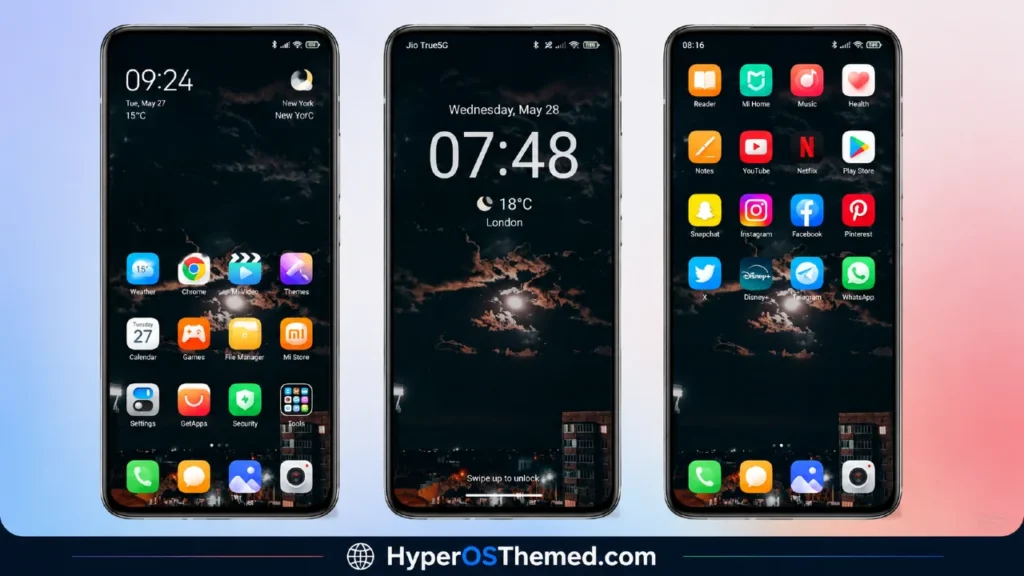
What You Get With Poi Poi MIUI Theme
- Clean, simple icon design
- Night-time, city-themed wallpapers
- Redesigned status bar
- Cool, matching lock screen
- Stylish Always-on Display
- Completely free to download and apply
- Works across Xiaomi, Redmi, and POCO devices on MIUI
Poi Poi MIUI Theme Theme Information
| Detail | Info |
|---|---|
| Theme Name | Poi Poi MIUI Theme |
| File Size | 25.27 MB |
| Designed By | Ryuta |
| Server Region | Global |
| Compatiblity | MIUI 14, MIUI 13, MIUI 12 |
| Style | Simple, Night, City |
Download the Theme
Installing on Stock HyperOS / MIUI (Official ROM Users)
If your phone is running the official Global Stable build of HyperOS or MIUI, follow these steps:
- Open this page using the Firefox browser on your phone.
- Tap the official Theme Store link in the download section above.
- You’ll land on a Xiaomi theme page written in Chinese — that’s normal. Tap the three dots in the top-right corner and choose “Open in app.”
- This hands off to your Themes Store app, where the download starts automatically.
- Once it finishes downloading, tap Apply.
Heads up: If the Theme Store link doesn’t open properly, try switching to Chrome or your phone’s default Xiaomi browser. Some third-party browsers block this redirect.
Installing via MTZ File (Custom ROM Users)
Running a custom build like Xiaomi.eu, MIUIRoom, or another MIUI/HyperOS-based ROM? Sideload the file manually instead:
- Download the
.mtzfile from the link above. - Open the Theme Store app and go to the Themes tab.
- Scroll to the bottom and tap Import.
- Select the
.mtzfile you just downloaded. - Tap Apply.
Tip: Restart your phone after applying the theme. If any icon, wallpaper, or lock screen element looks slightly off right after applying, a quick restart almost always fixes it. This theme has been tested and applies cleanly with no reported issues.
Final Thoughts
The Poi Poi MIUI Theme is a solid pick if you’re after something understated rather than over the top. The night-city wallpapers and simple icon layout give your phone a calmer, more grounded feel, and it’s light enough at 25 MB that there’s no real reason to skip it. If your home screen has been feeling a bit too busy lately, this is a quick, free way to tone things down without losing any style.
You May also like:
- WEWE GOMBEL HyperOS Theme For Xiaomi, Redmi & POCO
- Xiaomi Vision GT HyperOS Theme with 3D visuals, Sharp HD icons
- Liquid Glass HyperOS Theme with Dialer, Settings, Messages, and Control Centre
- Super 26 Pro HyperOS Theme for POCO, Redmi and Xiaomi Devices
- Best HyperUI V4 HyperOS Theme For Poco, Redmi and Xiaomi Devices
