
There’s a difference between a theme that’s just dark and one that’s dark with actual intention behind the color choices, and OX GR4 HyperOS Theme Xiaomi lands firmly in the second category. Designed by OXFURY, it pairs a striking dark red gradient with glossy, metallic-bordered icons and a genuinely extensive lock screen customization panel. At a lean 20.3 MB, it’s a light download for Xiaomi, Redmi and POCO devices built specifically for HyperOS 3.
OX GR4 HyperOS Theme Key Features
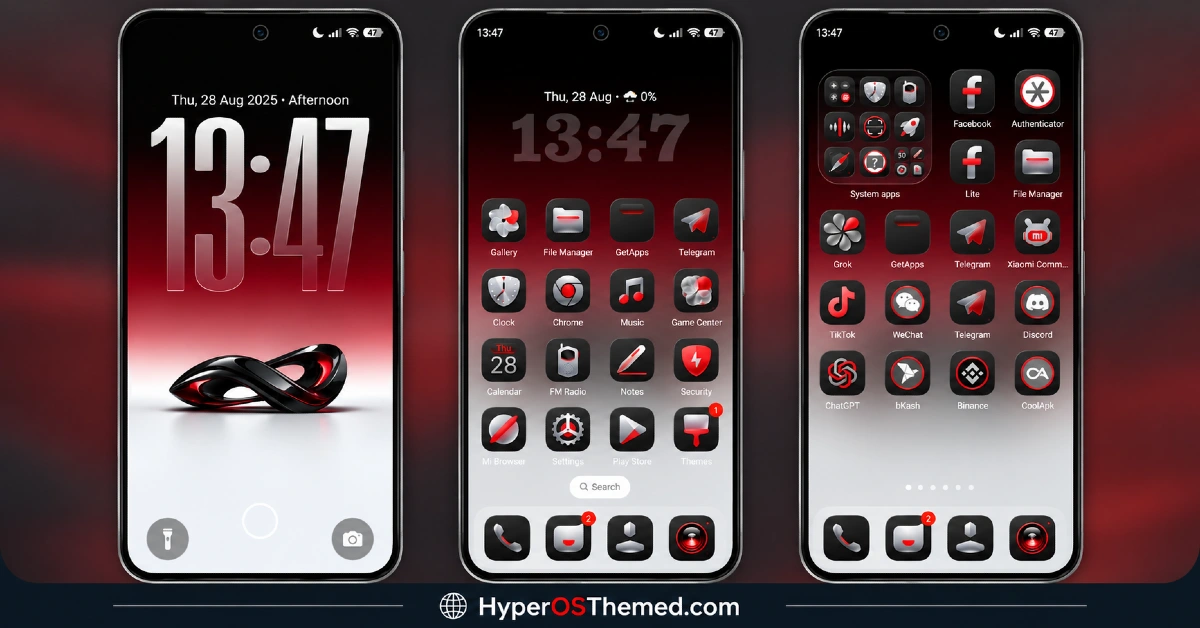
- Bold Typography Lock Screen Clock: The lock screen features a large, modern clock widget with sharp gradient accents running through the numbers themselves. It’s not just big for the sake of being big, the gradient treatment ties it directly into the rest of the theme’s red-and-dark color story.
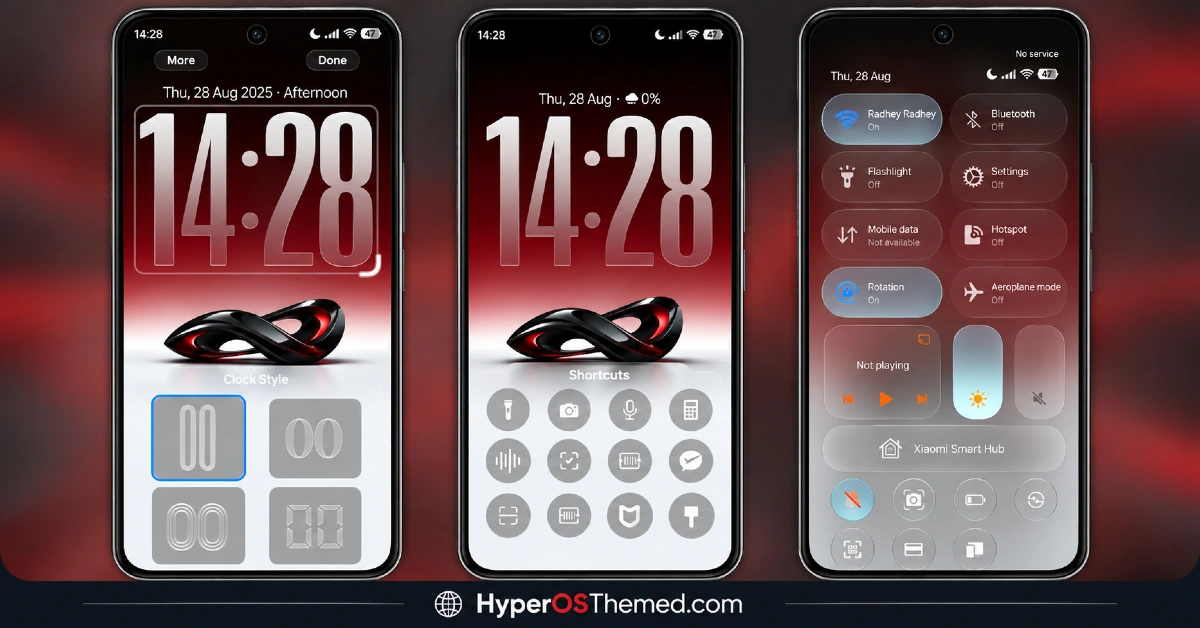
- Multiple Clock Style Options: Rather than locking users into one fixed clock design, OX GR4 HyperOS Theme includes a built-in clock style selector with several layout options to choose from. That’s a genuinely useful bit of flexibility most themes at this file size don’t bother including.
- Lock Screen Quick Access Shortcuts: A shortcut launcher sits right on the lock screen for essentials like Flashlight, Camera, Calculator, Recorder and Settings. It cuts down on the number of swipes needed to get to commonly used tools without unlocking the phone first.
- 3D Infinity Loop Emblem: A dynamic 3D infinity loop sits at the center of the lock screen design, set against the shifting gradient background. It’s a distinctive visual signature that gives the lock screen a bit more personality than a plain clock-and-wallpaper combo.
- Glossy Metallic Icon Pack: Icons are custom-designed with a metallic border and rich crimson highlights, covering a genuinely broad range of apps including Telegram, Chrome, TikTok, ChatGPT, Binance and bKash. That kind of specific third-party app coverage is worth noting since a lot of icon packs stop at the big-name apps and leave regional or niche ones untouched.
- Uniform Rounded-Square Icon Shapes: Beyond the color and metallic finish, icons stick to a consistent rounded-square shape across the board, keeping the home screen grid looking uniform rather than mismatched. This kind of shape consistency matters more than people expect for how “finished” a theme feels.
- Frosted Glass Control Center: The Control Center picks up a frosted glass background effect, moving away from a flat solid panel. It fits naturally with the gradient and metallic theme running through the rest of the design.
- Soft Rounded Control Tiles: Individual toggles for Wi-Fi, Bluetooth, Flashlight and the brightness slider all use softer, rounded tile shapes rather than sharp default rectangles. It’s a small detail, but one that makes the quick settings panel feel more considered.
- High-Visibility Status Bar: Status bar indicators for network, battery and the clock are designed with high contrast in mind, so they stay easy to read even against the busier gradient backgrounds elsewhere in the theme. This matters more here than in flatter themes, since gradient backdrops can sometimes swallow small icon details.
OX GR4 HyperOS Theme Preview
The screenshots below show the gradient lock screen with its 3D infinity emblem, the metallic icon pack and how the frosted Control Center looks once the theme is applied. Given how much detail is packed into the lock screen specifically, it’s worth taking a proper look at the preview to see the clock style options and shortcut launcher in context.
OX GR4 HyperOS Theme Overview
| Attribute | Details |
|---|---|
| Availability | Free, via Xiaomi Theme Store |
| Supported Devices | Xiaomi, Redmi and POCO phones running HyperOS |
| Theme Name | OX GR4 |
| Designer | OXFURY |
| Compatibility OS | HyperOS 3 |
| Features | Customizable lock screen with clock selector, metallic dark red icon pack, frosted glass Control Center, high-contrast status bar |
| File Size | ~20.3 MB |
OX GR4 HyperOS Theme Compatibility
OX GR4 HyperOS Theme is built specifically for HyperOS 3 and works across Xiaomi, Redmi and POCO devices running that version. Since the theme wasn’t designed with older HyperOS builds in mind, applying it on HyperOS 1.0 or 2.0 devices may result in some of the gradient and frosted glass effects rendering less accurately than intended.
Custom ROM users can still attempt installation manually, though results may vary more than usual given how specifically this release targets HyperOS 3. As with most themes modifying the lock screen and status bar, restarting the device after installation helps ensure the custom clock widgets, shortcut launcher and Control Center toggles all load in correctly.
Get OX GR4 HyperOS Theme
Download OX GR4 HyperOS Theme only through the official Theme Store link rather than random third-party file hosts or unofficial APK uploads. Files sourced outside verified channels are difficult to confirm as unaltered and may not reflect what OXFURY actually released. Sticking to the official Theme Store link keeps the installed version consistent with the intended design and ensures future updates remain accessible.
A note on installation access: if the Official Theme Store link doesn’t open automatically into the Themes app, check that your default mobile browser has permission to open system applications, since that’s the most common reason the redirect fails to trigger properly.
How to Apply OX GR4 HyperOS Theme
Follow the steps below to apply the theme:
- Open the Theme Store link given above on your Xiaomi, Redmi or POCO device.
- This will redirect you to the Theme Store.
- Tap the Free or Download button to fetch all the theme resources.
- Once downloaded, tap Apply to install the theme system-wide.
- Customize specific elements such as icons, lock screen or status bar if needed.
- Reboot your device for the full effect, this step is optional but recommended here specifically to make sure the custom status bar icons, Control Center toggles and lock screen widgets all render properly.
Note: If anything looks overlapped or doesn’t display correctly right after installing, restarting the device usually clears it up without further steps. This theme has been checked on HyperOS 3 without any major issues turning up during that process. Still, if something looks off on a specific device once it’s applied, leaving a comment with the details helps get it looked into.
Why Choose OX GR4 HyperOS Theme?
- Genuinely customizable lock screen — multiple clock styles and a built-in shortcut launcher, not just a fixed layout.
- Broad third-party icon coverage — apps like Binance, bKash and ChatGPT get matching metallic icons, not just the usual big names.
- Distinctive 3D emblem design — the infinity loop centerpiece sets the lock screen apart from typical gradient themes.
- Frosted glass Control Center — a cohesive visual upgrade over the standard flat quick settings panel.
- High-contrast status bar — stays legible even against the busier gradient backdrop.
- Lightweight file size — 20.3 MB is compact given how much lock screen customization is packed in.
- Free official download — no cost involved through a legitimate Theme Store link.
Conclusion
OX GR4 HyperOS Theme backs up its bold dark red aesthetic with real functional depth, particularly on the lock screen, where the clock style selector and quick access shortcuts go well beyond typical decorative changes. The broad third-party icon coverage and frosted Control Center round out a theme that feels considered rather than thrown together. For Xiaomi, Redmi and POCO users on HyperOS 3 who want a striking, high-contrast look with genuine customization options, OX GR4 HyperOS Theme is well worth trying.
You may also like:
OX F3 HyperOS Theme with Cartoon One UI Style with Dynamic Lock Screen for Xiaomi, POCO, Redmi
Crimson Obsidian HyperOS Theme with Luxury Black & Red Light Streaks for Xiaomi, POCO, Redmi
OX Colours HyperOS Theme – Vibrant Customizable Wallpapers for Xiaomi, POCO, Redmi
Codename G26 HyperOS Theme with Super Depth of Field iOS Style for Xiaomi, POCO, Redmi
Black OX HyperOS Theme with Premium 3D Business Look for Xiaomi, POCO, Redmi
NothingOS HyperOS Theme – Get Nothing Phone-Inspired Look for Xiaomi, POCO, Redmi
