
Nothing Phone’s design language has a cult following for a reason, that stark monochrome look with dot-matrix touches feels genuinely different from most Android skins, and NothingOS HyperOS Theme brings a good chunk of that identity over to HyperOS.
Designed by suhel, it doesn’t just slap a dark wallpaper on things, it rebuilds the lock screen, icon grid, control center and even the Settings app around that signature minimalist, monochrome aesthetic. At a lightweight 26.9 MB, it’s built specifically for HyperOS 3 and works across Xiaomi, Redmi and POCO devices, distributed for free through the official Theme Store.
NothingOS HyperOS Theme Key Features
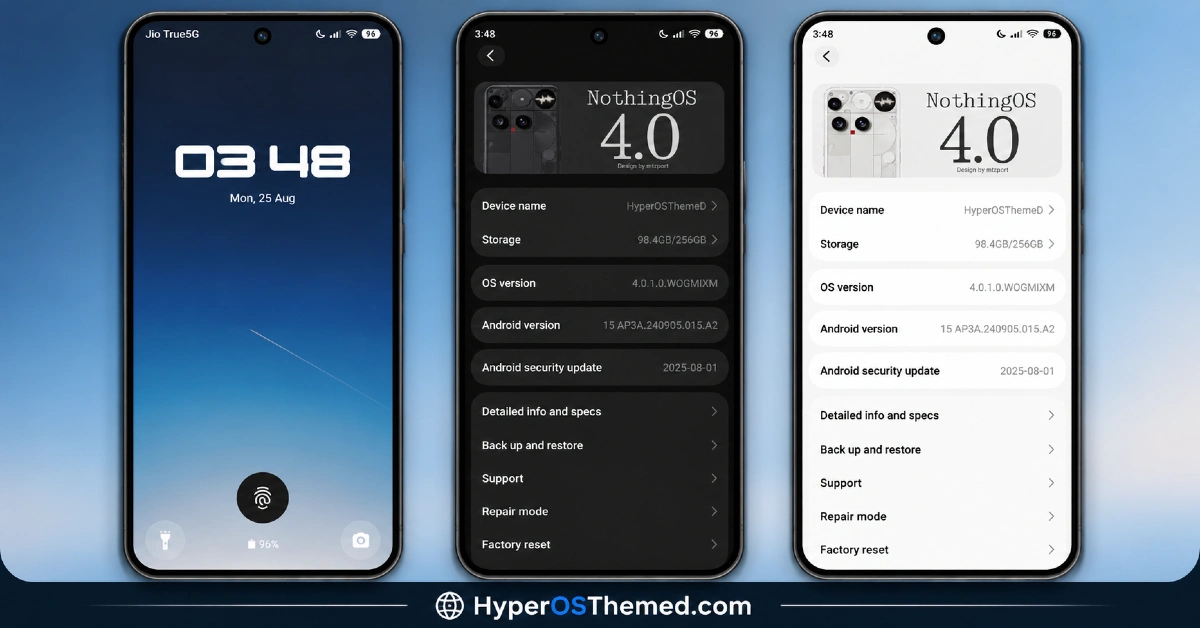
- Minimalist Lock Screen Design: The lock screen features a clean digital clock widget with bold, Nothing OS-inspired typography rather than a standard system font. Minimal shortcuts for the camera and flashlight sit at the bottom, keeping quick actions accessible without cluttering the screen, while subtle background gradients add a premium touch without being a battery drain.
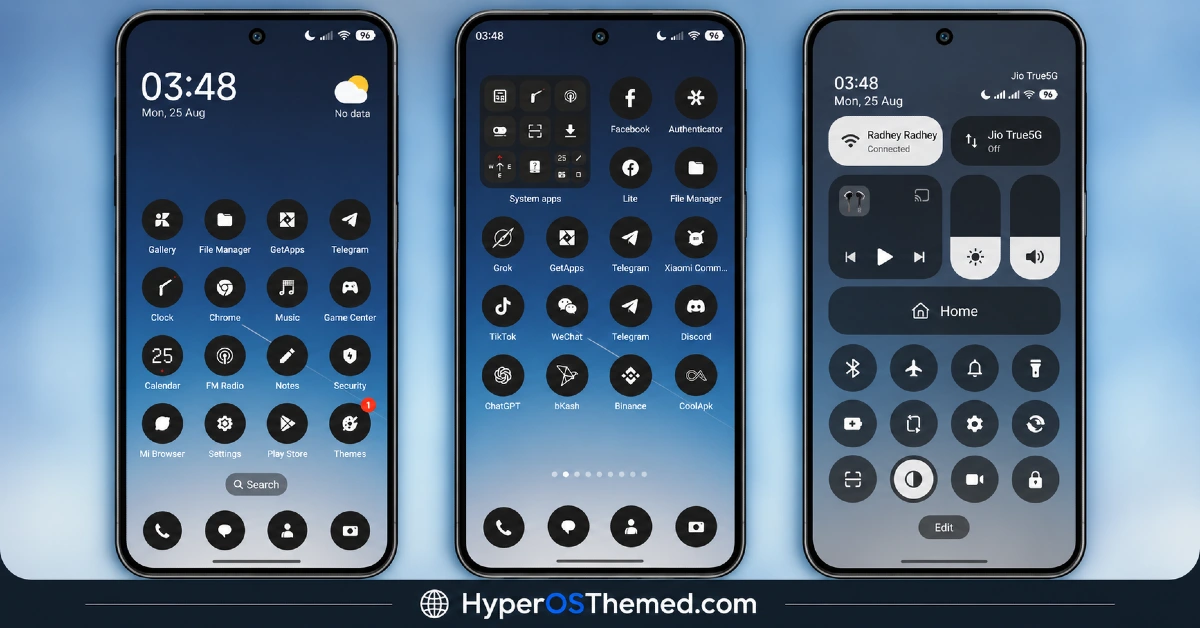
- Custom Monochrome App Icons:A fully customized dark, circular icon pack covers a broad range of system and popular third-party apps, including recognizable names like Telegram, Chrome, TikTok, ChatGPT and Binance. This keeps the home screen grid uniformly dark and consistent rather than mixing in bright, mismatched default icons.
- Redesigned Control Center and Status Bar: The Control Center gets rounded, pill-shaped sliders for volume and brightness, moving away from the standard HyperOS toggle style. Status bar icons for battery, network and Wi-Fi use high contrast for better visibility, and smooth blur effects across the quick settings panel make one-handed use noticeably easier.
- Custom System UI and Settings Menu: The Settings app is completely redesigned to support both Dark Mode and Light Mode, with custom header cards carrying “NothingOS 4.0” branding and clean spacing throughout. Device info and specification screens use rounded container cards with custom typography, giving even the most utilitarian parts of the phone a design refresh.
- Lightweight File Size: At just 26.9 MB, NothingOS is notably light for a theme that touches this many system areas, from the lock screen down to Settings. This keeps the download quick and shouldn’t put much strain on storage even on devices running low on space.
NothingOS HyperOS Theme Preview
The screenshots below show the minimalist lock screen, the monochrome icon grid and how the redesigned Control Center and Settings app look once the theme is applied. Since the Nothing Phone aesthetic is built on very specific typography and spacing choices, it’s worth looking closely at the preview to see how faithfully those details come through on HyperOS.
NothingOS Xiaomi Theme Overview
| Attribute | Details |
|---|---|
| Availability | Free, via Xiaomi Theme Store |
| Supported Devices | Xiaomi, Redmi and POCO phones running HyperOS |
| Theme Name | NothingOS |
| Designer | suhel |
| Compatibility OS | HyperOS 3 |
| Features | Minimalist lock screen, custom monochrome icon pack, redesigned Control Center and status bar, custom Settings UI |
| File Size | ~26.9 MB |
NothingOS HyperOS Theme Compatibility
NothingOS HyperOS Theme is built specifically for HyperOS 3 and works across Xiaomi, Redmi and POCO devices running that version. Since the theme wasn’t designed with older HyperOS builds in mind, applying it on HyperOS 1.0 or 2.0 devices may result in incomplete or inconsistent rendering of the Settings redesign and Control Center elements. Custom ROM users can still attempt installation manually through the MTZ file, though results may vary more than usual given how specifically this theme targets HyperOS 3. As with most themes modifying the lock screen and status bar, restarting the device after installation helps ensure all custom elements load in correctly.
Get NothingOS HyperOS Theme
Download NothingOS HyperOS Theme only through the official Theme Store link rather than random third-party file hosts or unofficial APK uploads. Files sourced outside verified channels are difficult to confirm as unaltered and may not reflect what suhel actually released. Sticking to the official Theme Store link keeps the installed version consistent with the intended design and ensures any future updates remain accessible.
A note on installation access: if the Official Theme Store link doesn’t open automatically into the Themes app on your device, check that your default browser has permission to open system applications, since that’s the most common reason the redirect fails to trigger properly.
How to Apply NothingOS HyperOS Theme
Follow the steps below to apply the theme:
- Open the Theme Store link given above on your Xiaomi, Redmi or POCO device.
- This will redirect you to the Theme Store.
- Download and install the theme.
- Tap on Apply.
- Customize specific elements such as icons, lock screen or status bar if needed.
- Reboot your device for the full effect, though this step is optional but recommended here specifically to make sure the custom status bar icons, widgets and lock screen elements all load properly.
Note: If anything looks overlapped or doesn’t display correctly right after installing, restarting the device usually clears it up without further steps. This theme has been checked on HyperOS 3 without any major issues turning up. Still, if something looks off on a specific device once it’s applied, leaving a comment with the details helps get it looked into.
Installing NothingOS on Custom ROM Devices
Devices running a Custom ROM aren’t able to use the direct Theme Store link, so the MTZ file needs to be brought in manually through the Theme Store app instead. Here’s how that works:
- Grab the MTZ file for NothingOS HyperOS Theme from the download section.
- Open the Theme Store app.
- Go into the Themes tab.
- Scroll down to find the Import option, then tap it.
- Use the file manager to locate the downloaded .mtz file.
- Wait for the import process to finish.
- Tap the theme once it appears in the list to apply it.
Why Choose NothingOS HyperOS Theme?
- Authentic Nothing Phone aesthetic — genuinely captures the monochrome, minimalist design language, not just a dark wallpaper.
- Broad third-party icon coverage — popular apps like Telegram, Chrome and Binance all get matching monochrome icons.
- Redesigned Settings app — even device info screens get custom typography and card-based layouts.
- Pill-shaped Control Center sliders — a distinct departure from standard HyperOS toggle design.
- Lightweight file size — 26.9 MB is small given how much of the system this theme touches.
- High-contrast status bar — battery, network and Wi-Fi icons stay clearly visible.
- Dark and Light Mode support in Settings — flexibility built into the redesigned system menu.
- Free official download — no cost involved through a legitimate Theme Store link.
Conclusion
NothingOS HyperOS Theme succeeds where a lot of “inspired by” themes fall short, actually capturing the specific typography, spacing and monochrome discipline that makes the Nothing Phone look recognizable, rather than just going generically dark. The redesigned Settings app and broad icon coverage show a level of care that goes beyond the usual lock screen and wallpaper swap. For Xiaomi, Redmi and POCO users on HyperOS 3 who’ve admired the Nothing Phone aesthetic from a distance, NothingOS HyperOS Theme is well worth trying.
You may also like:
TRX HyperOS Theme iOS Style Playful 3D Cartoon Numerals for Xiaomi, POCO, Redmi
OX MU1 HyperOS Theme with Immersive 3D Depth Wallpapers for Xiaomi, POCO, Redmi
Set Sail HyperOS Theme With Sea Widgets & Dialer Pad for Xiaomi, POCO, Redmi
Muses HyperOS Theme with Premium Icon Design for Xiaomi, POCO, Redmi
OX 3D1 HyperOS Theme with Liquid Glass Depth Effect for Xiaomi, POCO, Redmi
