
There’s a particular category of HyperOS theme that tries to do everything at once, animated lock screens, transparency, bold colors, moving widgets, and OX 3D1 HyperOS Theme deliberately isn’t one of them. Designed by oxfury 0.2, it takes the opposite approach, using liquid glass and depth effect touches sparingly against a mostly clean, minimal base rather than layering effects on top of each other.
It reworks Settings, the notification panel, control center, dialer and messaging apps into one consistent package for Xiaomi, Redmi and POCO devices. Built for HyperOS 2 and HyperOS 3, it’s for anyone who wants their phone to feel a little more premium without turning every screen into a showcase.
OX 3D1 HyperOS Theme Key Features
- System-Wide Interface Coverage: OX 3D1 HyperOS Theme extends its styling across Settings, the notification panel, dialer, messaging and other core system apps rather than stopping at the home screen. This kind of full coverage helps avoid the mismatched feeling that comes from themes that only touch icons and wallpapers.
- Liquid Glass and Depth Effect Touches: Rather than a heavy transparency overhaul, OX 3D1 Xiaomi Theme works subtle liquid glass and 3D depth effects into specific elements, giving certain panels a bit of dimension without overwhelming the minimal base design. It’s a restrained use of an effect that other themes tend to apply everywhere at once.
- Refined Icon Pack: The icon set uses simple, minimalistic shapes with a balanced color palette designed to stay legible in both light and dark modes. Coverage focuses mainly on system and common apps, so a handful of less popular third-party apps may still show their default icons.
- Cleaner Status Bar and Control Center: Quick toggles get reworked spacing and clearer icon and text readability compared to the stock HyperOS layout. The changes here are mostly about legibility and tidiness rather than a dramatic visual overhaul.
- Simplified Lock Screen: The lock screen is pared down for clear time and notification visibility, with font choices adjusted to improve readability at a glance. It’s a quiet redesign that fits the theme’s overall restrained approach.
- Subtle System Animations: OX 3D1 HyperOS Theme Xiaomi includes light animation touches meant to smooth out transitions without adding noticeable overhead to system responsiveness. These are understated by design, meant to support the interface rather than draw attention to themselves.
OX 3D1 HyperOS Theme Preview
The screenshots below show the redesigned icon pack, the simplified lock screen and how the liquid glass depth touches show up in the status bar and control center once applied. Since the depth effects here are meant to be subtle rather than dramatic, it’s worth looking closely at the preview to catch the detail work.
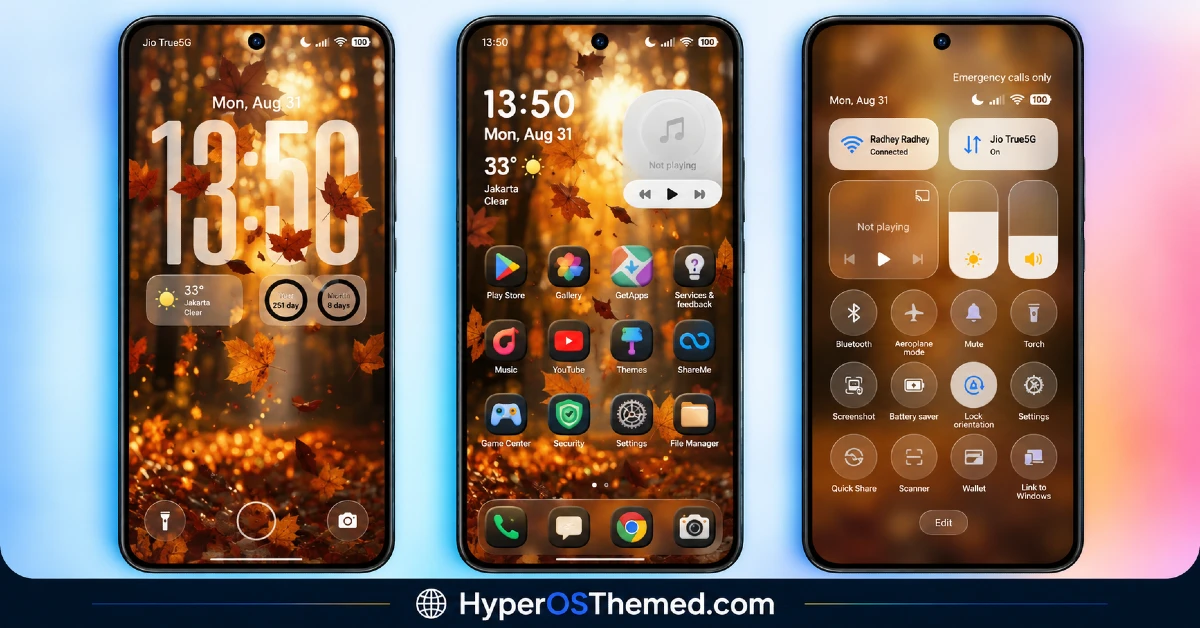
OX 3D1 HyperOS Theme Details
| Attribute | Details |
|---|---|
| Availability | Free, via Xiaomi Theme Store |
| Supported Devices | Xiaomi, Redmi and POCO phones running HyperOS |
| Theme Name | OX 3D1 |
| Designer | oxfury 0.2 |
| Compatibility OS | HyperOS 2 and HyperOS 3 |
| Features | System-wide UI customization, liquid glass depth effects, refined icon pack, cleaner status bar and control center, simplified lock screen, subtle animations |
| File Size | Not specified by designer |
OX 3D1 HyperOS Theme Compatibility
OX 3D1 supports both HyperOS 2, built on Android 14, and HyperOS 3, part of the Android 15/16 rollout, giving it reach across a good portion of current Xiaomi, Redmi and POCO devices. Since the theme touches so many system apps at once, some UI elements may render slightly differently depending on the specific device model and exact system version installed, so minor inconsistencies aren’t out of the question on less common hardware.
The theme is designed to run without background scripts or extra services, which generally keeps it stable across both mid-range and flagship devices, though as with any full-system theme it’s worth restarting the device after installation if something doesn’t display correctly the first time.
Get OX 3D1 HyperOS Theme
Download OX 3D1 HyperOS Theme only through the official Theme Store link rather than third-party file-sharing sites or unofficial APK sources. Files distributed outside the official channel are hard to verify and may not match what oxfury 0.2 actually released, so there’s real risk in trusting an unofficial copy just to skip a step. Sticking to the Theme Store keeps the installed version consistent with the intended design and ensures any future updates stay accessible.
A few important things to keep in mind: theme availability can vary depending on your region, so the Theme Store link may not work identically for everyone. Some of the theme’s finer visual details may also require your device to be running the latest HyperOS update to display properly. As always, downloading only from the official Theme Store is the safest way to avoid a corrupted or altered file.
How to Apply OX 3D1 HyperOS Theme
Follow the steps below to apply the theme:
- Open the Theme Store link given above on your Xiaomi, Redmi or POCO device.
- This will redirect you to the Theme Store.
- Download and install the theme.
- Tap on Apply.
- Customize specific elements such as icons, lock screen or status bar if needed.
- Reboot your device for the full effect, though this step is optional.
Note: If any part of the interface looks incomplete or fails to update after applying the theme, a quick restart is usually enough to get everything to load in properly. OX 3D1 HyperOS Theme has been checked across both supported HyperOS versions without any significant problems turning up during that process. That said, if something still looks off on a particular device, leaving a comment with the details helps in figuring out what’s going on.
Installing OX 3D1 HyperOS Theme on Custom ROM Devices
Devices running a Custom ROM won’t be able to rely on the direct Theme Store link, so the MTZ file needs to be added manually through the Theme Store app instead. Here’s how that works:
- Save the MTZ file for OX 3D1 onto the device.
- Open the Theme Store app.
- Head into the Themes section.
- Scroll to the bottom and tap the Import option once it appears.
- Use the file manager to locate the downloaded .mtz file.
- Wait for the import process to finish.
- Select the theme once it appears in the list to apply it.
Why Choose OX 3D1 HyperOS Theme?
- Full system coverage — Settings, dialer, messaging and the control center all get updated together, not just the home screen.
- Restrained use of depth effects — liquid glass touches add dimension without overwhelming the minimal design.
- Legible icon design — minimalistic shapes and balanced colors stay clear in both light and dark modes.
- No background processes — runs without extra services, so it doesn’t add unnecessary load to the system.
- Dual HyperOS version support — works across both HyperOS 2 and HyperOS 3 rather than a single release.
- Cleaner Settings navigation — better grouping and spacing make menus easier to scan.
- Subtle, non-intrusive animations — small transition effects that don’t get in the way of daily use.
- Free through the official Theme Store — no cost involved and distributed through a legitimate channel.
Conclusion
OX 3D1 HyperOS Theme takes a disciplined approach to a trend that often gets overused, applying liquid glass and depth effects only where they genuinely add something, then keeping the rest of the interface clean and consistent. The dual support for HyperOS 2 and HyperOS 3 makes it accessible across a wide range of devices, and the lack of background processes means it shouldn’t weigh down performance on either mid-range or flagship hardware. For Xiaomi, Redmi and POCO users who want a touch of premium polish without visual overload, OX 3D1 is worth trying.
You may also like:
VKOX HyperOS Theme for Xiaomi, POCO and REDMI Phones
JellyB HyperOS Theme with Dark Sea Colour Palette for Xiaomi, POCO and REDMI Phones
Gaze of Night HyperOS Theme with Premium Black for Xiaomi, POCO and REDMI Phones
