
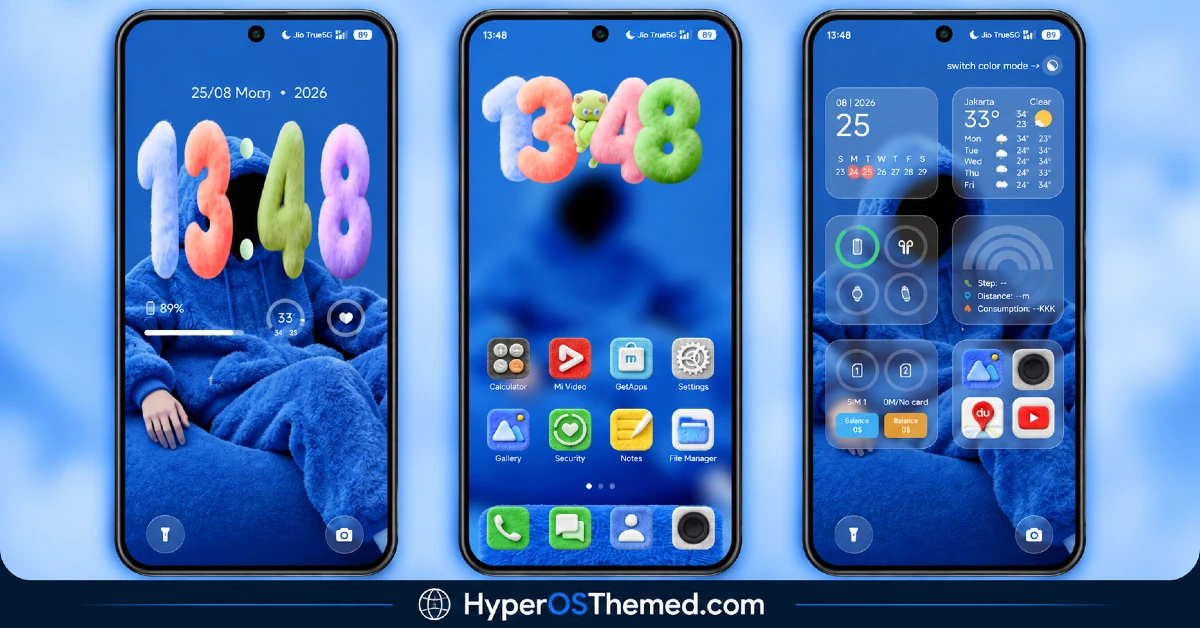
Most lock screens take themselves fairly seriously, big clean fonts, muted colors, but TRX HyperOS Theme throws that out entirely in favor of plush 3D cartoon numerals sitting inside a cozy blue character wallpaper. Designed by mydul, it borrows iOS-style widget layouts for weather, calendar and step tracking, then wraps them in a dynamic lock screen that even includes a color-mode switch. At 50.93 MB and compatible across HyperOS, HyperOS 2.0 and HyperOS 3.0, it’s a theme clearly built for anyone who wants their Xiaomi, Redmi or POCO device to feel a little more fun than functional.
TRX HyperOS Theme Key Features
- Plush 3D Cartoon Numerals: The lock screen clock uses fuzzy, plush-looking 3D numbers rather than a standard flat digital font. It’s an unusual, playful choice that immediately sets TRX Xiaomi Theme apart from the more serious, minimalist themes most HyperOS users are used to seeing.
- Cosy Blue Character Wallpaper: The wallpaper features a character-based design in cool blue tones, giving the whole theme a warm, approachable feel rather than a sleek or premium one. It pairs naturally with the plush numeral styling on the lock screen.
- iOS-Style Widget Layout: Widgets for weather, calendar and steps follow an iOS-inspired design language, giving the home screen a clean, organized structure familiar to anyone who’s used an iPhone. This blends the playful visual style with a genuinely functional widget system.
- Quick Access Shortcuts: Beyond the standard widgets, TRX HyperOS Theme includes quick shortcuts built into the lock screen for faster access to frequently used functions. This adds a practical layer on top of the more decorative elements of the theme.
- Dynamic Lock Screen: The lock screen isn’t static, incorporating movement and shifting visual elements that add life to the overall cartoon aesthetic. It’s one of the more animated lock screens among current HyperOS themes.
- Built-In Color Mode Switch: A dedicated toggle lets users switch between color modes directly within the theme, offering some flexibility without needing to dig through separate settings menus. This is a nice touch of customization for a theme that otherwise leans into a fixed playful style.
- Step Tracking Widget: A dedicated widget displays step count directly on the lock screen or home screen, giving quick access to fitness data without opening a separate health app. It’s a functional detail that fits naturally with the iOS-style widget approach.
- Cohesive Cool-Toned Palette: Despite all the playful cartoon elements, the color scheme stays consistently blue and cool-toned throughout, keeping the theme from feeling chaotic or mismatched. This restraint in color choice balances out the more whimsical numeral and character design.
TRX HyperOS Theme Preview
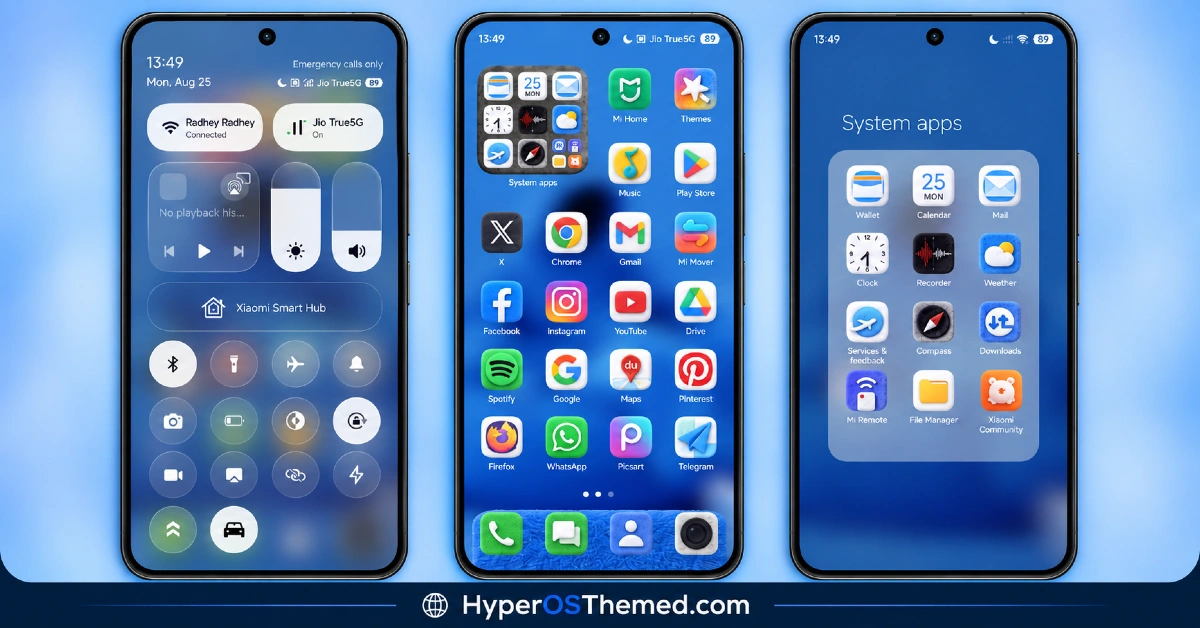
The screenshots below show the plush 3D numerals, the cozy blue character wallpaper and how the iOS-style widgets look once the theme is applied. Given how distinctive the cartoon numeral styling is, it’s worth taking a proper look at the preview to see if this playful direction fits your taste before downloading.
TRX HyperOS Theme Details
| Attribute | Details |
|---|---|
| Availability | Free, via Xiaomi Theme Store |
| Supported Devices | Xiaomi, Redmi and POCO phones running HyperOS |
| Theme Name | TRX |
| Designer | mydul |
| Compatibility OS | HyperOS, HyperOS 2.0 and HyperOS 3.0 |
| Features | Plush 3D cartoon numerals, cozy blue wallpaper, iOS-style widgets, dynamic lock screen, color mode switch, step tracking widget |
| File Size | 50.93 MB |
TRX HyperOS Theme Compatibility
TRX HyperOS Theme supports HyperOS, HyperOS 2.0 and HyperOS 3.0, giving it solid reach across Xiaomi, Redmi and POCO devices running any of those versions. Since the theme relies on a dynamic lock screen with animated cartoon elements, older or lower-powered devices may render the movement with slightly less smoothness compared to current flagship hardware.
Custom ROM users on setups like Xiaomi EU ROM or MIUIRoom can still install the theme manually through the MTZ file, though the color mode switch and widget animations may behave a bit differently outside the official global stable ROM. As with most themes touching the lock screen, restarting the device after installation is a sensible first step if anything looks overlapped or fails to display properly.
Get TRX HyperOS Theme
Download TRX only through the official Theme Store link rather than random third-party file hosts or unofficial APK uploads. Files sourced outside verified channels are difficult to confirm as unaltered and may not reflect what mydul actually released. Sticking to the official Theme Store link keeps the installed version consistent with the intended design and ensures any future updates remain accessible.
A note from the designer: if you run into any issues after applying TRX, the designer maintains an active Telegram channel specifically for reporting problems and getting quick fixes, rather than leaving users to troubleshoot alone. It’s also where updates on future premium themes get shared, so it’s worth following if you enjoyed this one.
How to Apply TRX HyperOS Theme
Follow the steps below to apply the theme:
- Open the Theme Store link given above on your Xiaomi, Redmi or POCO device.
- This will redirect you to the Theme Store.
- Download and install the theme.
- Tap on Apply.
- Customize specific elements such as icons, lock screen or status bar if needed.
- Reboot your device for the full effect, though this step is optional.
Note: If anything looks overlapped or doesn’t display correctly right after installing, restarting the device usually clears it up without further steps. This theme has been checked across its supported HyperOS versions without any major issues turning up. Still, if something looks off on a specific device once it’s applied, reaching out through the designer’s Telegram channel or leaving a comment with the details helps get it looked into.
Installing TRX on Custom ROM Devices
Devices running MIUI 11 through 14 or HyperOS based Custom ROMs such as Xiaomi EU ROM or MIUIRoom aren’t able to use the direct Theme Store link, so the MTZ file needs to be brought in manually instead. Here’s how that works:
- Grab the MTZ file for TRX from the download section.
- Open the Theme Store app.
- Go into the Themes tab.
- Scroll down to find the Import option, then tap it.
- Use the file manager to locate the downloaded .mtz file.
- Wait for the import process to finish.
- Tap the theme once it appears in the list to apply it.
Why Choose TRX HyperOS Theme?
- Genuinely playful design — plush 3D numerals offer something different from typical flat clock fonts.
- Functional iOS-style widgets — weather, calendar and steps are organized in a familiar, clean layout.
- Dynamic, animated lock screen — movement adds character rather than sitting static.
- Built-in color mode switch — a bit of flexibility without digging through extra settings.
- Cohesive blue color palette — keeps the playful elements from feeling mismatched or chaotic.
- Active designer support — a dedicated Telegram channel is available for quick issue reporting.
- Broad HyperOS compatibility — works across HyperOS, HyperOS 2.0 and HyperOS 3.0.
- Free official download — no cost involved and distributed through a legitimate Theme Store link.
Conclusion
TRX HyperOS Theme commits fully to a playful, cartoon-inspired aesthetic without giving up genuine functionality, blending plush 3D numerals and a cozy character wallpaper with practical iOS-style widgets for weather, calendar and steps. The active Telegram support from designer mydul is a nice bonus for anyone who runs into trouble after installing. For Xiaomi, Redmi and POCO users who want their lock screen to feel a bit more fun and less clinical, TRX is well worth trying.
You may also like:
OX MU1 HyperOS Theme with Immersive 3D Depth Wallpapers for Xiaomi, POCO, Redmi
Set Sail HyperOS Theme With Sea Widgets & Dialer Pad for Xiaomi, POCO, Redmi
Muses HyperOS Theme with Premium Icon Design for Xiaomi, POCO, Redmi
OX 3D1 HyperOS Theme with Liquid Glass Depth Effect for Xiaomi, POCO, Redmi
