
Most “colourful” themes settle for one bright wallpaper and call it a day, but OX Colours HyperOS Theme actually builds customization into that promise, letting you adjust things rather than locking you into whatever palette the designer picked. Designed by oxfury 0.2 alongside masuod, it pairs a dynamic lock screen with a genuinely premium wallpaper collection for Xiaomi, Redmi and POCO devices. At 46.15 MB, it’s a mid-weight download built for HyperOS and HyperOS 2.0.
OX Colours HyperOS Theme Key Features
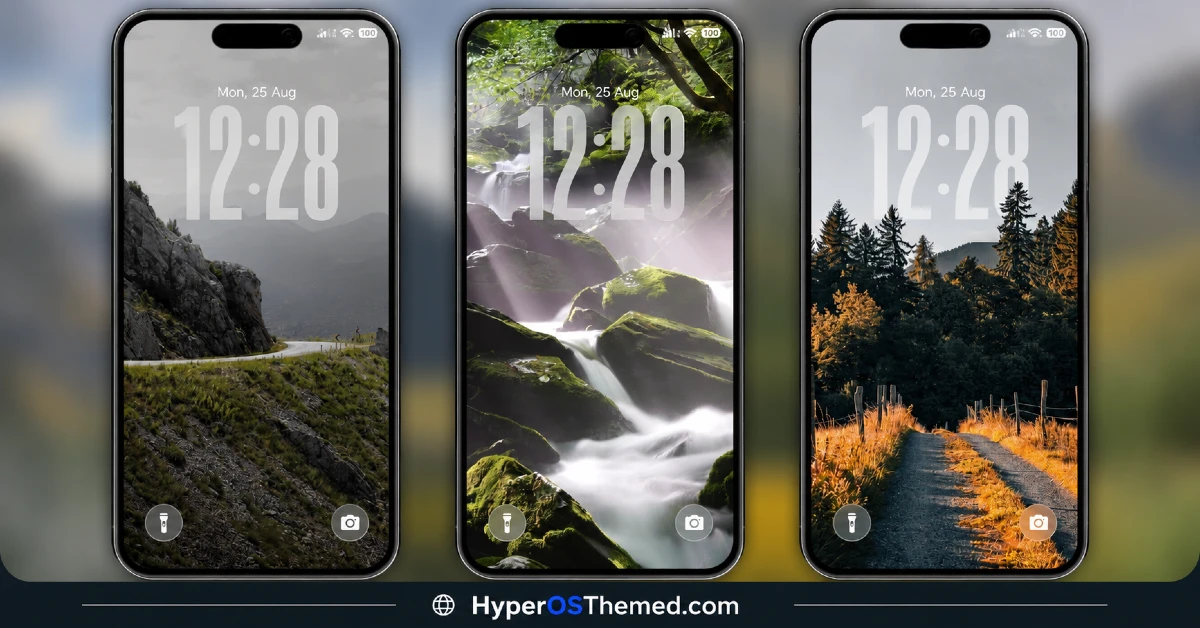
- Premium Wallpaper Collection: OX Colours ships with a curated set of vibrant wallpapers rather than a single showcase image, giving actual variety to pick from instead of committing to one look. The color work here feels more deliberate than the generic gradients a lot of themes fall back on.
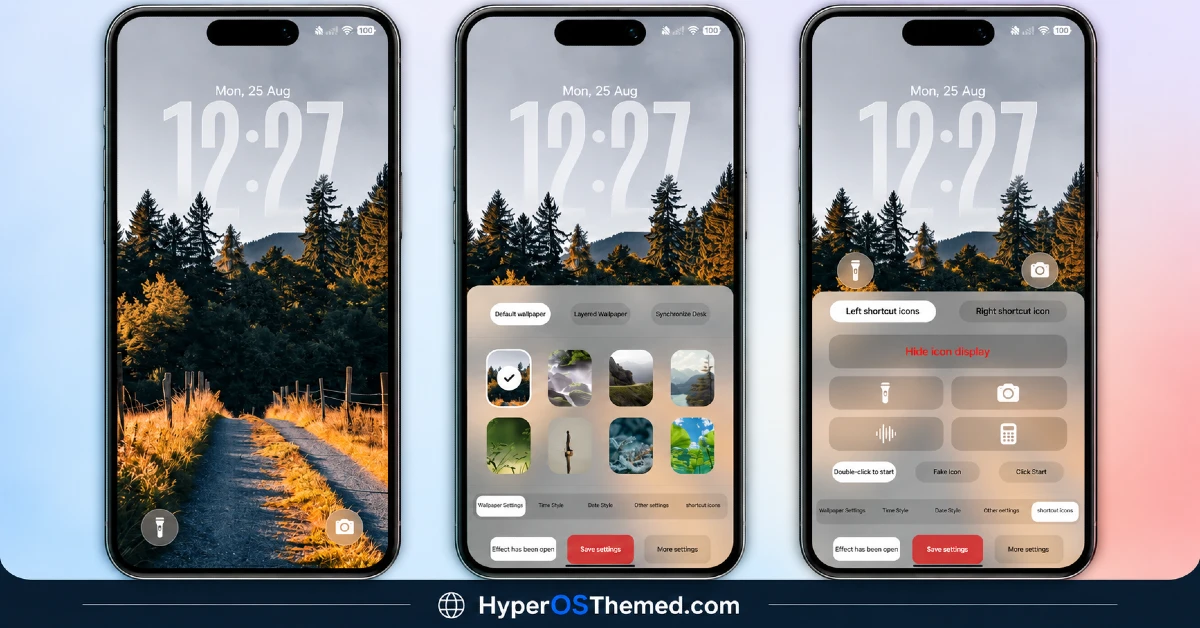
- Customizable Visual Elements: Several parts of the theme can be adjusted rather than staying fixed, which is a step beyond the usual “take it or leave it” approach most HyperOS themes take. Exactly what’s customizable becomes clearer once applied, since the toggle options sit inside the theme’s own settings panel.
- Dynamic Lock Screen: The lock screen isn’t static, incorporating movement that adds some life to the unlock experience instead of a plain fixed layout. It’s a fairly common feature in newer themes now, but it’s done here without feeling tacked on.
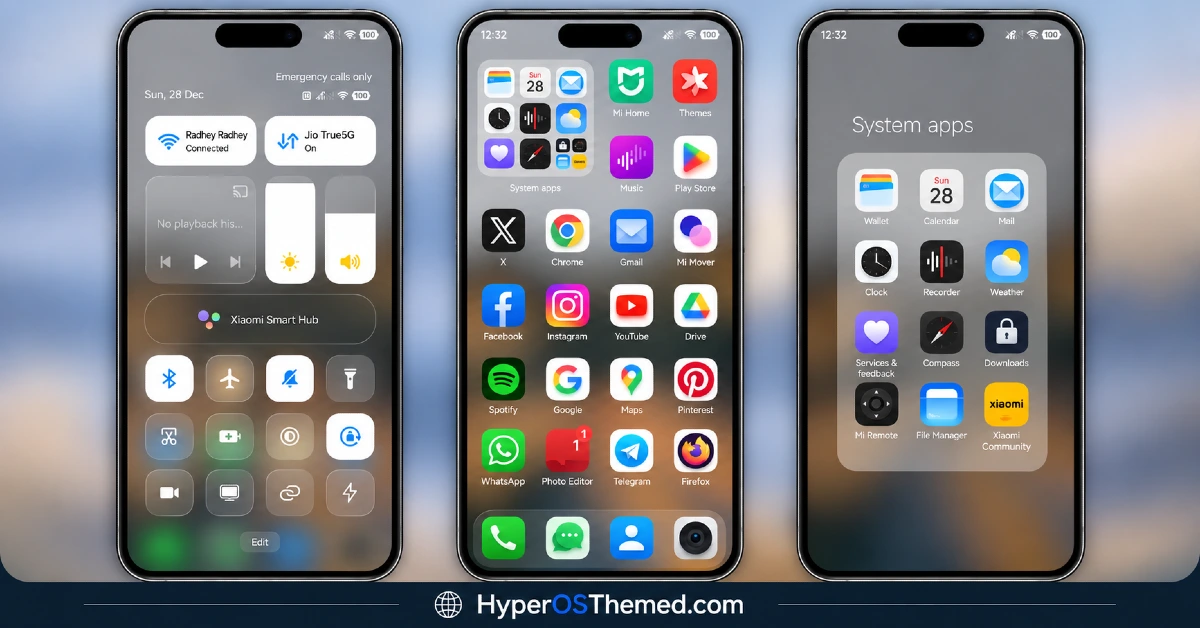
- Coordinated Icon Design:Icons are styled to match the colourful wallpaper direction rather than sitting as a mismatched afterthought. The home screen ends up feeling like one cohesive package instead of icons and wallpaper pulling in different directions.
- Two Version-Specific Setup Paths: OX Colours supports both HyperOS and HyperOS 2.0, and given how the designer structures other releases in this series, expect the install process to differ slightly depending on which version your device runs. Worth double-checking you’re following the right guide for your exact build.
- Actively Maintained by the Designers: oxfury 0.2 and masuod run dedicated Telegram channels for feedback and support rather than leaving the theme unsupported after release. That’s genuinely useful if something doesn’t render right on a specific device model.
- Compact for the Amount of Detail Included: At 46.15 MB, it’s not the lightest theme around, but it’s reasonable given the wallpaper variety and customization options bundled in. Downloads quickly enough on most connections without eating too much storage.
OX Colours HyperOS Theme Preview
The screenshots below show the vibrant wallpaper set, the coordinated icon design and how the dynamic lock screen looks once applied. Since customization options are a big part of the appeal here, it’s worth exploring the theme’s own settings after installing to see the full range of what can be adjusted.
OX Colours HyperOS ThemeTheme Details
| Attribute | Details |
|---|---|
| Availability | Free, via Xiaomi Theme Store |
| Supported Devices | Xiaomi, Redmi and POCO phones running HyperOS |
| Theme Name | OX Colours |
| Designer | oxfury 0.2 (with masuod) |
| Region | Global |
| Compatibility OS | HyperOS, HyperOS 2.0 and HyperOS 3.0 |
| Features | Premium wallpaper collection, customizable elements, dynamic lock screen, coordinated icon design |
| File Size | 46.15 MB |
OX Colours HyperOS Theme Compatibility
OX Colours HyperOS Theme supports HyperOS and HyperOS 2.0 across Xiaomi, Redmi and POCO devices, though it doesn’t currently extend official support to HyperOS 3.0. Since the theme relies on a dynamic lock screen and customizable elements, older or lower-powered devices may render some of these features with slightly less smoothness compared to current flagship hardware.
Custom ROM users on setups like Xiaomi EU ROM or MIUIRoom can still install the theme manually through the MTZ file, and if you’re on MIUI 14 specifically, there’s a separate video guide linked by the designer worth following instead of the standard steps. As with most themes touching the lock screen, restarting the device after installation is a sensible first step if anything looks overlapped or fails to display properly.
Get OX Colours Xiaomi Theme
Download OX Colours only through the official Theme Store link rather than random third-party file hosts or unofficial APK uploads. Files sourced outside verified channels are difficult to confirm as unaltered and may not reflect what oxfury 0.2 and masuod actually released. Sticking to the official Theme Store link keeps the installed version consistent with the intended design and ensures any future updates remain accessible.
Important notice from the designers: OX Colours is fully designed and developed by oxfury 0.2 and masuod, with some resources sourced from other creators. The designers have specifically asked that no part of this theme be copied, re-uploaded, or modified without permission, noting that unauthorized use will be reported to Xiaomi as a copyright violation. Anyone with feedback or questions can reach the designers directly through their listed Telegram channels. This is a genuine copyright request worth respecting given the original work that went into the theme’s wallpaper and customization design.
Channel : @englishthemesoxfury
Channel : @ThemeMasuod
Feedback : @englishthemesoxfurychat
Feedback : @httpstmegUgni8q6P5IyZmJk
How to Apply OX Colours HyperOS Theme Xiaomi
Follow the steps below to apply the theme:
- Open the Theme Store link given above on your Xiaomi, Redmi or POCO device.
- This will redirect you to the Theme Store.
- Download and install the theme.
- Tap on Apply.
- Customize specific elements such as icons, lock screen or status bar if needed.
- Reboot your device for the full effect, though this step is optional.
Note: If the Official Theme Store link doesn’t open properly, try switching to Chrome or your device’s default Xiaomi browser, since other browsers have been reported not to work reliably with this link. If anything looks overlapped or fails to display correctly right after installing, restarting the device usually clears it up. Still, if something looks off on a specific device once it’s applied, reaching out through the designers’ Telegram channels or leaving a comment with the details helps get it looked into.
Installing OX Colours HyperOS Theme on Custom ROM Devices
Devices running MIUI 11 through 14 or HyperOS based Custom ROMs such as Xiaomi EU ROM or MIUIRoom aren’t able to use the direct Theme Store link, so the MTZ file needs to be brought in manually instead. Here’s how that works:
- Grab the MTZ file for OX Colours from the download section.
- Open the Theme Store app.
- Go into the Themes tab.
- Scroll down to find the Import option, then tap it.
- Use the file manager to locate the downloaded .mtz file.
- Wait for the import process to finish.
- Tap the theme once it appears in the list to apply it.
Why Choose OX Colours HyperOS Theme?
- Genuine wallpaper variety — a curated collection instead of a single showcase image.
- Real customization options — several elements can be adjusted rather than staying fixed.
- Dynamic lock screen — subtle movement adds personality without overdoing it.
- Coordinated icon-wallpaper pairing — the home screen feels like one cohesive package.
- Active designer support — Telegram channels available directly for feedback and troubleshooting.
- Free official download — no cost involved through a legitimate Theme Store link.
- Original, protected work — clear copyright notice reflects real design effort behind the theme.
Conclusion
OX Colours backs up its name with actual variety and adjustable elements rather than just a bright wallpaper slapped on top of a standard theme structure. The active support from oxfury 0.2 and masuod through Telegram is a nice safety net if anything needs troubleshooting after install. For Xiaomi, Redmi and POCO users who want a colourful look they can actually tweak to their own taste, OX Colours is well worth trying.
You may also like:
Codename G26 HyperOS Theme with Super Depth of Field iOS Style for Xiaomi, POCO, Redmi
Black OX HyperOS Theme with Premium 3D Business Look for Xiaomi, POCO, Redmi
NothingOS HyperOS Theme – Get Nothing Phone-Inspired Look for Xiaomi, POCO, Redmi
TRX HyperOS Theme iOS Style Playful 3D Cartoon Numerals for Xiaomi, POCO, Redmi
OX MU1 HyperOS Theme with Immersive 3D Depth Wallpapers for Xiaomi, POCO, Redmi
Set Sail HyperOS Theme With Sea Widgets & Dialer Pad for Xiaomi, POCO, Redmi
