
Some themes go dramatic everywhere, and some go quiet everywhere. HyperUi, designed by Saktie, does something more interesting: it opens with a bold, fiery wallpaper and then settles into a clean, dark interface that never feels overwhelming. After trying it out, I think that balance is exactly what makes it work.
What Makes HyperUi HyperOS Theme Worth Trying
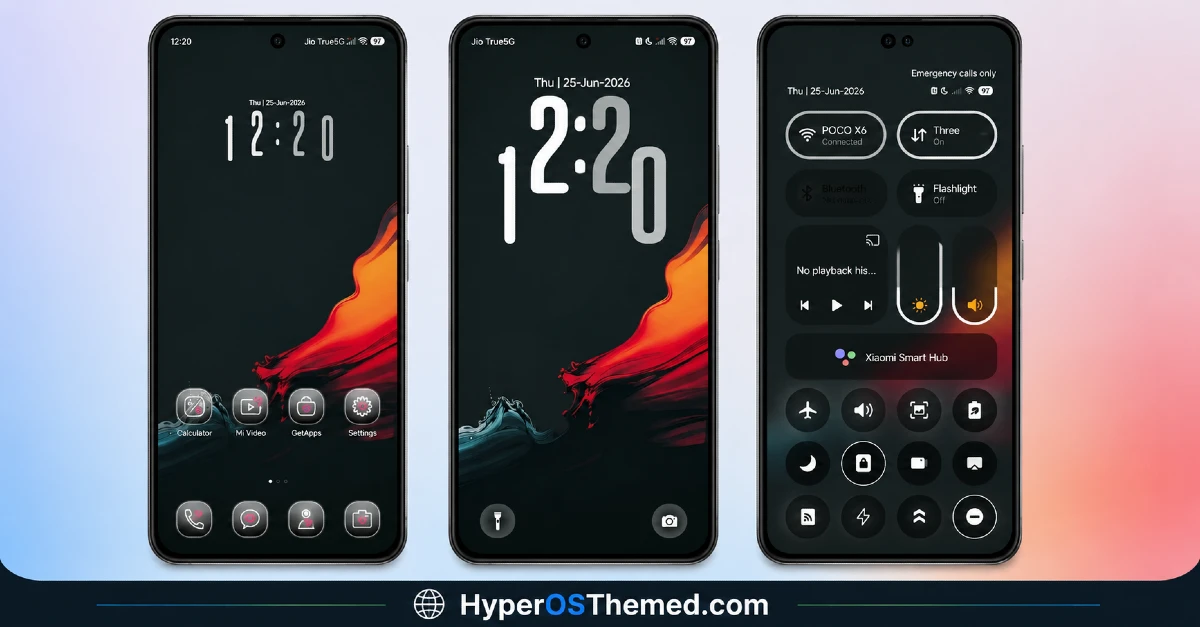
The HyperUi HyperOS theme grabs your attention immediately with a dramatic abstract flame wallpaper, red, orange, and teal blending together in a way that feels genuinely striking without tipping into chaotic. It’s the kind of background that makes a strong first impression the moment you unlock your phone.
- Bold flame wallpaper — Red, orange, and teal tones combine into an abstract design that’s eye-catching without being overwhelming, a genuinely confident visual choice.
- Soft rounded dark icon pack — A brand new icon set with a smooth, rounded style that keeps the interface feeling modern and cohesive against the fiery backdrop.
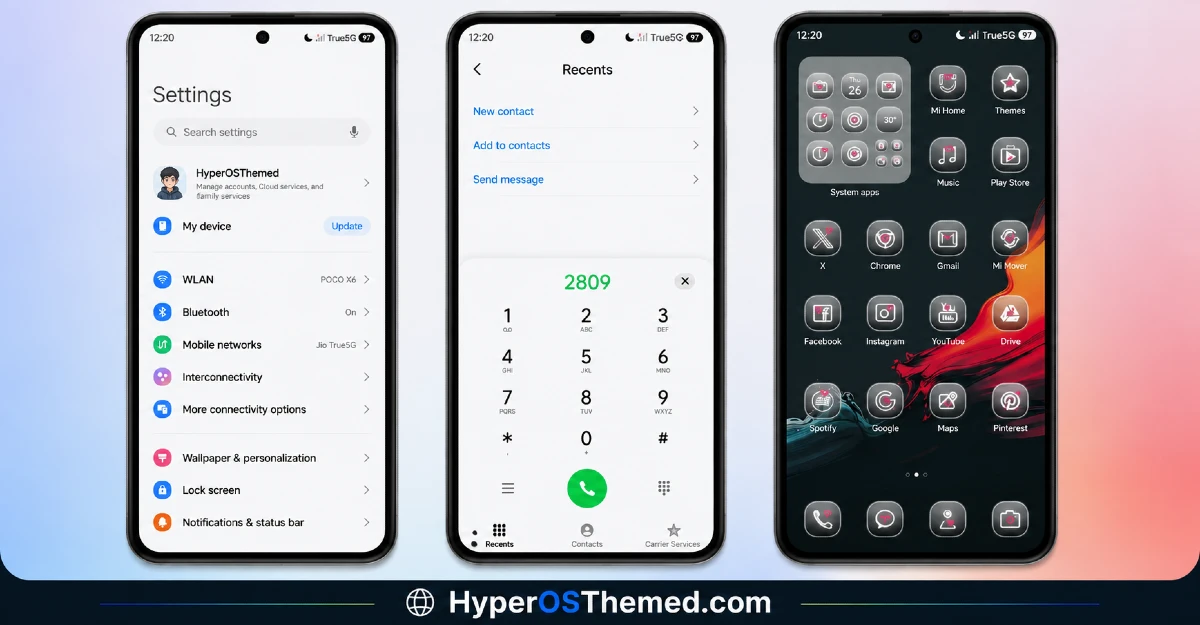
- Full UI theming — Settings, Dialer, and Control Center all get the same design treatment, so the redesign reaches well past just your home screen.
- Simple, uncluttered layout — Despite the dramatic wallpaper, the overall interface stays clean and easy to navigate, nothing competes unnecessarily for your attention.
- Consistent dark aesthetic — Every element ties back to the same dark, cohesive tone, keeping the whole experience feeling complete rather than piecemeal.
What I like most about HyperUi HyperOS Theme is the tension between its two halves, a genuinely bold, fiery wallpaper paired with an icon pack and overall UI that stays calm and rounded. A lot of themes either go all-in on drama or play it completely safe. HyperUi finds a middle ground that feels intentional, the wallpaper gets to be the star, while everything else supports it without competing.
Beyond the wallpaper and icons, HyperUi reaches into your Settings, Dialer, and Control Center, so the theme doesn’t stop at surface level. That kind of full coverage is what separates a genuinely complete theme from one that only touches what’s immediately visible.
HyperUi HyperOS Theme Preview
Who Should Try HyperUi HyperOS Theme
If you want a theme with a bold visual hook but a calm, easy to live with daily interface, HyperUi is a solid pick for your Xiaomi, Redmi, or POCO device. It’s compatible with HyperOS, HyperOS 2.0, and HyperOS 3.0, completely free, and light on storage at just over 13 MB.
HyperUi HyperOS Theme Details
| Detail | Info |
|---|---|
| Theme Name | HyperUi |
| File Size | 13.24 MB |
| Designer | Saktie |
| Region/Server | Global |
| Compatibility | HyperOS, HyperOS 2.0, HyperOS 3.0 |
| Features | Bold Abstract Wallpaper, Simple UI, New Icon Design |
Getting the Theme
Installing on Global Stable ROM
If your device is running the standard HyperOS or MIUI Global stable build, here’s how to install it:
- Open this page using the Firefox browser, since it handles the redirect best.
- Tap the Official Theme Store Link above.
- The page will open in Chinese, which is expected. Tap the three dots in the top right corner and select “Open in app.”
- This opens the Theme Store app, where the download will begin.
- Once it’s downloaded, tap Apply.
If the Official Theme Store Link doesn’t open properly, switch to Chrome or your phone’s default browser. Some third party browsers don’t handle this redirect correctly.
Installing on Custom ROMs
Running a custom build like Xiaomi.eu, MIUIRoom, or similar? Here’s the manual install method using the mtz file:
- Download the HyperUi mtz file from the link above.
- Open the Theme Store app and go to the Themes section.
- Scroll to the bottom and tap Import.
- Select the downloaded mtz file.
- Tap Apply.
One thing worth remembering: restart your device if anything looks slightly off after applying. A quick reboot usually clears it up right away. I tested this theme myself, and it ran smoothly with no issues at all.
Final Thoughts
HyperUi proves that a bold wallpaper and a calm interface aren’t mutually exclusive, they can actually complement each other really well. Saktie found a nice balance between drama and simplicity here, and the result feels genuinely cohesive rather than mismatched. If a fiery visual hook paired with an easy to live with dark UI sounds appealing, this one’s absolutely worth downloading.
You May also Like:
- Surge Liquid Circular OS – iOS Inspired HyperOS Theme For Xiaomi, Redmi & POCO
- NkO’S Edition Theme HyperOS For Xiaomi, Redmi, POCO
- Fazuhiro HyperOS Theme Compatible with MIUI, Xiaomi, Redmi and POCO
- iP27 Super Capsule iOS 27 Style HyperOS Theme For Redmi, Poco and Xiaomi
- Best Cyberpunk Anime Theme For MIUI & HyperOS
