
I don’t come across a lot of themes that fully commit to a cyberpunk look without it turning into a mess of clashing colors, so when Cyberpunk Anime Theme landed on my radar, I had to try it out myself before writing anything about it. And honestly, it delivers exactly what the name promises.
The First Impression of Cyberpunk Anime Theme
This theme leans hard into a neon Cyberpunk Anime Theme aesthetic, and it actually pulls it off well. The wallpapers carry that glowing, futuristic vibe you’d expect from a late night city skyline in an anime, all electric blues, pinks, and purples layered together without feeling overdone. It’s the kind of design that makes your phone feel like it belongs in a completely different universe than the stock HyperOS look.
What stood out to me most is how consistent the atmosphere feels across the whole interface. A lot of anime-inspired themes only nail the lock screen wallpaper and leave everything else looking untouched, but Cyber Anime keeps that same neon, futuristic energy running through the icons and overall visual style too.
Cyberpunk Anime Theme Theme Preview
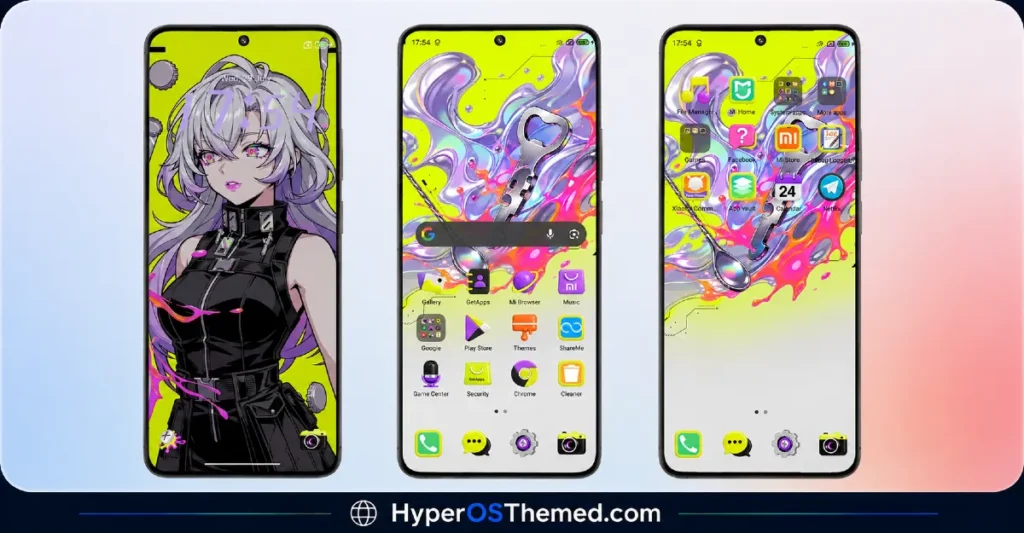
Why It’s Worth Trying
If you’re into anime aesthetics, cyberpunk visuals, or you just want your phone to stand out from the usual minimal or dark themes everyone else is running, this one’s a genuinely fun pick. It’s not trying to be subtle, and that’s exactly the point. Every time you unlock your phone, it feels like a small dose of that neon-lit, futuristic world.
Works across Xiaomi, Redmi, and POCO devices, so most of you should be able to jump in and try it without any compatibility headaches.
Cyberpunk Anime Theme Theme Details
| Detail | Info |
|---|---|
| Theme Name | Cyber Anime |
| Description | Neon cyberpunk anime futuristic design |
| Designer | Soul All Lists |
| Category | Theme |
| Region/Server | Global |
| Get the Theme | Official Theme Store Link |
Installing on Global Stable ROM
If your device is running the standard HyperOS or MIUI Global stable build, here’s how to install it:
- Open this page using the Firefox browser, since it handles the redirect best.
- Tap the Official Theme Store Link above.
- The page will open in Chinese, which is normal. Tap the three dots in the top right corner and select “Open in app.”
- This opens the Theme Store app, where the download will begin.
- Once it’s downloaded, tap Apply.
If the Official Theme Store Link doesn’t open properly, switch to Chrome or your phone’s default browser. Some third party browsers don’t handle this redirect correctly.
One thing worth remembering: restart your device if anything looks slightly off after applying. A quick reboot usually clears it up right away. If you run into anything unusual, drop a comment and I’ll help you sort it out.
Final Thoughts
Cyber Anime is proof that a theme doesn’t need to be minimal or muted to feel well made. It’s bold, it’s neon, and it commits fully to its cyberpunk anime identity from start to finish. If that kind of futuristic, glowing aesthetic sounds like your thing, give it a shot and let me know how it looks on your device.
A quick note: your details didn’t include a file size, compatibility version, or download links like your other posts, so I left those as placeholders. Want to send those over so I can fill in the table and download section properly?
You May Also Like:
- Jadol V3 Theme: Best HyperOS theme for MIUI 14
- iP27 Super Capsule iOS 27 Style HyperOS Theme For Redmi, Poco and Xiaomi
- Liuli OS 27 iOS 27 – Style Theme for POCO, Redmi & Xiaomi Devices
- Best HyperOS 3.0 Theme AS Neon Dark Mode For POCO, Xiaomi and Redmi Devices
- Best iOS Style HyperOS Theme Black for POCO, Xiaomi and Redmi Devices
