
Designer WhyFAEL called this one “wonderful,” and honestly, after seeing it in action, I’m inclined to agree. Fazuhiro builds its entire identity around flowing, wave-like shapes in blue and green tones, and the result is one of the more visually satisfying HyperOS themes I’ve come across recently.
What Makes Fazuhiro HyperOS Theme Stand Out
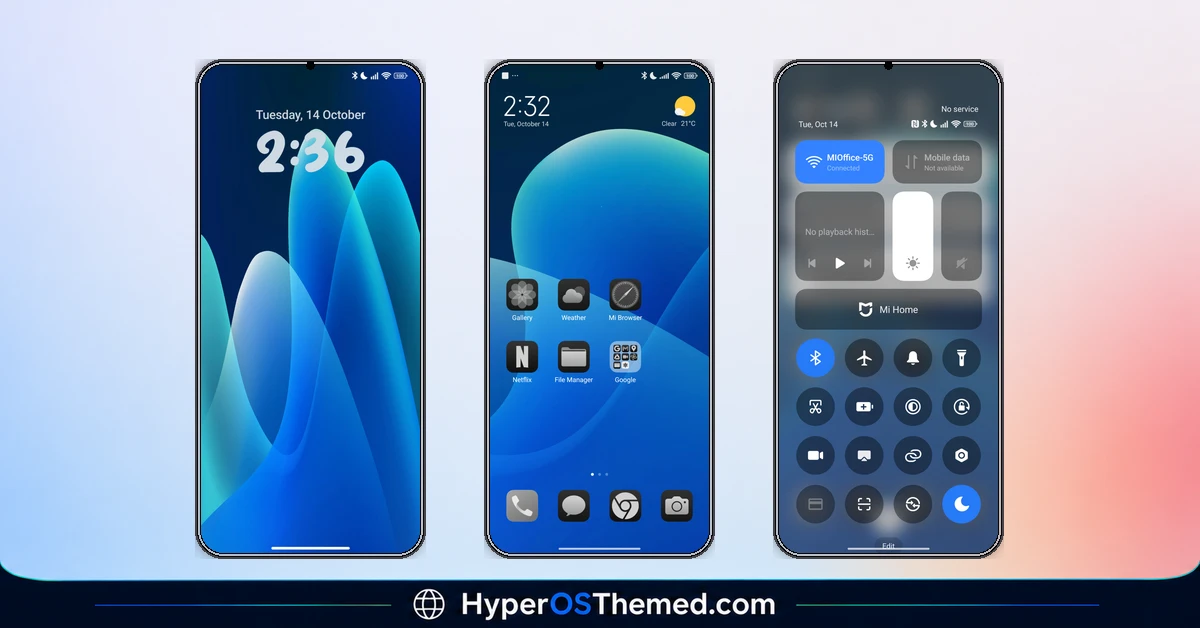
The lock screen is where this theme makes its first impression, and it’s a strong one. Instead of a flat static image, you get layered, translucent wave shapes flowing across a deep navy backdrop, teal, blue, and soft green blending into each other like light passing through glass. The bold, rounded clock typography sits comfortably on top without fighting the wallpaper for attention.
That same flowing shape carries straight through to the home screen, where a massive translucent circle dominates the background, giving the whole interface a sense of depth and movement rather than a flat, static feel. It’s a striking design choice that makes the phone feel alive rather than just decorated.
Fazuhiro HyperOS Theme Preview
Consistency Across the Whole Interface
What really sets Fazuhiro HyperOS Theme apart is how far the redesign reaches. The app icons follow a clean, monochrome black-and-white style with simple, minimal shapes, keeping the colorful wave wallpaper as the true visual centerpiece rather than competing with it. Even the recent apps view and system panels, like Alarm and Contacts, carry that same crisp black-and-white card design, so switching between screens never feels jarring or inconsistent.
- Flowing wave-style wallpaper — layered blue, green, and teal tones with a genuine sense of depth
- Bold, rounded lock screen typography — clean and easy to read against the colorful backdrop
- Monochrome black and white icon set — minimal and consistent, letting the wallpaper shine
- Matching system UI cards — alarms, contacts, and recent apps all follow the same clean visual language
- Full color palette variety — blue, green, black, white, and colorful accents woven throughout
Why Fazuhiro HyperOS Theme Worth Trying
If you want a theme that feels genuinely designed rather than thrown together, Fazuhiro delivers. The wave motif isn’t just a wallpaper gimmick, it’s carried through consistently, and the restrained black-and-white icon treatment shows real design discipline rather than overloading the screen with competing colors.
Fazuhiro HyperOS Theme Details
| Detail | Info |
|---|---|
| Theme Name | Fazuhiro |
| Designer | WhyFAEL |
| Category | Theme |
| Region | Global |
| Compatibility | HyperOS, MIUI |
Getting the Theme
Installing Fazuhiro HyperOS Theme on Global Stable ROM
If your device is running the standard HyperOS or MIUI Global stable build, here’s how to install it:
- Open this page using the Firefox browser, since it handles the redirect best.
- Tap the Official Theme Store Link above.
- The page will open in Chinese, which is expected. Tap the three dots in the top right corner and select “Open in app.”
- This opens the Theme Store app, where the download will begin.
- Once it’s downloaded, tap Apply.
If the Official Theme Store Link doesn’t open properly, switch to Chrome or your phone’s default browser. Some third party browsers don’t handle this redirect correctly.
Installing Fazuhiro HyperOS Theme on Custom ROMs
Running a custom build like Xiaomi.eu, MIUIRoom, or similar? Here’s the manual install method using the mtz file:
- Download the Fazuhiro HyperOS Theme mtz file from the link above.
- Open the Theme Store app and go to the Themes section.
- Scroll to the bottom and tap Import.
- Select the downloaded mtz file.
- Tap Apply.
One thing worth remembering: restart your device if anything looks slightly off after applying. A quick reboot usually clears it up right away. I tested this theme myself, and it ran smoothly with no issues at all.
Final Thoughts
The OX F2 HyperOS theme takes a genuinely artistic approach to icon design and pairs it with a bright, clean wallpaper and a genuinely useful widget dashboard. OXFURY and masuod clearly know how to balance visual creativity with actual daily usability, and it shows in this release. If a light, colorful, artistically detailed theme sounds like your kind of upgrade, this one’s absolutely worth downloading
You may also like:
- Maxos26 HyperOS Theme with Dynamic Lock Screen & Dynamic Icons
- Colorful 26 HyperOS Theme With a Genuine Liquid Glass Feel
- Best HyperUI V4 HyperOS Theme For Poco, Redmi and Xiaomi Devices
- 27OS HyperOS Theme: Best iOS-Inspired Theme For Redmi, Xiaomi Devices
- Premium Cool HyperOS Theme For POCO, Redmi and Xiaomi Phones
