
BoZinsky has shown up on this site before with Hyper Businessman, a theme built around restraint and discipline, and GOASP continues that same approach. This time the palette shifts, black, red, gray, and yellow, but the philosophy stays consistent, keep it flat, keep it clean, and don’t chase unnecessary effects.
What Makes GOASP HyperOS Theme Worth Trying
The GOASP HyperOS theme commits fully to dark mode, and BoZinsky was upfront about that from the start, this one’s built exclusively for it, no light mode compromise attempted. The color combination itself is unusual, black and gray form the base, with red and yellow used sparingly as accents rather than dominating the design. It’s a bold pairing that could easily go wrong, but the restraint in how it’s applied keeps everything looking sharp instead of chaotic.
One detail worth calling out specifically is the inclusion of HOS3 icons for testing, along with a custom hyper control center edition. BoZinsky is clearly experimenting a bit here, giving users an early look at design elements tied to newer system versions, a nice touch for anyone who likes seeing what’s coming next.
A Deliberately Flat Design
BoZinsky made a specific choice with this one: no 3D effects. Everything here is flat by design, and that’s not a limitation, it’s a stylistic decision that keeps the interface feeling sharp and consistent rather than trying to layer in depth effects that don’t always age well. If you’ve been drawn to the recent wave of 3D and glass-style themes, GOASP is a refreshing change of pace in the opposite direction.
GOASP HyperOS theme Preview
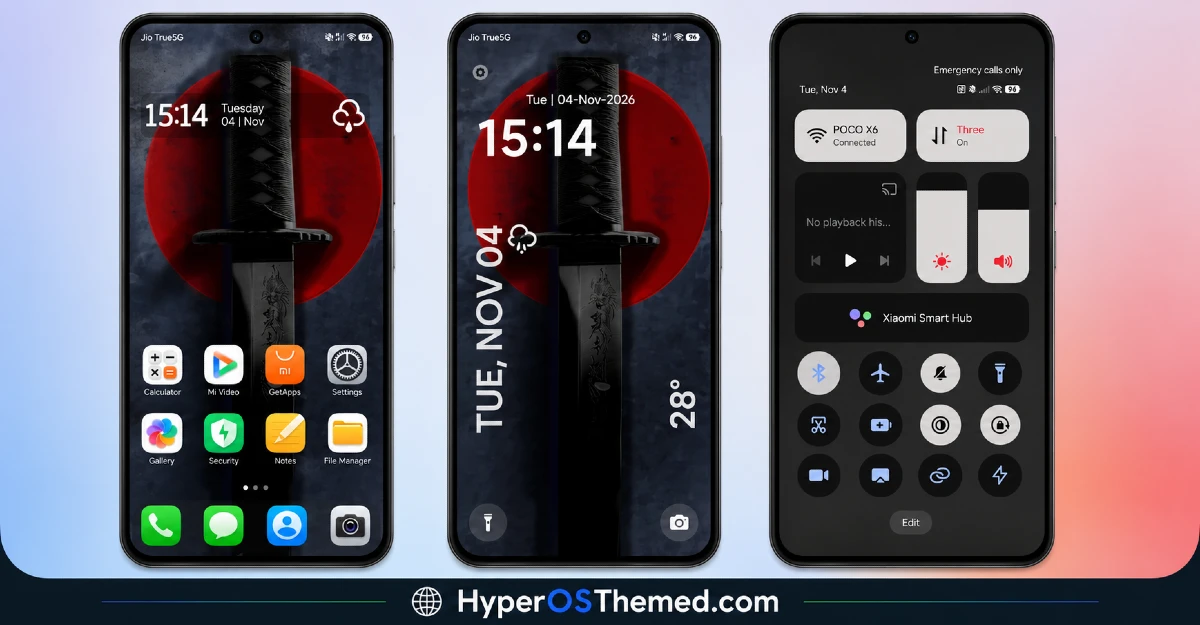
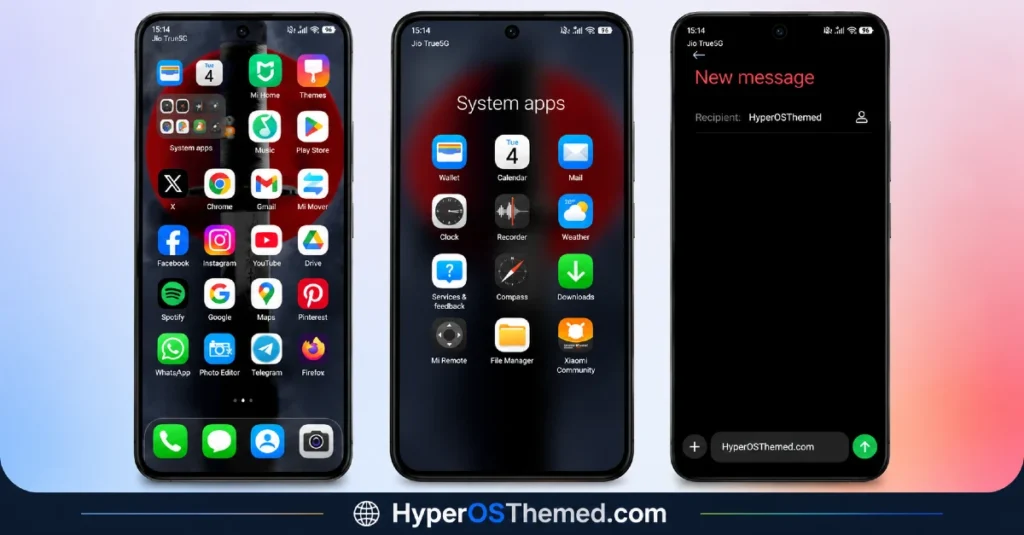
A Useful Customization Tips for GOASP HyperOS theme
BoZinsky also included a genuinely helpful note in the theme description, you can edit the lock screen directly from the Settings page, just head into the Theme Store app and tap the settings icon. It’s a small detail, but knowing exactly where to find customization options saves you from digging around blindly.
There’s also a practical suggestion worth following: disable advanced texture in your display options. Given the flat design philosophy behind GOASP HyperOS theme, turning that setting off helps the theme render exactly as intended.
GOASP HyperOS theme Details
| Detail | Info |
|---|---|
| Theme Name | GOASP |
| File Size | 18.58 MB |
| Designer | BoZinsky |
| Region/Server | Global |
| Compatibility | HyperOS, HyperOS 2.0 |
| Features | Premium Design, Dark Mode Only, Flat UI |
| Color Palette | Black, Red, Gray, Yellow |
BoZinsky’s tip: disable advanced texture in display options for the best experience, and remember lock screen editing is accessible right from the Theme Store app’s settings icon.
Getting the Theme
How to install GOASP HyperOS theme on Global Stable ROM
If your device is running the standard HyperOS or MIUI Global stable build, here’s how to install it:
- Open this page using the Firefox browser, since it handles the redirect best.
- Tap the Official Theme Store Link above.
- The page will open in Chinese, which is expected. Tap the three dots in the top right corner and select “Open in app.”
- This opens the Theme Store app, where the download will begin.
- Once it’s downloaded, tap Apply.
If the Official Theme Store Link doesn’t open properly, switch to Chrome or your phone’s default browser. Some third party browsers don’t handle this redirect correctly.
How to install GOASP HyperOS theme on Custom ROMs
Running a custom build like Xiaomi.eu, MIUIRoom, or similar? Here’s the manual install method using the mtz file:
- Download the GOASP mtz file from the link above.
- Open the Theme Store app and go to the Themes section.
- Scroll to the bottom and tap Import.
- Select the downloaded mtz file.
- Tap Apply.
One thing worth remembering: restart your device if anything looks slightly off after applying. A quick reboot usually clears it up right away. I tested this theme myself, and it ran smoothly with no issues at all.
Final Thoughts
GOASP is exactly what you’d expect from a designer who values discipline over spectacle, dark, flat, and genuinely well considered. Between the unusual color pairing, the flat design philosophy, and the practical customization tips built right into the description, BoZinsky delivered another solid, no-nonsense theme. If a sharp, dark mode only interface without unnecessary effects sounds like your kind of upgrade, GOASP is absolutely worth using.
You May also Like:
- Surge Liquid Circular OS – iOS Inspired HyperOS Theme For Xiaomi, Redmi & POCO
- NkO’S Edition Theme HyperOS For Xiaomi, Redmi, POCO
- Fazuhiro HyperOS Theme Compatible with MIUI, Xiaomi, Redmi and POCO
- iP27 Super Capsule iOS 27 Style HyperOS Theme For Redmi, Poco and Xiaomi
- Best Cyberpunk Anime Theme For MIUI & HyperOS
