
BoZinsky’s back again, and this time with a bit of a story baked into the design. HOST-N 126 HyperOS Theme is named after a small lighthouse somewhere in northern Europe, and once you know that, the whole theme starts to make more sense: calm, quiet, and built around the kind of stillness you’d feel watching waves roll in.
What Makes HOST-N.126 Worth Trying
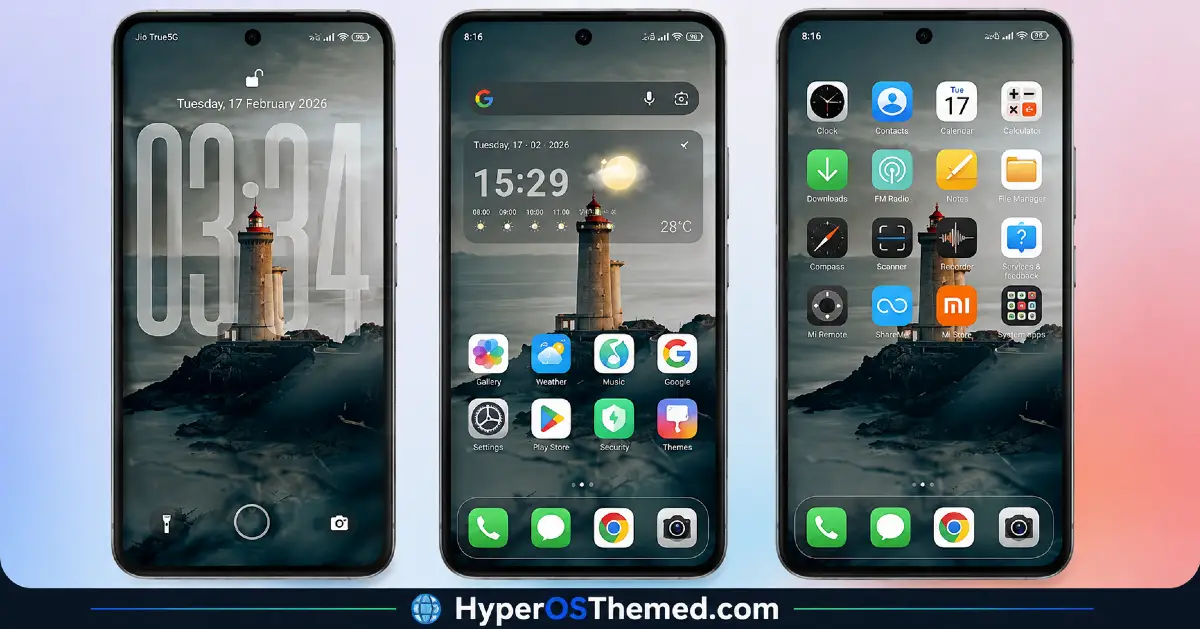
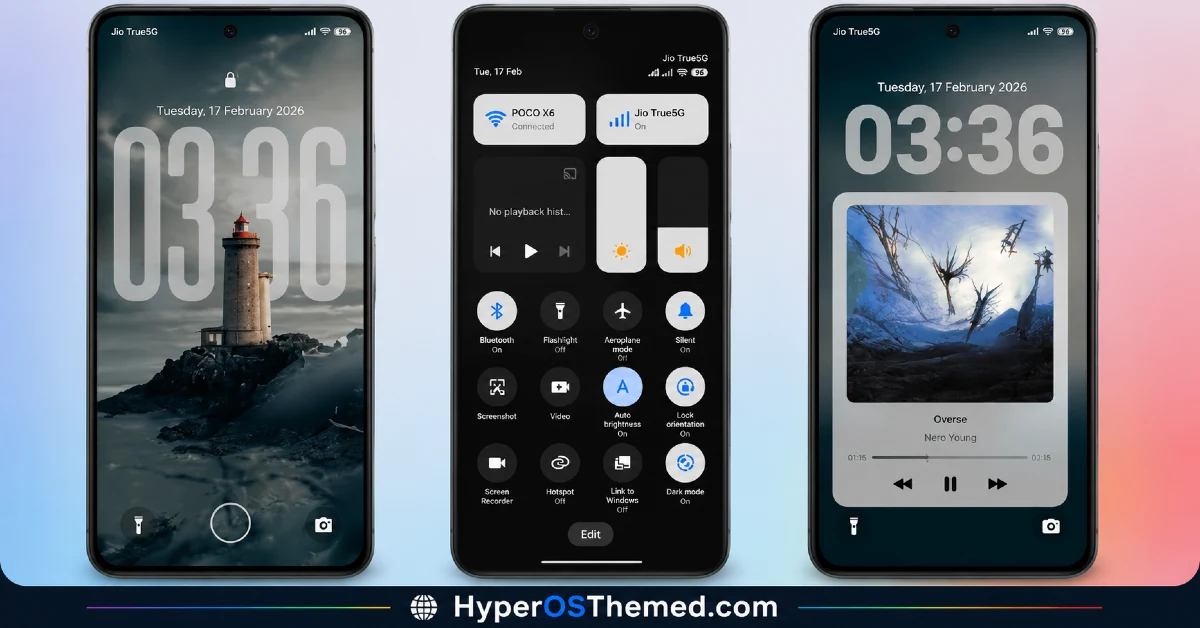
- Black and gray flat design — No 3D gloss or heavy shading here, just a clean, flat base that keeps things sharp without trying too hard to impress.
- Rounded components throughout — Every button and card leans soft and rounded, giving the whole interface a gentler feel compared to sharper, boxier themes.
- Yellow and blue accent colors — Used sparingly against the dark base, these two colors add just enough contrast without pulling focus from the overall calm tone.
- Adjustable lock screen clock height — Tap the lower bar on your lock screen and you can actually change how tall the clock digits sit, a small but genuinely useful customization option most themes don’t bother offering.
- A quiet, coastal personality — The name itself comes from a real lighthouse, and that sense of calm, open-water stillness comes through in how restrained and unhurried the whole design feels.
What I appreciate about BoZinsky’s releases, this one included, is that he doesn’t just hand you a theme and walk away. He drops genuinely practical advice right in the description. For HOST-N 126 HyperOS Theme, his suggestion is to disable advanced texture and window blur in your dev options, which apparently gives you cleaner transparency in the Control Center and notifications. It’s the kind of tip that comes from someone who’s actually tested this extensively on their own device, not just written a generic description.
HOST-N 126 HyperOS Theme Preview
Why the Lock Screen of HOST-N 126 HyperOS Theme Stands Out
Most themes give you a fixed lock screen and call it done. HOST-N 126 HyperOS Theme lets you tap the lower bar and adjust the clock digit height directly, no digging through settings menus, no guesswork. It’s a small thing, but it’s exactly the kind of detail that shows someone thought about how people actually use their lock screen day to day, not just how it looks in a screenshot.
HOST-N 126 HyperOS Theme Details
| Detail | Info |
|---|---|
| Theme Name | HOST-N.126 |
| File Size | 22.73 MB |
| Designer | BoZinsky |
| Region/Server | Global |
| Compatibility | HyperOS, HyperOS 2.0 |
| Features | Premium Design, Dark Mode, 3D Depth, Adjustable Lock Screen Clock |
| Color Palette | Black, Gray, Yellow, Blue Accents |
BoZinsky’s personal tip: disable advanced texture and window blur in dev options for cleaner transparency in the Control Center and notifications.
Getting the Theme
How to install HOST-N 126 HyperOS Theme on Global Stable ROM
If your device is running the standard HyperOS or MIUI Global stable build, here’s how to install it:
- Open this page using the Firefox browser, since it handles the redirect best.
- Tap the Official Theme Store Link above.
- The page will open in Chinese, which is expected. Tap the three dots in the top right corner and select “Open in app.”
- This opens the Theme Store app, where the download will begin.
- Once it’s downloaded, tap Apply.
If the Official Theme Store Link doesn’t open properly, switch to Chrome or your phone’s default browser. Some third party browsers don’t handle this redirect correctly.
How to install HOST-N 126 HyperOS Theme on Custom ROMs
Running a custom build like Xiaomi.eu, MIUIRoom, or similar? Here’s the manual install method using the mtz file:
- Download the HOST-N.126 mtz file from the link above.
- Open the Theme Store app and go to the Themes section.
- Scroll to the bottom and tap Import.
- Select the downloaded mtz file.
- Tap Apply.
One thing worth remembering: restart your device if anything looks slightly off after applying. A quick reboot usually clears it up right away. I tested this theme myself, and it ran smoothly with no issues at all.
Final Thoughts
The HOST-N 126 HyperOS Theme carries a quiet confidence that’s hard to fake, flat and grounded where it needs to be, with just enough color and customization to keep things interesting. BoZinsky clearly built this one around a real feeling, that sense of standing near open water with nothing to rush toward, and it comes through in every detail, right down to that adjustable clock height. If a calm, coastal-inspired dark theme sounds like your kind of upgrade, this one’s absolutely worth downloading.
You may also like:
