
There’s a particular kind of theme that looks great in screenshots but falls apart the moment you actually try to use it day to day, widgets that do nothing, a control center that’s purely decorative. Dark Ret V HyperOS Theme Xiaomi avoids that trap by pairing its moody desert-sunset wallpaper with a widget system that genuinely earns its keep, weather, reminders, music controls and a customizable control center all sitting right there on the home screen rather than buried behind extra taps.
Designed by VK, it leans on clean iOS-style icons to keep the whole thing looking premium rather than cluttered, despite how much functionality is packed in. At a compact 27.23 MB, it covers HyperOS, HyperOS 2.0 and HyperOS 3.0, making it accessible to a wide range of Xiaomi, Redmi and POCO devices without demanding much storage in return.
Dark Ret V HyperOS Theme Features
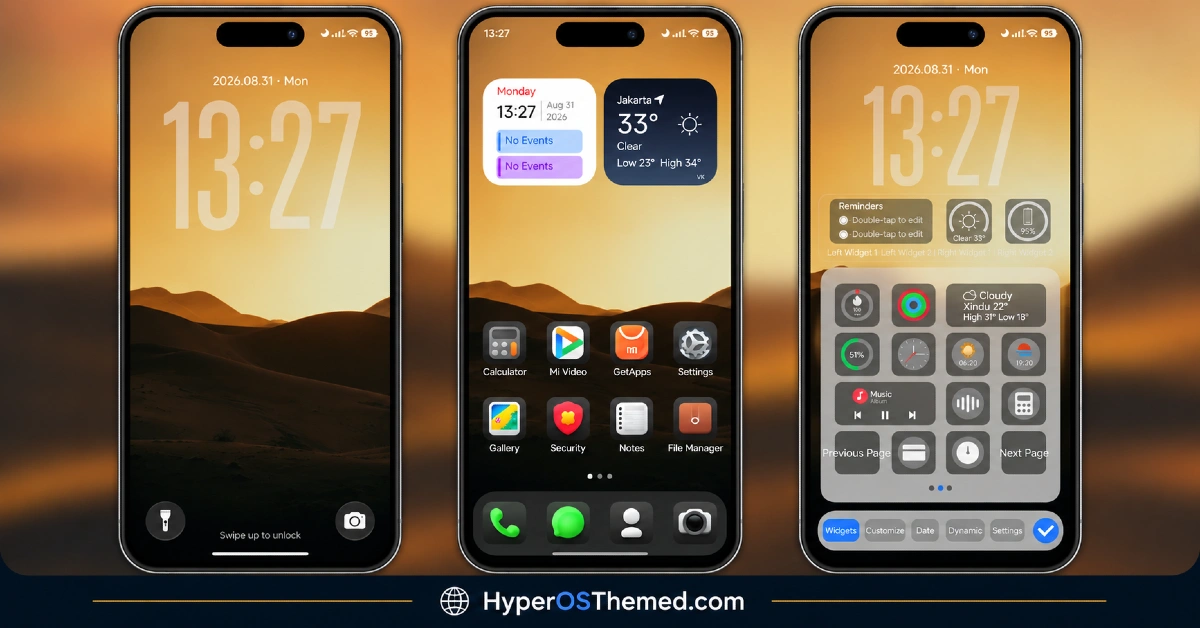
- Moody Desert Sunset Wallpaper: The signature visual here is a warm, atmospheric desert sunset scene that sets the tone for the whole theme. It’s dark enough to stay easy on the eyes but still has enough color warmth to avoid feeling flat or lifeless.
- Clean iOS-Style Icon Set: Icons follow the rounded, minimal shapes associated with iOS rather than blending in HyperOS’s native design cues. This gives the home screen a familiar, polished look for anyone who’s used an iPhone before.
- Functional Weather Widget: A dedicated weather widget sits on the home screen showing real conditions rather than acting as a static decoration. It’s the kind of practical addition that actually gets used daily instead of being ignored after the first week.
- Built-In Reminders Widget: Reminders can be viewed directly from the home screen without opening a separate app first. This keeps quick tasks and notes visible at a glance, which fits well with the theme’s overall practical, not-just-pretty approach.
- Music Control Widget: The package includes a music control widget, letting you skip tracks or pause without fully unlocking the phone. It’s a small convenience, but many themes skip it in favour of purely decorative widgets.
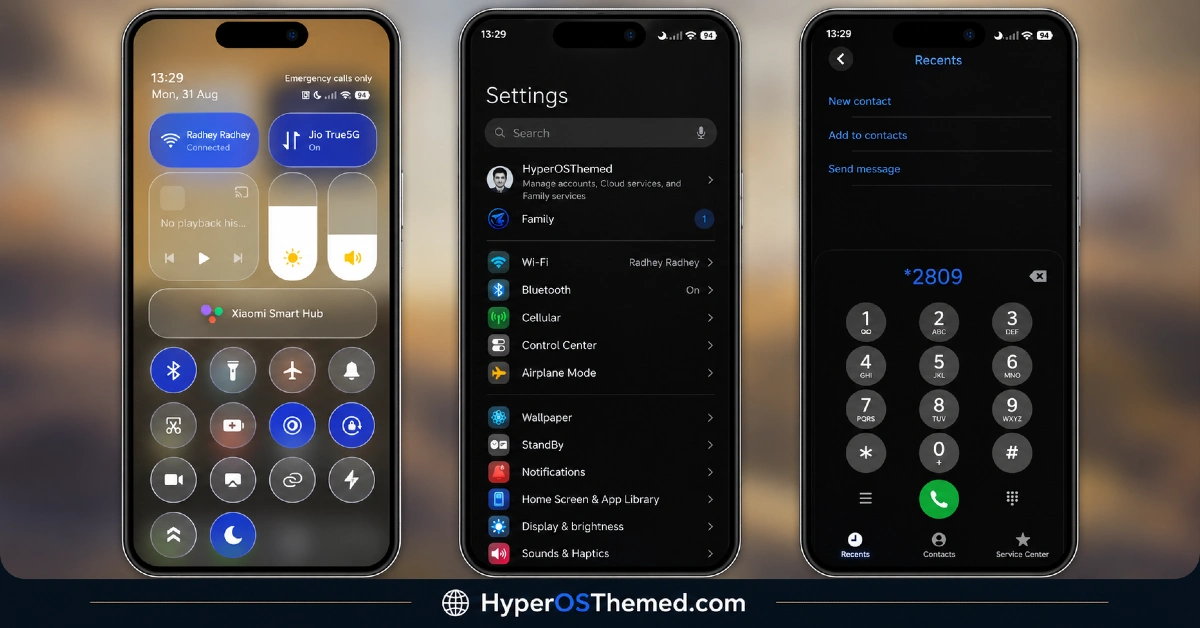
- Customizable Control Center: The Control Center isn’t locked into a single fixed layout, offering some flexibility in how toggles and shortcuts are arranged. That extra bit of control is worth calling out since most themes at this file size settle for a fixed design.
- Broad HyperOS Version Support: Dark Ret V covers HyperOS, HyperOS 2.0 and HyperOS 3.0, giving it wider reach than themes locked to a single release. That range matters more than it might seem, since a lot of premium-styled themes end up limited to just the newest HyperOS build.
- Compact File Size for the Functionality Included: At 27.23 MB, it’s genuinely light considering how many functional widgets are packed in alongside the icon redesign and wallpaper. Downloads quickly and shouldn’t put much strain on storage even on older devices.
Dark Ret V HyperOS Theme Preview
The screenshots below show the desert sunset wallpaper, the iOS-style icon set and how the weather, reminders and music widgets look arranged on the home screen. Since the widgets here are meant to be genuinely useful rather than just decorative, it’s worth looking at how they’re laid out in the preview before deciding if that setup fits how you actually use your phone.
Dark Ret V Theme Details
| Attribute | Details |
|---|---|
| Availability | Free, via Xiaomi Theme Store |
| Supported Devices | Xiaomi, Redmi and POCO phones running HyperOS |
| Theme Name | Dark Ret V |
| Designer | VK |
| Region | Global |
| Compatibility OS | HyperOS, HyperOS 2.0 and HyperOS 3.0 |
| Features | Desert sunset wallpaper, iOS-style icons, functional weather widget, reminders widget, music control widget, customizable Control Center |
| File Size | 27.23 MB |
Dark Ret V HyperOS Theme Compatibility
Dark Ret V supports HyperOS, HyperOS 2.0 and HyperOS 3.0, giving it solid reach across Xiaomi, Redmi and POCO devices running any of those versions. Since the theme relies on functional widgets rather than just decorative ones, it’s worth confirming that permissions for weather and reminders are granted properly after installation so those widgets actually populate with live data.
Custom ROM users on setups like Xiaomi EU ROM or MIUIRoom can still install the theme manually through the MTZ file, and given the design leans more on color and layout than heavy 3D or transparency effects, compatibility tends to be fairly consistent across different devices.
Get Dark Ret V HyperOS Theme
Download Dark Ret V only through the official Theme Store link rather than random third-party file hosts or unofficial APK uploads. This theme is also copyright protected by VK Themes, so beyond the usual safety concerns with third-party files, re-uploading, redistributing, modifying or repackaging it elsewhere isn’t permitted either, and doing so can result in copyright claims or takedown requests.
If you want to share this theme with someone, the designer specifically asks that you share the official VK Themes Telegram channel link instead of passing along the files directly. Sticking to the official source respects the designer’s work while making sure the version installed matches what was actually released.
How to Apply Dark Ret V HyperOS Theme
Follow the steps below to apply the theme:
- Open the Theme Store link given above on your Xiaomi, Redmi or POCO device.
- This will redirect you to the Theme Store.
- Download and install the theme.
- Tap on Apply.
- Customize specific elements such as icons, lock screen or status bar if needed.
- Reboot your device for the full effect, though this step is optional.
Note: If the Official Theme Store link doesn’t open properly, try switching to Chrome or your device’s default Xiaomi browser, since other browsers have been reported not to work reliably with this link. If you’re on MIUI 14 specifically, there’s a separate video walkthrough worth following instead of the standard steps. If anything looks overlapped or fails to display correctly right after installing, restarting the device usually clears it up, and leaving a comment with the details helps if the problem persists.
Installing Dark Ret V HyperOS Theme on Custom ROM Devices
Devices running MIUI 11 through 14 or HyperOS based Custom ROMs such as Xiaomi EU ROM or MIUIRoom aren’t able to use the direct Theme Store link, so the MTZ file needs to be brought in manually instead. Here’s how that works:
- Grab the MTZ file for Dark Ret V from the download section.
- Open the Theme Store app.
- Go into the Themes tab.
- Scroll down to find the Import option, then tap it.
- Use the file manager to locate the downloaded .mtz file.
- Wait for the import process to finish.
- Tap the theme once it appears in the list to apply it.
Why Choose Dark Ret V Theme?
- Genuinely functional widgets — weather, reminders and music controls that actually work, not just decoration.
- Atmospheric desert wallpaper — a distinctive warm-toned backdrop rather than a generic dark gradient.
- Clean iOS-style icons — familiar, polished shapes that suit the premium framing.
- Customizable Control Center — more flexibility than the fixed layouts most themes offer.
- Broad HyperOS compatibility — works across HyperOS, HyperOS 2.0 and HyperOS 3.0.
- Compact file size — 27.23 MB is light given how much functionality is included.
- Free official download — no cost involved through a legitimate Theme Store link.
Conclusion
Dark Ret V HyperOS Theme manages to feel premium without being all show, the desert sunset visuals and iOS-style icons look the part, but it’s the actually functional weather, reminders and music widgets that make it worth keeping installed past the first day. The customizable Control Center adds a nice bit of flexibility on top, and the broad HyperOS support means most Xiaomi, Redmi and POCO users can try it without version concerns. For anyone who wants a dark theme that looks good and actually does something, Dark Ret V HyperOS Theme Xiaomi is well worth trying.
You may also like:
OX F3 V2 HyperOS Theme with Cartoon One UI Style with Dynamic Lock Screen for Xiaomi, POCO, Redmi
Bitcoin HyperOS Theme with Cartoon 3D Depth of Field for Xiaomi, POCO, Redmi
LTC HyperOS Theme – Depth Effect Lock Screen for Xiaomi, POCO, Redmi
OX GR4 HyperOS Theme for Xiaomi, POCO, Redmi
OX F3 HyperOS Theme with Cartoon One UI Style with Dynamic Lock Screen for Xiaomi, POCO, Redmi
