
Sequels in the theme world are a mixed bag, sometimes a “V2” just means a fresh coat of paint on the same idea, but other times it’s the designer going back and actually fixing what bugged people about the original. OX F3 V2 HyperOS Theme falls into that second camp. Building on the cartoon-meets-One-UI concept from the first OX F3, oxfury 0.2 and masuod have refined the execution here, keeping that same playful, rounded Samsung-inspired structure but with a lighter file size and what feels like a more settled visual identity.
It’s still very much a theme for people who want their Xiaomi phone to borrow One UI’s clean spacing without losing a sense of fun in the process, and at 31.91 MB, it’s noticeably more compact than a lot of themes chasing this same aesthetic. Built for HyperOS and HyperOS 2.0, it’s available for free across Xiaomi, Redmi and POCO devices.
OX F3 V2 HyperOS Theme Key Features
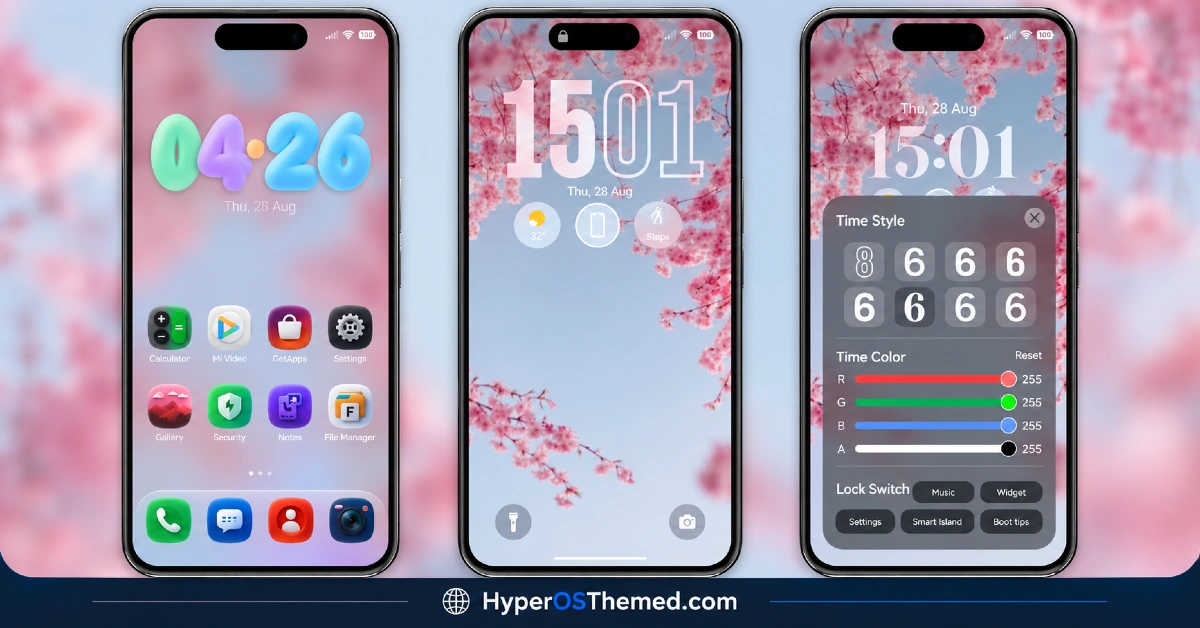
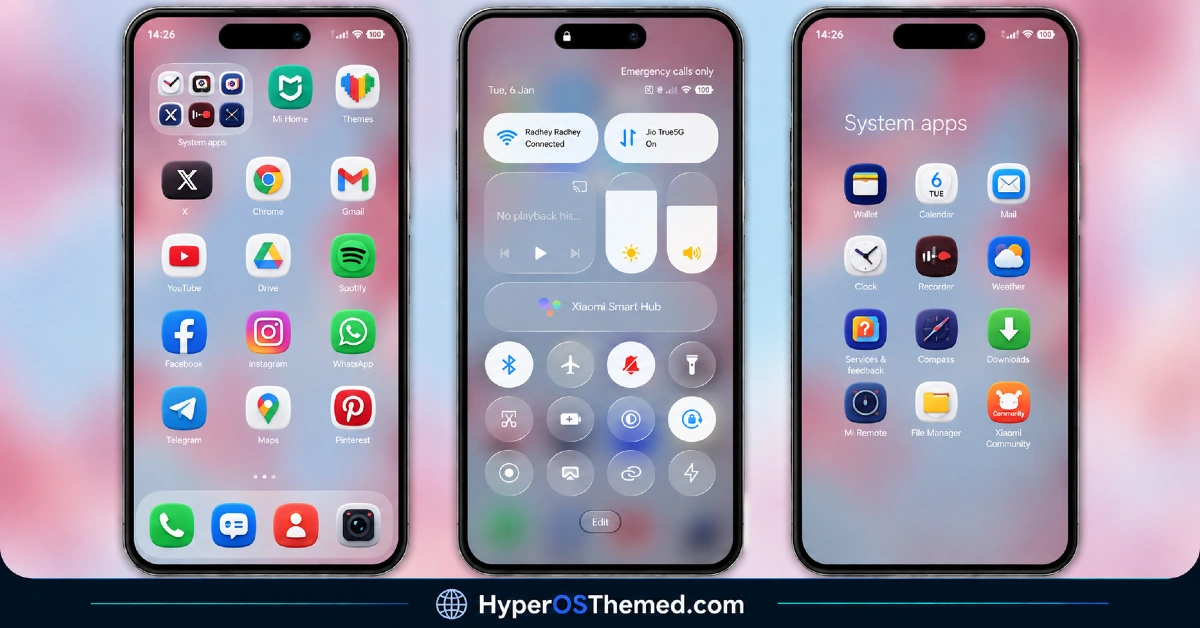
- Cartoon-Inspired Visual Style: The theme keeps its playful, cartoon-style approach to icons and visual accents rather than going for a strictly serious One UI clone. That softer touch is really what sets it apart from the more corporate-feeling Samsung-style themes that dominate this category.
- One UI Structural Influence: Underneath the cartoon detailing, the layout still borrows Samsung’s rounded shapes and generous spacing rather than sticking to HyperOS’s native design language. That structural backbone is what makes the One UI comparison hold up, separate from the illustration work layered on top.
- Dynamic Lock Screen: The lock screen isn’t static, incorporating movement and shifting visual elements rather than a plain, fixed layout. It’s carried over as one of the theme’s core features from the original release, and it’s still one of the more noticeable touches once applied.
- Refined, Lighter Build: At 31.91 MB, OX F3 V2 HyperOS Theme Xiaomi is noticeably more compact than the earlier 45.58 MB original, suggesting some cleanup or optimization work went into this version. That’s a welcome change for anyone on limited storage or a slower connection.
- Verified Original Design: oxfury 0.2 and masuod are explicit that this is their own original work, built with some resources from other creators but not a recycled copy from elsewhere. Worth knowing given how much repackaged content circulates in this space.
- Active Telegram Support Channels: Both designers maintain dedicated channels for feedback and troubleshooting rather than disappearing after release. If something doesn’t render correctly on a specific device, there’s an actual place to flag it and get help.
- Same Version Compatibility as the Original: OX F3 V2 supports HyperOS and HyperOS 2.0, matching the compatibility range of the first release rather than extending further. Anyone on HyperOS 3.0 or an older MIUI build should keep that in mind before downloading.
OX F3 V2 HyperOS Theme Preview
The screenshots below show the cartoon-style icon redesign, the One UI-inspired layout and how the dynamic lock screen looks once the theme is applied. If you’ve seen the original OX F3, it’s worth comparing the two previews side by side to spot what’s actually changed in this version.
OX F3 V2 Theme Overview
| Attribute | Details |
|---|---|
| Availability | Free, via Xiaomi Theme Store |
| Supported Devices | Xiaomi, Redmi and POCO phones running HyperOS |
| Theme Name | OX F3 V2 |
| Designer | oxfury 0.2 (with masuod) |
| Region | Global |
| Compatibility OS | HyperOS, HyperOS 2.0 And HyperOS 3.0 |
| Features | Cartoon visual style, One UI structural design, dynamic lock screen |
| File Size | 31.91 MB |
OX F3 V2 HyperOS Theme Compatibility
OX F3 V2 supports HyperOS and HyperOS 2.0 across Xiaomi, Redmi and POCO devices, matching the same version range as the original release rather than extending to HyperOS 3.0. Custom ROM users on setups like Xiaomi EU ROM or MIUIRoom can still install manually through the MTZ file, and given how much the dynamic lock screen relies on animation, older or lower-powered devices may render it with slightly less smoothness than current flagship hardware. Since this is a refined version of an earlier release, most of the groundwork has already been tested, so compatibility quirks should be fewer than what a brand-new theme concept might run into.
Get OX F3 V2 HyperOS Theme
Download OX F3 V2 HyperOS Xiaomi Theme only through the official Theme Store link or the direct MTZ file rather than random third-party file hosts or unofficial APK uploads. Files sourced outside verified channels are difficult to confirm as unaltered and may not reflect what oxfury 0.2 and masuod actually released. Sticking to the official links keeps the installed version consistent with the intended design and ensures any future updates remain accessible.
Important notice from the designers: OX F3 V2 HyperOS Theme is fully designed and developed by oxfury 0.2 and masuod, with some resources sourced from other creators. The designers have specifically asked that no part of this theme be copied, re-uploaded, or modified without permission, noting that unauthorized use will be reported to Xiaomi as a copyright violation. Anyone with feedback or questions can reach the designers directly through their listed Telegram channels. This is a genuine copyright request worth respecting given the original work that went into the theme’s design.
How to Apply OX F3 V2 HyperOS Theme
Follow the steps below to apply the theme:
- Open the Theme Store link given above on your Xiaomi, Redmi or POCO device.
- This will redirect you to the Theme Store.
- Download and install the theme.
- Tap on Apply.
- Customize specific elements such as icons, lock screen or status bar if needed.
- Reboot your device for the full effect, though this step is optional.
Note: If the Official Theme Store link doesn’t open, switching to Chrome or your device’s default Xiaomi browser tends to help, since other browsers have occasionally caused issues with this kind of direct link. If you’re on MIUI 14 specifically, there’s a separate video walkthrough worth following instead of the standard steps. Restarting the device after installation is worth doing if anything looks overlapped or fails to display correctly, and reaching out through the designers’ Telegram channels is the most direct way to get help if a problem persists.
Installing OX F3 V2 HyperOS Theme on Custom ROM Devices
Devices running MIUI 11 through 14 or HyperOS based Custom ROMs such as Xiaomi EU ROM or MIUIRoom aren’t able to use the direct Theme Store link, so the MTZ file needs to be brought in manually instead. Here’s how that works:
- Grab the MTZ file for OX F3 V2 from the download section.
- Open the Theme Store app.
- Go into the Themes tab.
- Scroll down to find the Import option, then tap it.
- Use the file manager to locate the downloaded .mtz file.
- Wait for the import process to finish.
- Tap the theme once it appears in the list to apply it.
Why Choose OX F3 V2 HyperOS Theme Theme?
- Refined, lighter build — noticeably smaller file size than the original OX F3 release.
- Distinctive cartoon-meets-One UI look — a friendlier take on the usual serious Samsung-style theme.
- Genuinely dynamic lock screen — real movement instead of a static, fixed layout.
- Verified original design — a clear designer statement backs up the theme’s originality.
- Active support channels — direct Telegram access to the designers for feedback or issues.
- Free official download — no cost involved once accessed through the correct channel.
Conclusion
OX F3 V2 HyperOS Theme takes the same appealing cartoon-and-One-UI blend from the original and tightens it up into a smaller, more efficient package, without losing the dynamic lock screen that made the first version stand out. It’s still limited to HyperOS and HyperOS 2.0, so it’s not for everyone, but for Xiaomi, Redmi and POCO users already in that range who want something a little more fun than the typical One UI clone, OX F3 V2 is a solid pick.
You may also like:
Bitcoin HyperOS Theme with Cartoon 3D Depth of Field for Xiaomi, POCO, Redmi
LTC HyperOS Theme – Depth Effect Lock Screen for Xiaomi, POCO, Redmi
OX GR4 HyperOS Theme for Xiaomi, POCO, Redmi
OX F3 HyperOS Theme with Cartoon One UI Style with Dynamic Lock Screen for Xiaomi, POCO, Redmi
Crimson Obsidian HyperOS Theme with Luxury Black & Red Light Streaks for Xiaomi, POCO, Redmi
