
Green isn’t a color you see often in phone themes, so when I came across BrS v9 MIUI Theme, it immediately stood out from the usual sea of blues, purples, and dark neutrals that dominate most theme releases. After testing it out myself, I can say designer Taha put together something that’s genuinely distinct in a good way.
What Makes BrS v9 MIUI Theme Different
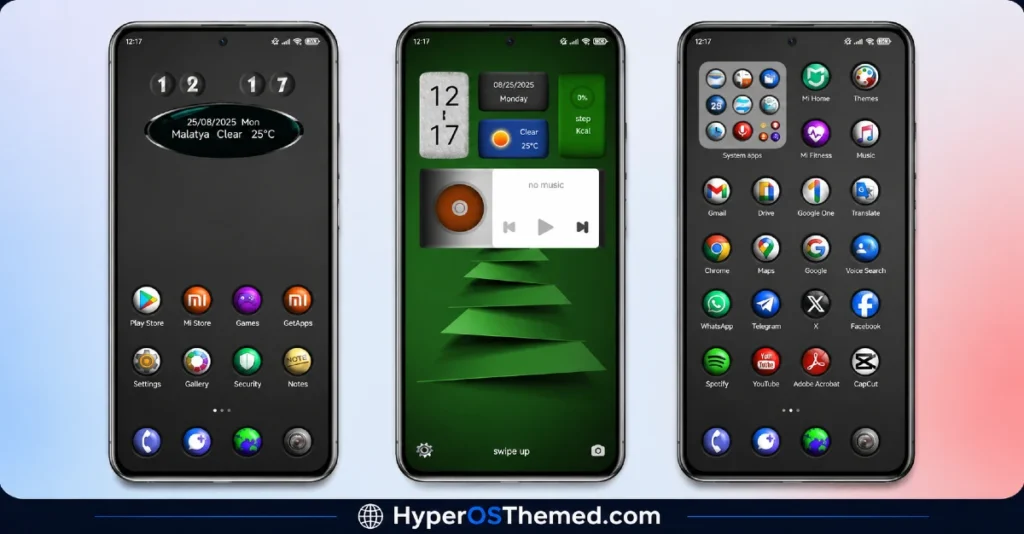
The BrS v9 MIUI theme builds its entire identity around a black and green color combination, and it’s executed with more restraint than you’d expect. Instead of green splashed everywhere, it’s used as an accent against a dominant black base, giving the whole interface a sharp, almost tech noir feel rather than looking loud or overdone.
The icon set follows a rounded design language, softening what could otherwise feel like a harsh color pairing. That small design choice makes a real difference; the icons feel approachable rather than aggressive, even with that striking black and green palette running behind them.
There’s also a 3D visual element built into the theme, adding a bit of depth and dimension that flat themes simply can’t match. Combined with the dynamic lock screen, unlocking your phone doesn’t feel like a static, repetitive moment; there’s some life and movement built into that first interaction every time.
BrS v9 MIUI Theme Preview
Why BrS v9 MIUI Theme Is Worth Installing
What I appreciate most about the BrS v9 MIUI theme is how complete the redesign feels. The status bar, the lock screen, the icon pack, the wallpapers- none of it feels like an afterthought bolted onto a stock interface. Everything follows that same black and green identity consistently, which is honestly harder to pull off than people realize. A lot of themes nail the wallpaper and forget the smaller details; this one doesn’t.
If you’re running MIUI 12, 13, or 14 on your Xiaomi, Redmi, or POCO device and you want something with real personality instead of another dark or minimal theme, this is a strong option to consider.
BrS v9 MIUI Theme Details
| Detail | Info |
|---|---|
| Theme Name | BrS v9 |
| File Size | 57.63 MB |
| Designer | Taha |
| Region/Server | Global |
| Compatibility | MIUI 14, MIUI 13, MIUI 12 |
| Features | Dynamic Lock Screen, Rounded Icons, Black & Green Palette, 3D Design |
Getting the Theme
Installing on Global Stable ROM
If your device is running the standard HyperOS or MIUI Global stable build, here’s how to install it:
- Open this page using the Firefox browser, since it handles the redirect best.
- Tap the Official Theme Store Link above.
- The page will open in Chinese, which is expected. Tap the three dots in the top right corner and select “Open in app.“
- This opens the Theme Store app, where the download will begin.
- Once it’s downloaded, tap Apply.
If the Official Theme Store Link doesn’t open properly, switch to Chrome or your phone’s default browser. Some third party browsers don’t handle this redirect correctly.
One thing worth remembering: restart your device if anything looks slightly off after applying. A quick reboot usually clears it up right away. I tested this theme myself, and it worked cleanly with no issues at all.
Final Thoughts
The BrS v9 MIUI theme takes a color combination most designers avoid and turns it into something genuinely striking. Between the rounded icons, the 3D depth, and that consistent black and green identity running through every screen, Taha clearly put real thought into this one. If you want your phone to look different from everyone else’s, this is a theme worth trying. Give it a shot and let me know how it looks on your device.
You may also like:
- GODKING7 HyperOS Theme Best for POCO, Xiaomi & Redmi Phones
- Best iOS Style HyperOS theme Black for POCO, Xiaomi and Redmi Devices
- Blackess Pro iOS Style Theme for HyperOS with Dynamic Island
- Shadowed Gleam MIUI Theme Best for POCO, Redmi and Xiaomi Phones
- iOS ProMotion Theme Xiaomi HyperOS for Poco, Redmi and Xiaomi devices
