
If you’ve ever wished your Xiaomi or Redmi phone had that clean, premium iPhone-style look, the ProMotion Theme Xiaomi HyperOS is exactly the theme you’ve been waiting for.
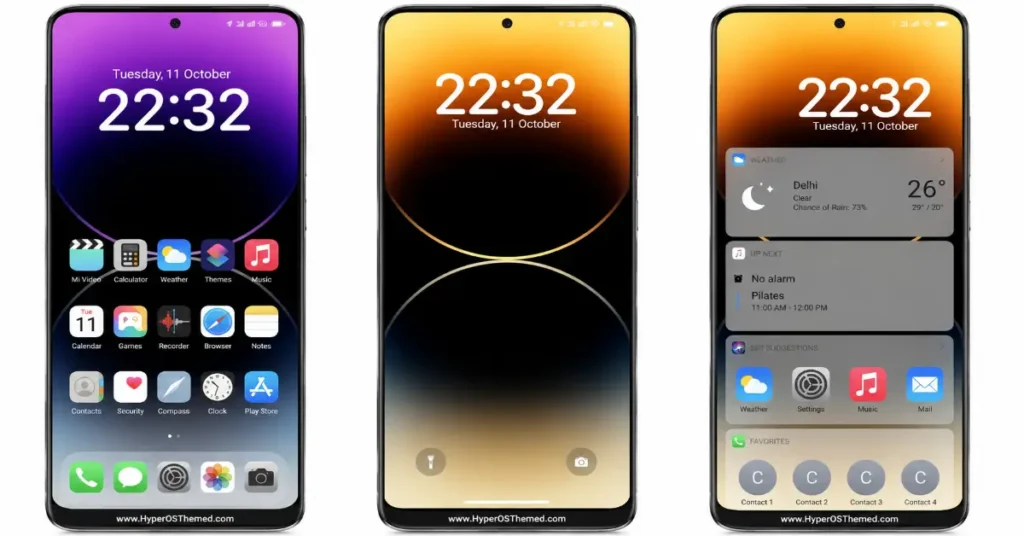
ProMotion Theme Xiaomi HyperOS brings a beautifully minimal, iOS-inspired aesthetic to HyperOS. The standout feature is its signature lock screen design, two overlapping circles forming an eclipse-like silhouette, rendered in smooth gradient tones. You get multiple lock screen variations included: a deep purple-to-black gradient, a warm golden-amber sunset gradient, and a punchy orange-to-black home screen style — so you can match your mood or time of day.
What’s Inside The ProMotion Theme Xiaomi HyperOS
- iOS-style app icons — clean, rounded, uniform icon set replacing the default HyperOS look
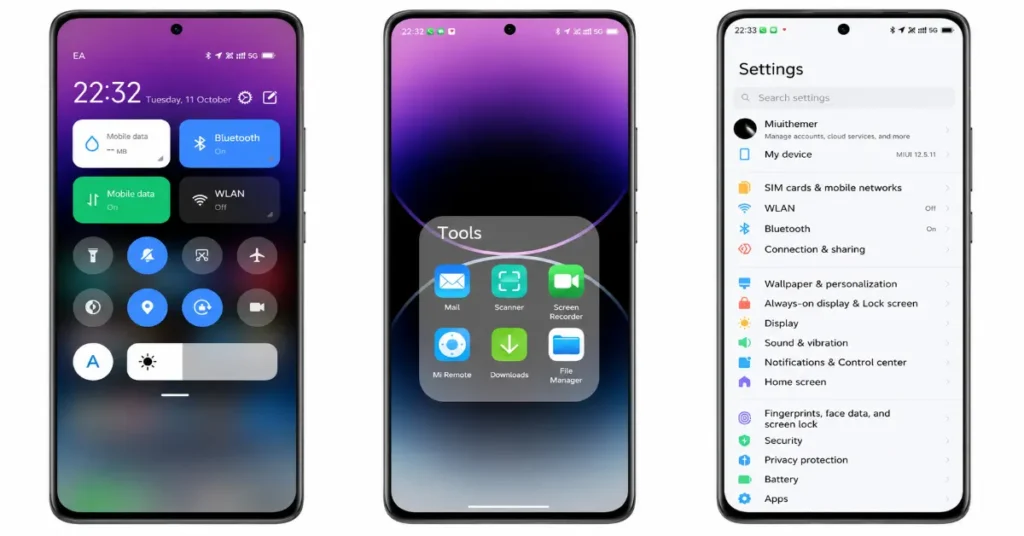
- iPhone-style Control Centre — toggle Bluetooth, WLAN, flashlight, and more with that familiar rounded-card layout
- iOS-style widgets — weather, calendar, and “up next” style cards on the home screen, just like Apple’s stock widgets
- Custom lock screen clock typography — bold, minimal time display that keeps the focus on your wallpaper
- Full system-wide consistency — even the Settings menu and folder layouts feel refined and cohesive
ProMotion Theme Xiaomi HyperOS Features
There’s something satisfying about a phone that feels premium without requiring a switch in ecosystems. ProMotion HyperOS theme gives your Xiaomi or Redmi device that polished, “flagship” feel, perfect if you’re someone who appreciates clean design, subtle gradients, and a UI that doesn’t feel cluttered. It’s especially great for anyone who’s used an iPhone before and misses that specific visual language, but doesn’t want to give up their MIUI/HyperOS device.
ProMotion Theme Xiaomi HyperOS Preview
| ProMotion Theme Xiaomi HyperOS Details | Data |
|---|---|
| Theme Name | ProMotion |
| File Size | 11.36 MB |
| File Format | .mtz |
| Designer | YSL |
| Compatibility | HyperOS, MIUI 13, MIUI 12.5, MIUI 12 |
| Style | iOS-Inspired |
| Source | Official Theme Store Link |
How to Get and Apply ProMotion Theme Xiaomi HyperOS
Follow the steps below to apply the theme:
- Open the Theme Store Link given above on your Xiaomi / REDMI / POCO device
- This will redirect you to the Theme Store.
- Download and install the theme
- Tap on Apply
- Customize specific elements (icons, lock screen, status bar) if needed
- Reboot your device (optional for full effect)
Important Notes
- Theme availability may vary depending on region
- Some features may require the latest HyperOS updates
- Always download themes from the official Theme Store for security
Why Choose ProMotion Theme Xiaomi HyperOS ?
The TripM theme stands out due to its balance between visual appeal and usability:
- Designed specifically for HyperOS
- Clean and minimal interface
- No need for root or third-party tools
- Fully optimized for daily use
- Maintains system performance and battery efficiency
The ProMotion Theme Xiaomi HyperOS is a solid customization pick for users who want a premium, iOS-inspired look without sacrificing everyday usability. Its clean icon set, cohesive control centre design, and full compatibility with HyperOS versions make it a great fit for Xiaomi and Redmi users seeking a polished, refined experience.
For those who appreciate a minimal, elegant aesthetic with smooth gradient lock screens and consistent design across the entire system, ProMotion is a well-crafted, easy-to-install theme available directly through the official Theme Store.
