
Not every theme needs bold colors or dramatic effects to be worth your time, and HyperMax HyperOS Theme is a good example of that. Designed by KimDung, this one keeps things simple and nature-inspired, with a small detail that sets it apart from the usual digital clock crowd.
What Makes HyperMax HyperOS Theme Worth Trying
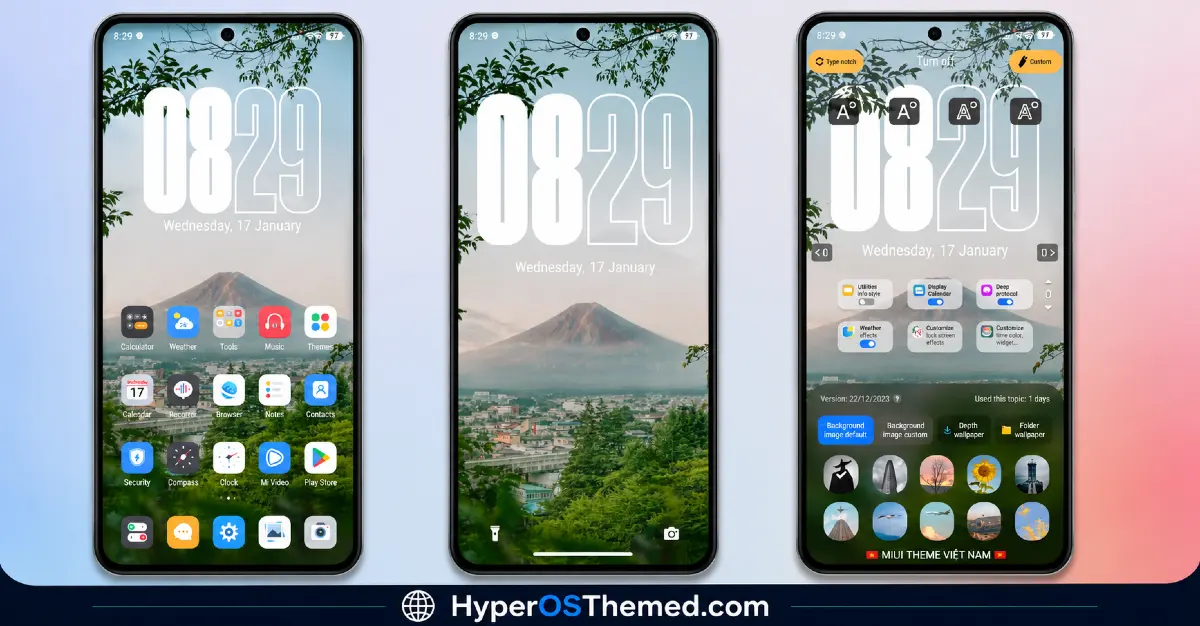
The standout feature here is the text clock on the lock screen. Instead of numbers, the time is spelt out in words, a subtle, almost poetic touch that gives the whole lock screen a calmer, less mechanical feel. It’s the kind of small design choice that most themes skip entirely, and it genuinely changes how the lock screen feels to glance at throughout the day.
Paired with that text clock is a nature-inspired aesthetic running through the wallpapers, soft and simple rather than overdone or busy. Nothing here competes for attention, which fits the overall calm, minimal direction KimDung clearly went for with this release.
HyperMax HyperOS Theme & MIUI Theme Preview
Consistency Across the Interface
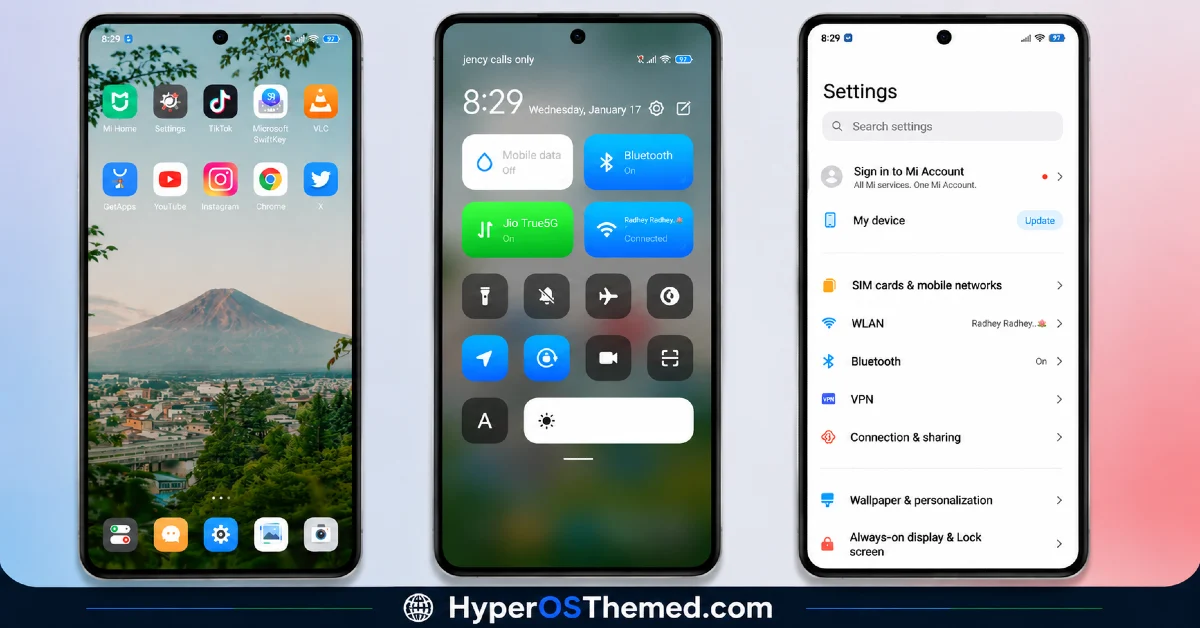
Beyond the lock screen, HyperMax HyperOS Theme brings the usual full package: freshly designed icons, a reworked status bar, and an Always-on Display that stays true to that same simple, nature-leaning tone. Everything feels cohesive rather than like separate pieces stitched together.
Wide Compatibility Of HyperMax HyperOS Theme
One thing worth calling out is just how broad the compatibility list is here. HyperMax HyperOS Theme and MIUI Theme supports HyperOS, MIUI 14, MIUI 13, MIUI 12.5, and MIUI 12, so whether you’re on the latest build or still running something a bit older, this theme covers you. That’s a wider net than a lot of newer releases bother casting.
Who Should Try This
If you like your phone’s interface calm and understated, with a small unexpected twist like a text based clock, HyperMax HyperOS Theme is a solid pick for your Xiaomi, Redmi, or POCO device. It’s free, works across a wide range of software versions, and doesn’t demand much from your storage at just under 37 MB.
HyperMax HyperOS Theme Details
| Detail | Info |
|---|---|
| Theme Name | HyperMax |
| File Size | 36.82 MB |
| Designer | KimDung |
| Region/Server | Global |
| Compatibility | HyperOS, MIUI 14, MIUI 13, MIUI 12.5, MIUI 12 |
| Features | Text Clock, Simple Design, Nature-Inspired Wallpapers |
Getting the Theme
Installing on Global Stable ROM
If your device is running the standard HyperOS or MIUI Global stable build, here’s how to install it:
- Open this page using the Firefox browser, since it handles the redirect best.
- Tap the Official Theme Store Link above.
- The page will open in Chinese, which is expected. Tap the three dots in the top right corner and select “Open in app.”
- This opens the Theme Store app, where the download will begin.
- Once it’s downloaded, tap Apply.
If the Official Theme Store Link doesn’t open properly, switch to Chrome or your phone’s default browser. Some third party browsers don’t handle this redirect correctly.
Installing on Custom ROMs
Running a custom build like Xiaomi.eu, MIUIRoom, or similar? Here’s the manual install method using the mtz file:
- Download the HyperMax mtz file from the link above.
- Open the Theme Store app and go to the Themes section.
- Scroll to the bottom and tap Import.
- Select the downloaded mtz file.
- Tap Apply.
One thing worth remembering: restart your device if anything looks slightly off after applying. A quick reboot usually clears it up right away. I tested this theme myself, and it ran smoothly with no issues at all.
Final Thoughts
HyperMax doesn’t chase attention with loud visuals, and that’s exactly its charm. Between the text based lock screen clock and the calm, nature-inspired design, KimDung built something quietly different from the usual theme release. If a simple, understated look with one clever twist sounds appealing, this one’s absolutely worth downloading.
You may also like:
- WEWE GOMBEL HyperOS Theme For Xiaomi, Redmi & POCO
- Super 26 Pro HyperOS Theme for POCO, Redmi and Xiaomi Devices
- VibrantV HyperOS Theme with Premium Icons, Status Bar & AOD
- Poi Poi MIUI Theme HyperOS with 3D Effects, Dozen Customization Sliders & More
- iP27 Super Capsule iOS 27 Style HyperOS Theme For Redmi, Poco and Xiaomi
