
TOP VK HyperOS Theme is a Premium theme designed by VK, built for Xiaomi, Redmi, and Poco devices running HyperOS 3. It pairs a black and white long exposure river landscape wallpaper with liquid glass clock numerals, a jewel toned 3D icon pack, and a frosted glass Control Center, giving the interface a moody, artistic look rather than a bright or playful one.
TOP VK HyperOS Theme leans on contrast as its main design idea. The wallpaper stays almost entirely monochrome, while the icons and clock elements introduce color and texture on top of it, so the two layers work against each other instead of blending into one flat look.
Beyond the visual style, the theme also touches several functional areas of the system, including the Control Center, status bar, and home screen widgets, which keeps it from feeling like a wallpaper and icon pack alone.
TOP VK HyperOS Theme Key Features
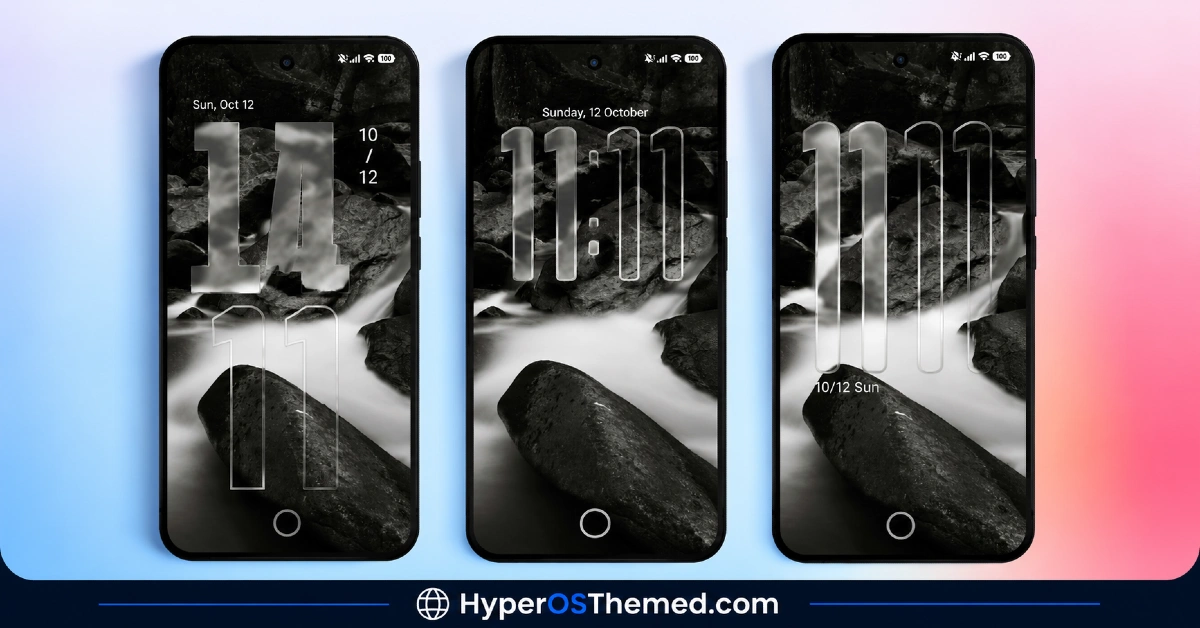
1. Liquid Glass Clock Numerals: The lock screen clock uses large, semi-transparent glass style numerals that sit directly over the monochrome river and rock background. The glass effect lets parts of the wallpaper show through the numbers rather than blocking them out completely.
2. Multiple Clock Typography Layouts: More than one clock font style is available, ranging from a bold solid fill dual line clock to a thinner outline glass version. This gives some flexibility in how heavy or subtle the lock screen clock looks.
3. Layered Depth Effect on the Lock Screen:The clock numerals are positioned so they appear to sit behind certain rocks and elements in the foreground of the wallpaper. This creates a sense of depth rather than having the clock float flatly on top of the image.
4. Minimalist Lock Screen Status Overlay: Date, month, and battery percentage are shown in a clean, simple layout on the lock screen. Nothing overlaps the clock numerals or crowds the bottom of the screen.
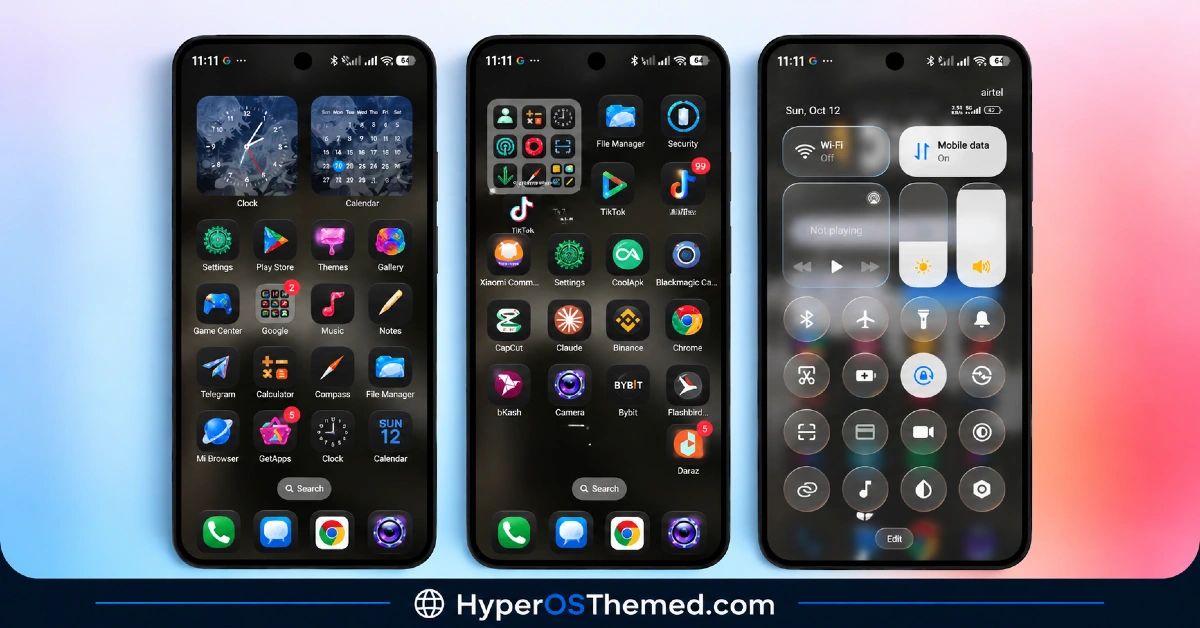
5. High Gloss 3D Icon Pack: App icons use dark squircle bases with vibrant, jewel toned 3D graphics inside them. The contrast between the dark icon base and the bright inner graphic is the main visual signature of the icon set.
6. Extensive Third Party App Icon Coverage: Beyond native system apps, the icon pack covers popular third party apps including Telegram, Facebook, Chrome, TikTok, Claude, Binance, Bybit, bKash, and Daraz. This keeps the home screen looking consistent even with a mix of installed apps.
7. Dual Home Screen Widgets: An analog clock card and a monthly calendar widget are included as home screen options. Both follow the same dark, glossy visual style as the rest of the theme.
8. Frosted Glass Control Center: The Control Center uses a translucent dark background with high contrast toggle pills for active settings. This keeps the panel readable while still fitting the theme’s overall glass aesthetic.
9. Pill Shaped Sliders: Brightness and volume sliders are redesigned as vertical pill shapes, positioned for easier one handed adjustment. This is a small but noticeable change from the default HyperOS slider style.
10. Updated Status Bar Indicators: Network speed, battery percentage, and signal strength are displayed with cleaner, more legible indicators in the status bar. These match the overall dark, high contrast look used throughout the rest of the theme.
TOP VK HyperOS Theme Preview
The visual style is built around contrast, a black and white long exposure river landscape wallpaper paired with glass style clock numerals and richly colored 3D icons. Dark tones dominate the Control Center and status bar, while the icon pack introduces jewel toned color as the main accent throughout the interface.
TOP VK HyperOS Theme Overview
| Attribute | Details |
|---|---|
| Availability | Free, via Xiaomi Theme Store |
| Supported Devices | Xiaomi, Redmi and POCO phones running HyperOS 3 |
| Theme Name | TOP VK |
| Designer | VK |
| Region | Global |
| Compatibility OS | HyperOS 3 |
| Features | Liquid glass clock numerals, 3D dark icon pack, frosted glass Control Center, dual home screen widgets, pill shaped sliders, updated status bar |
| File Size | Approx. 31.8 MB |
Get TOP VK HyperOS Theme
TOP VK HyperOS Theme can be downloaded directly through the official Xiaomi Theme Store link provided above. Installing through the official store link keeps the lock screen font overlays and Control Center elements working as intended, rather than relying on unofficial theme files that can cause rendering issues.
TOP VK HyperOS Theme Compatibility
TOP VK is built for HyperOS 3 and works across Xiaomi, Redmi, and Poco devices running this version. Since features such as the liquid glass clock and layered depth effect depend on newer HyperOS 3 rendering components, devices still on HyperOS 1 or HyperOS 2 are not the intended target for this theme. Availability through the Theme Store can also vary slightly by region, since Xiaomi does not roll out every theme to every market at the same time.
How to TOP VK HyperOS Theme
- Open the Theme Store link given above on your Xiaomi, Redmi, or Poco device.
- This will redirect you to the Theme Store.
- Download and install the theme.
- Tap on Apply.
- Customize specific elements such as icons, lock screen clock style, or widgets if needed.
- Reboot your device to make sure the lock screen scripts and status bar toggles render correctly, though this step is optional.
Why Choose TOP VK HyperOS Theme?
- Liquid glass clock numerals — a distinct, semi-transparent lock screen clock style not found in most icon-focused themes.
- Layered depth effect — clock numerals appear to sit behind foreground elements in the wallpaper for a more dimensional look.
- High contrast icon design — dark squircle bases paired with vibrant 3D inner graphics stand out against most icon packs.
- Wide third party app coverage — icons extend to apps like Telegram, TikTok, Binance, and Daraz, not just system apps.
- Frosted glass Control Center — translucent panel design with clear, high contrast toggle pills.
- Pill shaped sliders — brightness and volume controls redesigned for easier one handed use.
- Multiple clock typography options — choice between bold and thin glass style clock fonts.
- Free official download — available directly through the Xiaomi Theme Store at no cost.
Conclusion
TOP VK stands out for how deliberately it contrasts a quiet monochrome wallpaper against loud, glossy 3D icons, which is not a combination most HyperOS themes attempt. The liquid glass clock numerals and layered depth effect on the lock screen are the most distinctive parts of the package, and they carry through into a Control Center and status bar that stay consistent with the same dark, glass inspired look.
Since it depends on HyperOS 3 specific rendering features, it is not an option for anyone still on an older HyperOS build. The file size stays modest at under 32 MB, keeping the download and install process quick. For Xiaomi, Redmi, and Poco users on HyperOS 3 who want a theme built around contrast rather than a single flat color scheme, TOP VK is one of the more visually distinctive options currently available through the Theme Store.
Also Check These Themes:
- Fulloful HyperOS Theme with Depth Wallpapers for Xiaomi, POCO, Redmi
- OE1 HyperOS Theme For Redmi, Xiaomi, and POCO
- Sunlit Canyon HyperOS Theme With Canyon Wallpapers and Dialer Pad Redesign for Xiaomi, POCO, Redmi
- Guofeng 27 HyperOS Theme with iOS 27 Style UI, Redesigned Icons, and a Revamped Control Center
- AS Suhel HyperOS Theme with Animated Lock Screen and Liquid Glass Icons for Xiaomi, POCO, Redmi
