
Guofeng 27 HyperOS Theme is an iOS-inspired theme designed by 凡凡, built to bring an iOS 27 inspired look to Xiaomi, Redmi, and Poco devices. It reworks the icon set, lock screen, and Control Center to follow Apple’s newer visual language while staying within the HyperOS theming system.
The theme is aimed at users who prefer the iOS aesthetic but want to keep using HyperOS, offering a full UI overhaul rather than just a wallpaper and icon swap. It covers system apps, the notification panel, and core interface elements for a more complete transformation.
Guofeng 27 HyperOS Theme Key Features
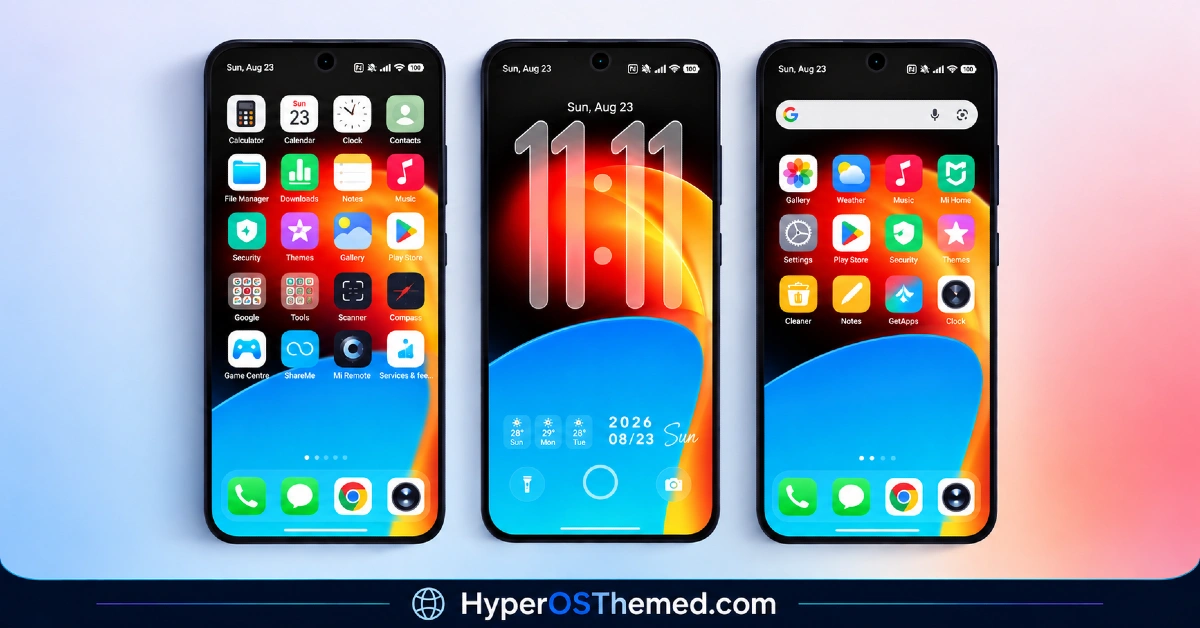
1. iOS 27 Style Icon Set: App icons follow the rounded-square iOS 27 design language, replacing the default HyperOS icon shapes across system and supported third-party apps. The icon set aims for close visual alignment with Apple’s current icon style rather than a loose interpretation of it.
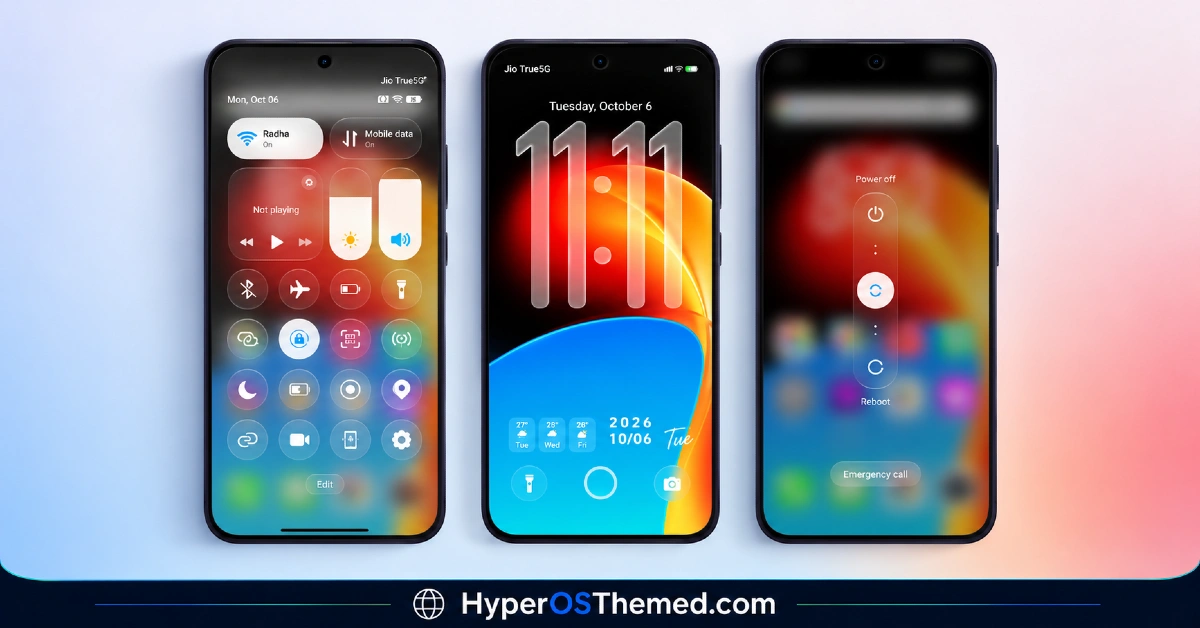
2. Redesigned Control Center: The Control Center is rebuilt to mirror the iOS layout, with toggle placement and panel structure shifted away from the standard HyperOS quick settings design. This changes both the look and the navigation flow of the pull-down panel.
3. Revamped Lock Screen: The lock screen layout is adjusted to reflect iOS style time placement and notification stacking. This gives the lock screen a different visual rhythm compared to stock HyperOS, particularly around how the clock and notifications are arranged.
4. System-Wide UI Overhaul: The theme extends beyond icons and lock screen to cover the Dialer, Messages, and Settings apps, keeping the iOS visual language consistent across core system interfaces rather than isolated to the home screen.
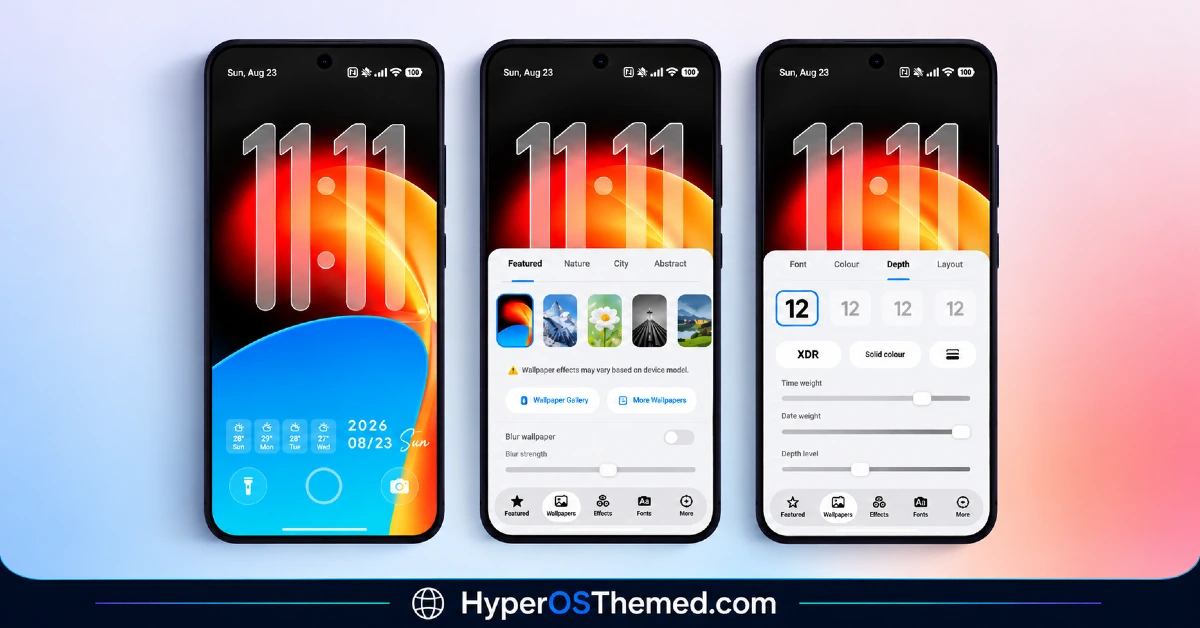
5. New Home Screen Widgets: Guofeng 27 includes widget options that go beyond a basic digital clock, giving the home screen more functional elements in line with the broader iOS style layout.
6. Depth Effect Wallpaper Support: The theme includes wallpaper options with depth effect styling, adding a layered visual appearance when paired with the icon set and lock screen design.
7. MTZ File Support for Custom ROMs: Alongside the official Theme Store version, the theme is available as an MTZ file for devices running custom ROMs such as Xiaomi.eu, MIUIRoom, or HyperOS CN, where it can be imported manually through the Theme Store app’s import option.
Guofeng 27 HyperOS Theme Preview
The visual style follows Apple’s iOS 27 language closely, with rounded-square icons, layered depth effect wallpapers, and a Control Center layout that mirrors iOS panel structure. The overall look leans toward a clean, app-icon-forward design rather than heavy color theming.
Guofeng 27 HyperOS Theme Overview
| Attribute | Details |
|---|---|
| Availability | Free, via Xiaomi Theme Store |
| Supported Devices | Xiaomi, Redmi and POCO phones running HyperOS |
| Theme Name | Guofeng 27 |
| Designer | 凡凡 |
| Region | Global |
| Compatibility OS | HyperOS 1.0, 2.0 & 3.0 |
| Features | iOS 27 style icon set, redesigned Control Center, revamped lock screen, new home screen widgets, depth effect wallpapers, system-wide UI overhaul |
| File Size | 61.2 MB (MTZ) / 76.5 MB (Backup File) |
Get Guofeng 27 HyperOS Theme
Guofeng 27 can be downloaded through the official Xiaomi Theme Store link for devices on the Global stable ROM, or as an MTZ file for devices running custom ROMs. Using the official Theme Store link or the verified MTZ import process helps avoid installation issues compared to unofficial theme sources.
Guofeng 27 HyperOS Theme Compatibility
Guofeng 27 HyperOS Theme works across Xiaomi, Redmi, and Poco devices running HyperOS 1.0, HyperOS 2.0, and HyperOS 3.0, with separate installation guides provided for HyperOS 1.0 and the newer HyperOS 2.0/3.0 builds. Devices on the Global stable ROM can install the theme directly through the Theme Store, while devices running custom ROMs such as Xiaomi.eu or HyperOS CN need the MTZ file imported manually. Some UI elements may render slightly differently depending on the specific ROM and HyperOS version installed.
How to Apply Guofeng 27 HyperOS Theme
- Open the Theme Store link given above on your Xiaomi, Redmi, or Poco device.
- This will redirect you to the Theme Store.
- Download and install the theme.
- Tap on Apply.
- Customize specific elements such as icons, lock screen, or Control Center if needed.
- Reboot your device if you experience any display issues after applying, though this step is optional.
Why Choose Guofeng 27 HyperOS Theme?
- iOS 27 style icon set — rounded-square icons that follow Apple’s current design language across system apps.
- Rebuilt Control Center — toggle layout and panel structure changed to mirror the iOS quick settings design.
- Revamped lock screen — clock placement and notification stacking follow an iOS style layout.
- System-wide coverage — Dialer, Messages, and Settings apps are themed alongside the home screen and lock screen.
- Depth effect wallpapers included — layered wallpaper options add visual depth beyond flat backgrounds.
- MTZ file available — custom ROM users can import the theme manually without needing the official Theme Store.
- Broad HyperOS compatibility — works across HyperOS 1.0, 2.0, and 3.0 with separate installation guides for each.
- Free official download — available through the Xiaomi Theme Store or verified MTZ file link at no cost.
Conclusion
Guofeng 27 HyperOS Theme delivers a fairly complete iOS 27 style transformation for HyperOS, covering icons, lock screen, Control Center, and core system apps rather than a surface-level reskin. The inclusion of both an official Theme Store version and an MTZ file makes it accessible to Global stable ROM users as well as those running custom ROMs. Coverage across HyperOS 1.0 through 3.0 gives it broader reach than themes limited to a single HyperOS version. For Xiaomi, Redmi, and Poco users looking for an iOS style interface without leaving HyperOS, Guofeng 27 HyperOS Theme Xiaomi is a comprehensive option available at no cost.
Also Check These Themes:
- AS Suhel HyperOS Theme with Animated Lock Screen and Liquid Glass Icons for Xiaomi, POCO, Redmi
- Knock Cute HyperOS Theme With Gradient Icons in a Tiny Package for Xiaomi, POCO, Redmi
- RS1 HyperOS Theme with Dynamic Depth Wallpapers and a Feature-Rich Lock Screen Customizer
- Aquarel HyperOS Theme with Aquatic Glassmorphism Look for Xiaomi, POCO, Redmi
- AJ Pink HyperOS Theme For Xiaomi, POCO and Redmi Phones
