
A theme designed by suhel himself,AS Suhel HyperOS Theme carries a personal signature quality to it, sharp design choices and elegant transitions rather than a generic template applied on autopilot. It reaches well past the home screen, reskinning Settings, File Manager and Calculator alongside a genuinely animated lock screen carrying built-in shortcuts for music, flashlight and notifications. Built for Xiaomi, Redmi and POCO devices running HyperOS 3 or earlier, it’s worth knowing upfront that access to this one comes with a regional caveat, more on that below.
AS Suhel HyperOS Theme Key Features
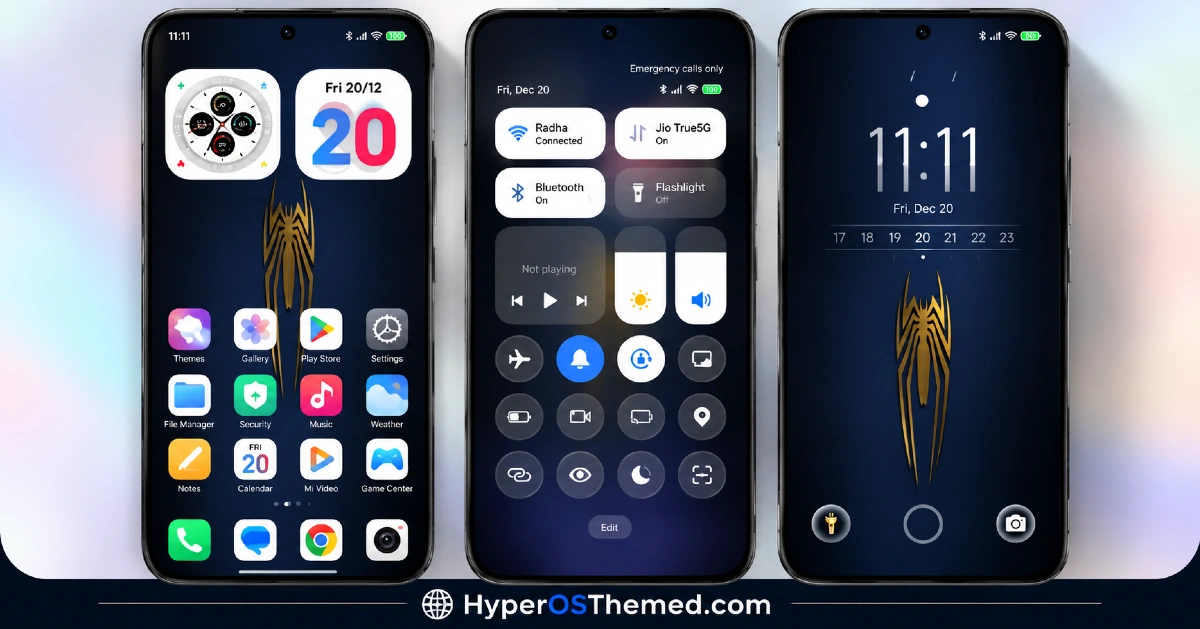
- Animated Lock Screen with Quick Shortcuts: The lock screen isn’t just visually redesigned, it’s genuinely interactive, with shortcuts for music controls, flashlight and notifications built right in. That’s a step beyond most themes that treat the lock screen as a static wallpaper with a clock on top.
- Modified Control Center: Toggles for brightness, Wi-Fi and other common settings get redesigned with smooth animation when switching states. The layout changes enough that a bit of relearning is needed compared to the stock HyperOS control center, but it’s worth it for the added polish.
- Uniform Flat Icon Design: The icon pack follows a consistent, flat design language across system and popular apps, aiming for a cleaner, more premium home screen look. As with most icon packs, coverage typically doesn’t extend to every single third-party app installed.
- Minimalist Dialer and Messaging UI: Both the dialer and messaging apps get a simplified interface redesign with support for both dark and light modes. This keeps the core communication apps visually aligned with the rest of the theme instead of standing out as untouched.
- System App Reskin: Apps like Settings, File Manager and Calculator are given a matching visual update so the theme extends beyond just the home screen and lock screen. This kind of deeper system app coverage isn’t something every HyperOS theme includes.
- Fluid System Animations: Scrolling and general UI transitions are tuned to feel smoother throughout the system rather than relying on default system animation speeds. It’s a subtle touch, but one that contributes to the overall polished, liquid-glass feel the theme is going for.
AS Suhel HyperOS Theme Preview
The screenshots below show the animated lock screen, the flat icon design and how the redesigned control center and system apps look once the theme is applied. Since a good portion of the appeal here comes from the animations and transitions, the preview only tells part of the story compared to seeing it running live on a device.
AS Suhel HyperOS Theme Overview
| Attribute | Details |
|---|---|
| Availability | Free via Theme Store; paid global compatibility access via Telegram |
| Supported Devices | Xiaomi, Redmi and POCO phones |
| Theme Name | AS Suhel |
| Designer | suhel |
| Region | Global |
| Compatibility OS | HyperOS 3 and below |
| Features | Animated lock screen with shortcuts, modified Control Center, uniform flat icons, minimalist dialer and messaging UI, system app reskin, fluid animations |
| File Size | Not specified by designer |
AS Suhel HyperOS Theme Compatibility
AS Suhel supports HyperOS 3 and earlier versions, covering a wide range of Xiaomi, Redmi and POCO devices. Since this theme touches so many system apps, from the dialer to Settings and File Manager, there’s a slightly higher chance of partial application issues compared to lighter icon-only themes, so following the customization steps carefully during installation matters more here than usual. Custom ROM users should expect the animated lock screen elements in particular to behave less consistently outside the official global stable ROM.
A genuine note on access: some original HyperOS themes, including this one, are officially distributed for free through the China Themes Store, which many users outside that region simply can’t reach. Backup copies are made available here after real effort to extend compatibility more broadly, and while most of what’s shared is free, some themes distributed through the associated Telegram channel may be paid. If you do have access to the China Themes Store directly, downloading from the original creator there is the better route to support suhel directly.
Get AS Suhel HyperOS Theme
Download AS Suhel only through the official Theme Store link, or the Telegram channel mentioned above for global compatibility access.
Avoid third-party APK sites or unofficial file-sharing uploads claiming to offer either version for free, since these are difficult to verify and may not match what suhel actually released. Sticking to official channels, whether free or paid, ensures the correct version is installed and keeps future updates accessible.
How to Apply AS Suhel HyperOS Theme
Follow the steps below to apply the theme:
- Open the Theme Store link given above on your Xiaomi, Redmi or POCO device.
- This will redirect you to the Theme Store.
- Download and install the theme.
- Tap on Apply.
- Customize specific elements such as icons, lock screen or status bar if needed.
- Reboot your device for the full effect, though this step is optional.
Note: If certain elements like icons, the lock screen or control center don’t apply correctly after installation, reapplying the theme through the Customise option usually resolves it. A quick reboot afterward can also help push through anything that didn’t load in fully. This theme has been checked for smooth application on supported HyperOS versions, but if something still doesn’t display correctly on a specific device, clearing the Themes app data or leaving a comment with the details can help track down the cause.
Installing AS Suhel HyperOS Theme on Custom ROM Devices
Devices running Custom ROMs won’t be able to use the direct Theme Store link, so the MTZ file needs to be brought in manually through the Theme Store app itself. Here’s how that works:
- Save the MTZ file for AS Suhel HyperOS Theme onto the device.
- Open the Theme Store app.
- Head into the Themes section.
- Scroll to the bottom and tap the Import option once it appears.
- Use the file manager to locate the downloaded .mtz file.
- Wait for the import process to finish.
- Select the theme once it appears in the list to apply it.
Why Choose AS Suhel HyperOS Theme?
- Animated lock screen with shortcuts — includes quick-access controls for music, flashlight and notifications, not just visual styling.
- Deep system app coverage — Settings, File Manager and Calculator all get reskinned along with the usual icons and lock screen.
- Smooth, fluid animations — scrolling and transitions are noticeably tuned compared to default HyperOS motion.
- Dark and light compatible dialer and messaging — communication apps adapt rather than clashing with system mode settings.
- Uniform flat icon language — consistent design across icons for a cleaner, more premium home screen.
- Redesigned Control Center toggles — smoother animated transitions for common settings like brightness and Wi-Fi.
- No root required — applies fully through the standard Theme Store or Telegram access without modifying the device.
- Optional global access route — a Telegram-based path exists for users who can’t reach the China Themes Store directly.
Conclusion
AS Suhel HyperOS Theme stands out for going beyond the usual icon and wallpaper changes, reaching into system apps and adding functional shortcuts on the lock screen that most HyperOS themes skip entirely. The regional access situation is worth understanding before downloading, since it’s officially a China Themes Store release, but the Telegram-based route offers a workaround for global users. For Xiaomi, Redmi and POCO users on HyperOS 3 or below who want a more animated, feature-rich theme designed personally by suhel, AS Suhel HyperOS Theme is worth exploring.
Also Check These Themes:
- Knock Cute HyperOS Theme With Gradient Icons in a Tiny Package for Xiaomi, POCO, Redmi
- RS1 HyperOS Theme with Dynamic Depth Wallpapers and a Feature-Rich Lock Screen Customizer
- Aquarel HyperOS Theme with Aquatic Glassmorphism Look for Xiaomi, POCO, Redmi
- AJ Pink HyperOS Theme For Xiaomi, POCO and Redmi Phones
- OX BM HyperOS Theme with Premium Wallpapers, 3D Depth, Customizable,Black icons
