
ProjectX HyperOS Theme is a HyperOS theme for Xiaomi, Redmi and POCO devices designed by Yunuz Alvarez, built around a fresh, nature-inspired visual style paired with a dynamic lock screen.
Instead of leaning on bold colors or heavy transparency effects, this one takes a calmer approach with natural imagery and a lock screen that adds a bit of movement rather than staying static. At 34.26 MB, it sits comfortably in the mid-range for file size, and it’s compatible across HyperOS, HyperOS 2.0 and HyperOS 3.0, giving it decent reach across both newer and slightly older devices.
ProjectX HyperOS Theme Features
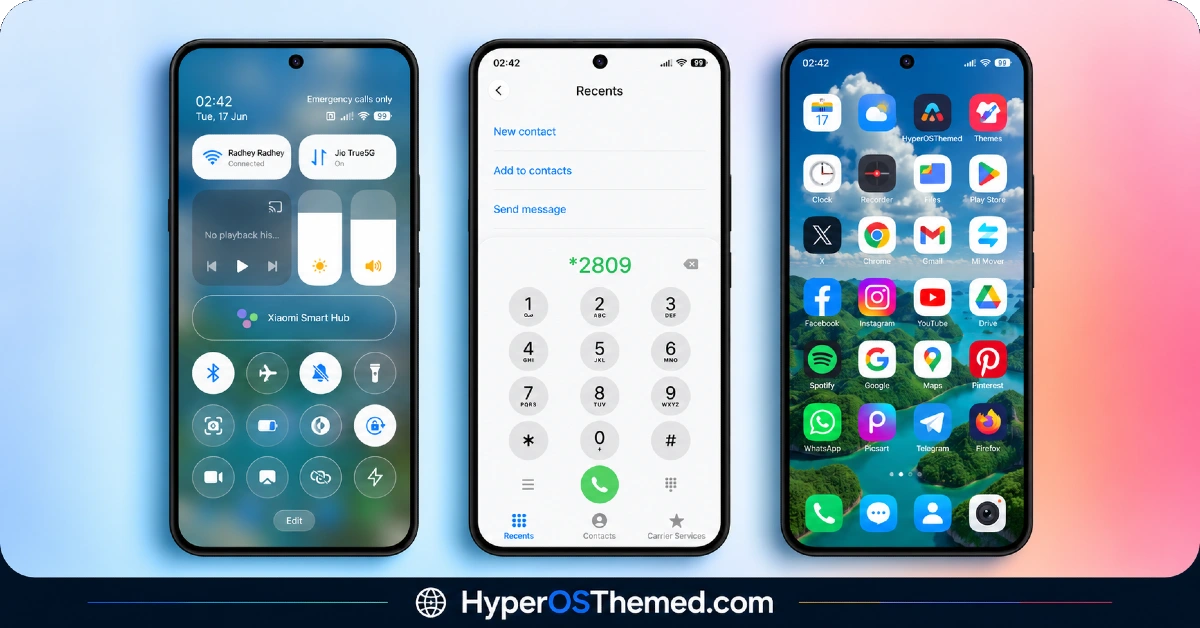
- Nature-Inspired Wallpaper Set: ProjectX HyperOS Theme includes a collection of wallpapers built around natural scenery and fresh, outdoor-style imagery rather than abstract patterns or gradients. This gives the theme a calmer, more grounded feel compared to bolder or more graphic-heavy designs.
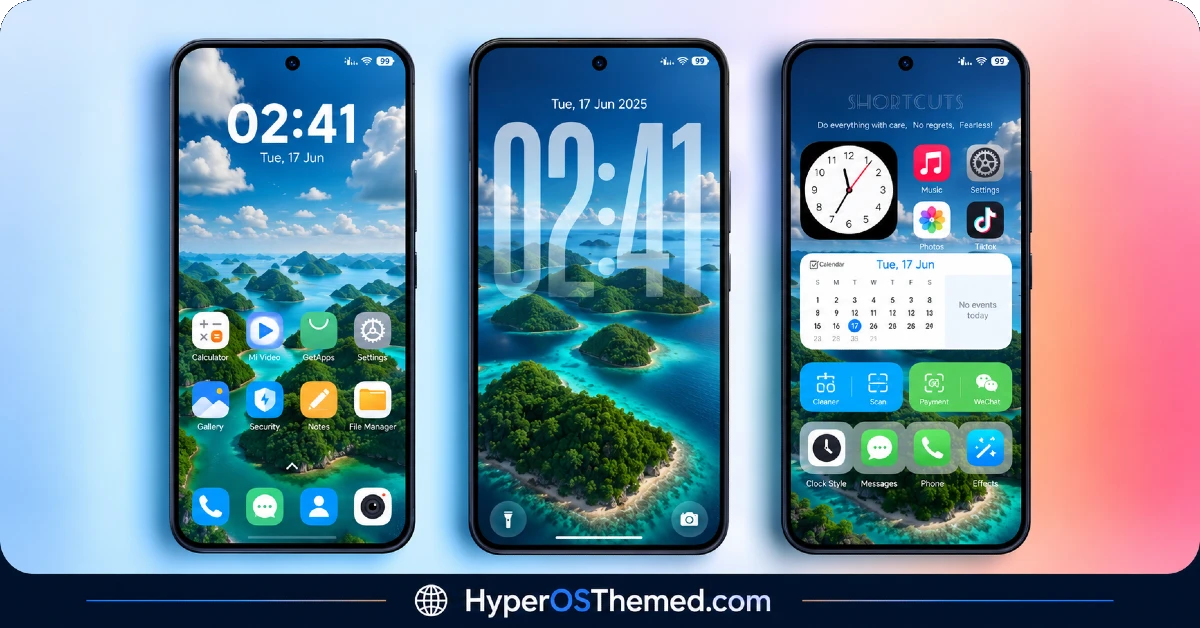
- Dynamic Lock Screen: The lock screen incorporates some movement or shifting visual elements instead of staying completely static like most default HyperOS lock screens. It’s one of the more noticeable features once applied and tends to be the first thing that stands out.
- Custom Icon Set: System and popular third-party app icons are redesigned to match the theme’s fresh, nature-toned color palette. As with most icon packs, a portion of less common apps typically retain their default look since full coverage across every installed app isn’t standard.
- Redesigned Status Bar: The status bar gets a visual update to tie in with the overall theme, adjusting how time, battery and network icons are displayed. It’s a smaller detail compared to the wallpaper and lock screen changes, but it keeps the top of the screen from feeling disconnected from the rest of the design.
- Styled Always-on Display: The Always-on Display receives its own custom look rather than relying on the stock clock face, which fits well with the nature-themed aesthetic if AOD is left running throughout the day. How this looks in practice can vary slightly depending on the specific display panel of the device.
- Broad HyperOS Version Support: ProjectX Xiaomi Theme works across HyperOS, HyperOS 2.0 and HyperOS 3.0 rather than being locked to a single release. This makes it accessible to a wider range of Xiaomi, Redmi and POCO devices instead of just the newest models.
ProjectX HyperOS Theme Preview
The screenshots below show the nature-inspired wallpapers, the dynamic lock screen and how the redesigned status bar and Always-on Display look once the theme is applied. Since natural imagery and subtle motion effects are easier to judge visually, it’s worth looking through these before deciding if the overall tone fits your taste.
ProjectX HyperOS Theme Details
| Attribute | Details |
|---|---|
| Availability | Free, via Xiaomi Theme Store |
| Supported Devices | Xiaomi, Redmi and POCO phones running HyperOS |
| Theme Name | ProjectX |
| Designer | Yunuz Alvarez |
| Compatibility OS | HyperOS, HyperOS 2.0 and HyperOS 3.0 |
| Features | Nature-inspired wallpapers, dynamic lock screen, custom icons, redesigned status bar, styled Always-on Display |
| File Size | 34.26 MB |
ProjectX HyperOS Theme Compatibility
ProjectX supports HyperOS, HyperOS 2.0 and HyperOS 3.0, covering a fairly wide range of Xiaomi, Redmi and POCO devices rather than being limited to the newest builds. Since theme installations can occasionally interact unpredictably with certain system configurations, it’s a good idea to back up important data before applying any new theme, including this one, just as a general precaution rather than because of a known issue specific to ProjectX.
Custom ROM users on setups like Xiaomi EU ROM or MIUIRoom can still bring the theme in manually through the MTZ file, though the dynamic lock screen animation may render slightly differently outside the official global stable ROM. If anything looks glitchy or fails to load properly right after applying the theme, restarting the device is typically enough to clear it up.
Get ProjectX HyperOS Theme
Download ProjectX HyperOS Theme only through the official Theme Store link rather than random third-party file hosts or unofficial APK uploads. Files sourced outside verified channels are difficult to confirm as unaltered and may not match what the designer actually released. Sticking to the official Theme Store link keeps the installed version consistent with the intended design and ensures any future updates remain accessible.
How to Apply ProjectX HyperOS Theme
Follow the steps below to apply the theme:
- Open the Theme Store link given above on your Xiaomi, Redmi or POCO device.
- This will redirect you to the Theme Store.
- Download and install the theme.
- Tap on Apply.
- Customize specific elements such as icons, lock screen or status bar if needed.
- Reboot your device for the full effect, though this step is optional.
Note: It’s worth backing up your important data before applying any new theme as a general safety habit, since system and theme interactions can occasionally behave unexpectedly. If anything looks glitchy or doesn’t display correctly right after installing ProjectX, restarting the device usually loads everything back cleanly. This theme has been checked across its supported HyperOS versions without any major issues turning up, but if something still looks off on a specific device, leaving a comment with the details helps get it looked into.
Installing ProjectX HyperOS Theme on Custom ROM Devices
Devices running MIUI 11 through 14 or HyperOS based Custom ROMs such as Xiaomi EU ROM or MIUIRoom aren’t able to use the direct Theme Store link, so the MTZ file needs to be brought in manually instead. Here’s how that works:
- Grab the MTZ file for ProjectX from the download section.
- Open the Theme Store app.
- Go into the Themes tab.
- Scroll down to find the Import option, then tap it.
- Use the file manager to locate the downloaded .mtz file.
- Wait for the import process to finish.
- Tap the theme once it appears in the list to apply it.
Why Choose ProjectX HyperOS Theme?
- Fresh, nature-inspired look — a calmer visual style compared to bold or abstract theme designs.
- Dynamic lock screen — subtle movement makes the lock screen feel less static than stock HyperOS.
- Wide HyperOS compatibility — works across HyperOS, HyperOS 2.0 and HyperOS 3.0.
- Coordinated status bar design — small details are updated to stay consistent with the rest of the theme.
- Custom Always-on Display — a nice touch for devices that keep AOD active throughout the day.
- Moderate file size — 34.26 MB keeps the download reasonably quick without feeling too light on content.
- Free official download — no cost involved and distributed through a legitimate Theme Store link.
- Consistent icon redesign — icons are styled to match the overall nature-toned palette.
Conclusion
ProjectX HyperOS Theme offers a calmer, nature-inspired alternative to the bolder, more colorful HyperOS themes out there, with the dynamic lock screen adding a bit of personality without going overboard. The broad version support across HyperOS, HyperOS 2.0 and HyperOS 3.0 makes it accessible to a good range of Xiaomi, Redmi and POCO devices, and backing up data first is a sensible habit before applying it like any other theme. For anyone looking for a fresher, outdoor-inspired aesthetic, ProjectX is worth trying.
You may also like:
BNB HyperOS Theme with colourful icons and 3D depth-of-field effects for Xiaomi, Redmi and POCO
Diamond.V2 HyperOS Theme with Complete iOS-Inspired Theme for Xiaomi, POCO and REDMI Phones
Jiyan IzzyBRV15 HyperOS Theme with Black and Dark Icon Design for Xiaomi, POCO and REDMI Phones
iOS Style Super Surge HyperOS Theme for Xiaomi, POCO and Redmi Phones
