
Super Surge HyperOS Theme is a theme for Xiaomi, Redmi and POCO devices built around a bold, high-impact visual style rather than a subtle refresh. It reworks the lock screen, icon set, control center and several core apps into a single connected package instead of leaving elements looking patched together. The theme is offered as both a backup file and a standalone MTZ file, giving users flexibility depending on how they prefer to install it. At 46.5 MB for the standard file, it’s on the heavier end for a HyperOS theme, which usually means more detailed icon work and visual assets packed in.
Super Surge HyperOS Theme Features
- Bold Visual Identity: Super Surge HyperOS Theme leans into strong contrast and vivid accent colors rather than a muted or minimal palette. This makes it a better fit for users who want their home screen to stand out rather than blend into the background.
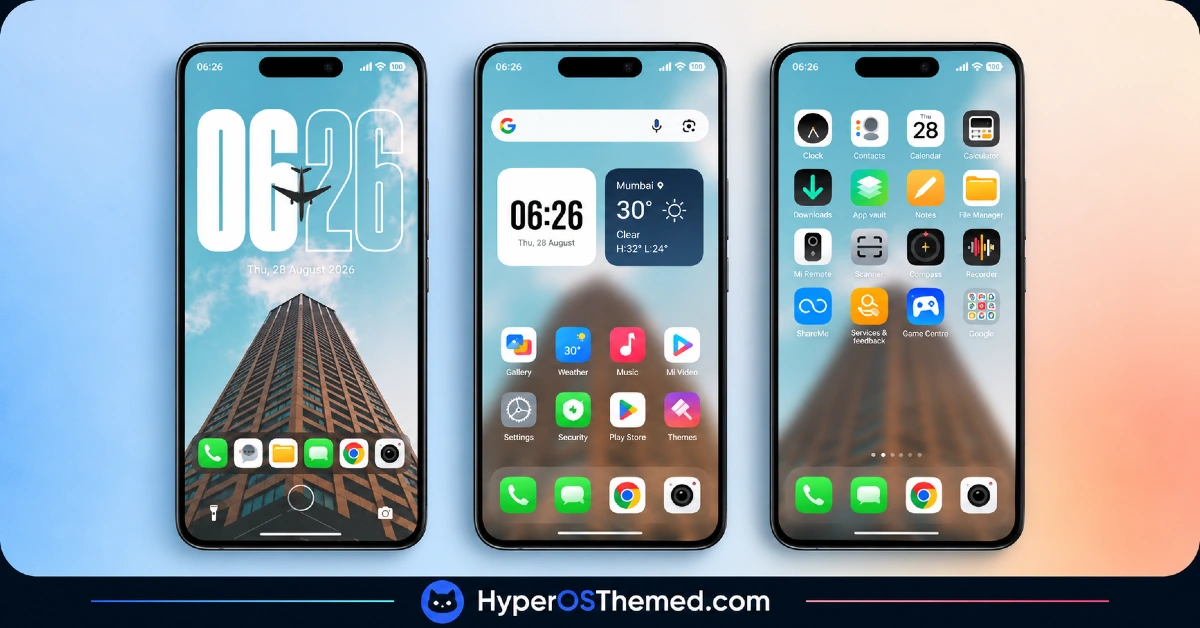
- Custom Icon Set: System and popular third-party app icons are redesigned with a matching color scheme and sharper edge styling. As with most theme packs, a portion of less common or regional apps retain their default icons since full coverage isn’t guaranteed.
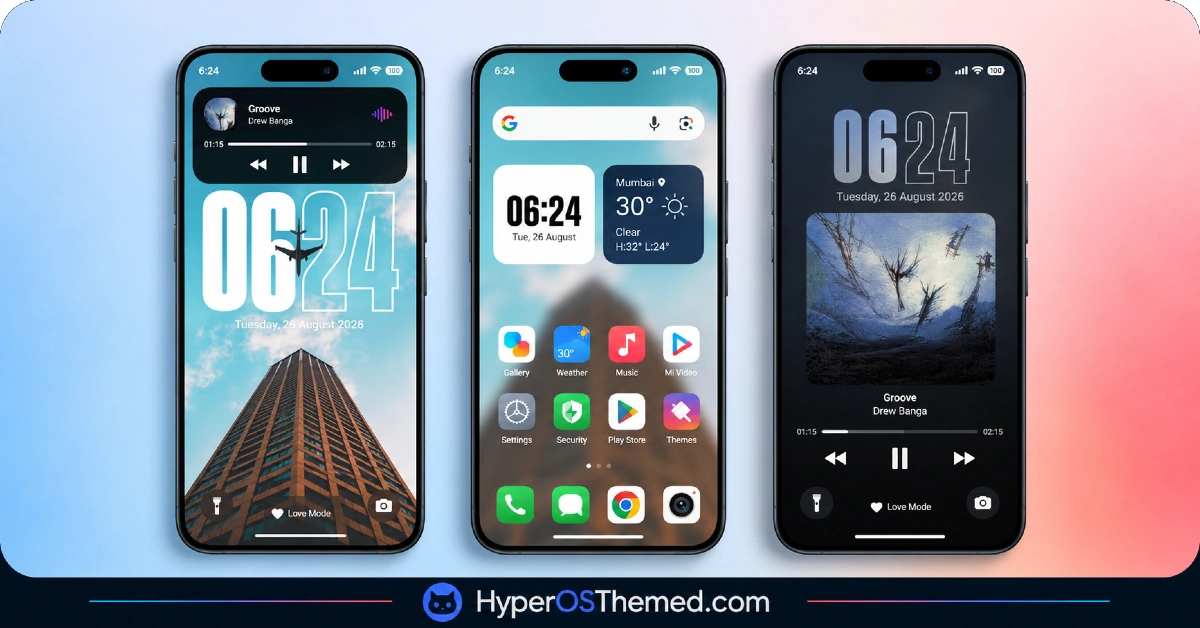
- Reworked Lock Screen: The lock screen gets a restructured layout with repositioned clock placement and updated spacing around notifications. This is one of the more visibly different areas compared to the stock HyperOS lock screen layout.
- System App Styling: Dialer, Messages and Settings all receive coordinated visual updates so the bold color scheme carries through daily-use apps instead of stopping at the launcher. This keeps the overall experience from feeling split between a themed home screen and an untouched settings menu.
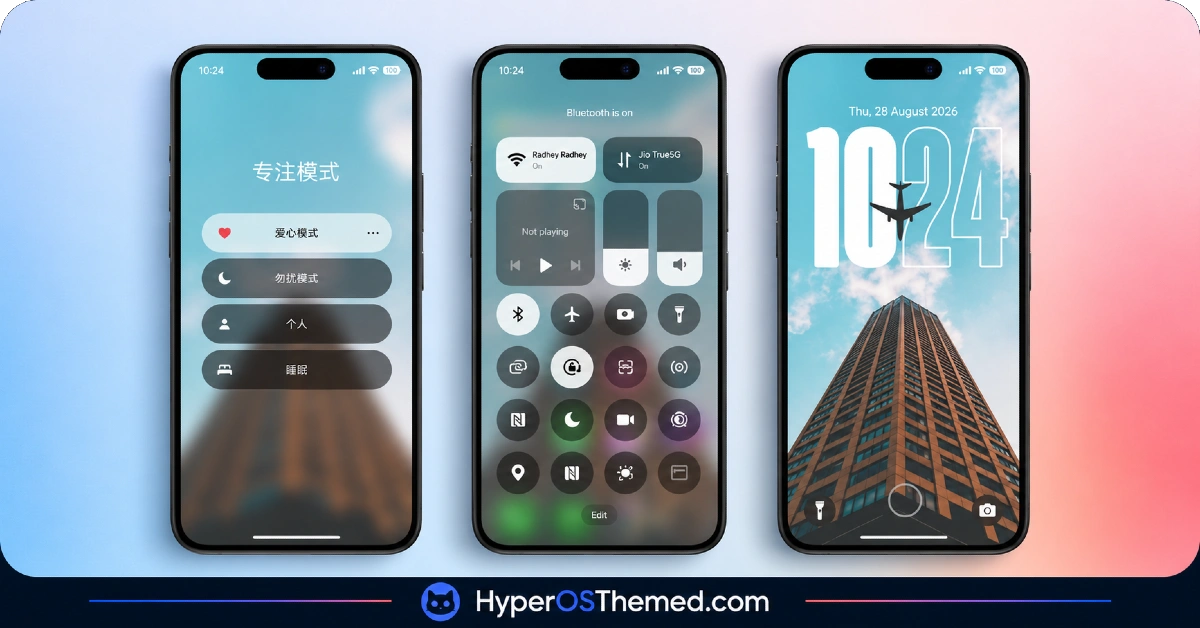
- Updated Control Center Design: Quick toggle icons and panel elements get a refreshed look that matches the theme’s overall color direction. The layout of toggles stays largely familiar, so it functions more as a styling pass than a rearrangement.
- Dual File Options: The theme is distributed as a smaller MTZ file alongside a considerably larger backup file. Most users installing through the standard method will only need the MTZ file, with the backup option mainly useful for those wanting a full restore point.
Super Surge HyperOS Theme Preview
The screenshots below show how the bold colour scheme and icon redesign look once applied, along with the updated lock screen and Control Centre panel. Because this theme’s visual impact is stronger than more subdued options, review the preview closely before deciding whether the style fits your taste.
Super Surge HyperOS Theme Details
| Attribute | Details |
|---|---|
| Availability | Free, MTZ |
| Supported Devices | Xiaomi, Redmi and POCO phones running HyperOS |
| Theme Name | Super Surge |
| Designer | 苏哥suger |
| Compatibility OS | HyperOS 1.0, HyperOS 2.0 and HyperOS 3.0 |
| Features | Bold visual identity, custom icon set, reworked lock screen, system app styling, updated control center |
| File Size | 46.5 MB (MTZ file), 95 MB (Backup file) |
Super Surge Theme Compatibility
Super Surge HyperOS Theme covers a wide compatibility range, supporting HyperOS 1.0, HyperOS 2.0 and HyperOS 3.0 across Xiaomi, Redmi and POCO devices. Since the installation steps differ slightly depending on which HyperOS version is installed, following the guide that matches the specific version is a better approach than assuming a single method applies everywhere.
Custom ROM users on builds like Xiaomi.eu, MIUIRoom or HyperOS CN can still bring the theme in manually through the MTZ file, though the bolder color treatment may look slightly less refined outside the official global stable ROM. Given the larger file size and the amount of UI this theme touches, devices with limited storage should double check available space before downloading, particularly if planning to use the backup file as well.
Get Super Surge HyperOS Theme
Download Super Surge only through the official Theme Store link rather than third-party file-sharing sites or unofficial APK sources. MTZ or backup files circulating outside the official store are difficult to verify and may differ from what the designer actually released, sometimes with unwanted additions. Sticking to the official channel ensures the installed version matches the intended release and stays eligible for any future updates.
How to Apply Super Surge HyperOS Theme
Follow the steps below to apply the theme:
- Open the Theme Store link given above on your Xiaomi, Redmi or POCO device.
- This will redirect you to the Theme Store.
- Download and install the theme.
- Tap on Apply.
- Customize specific elements such as icons, lock screen or status bar if needed.
- Reboot your device for the full effect, though this step is optional.
Note: If any overlapping elements or display glitches appear right after installing, a quick restart typically resolves them without further steps. This theme has gone through careful checks across supported HyperOS versions and hasn’t shown any major issues in that process. Even so, if something looks off after applying it on a specific device, leaving a comment with the details helps get it addressed.
Installing Super Surge on Custom ROM Devices
Devices running a Custom ROM such as Xiaomi.eu, MIUIRoom, MIUI SR or HyperOS CN can’t use the direct Theme Store link, so the MTZ file needs to be added manually through the Theme Store app. Here’s the process:
- Save the MTZ file for the theme onto the device.
- Open the Theme Store app.
- Head into the Themes section.
- Scroll to the bottom and tap the Import option once it appears.
- Use the file manager to locate the downloaded .mtz file.
- Allow the import to finish before continuing.
- Select the theme from the list once it appears to apply it.
Why Choose Super Surge HyperOS Theme?
- Bold, distinctive color scheme — stands out clearly compared to more muted, minimal theme options.
- Broad HyperOS support — works across HyperOS 1.0, 2.0 and 3.0 rather than a single version.
- Coordinated system app styling — Dialer, Messages and Settings all match the overall visual direction.
- Two download formats — choice between the lighter MTZ file or the full backup file depending on need.
- Reworked lock screen layout — a clear visual shift from the stock HyperOS lock screen.
- Matching control center design — toggle icons and panel styling tie in with the rest of the theme.
- Free official availability — no cost involved and distributed through the legitimate Theme Store.
- Version-specific installation guides — separate instructions reduce guesswork across different HyperOS builds.
Conclusion
Super Surge HyperOS Theme is built for users who want their Xiaomi, Redmi or POCO device to make a visual statement rather than blend into the background, and the broad HyperOS version support makes it accessible across a good range of devices. The larger file size and partial third-party icon coverage are worth factoring in, but neither should complicate the setup process. For anyone drawn to a bolder, higher-contrast look over subtle customization, it’s a solid theme to try out.
You may also like:
Super Surging 3 HyperOS Theme with iOS-Style Dynamic Island for Xiaomi, POCO and REDMI Phones
OX LS: HyperOS & MIUI Theme for Xiaomi, POCO and REDMI Phones
Retina HyperOS Theme for Xiaomi, POCO and REDMI Phones
Aurora Pulse HyperOS Theme With Premium Gradient Redesign for Xiaomi, POCO & Redmi
Purple Stars HyperOS Theme with Clean Minimal Redesign for Xiaomi, POCO & Redmi
