
OX M1 HyperOS Theme is one of the larger HyperOS theme packages currently floating around, sitting at just under 79 MB, which puts it closer in size to the premium multi-feature themes than the lightweight icon-pack-only downloads. Designed by OXFURY, it targets a gradient-heavy, iOS-adjacent aesthetic rather than committing fully to either camp, blending elements from both styles instead of picking one lane.
The theme covers the usual ground a full HyperOS package touches: icons, wallpaper, lock screen, and Control Center, plus wider system app changes. Given how many themes claim “hundreds of icons” without actually backing that up in the app drawer, the icon count here is worth taking with a bit of skepticism until you see it applied on your own device, though the coverage described does extend to system apps rather than stopping at the most common ones.
OX M1 HyperOS Theme Features
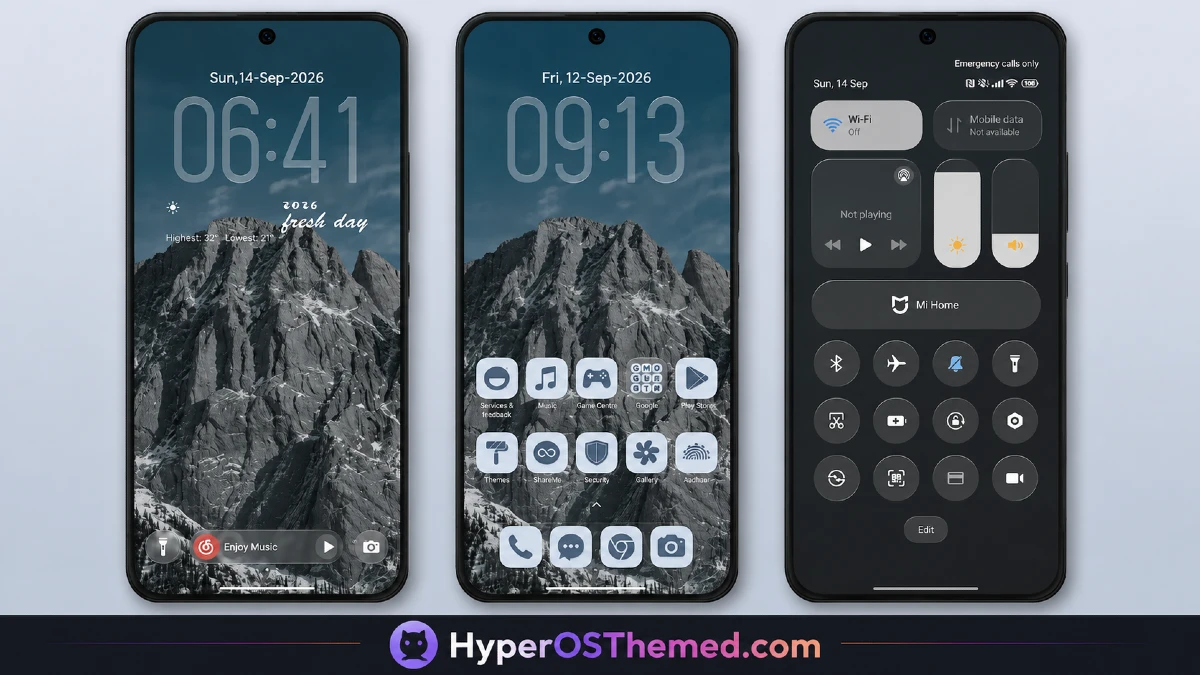
Icon Pack: The headline feature is the sheer size of the icon set, described as covering hundreds of apps rather than the couple dozen most themes bother designing manually. For a theme this size, that tracks, a big chunk of the 79 MB file size likely goes toward that icon breadth rather than animation or video assets.
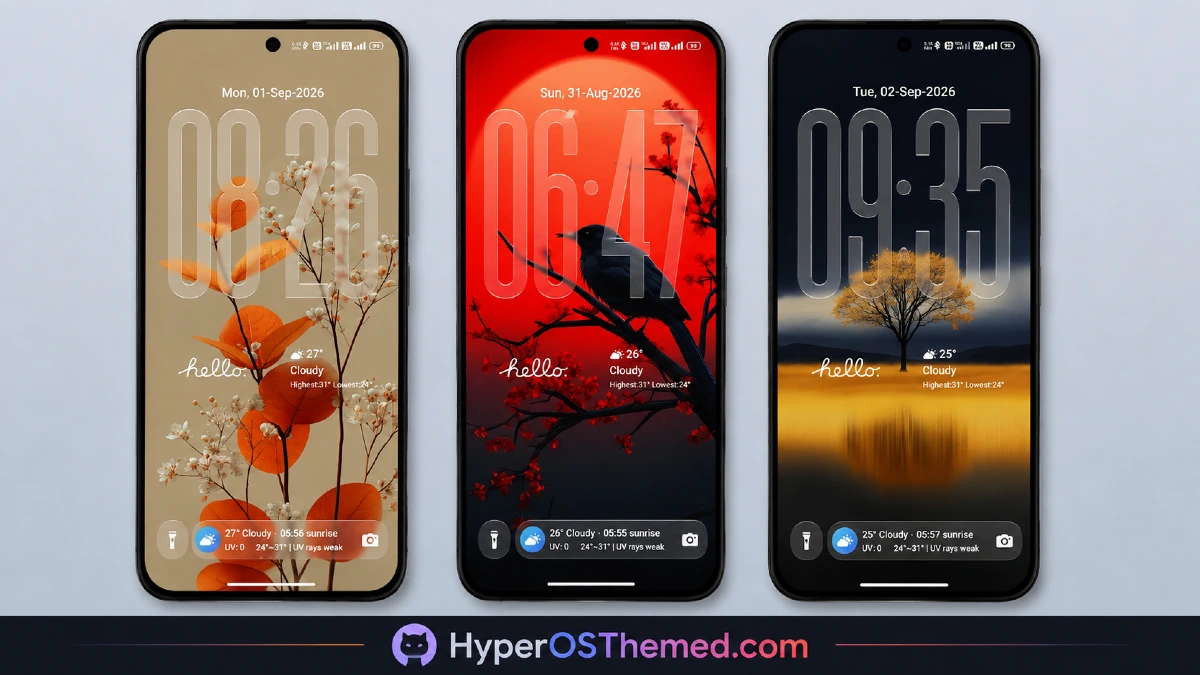
Gradient Wallpaper Collection: Rather than photography-based backgrounds, the wallpapers use a gradient color palette, and the accent colors used across the rest of the interface, icons, Control Center, system menus, pull from that same palette. That’s the detail that actually matters here: a lot of themes ship a nice wallpaper and then leave the rest of the UI looking mismatched. Here, the accents are described as tied directly to the wallpaper tones, which is what creates that “everything belongs together” feeling rather than a wallpaper sitting disconnected from icons around it.
Lock Screen Redesign: The lock screen gets its own distinct treatment as part of the package, though the source material doesn’t go into specifics beyond calling it “unique.” Given the bootloop warning attached to this theme (more on that below), the lock screen is probably the component worth watching most closely after installing.
Control Center Changes: Quick settings and toggles get reworked alongside everything else, keeping the visual language consistent when you pull down from the top of the screen instead of hitting a plain stock panel mid-theme.
System-Wide Reach: Beyond the home screen, the changes extend into broader system UI, matching the pattern most full HyperOS themes follow now: touch the Dialer, Settings, and Messages apps too, not just the launcher.
OX M1 HyperOS Theme Preview
OX M1 HyperOS Theme Stability
The source material includes a specific caution worth repeating rather than glossing over: this theme was tested on HyperOS and worked without issues in that environment, but behavior may differ across other MIUI and HyperOS versions, and in some cases lock screen elements have been known to cause a bootloop. That’s not a small warning to bury in fine print, a bootloop means your phone gets stuck restarting and won’t boot normally, which is a genuinely disruptive problem if it happens.
If you’re running a less common firmware build, or anything outside the mainstream current HyperOS release, it’s worth backing up your current theme settings before applying OX M1, just as a precaution. If something does go wrong with the lock screen specifically, that’s the area flagged as the higher-risk component.
| Detail | Info |
|---|---|
| Theme Name | OX M1 |
| Designer | OXFURY |
| File Size | 78.99 MB |
| Compatibility | HyperOS |
| Region | Global |
| Supported Devices | Xiaomi, POCO, Redmi |
OX M1 HyperOS Theme Compatibility
OX M1 HyperOS Theme is pitched as working across the board on Xiaomi, POCO, and Redmi devices running HyperOS, without a version-specific split between HyperOS 2.0 and HyperOS 3.0 the way some other releases spell out. That broad framing is convenient if you’re not sure exactly which HyperOS build your device is on, but it also means the “may work differently” caveat mentioned above is worth taking seriously rather than assuming universal means guaranteed identical results everywhere.
Download OX M1 HyperOS Theme
OX M1 HyperOS Theme is available both through the official Theme Store link and as a direct MTZ download, so there are two routes depending on how you prefer to install. Going through the official Theme Store is generally the safer bet since it removes any question about whether the file has been altered somewhere along the way.
If you’re using the MTZ route instead, whether because you’re on a custom ROM or just prefer manual installs, make sure the file is coming from the source link tied to this listing rather than a random reupload elsewhere.
Installing OX M1 HyperOS Theme
- Tap the official Theme Store link if using that method, which opens the Theme Store app directly
- Alternatively, download the MTZ file from the provided link
- Open the Theme Store app, tap Themes, then scroll down and select Import
- Locate the downloaded MTZ file through your file manager
- Wait for the import to finish, then tap the theme to apply it
- Restart your device if anything looks overlapped or isn’t displaying correctly after applying
Concluson
OX M1 HyperOS Theme fits into a growing category of HyperOS themes trying to split the difference between iOS-style minimalism and MIUI’s more flexible customization options, without going all-in on either. The gradient wallpaper tying into the icon and Control Center accents is the detail that actually determines whether a theme like this feels cohesive once it’s on your phone rather than just impressive in preview screenshots.
Given the file size and the bootloop caution attached, it’s a theme worth trying if you’re comfortable with a bit of troubleshooting risk, and one where backing up first isn’t a bad habit regardless of which theme you’re installing.
You may also like:
Purple Stars HyperOS Theme with Clean Minimal Redesign for Xiaomi, POCO & Redmi
MS M1 HyperOS Theme with iOS 27 Lock Screen and Super Capsule for Xiaomi, POCO & Redmi
Liquid Crystal HyperOS Theme for Xiaomi, Redmi, and POCO Phones
Jing HyperOS Theme with Complete System-Wide Redesign for Xiaomi, POCO & Redmi
Super Nai 27 HyperOS Theme — Gradient Minimal Design for Xiaomi, POCO & Redmi
