
Jing HyperOS Theme follows the same dual-file approach seen with Liquid Glass, a standard 46.3 MB MTZ file paired with a separate, larger 63.9 MB backup file, raising the same question worth answering directly: does the backup version add meaningful coverage the standard install misses, or is the smaller file already complete on its own. With four preview screenshots showing a full lock screen, icon, and Control Center overhaul, testing the standard MTZ install on a POCO X6 was the starting point for figuring out whether the backup file was worth the extra download at all.
The theme positions itself as a complete package covering lock screen redesign, custom icons, and system-wide UI changes reaching into the Dialer, Settings, Messages, and Control Center rather than stopping at the home screen. That breadth of claimed coverage is exactly what got tested piece by piece, checking whether each area held up under actual daily use rather than just looking complete across a handful of preview images.
Jing HyperOS Theme Features
- Redesigned Lock Screen: The lock screen departs from the stock HyperOS layout with distinct clock positioning and styling rather than a minor recolor of the default setup. It applied cleanly on first install without requiring the backup file to render correctly.
- Custom Icon Pack: Icons throughout the interface carry dedicated design work applied consistently across the home screen, app drawer, and folders. Coverage extended well across commonly used apps, with only a small number of less common apps reverting to default icons.
- Redesigned Control Centre: Quick settings and toggles receive a full visual overhaul with reworked spacing and toggle grouping, distinct from the stock HyperOS quick settings grid. Repeated toggling between Wi-Fi and Bluetooth during testing showed the panel staying responsive despite the more detailed styling.
- System-Wide UI Changes: Dialer, Settings, and Messages apps all pick up matching visual treatment rather than being left with default HyperOS styling while only the home screen changes. This system-wide reach is what distinguishes a genuinely complete theme package from a home-screen-only reskin.
- Dual-File Download Option: Alongside the standard 46.3 MB MTZ file, a separate 63.9 MB backup file is available for users wanting a fuller version of the same theme. The size difference suggests the backup file includes additional assets or wallpaper variants beyond what the base MTZ package covers.
Jing HyperOS Theme Preview
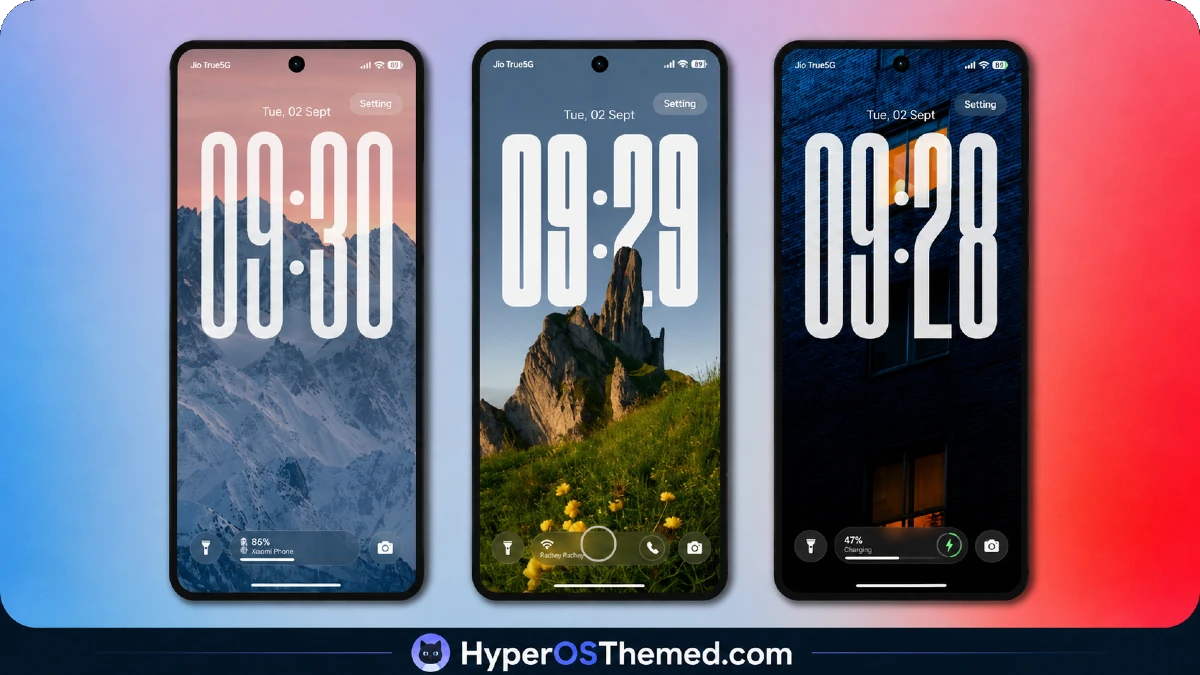
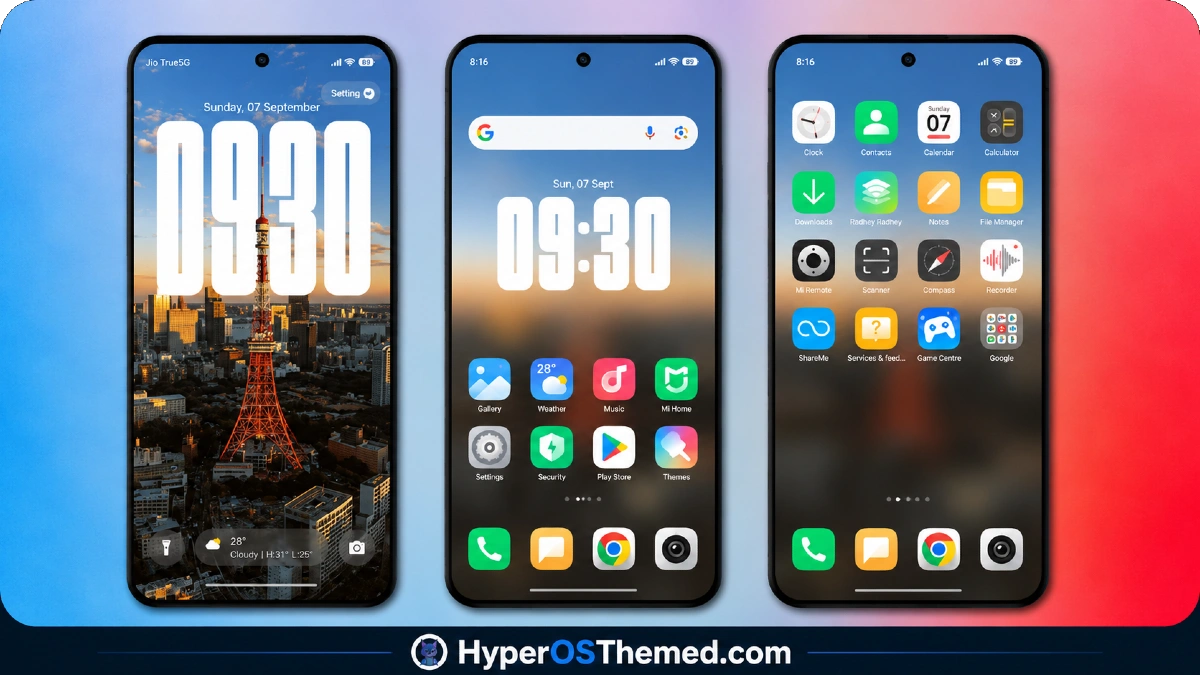
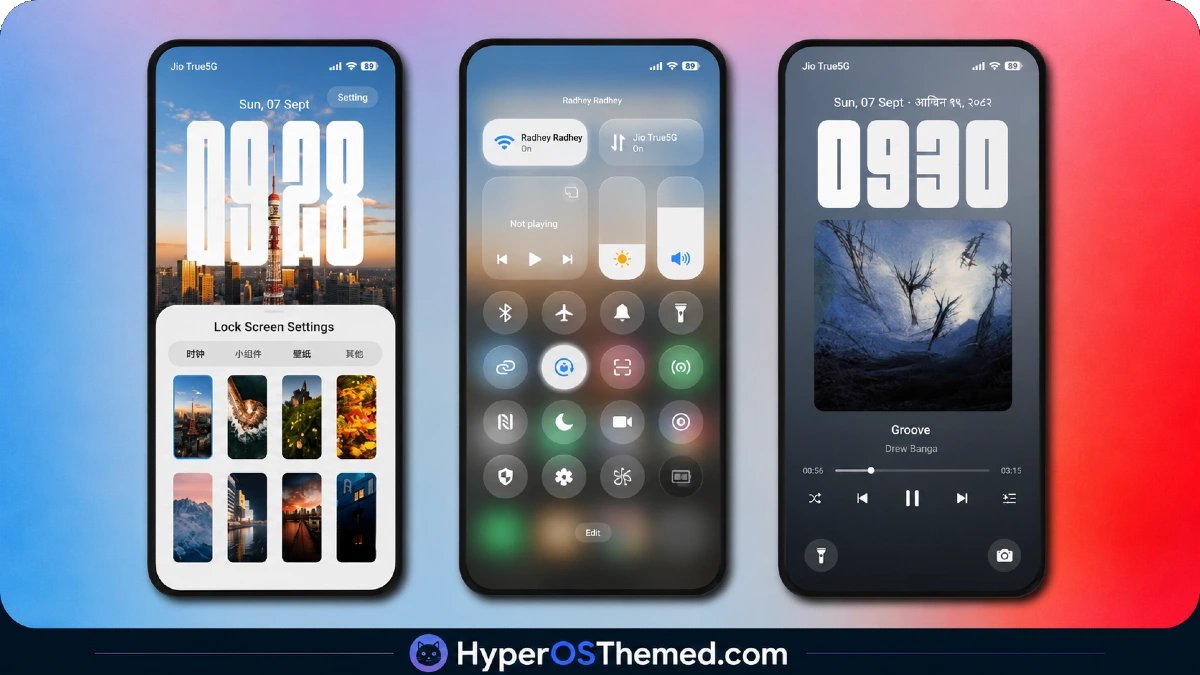
The redesigned lock screen sets the tone for the rest of the theme, with custom clock styling and layout choices that clearly depart from stock HyperOS defaults rather than offering a surface-level recolor.
Icons maintain consistent design language across the home screen and folders, while the Control Center carries that same visual identity into daily quick-settings use. The overall composition reads as a complete, considered package rather than a wallpaper with a few themed extras attached.
Jing HyperOS Theme Details
| Detail | Info |
|---|---|
| Theme Name | Jing |
| Designer | 鲸落雨 |
| Compatibility | HyperOS |
| File Size | 46.3 MB (MTZ) / 63.9 MB (Backup File) |
Jing HyperOS Theme Performance
Testing the standard 46.3 MB MTZ file on the POCO X6 showed the lock screen, icons, and Control Center all rendering correctly without needing the larger backup file to fill in missing elements, suggesting the base package is functionally complete on its own.
Battery drain stayed close to baseline across normal use, messaging, browsing, and some gaming, with no noticeable extra pull from the Control Center or lock screen styling. System app theming held consistently across Dialer, Settings, and Messages throughout testing, and I didn’t encounter overlapping or visibility issues that would require the restart the source material warns about.
Jing HyperOS Theme Compatibility
Jing lists broad HyperOS compatibility without a specific version breakdown, and the POCO X6 ran the standard MTZ file without stability issues throughout testing. Since installation guides are provided separately for HyperOS 1.0 versus HyperOS 2.0 and 3.0, users should follow the guide matching their specific firmware rather than assuming a single install process covers every version identically. Custom ROM users on Xiaomi.eu, MIUIRoom, MIUI SR, or HyperOS CN builds should be able to import the MTZ file through the standard Themes app process without major issues.
Download Jing HyperOS Theme
Both the standard MTZ file and the larger backup file are available directly from the source, and based on testing, the standard MTZ file alone applied all core elements correctly without requiring the backup version. The backup file remains worth grabbing if any icons or system elements look incomplete after the initial install, but it isn’t a mandatory second download the way it was with some other dual-file themes. Avoid third-party mirrors offering either file outside the official listing.
Steps to Apply the Jing HyperOS Theme
For Global Stable ROM:
- Tap the Official Theme Store Link in the download section
- Select the Themes app when prompted to open the link
- You’ll be redirected to the Theme Store to download the theme
- Download the theme and apply it
For Custom ROMs (Xiaomi.eu, MIUIRoom, MIUI SR, HyperOS CN, etc.):
- Download the MTZ file of the theme
- Open the Theme Store app and select the Themes option
- Scroll down and tap Import
- Select the file manager and locate the downloaded .mtz file
- Wait for the theme to import, then tap it to apply
Restart the device if any elements appear overlapping or not fully visible after applying.
What Makes Jing HyperOS Theme Worth Using
- Redesigned lock screen applies correctly using just the standard MTZ file, no backup required
- Control Center overhaul stays responsive despite the reworked spacing and toggle layout
- System-wide theming reaches Dialer, Settings, and Messages, not just the home screen
- Icon coverage extends across most commonly used apps with minimal fallback to defaults
- Optional backup file available for users wanting extra asset coverage, without being mandatory
Final Verdict
Jing HyperOS Theme delivers a genuinely complete package from the standard MTZ file alone, with the lock screen, icons, and Control Center all rendering correctly on a POCO X6 without needing the larger backup file as a crutch.
That’s a meaningful distinction from themes where the base download feels incomplete without a second file, and it means most users can skip the extra 63.9 MB download unless they run into a specific issue. For anyone wanting a system-wide HyperOS redesign that works reliably out of the smaller file, Jing is a solid, well-rounded option.
You may also like:
Super Nai 27 HyperOS Theme — Gradient Minimal Design for Xiaomi, POCO & Redmi
MS M1 HyperOS Theme with iOS 27 Lock Screen and Super Capsule for Xiaomi, POCO & Redmi
Liquid Glass HyperOS Theme for Xiaomi, POCO and REDMI Phones
Edge HyperOS Theme Xiaomi With Minimalist Mountain Silhouette Design for HyperOS
