
A theme built entirely around a single black-and-white image sounds like it should feel thin, but Edge HyperOS Theme’s tiny 6.23 MB file size made me curious whether that restraint actually translated into something purposeful or just underwhelming. I put it on a POCO X6 specifically to test whether the “dynamic lock screen” claim held real function, given how much smaller this file is compared to most of the wallpaper-gallery themes that typically carry that same label.
Edge HyperOS Theme Features
- Black-and-White Cliff Silhouette Wallpaper: The central image shows a lone figure standing atop a cliff edge, rendered entirely in monochrome for a stark, cinematic quality rather than a busy or colorful backdrop. It carries a genuine sense of quiet drama that most minimal themes, which tend to rely on flat gradients or plain colors, don’t attempt.
- Dynamic Lock Screen with Real Data: Rather than a static overlay, the lock screen actively displays battery percentage, remaining time estimates, and step count at a glance. This is meaningfully different from themes that call something “dynamic” just because a clock shifts position, this one actually surfaces live device data directly on the lock screen.
- Oversized Clean Clock: The time display uses a large, simple font that sits comfortably against the silhouette image without needing a background panel to stay legible. It reinforces the overall restrained, purposeful design language rather than competing visually with the mountain scene behind it.
- Open Screen Animation: Per the designer’s own notes, there’s a distinct animation that plays when the screen wakes, adding a small moment of visual polish to what’s otherwise a very stripped-down theme. It’s a detail easy to overlook in a file this size, but it shows deliberate design effort beyond just a static wallpaper swap.
- Shortcut Button Navigation: The lock screen includes a shortcut button that jumps directly into a chosen application, adding a functional shortcut layer on top of the minimalist visual design. It’s a practical touch that fits the “purposeful design” framing better than pure decoration would.
- Extremely Compact File Size: At just 6.23 MB, Edge is one of the smallest themes with this much functional lock screen detail packed in. Installation on the POCO X6 was close to instant, without any of the longer waits associated with larger, image-heavy premium themes.
Edge HyperOS Theme Preview
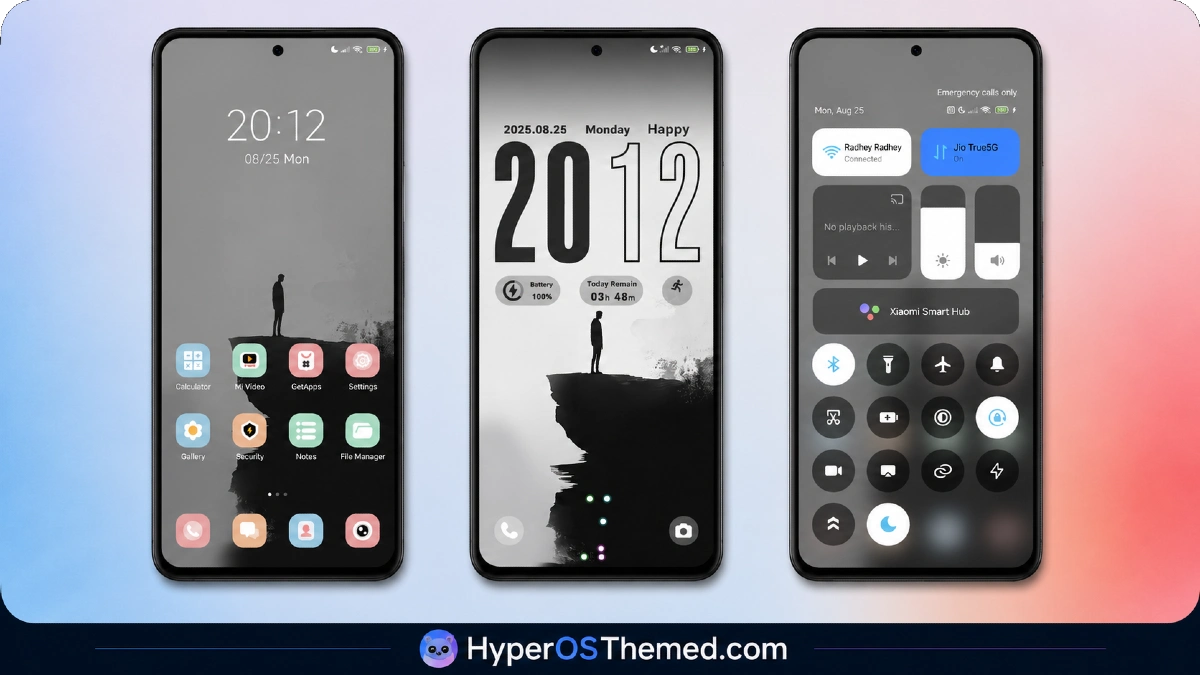
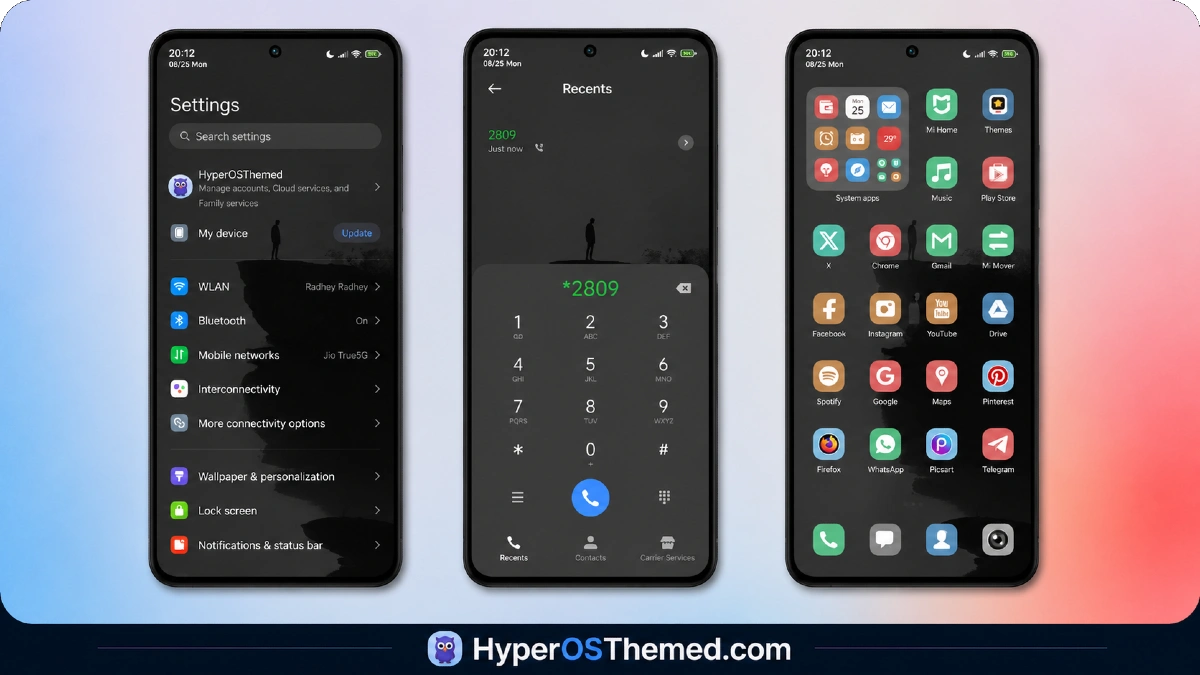
Monochrome carries the entire visual weight here, with the cliff silhouette doing more emotional work than a typical minimal theme’s flat color background ever manages. .
The oversized clock and functional data readouts, battery, time remaining, and steps, sit cleanly against that stark backdrop without cluttering the composition. It reads as deliberate and purposeful rather than sparse for lack of effort, closer to a well-composed photograph than a generic wallpaper choice.
Edge HyperOS Theme Details
| Detail | Info |
|---|---|
| Theme Name | Edge |
| Designer | esuny |
| Compatibility | HyperOS, HyperOS 2.0, HyperOS 3.0 |
| Region | Global |
| Features | Simple, Minimal, Dynamic Lock Screen, Mountain |
| File Size | 6.23 MB |
Edge HyperOS Theme Performance
Given how much live data the lock screen surfaces, battery, time remaining, and steps, all updating in real time, I paid close attention to whether that constant refreshing introduced any drag, and on the POCO X6 it didn’t.
Battery drain across normal use stayed close to baseline, which tracks given the wallpaper itself is static and the data readouts don’t require heavy rendering work. The open screen animation played consistently every time without stutter, and the shortcut button responded immediately when tapped, functioning exactly as described rather than feeling like a decorative afterthought.
Edge HyperOS Theme Compatibility Notes
Edge supports HyperOS, HyperOS 2.0, and HyperOS 3.0, covering the current range of Xiaomi, Redmi, and POCO devices, and the POCO X6 ran it without any stability issues. MIUI 11 through 14 aren’t part of official support here. Given the tiny file size, custom ROM users on Xiaomi.eu or similar HyperOS-based builds should be able to import the MTZ file with essentially no friction compared to larger, more complex themes.
Downloading Edge HyperOS Theme
Use the Official Theme Store Link to download the Edge HyperOS Theme rather than a third-party mirror or forum repost claiming to offer the same file. A theme this small is an easy target for bundling with unwanted extras if downloaded from an unverified source, so sticking with the verified link matters even for a file this size.
Note: If the Official Theme Store Link doesn’t redirect properly, try opening the page in Chrome or the default Xiaomi browser, since other browsers may not handle the redirect correctly.
Steps to Apply the Edge HyperOS Theme
- Open the Theme Store Link given above on your Xiaomi / REDMI / POCO device
- This will redirect you to Theme Store.
- Download and install the theme
- Tap on Apply
- Customize specific elements (icons, lock screen, status bar) if needed
- Reboot your device (optional for full effect)
Why I Choose Edge HyperOS Theme
- Dynamic lock screen surfaces real data, battery, time remaining, and steps, not just visual movement
- Black-and-white silhouette wallpaper delivers genuine cinematic quality in a tiny file
- Shortcut button adds real function on top of the minimalist design
- Extremely compact 6.23 MB size means near-instant installs
- Open screen animation adds polish without bloating the file size
Final Verdict
Edge HyperOS Theme proves a theme doesn’t need a large file size or a wallpaper gallery to feel complete; the black-and-white cliff image and genuinely functional lock screen data readouts do more with less than most larger, more decorated themes manage.
On a POCO X6, it installed instantly, ran without any performance cost, and delivered exactly what its sparse feature list promised. For anyone who wants a minimal theme that’s purposeful rather than just plain, it’s one of the most efficient picks available.
You may also like:
TronM HyperOS Theme with Vibrant Orange Neon Design for Xiaomi & Redmi
Super26i HyperOS Theme with Premium Colourful, Dynamic Lock Screen for Xiaomi, POCO & Redmi
Rat V HyperOS Theme with 3D Anime Style Meets Dynamic Island for Xiaomi & Redmi
Super Surge HyperOS Theme With iOS-Inspired Dynamic Island for Xiaomi, POCO & Redmi
Pure Blue HyperOS Theme with Deep Space Vortex Design for Xiaomi, POCO & Redmi
