
OX M3 HyperOS Theme is a theme for Xiaomi, Redmi and POCO devices designed by Oxfury, covering a wide compatibility range across HyperOS 1.0, 2.0 and 3.0. It brings a coordinated redesign across the lock screen, icons and control center, along with a separate depth effect wallpaper included as an optional add-on.
What sets this one apart from many single-version themes is the dedicated download path for both older and newer HyperOS builds, which reduces the guesswork often involved with cross-version compatibility. At 41.4 MB, it sits in a reasonable middle ground for file size given the amount of UI it modifies.
OX M3 HyperOS Theme Features
- Cross-Version Compatibility: OX M3 is built to support HyperOS 1.0, 2.0 and 3.0 through separate installation paths rather than a single universal file. This structure helps reduce rendering inconsistencies that often show up when older devices install themes designed primarily for newer builds.
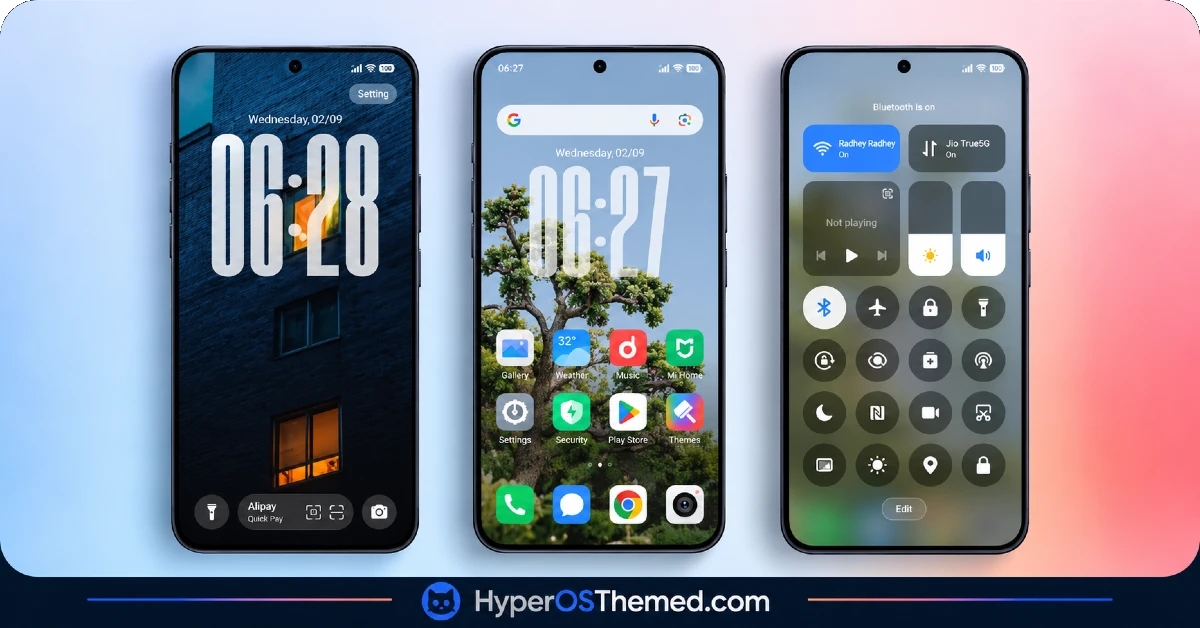
- Custom Icon Pack System and commonly used third-party app icons receive a redesigned look with consistent shading and outline style. As with most icon packs, a portion of less common apps may retain their default appearance since full coverage across every installed app isn’t typical.
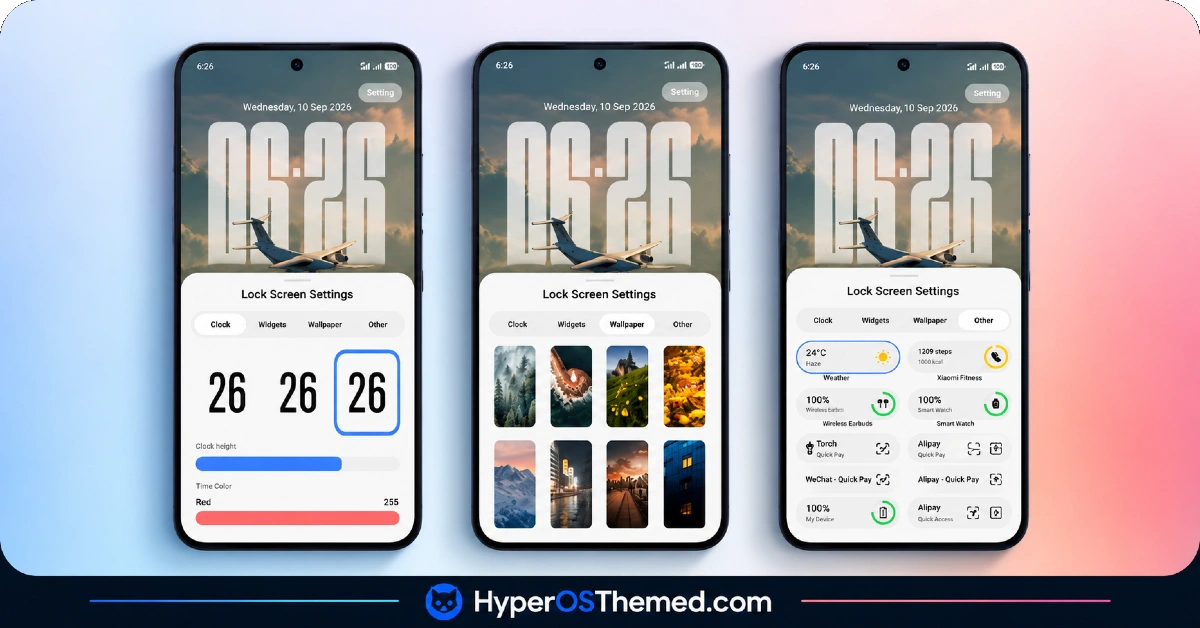
- Redesigned Lock Screen: The lock screen layout is restructured with adjusted clock placement and refreshed spacing around notifications. This is one of the more visually distinct areas compared to the stock HyperOS lock screen.
- Updated Control Centre: Quick toggle icons and the panel layout get a visual refresh that ties in with the rest of the theme’s design direction. The core toggle arrangement stays close to stock, so it functions mainly as a styling update rather than a layout overhaul.
- Optional Depth Effect Wallpaper: A separate depth effect wallpaper file is available as an add-on download rather than being bundled directly into the main theme file. This keeps the core MTZ file lighter for anyone who prefers to skip the extra wallpaper.
- Dedicated Version-Specific Installation Links: Rather than one link for all devices, OX M3 HyperOS Theme provides separate Theme Store links depending on whether the device runs HyperOS 3.0 or HyperOS 1.0/2.0. This reduces the chance of installing a mismatched version and running into display issues afterward.
OX M3 HyperOS Theme Preview
The screenshots below show the redesigned icon layout, the updated lock screen and how the control center panel appears once the theme is applied. Reviewing these first is useful since the depth effect wallpaper adds a visual layer that’s easier to judge by sight than by description.
OX M3 HyperOS Theme Details
| Attribute | Details |
|---|---|
| Availability | Free, via Xiaomi Theme Store |
| Supported Devices | Xiaomi, Redmi and POCO phones running HyperOS |
| Theme Name | OX M3 |
| Designer | Oxfury |
| Compatibility OS | HyperOS 1.0, HyperOS 2.0 and HyperOS 3.0 |
| Features | Custom icon pack, redesigned lock screen, updated control center, optional depth effect wallpaper |
| File Size | 41.4 MB (MTZ file), 2.5 MB (Depth Effect Wallpaper) |
OX M3 HyperOS Theme Compatibility
OX M3 HyperOS Theme supports a broad range of HyperOS versions, with separate download links provided for HyperOS 3.0 devices and HyperOS 1.0/2.0 devices. This split approach is meant to reduce compatibility issues that can arise when a single theme file is applied across very different HyperOS builds.
Custom ROM users on setups like Xiaomi.eu, MIUIRoom or HyperOS CN can still import the MTZ file manually, though the visual results may vary slightly from what’s shown on the official global stable ROM. Since icon coverage typically doesn’t extend to every third-party app installed, users with a heavily customized app list may notice a few icons that don’t match the rest of the theme.
Get OX M3 HyperOS Theme
Download OX M3 HyperOS Theme only through the official Theme Store links provided above, matched to the correct HyperOS version running on the device.
Files sourced from third-party APK sites or unofficial file-sharing forums are difficult to verify and may not reflect the version Oxfury actually released. Using the official Theme Store also means the correct version is installed automatically and any future updates remain accessible.
How to Apply OX M3 HyperOS Theme
Follow the steps below to apply the theme:
- Open the Theme Store link given above on your Xiaomi, Redmi or POCO device.
- This will redirect you to the Theme Store.
- Download and install the theme.
- Tap on Apply.
- Customize specific elements such as icons, lock screen or status bar if needed.
- Reboot your device for the full effect, though this step is optional.
Note: If any visual glitches or overlapping elements appear right after installing, restarting the device usually clears them up without additional steps. This theme has been checked across its supported HyperOS versions and hasn’t shown any significant issues during that process. Still, if something doesn’t look right on a particular device after applying it, leaving a comment with the details helps get it looked into.
Installing OX M3 HyperOS Theme on Custom ROM Devices
Devices running a Custom ROM such as Xiaomi.eu, MIUIRoom, MIUI SR or HyperOS CN aren’t able to use the direct Theme Store link, so the MTZ file needs to be brought in manually through the Theme Store app. Here’s how that works:
- Save the MTZ file for OX M3 onto the device.
- Open the Theme Store app.
- Head into the Themes section.
- Scroll down until the Import option appears, then tap it.
- Use the file manager to locate the downloaded .mtz file.
- Wait for the import process to finish.
- Select the theme once it appears in the list to apply it.
Why Choose OX M3 HyperOS Theme?
- Wide version compatibility — supports HyperOS 1.0, 2.0 and 3.0 through dedicated installation paths.
- Separate download links by version — reduces the risk of installing an incompatible file.
- Coordinated icon and lock screen design — visual elements tie together rather than feeling separate.
- Optional depth wallpaper add-on — available separately without bloating the main theme file.
- Moderate file size — 41.4 MB keeps download times reasonable for the amount of UI covered.
- Consistent control center styling — toggle icons match the rest of the theme’s visual direction.
- Free through the official Theme Store — no cost involved and no need for third-party sources.
- Version-specific install guidance — clear separation between HyperOS 3.0 and older version instructions.
Conclusion
OX M3 HyperOS Theme stands out mainly for its broad HyperOS version support and the dedicated installation paths that come with it, which makes it a more accessible option for users on older devices as well as newer ones. The optional depth wallpaper and coordinated icon design add a nice finishing touch, even if icon coverage across every third-party app isn’t complete. For Xiaomi, Redmi and POCO users looking for a theme that works reliably across multiple HyperOS versions, OX M3 is worth trying.
You may also like:
iOS Style Super Surge HyperOS Theme for Xiaomi, POCO and Redmi Phones
Super Surging 3 HyperOS Theme with iOS-Style Dynamic Island for Xiaomi, POCO and REDMI Phones
OX LS: HyperOS & MIUI Theme for Xiaomi, POCO and REDMI Phones
Retina HyperOS Theme for Xiaomi, POCO and REDMI Phones
Aurora Pulse HyperOS Theme With Premium Gradient Redesign for Xiaomi, POCO & Redmi
