
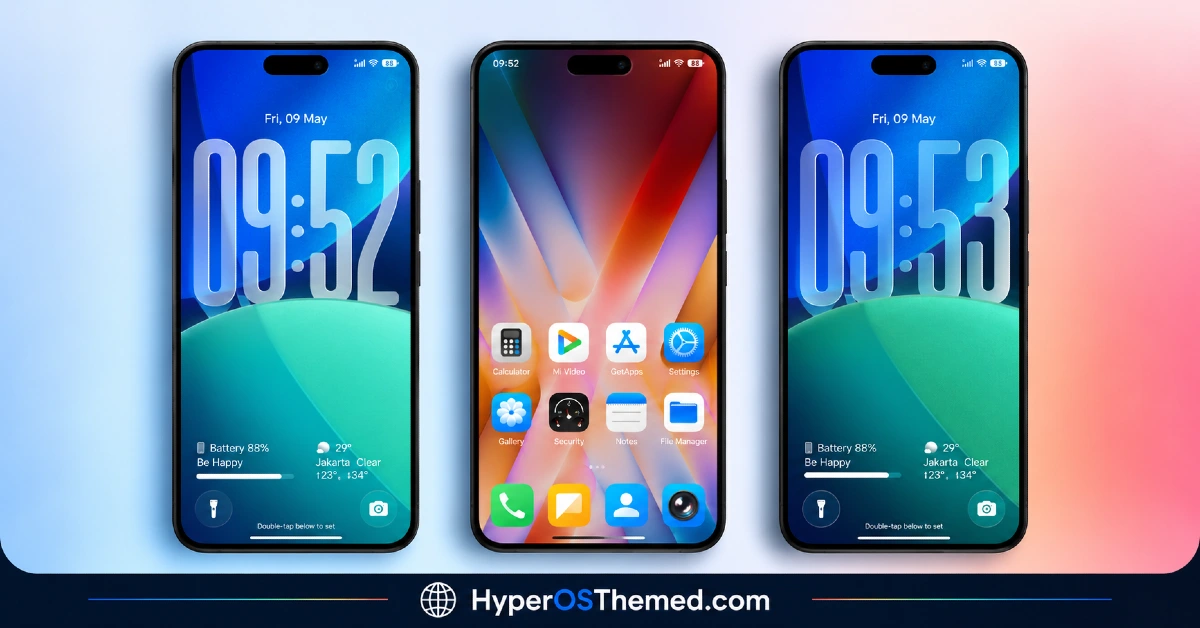
Diamond.V2 HyperOS Theme is a premium iOS-inspired theme for Xiaomi, Redmi and POCO devices, built around a large glass-style lock screen clock and a wide library of built-in wallpapers ranging from blue-green gradients to icy landscape and aerial photography shots.
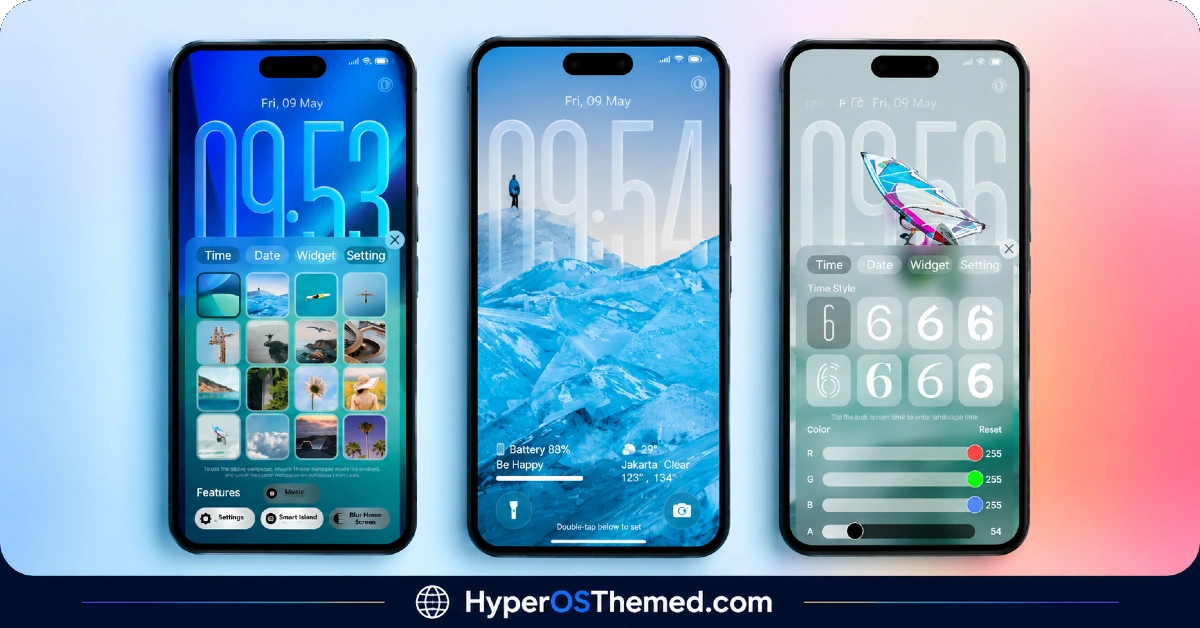
Designed by Ajay, it goes further than most themes by letting users adjust the lock screen clock color directly through RGB sliders instead of offering a fixed set of preset colors.
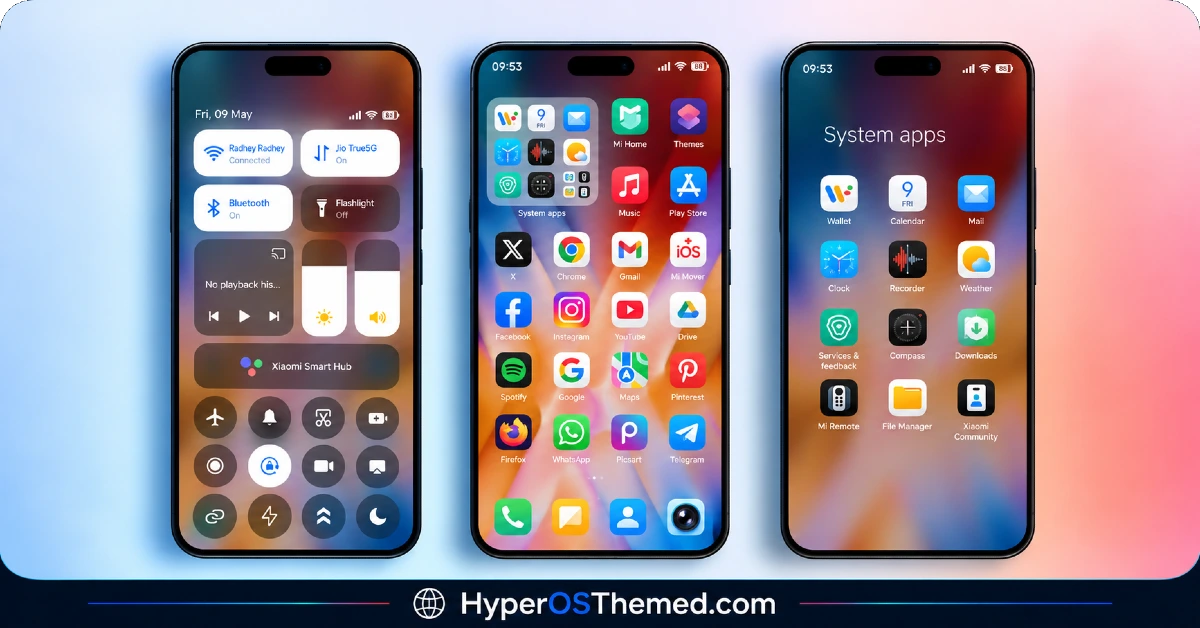
The home screen carries the same iOS-leaning aesthetic with original icon designs, a frosted glass control center and added extras like Smart Island support and a Blur Home Screen option. At 29.10 MB and compatible across HyperOS, HyperOS 2.0 and HyperOS 3.0, it’s a fairly well-rounded package for anyone chasing that iOS-style look on a Xiaomi device.
Diamond.V2 HyperOS Theme Features
- Customizable Glass-Style Lock Screen Clock: The standout feature here is the oversized outline clock on the lock screen, which uses a glass-like transparent effect layered over the chosen wallpaper. RGB sliders let users pick a specific clock color rather than choosing from a limited preset palette, which is a level of control most HyperOS themes don’t offer.
- Extensive Built-In Wallpaper Library: Diamond.V2 HyperOS Theme ships with a notably wide range of wallpapers, including gradient designs, icy landscape shots and aerial photography. Having this many options built directly into the theme means less searching for a separate wallpaper that matches the overall aesthetic.
- iOS-Inspired Icon Set The icons are redesigned from scratch to mimic the rounded, flat style associated with iOS rather than simply recoloring existing HyperOS icons. Coverage extends to most common apps, though as with any icon pack, a few less popular apps may retain their original look.
- Frosted Glass Control Center: The quick settings panel gets a translucent, frosted glass treatment that’s a clear visual departure from the standard HyperOS control center. It’s one of the more distinctive elements of the theme and ties in well with the overall glass motif used on the lock screen.
- Smart Island and Blur Home Screen Support: Diamond.V2 includes Smart Island functionality along with an optional Blur Home Screen effect, both of which push it closer to a full iOS-style experience rather than a simple icon and wallpaper swap. These extras add a bit more depth compared to themes that stop at visual styling alone.
- Dedicated Settings Shortcut: A built-in Settings shortcut is included as part of the theme package, which is a smaller but convenient addition considering how much of the interface this theme touches. It’s not a major feature on its own, but it fits with the theme’s overall focus on convenience and polish.
Diamond.V2 HyperOS Theme Preview
The screenshots below show the glass-style lock screen clock, the wallpaper variety and how the frosted control center looks once applied. Since the RGB clock customization and glass effects are difficult to fully picture from a written description, checking the preview gives a much clearer sense of how the finished look actually appears on screen.
Diamond.V2 HyperOS Theme Details
| Attribute | Details |
|---|---|
| Availability | Free, via Xiaomi Theme Store |
| Supported Devices | Xiaomi, Redmi and POCO phones running HyperOS |
| Theme Name | Diamond.V2 |
| Designer | Ajay |
| Features | RGB customizable lock screen clock, extensive wallpaper library, iOS-inspired icons, frosted glass control center, Smart Island support, Blur Home Screen |
| File Size | 29.10 MB |
Diamond.V2 Theme Compatibility
Diamond.V2 HyperOS Theme supports HyperOS, HyperOS 2.0 and HyperOS 3.0, giving it a decent spread across both older and newer Xiaomi, Redmi and POCO devices. Since the theme relies on effects like frosted glass and glass-style clock rendering, older HyperOS builds may display these elements with slightly less polish compared to the most current version.
Custom ROM users on setups like Xiaomi EU ROM or MIUIRoom can still install the theme manually through the MTZ file, though the RGB clock customization and blur effects may behave a little differently outside the official global stable ROM. As with most lock-screen-heavy themes, it’s worth restarting the device after installation if anything looks overlapped or fails to render correctly on the first attempt.
Get Diamond.V2 HyperOS Theme
Download Diamond.V2 HyperOS Theme Xiaomi only through the official Theme Store link rather than random third-party file hosts or unofficial APK sources. Files circulating outside verified channels are hard to confirm as unaltered, and there’s no way to know if extra, unwanted elements have been added to them. Using the official Theme Store link ensures the version installed matches what the designer actually released and keeps future updates accessible.
How to Apply Diamond.V2 HyperOS Theme
Follow the steps below to apply the theme:
- Open the Theme Store link given above on your Xiaomi, Redmi or POCO device.
- This will redirect you to the Theme Store.
- Download and install the theme.
- Tap on Apply.
- Customize specific elements such as icons, lock screen or status bar if needed.
- Reboot your device for the full effect, though this step is optional.
Note: If any part of the interface looks overlapped or fails to display properly right after installing, restarting the device usually takes care of it. This theme has been checked across its supported HyperOS versions without any major issues coming up in that process. Even so, if something looks off on a specific device once it’s applied, leaving a comment with the details helps get it looked into.
Installing Diamond.V2 HyperOS Theme on Custom ROM Devices
Devices running MIUI 11 through 14 or HyperOS based Custom ROMs such as Xiaomi EU ROM or MIUIRoom aren’t able to use the direct Theme Store link, so the MTZ file needs to be brought in manually. Here’s how that works:
- Grab the MTZ file for Diamond.V2 HyperOS Theme from the download section.
- Open the Theme Store app.
- Go into the Themes tab.
- Scroll down to find the Import option, then tap it.
- Use the file manager to locate the downloaded .mtz file.
- Wait for the import process to finish.
- Tap the theme once it appears in the list to apply it.
Why Choose Diamond.V2 HyperOS Theme Theme?
- RGB clock customization — full color control over the lock screen clock instead of a fixed preset palette.
- Large wallpaper variety — includes gradients, landscape shots and aerial photography built right into the theme.
- Genuine iOS-style icon redesign — icons are built from scratch rather than just recolored versions of stock ones.
- Frosted glass control center — a visually distinct panel design that stands apart from the default HyperOS look.
- Smart Island functionality included — adds a feature-rich touch beyond typical icon and wallpaper theming.
- Optional Blur Home Screen effect — gives extra visual depth for users who want it.
- Broad HyperOS version support — works across HyperOS, HyperOS 2.0 and HyperOS 3.0.
- Free official availability — no cost involved and distributed through a legitimate Theme Store link.
Conclusion
Diamond.V2 HyperOS Theme stands out for how much control it hands over to the user, particularly with the RGB lock screen clock and the sheer variety of built-in wallpapers to choose from. The frosted glass control center and Smart Island support round it out into one of the more feature-complete iOS-style themes available for HyperOS right now. For Xiaomi, Redmi and POCO users chasing a premium, customizable iOS look, Diamond.V2 is well worth trying.
You may also like:
Jiyan IzzyBRV15 HyperOS Theme with Black and Dark Icon Design for Xiaomi, POCO and REDMI Phones
iOS Style Super Surge HyperOS Theme for Xiaomi, POCO and Redmi Phones
Super Surging 3 HyperOS Theme with iOS-Style Dynamic Island for Xiaomi, POCO and REDMI Phones
OX LS: HyperOS & MIUI Theme for Xiaomi, POCO and REDMI Phones
