
Jiyan IzzyBRV15 HyperOS Theme is a Premium theme for Xiaomi, Redmi and POCO devices built around a black and dark color icon design rather than a bright or gradient-heavy look. It brings a coordinated set of new icons, wallpapers, a redesigned status bar and lock screen, along with a styled Always-on Display, all working toward the same darker visual identity.
Designed by agit77, the theme is distributed globally and stays fairly compact at just over 25 MB, making it one of the lighter downloads compared to some of the larger HyperOS theme packages out there. For anyone who wants a stock look with less brightness and a more uniform dark tone across the interface, this is a reasonably straightforward option to try.
Jiyan IzzyBRV15 HyperOS Theme Features
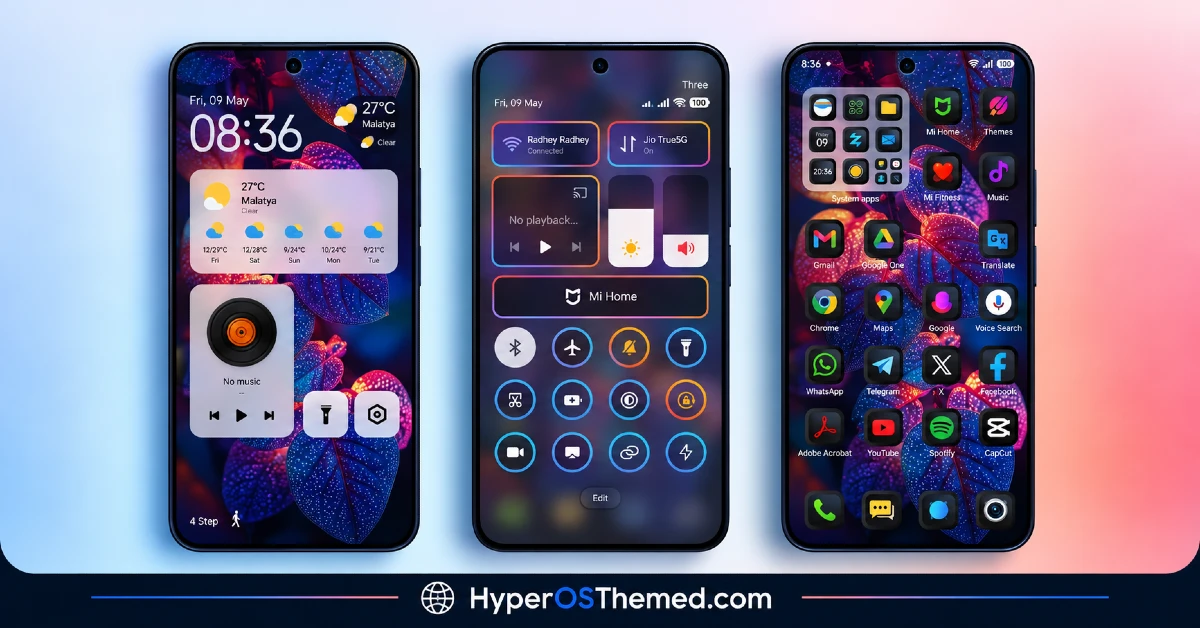
- Black and Dark Icon Design: The core of this theme is its black-toned icon set, which replaces the default colorful icons with a darker, more uniform palette across system and popular apps. This kind of styling tends to pair well with an AMOLED display since darker tones can reduce screen glare in low-light settings.
- Custom Status Bar: The status bar receives a visual update to match the darker overall theme, changing how time, battery and network icons appear at the top of the screen. It’s a smaller change compared to the icon overhaul, but it helps keep the top bar from clashing with the rest of the dark design.
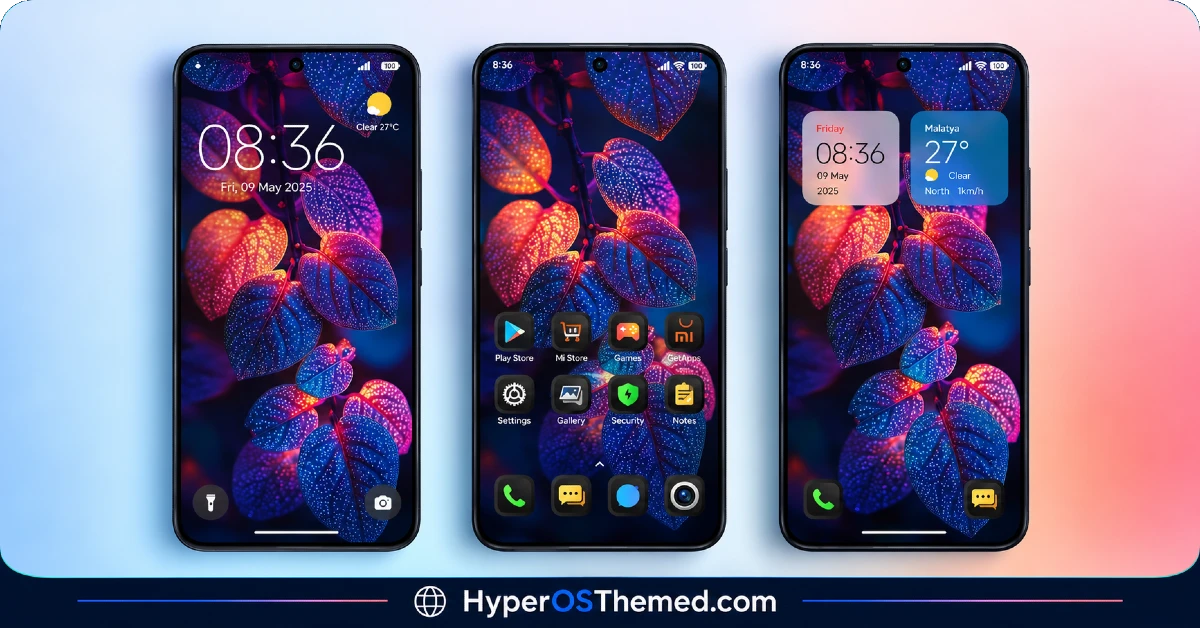
- Redesigned Lock Screen: The lock screen layout is adjusted to fit the theme’s dark aesthetic, with updated spacing and styling around the clock and notifications. As with most lock screen modifications, it’s worth keeping an eye on it right after applying in case any display quirks show up on a specific device.
- Styled Always-on Display: The Always-on Display gets its own custom look rather than relying on the default clock face, which is a nice inclusion for devices that keep AOD active throughout the day. Since AOD styling can vary depending on panel type, results may look slightly different depending on the specific Xiaomi or Redmi model.
- Fresh Wallpaper Set: The included wallpapers are designed to complement the dark icon palette rather than clash with it, keeping the whole visual package feeling connected. The selection isn’t huge, so those wanting a large wallpaper gallery to rotate through may find the choices somewhat limited.
- Compact File Size: At roughly 25 MB, Jiyan IzzyBRV15 is noticeably lighter than many full-system HyperOS themes that push past 40 or 50 MB. This makes it a quicker download and a lower storage commitment for anyone just wanting to try it out.
Jiyan IzzyBRV15 HyperOS Theme Preview
The screenshots below show the black icon design, the updated status bar and lock screen, along with how the Always-on Display looks once the theme is applied. Since dark themes can look quite different depending on screen type and brightness settings, checking the preview first gives a more accurate sense of what to expect on an actual device.
Jiyan IzzyBRV15 HyperOS Theme Details
| Attribute | Details |
|---|---|
| Availability | Free, via Xiaomi Theme Store |
| Supported Devices | Xiaomi, Redmi and POCO phones running HyperOS |
| Theme Name | Jiyan IzzyBRV15 |
| Designer | agit77 |
| Features | Black and dark icon design, custom status bar, redesigned lock screen, styled Always-on Display, fresh wallpapers |
| File Size | 25.21 MB |
Jiyan IzzyBRV15 HyperOS Theme Compatibility
Jiyan IzzyBRV15 HyperOS Theme is built for HyperOS and works across Xiaomi, Redmi and POCO devices running that system. Since the theme relies heavily on dark tones for icons and the Always-on Display, how it looks can vary slightly depending on the specific display panel used by each device model.
Custom ROM users on builds like Xiaomi.eu, MIUIRoom or other MIUI and HyperOS based ROMs can install the theme manually through the MTZ file, though visual results may differ a bit from the official global stable ROM experience. One general point worth keeping in mind with any dark, lock-screen-modifying theme is that display glitches can occasionally show up after installation, so a restart is usually the first thing to try if anything looks off.
Get Jiyan IzzyBRV15 HyperOS Theme
Download Jiyan IzzyBRV15 only through the official Theme Store link rather than third-party APK sites or random file-sharing uploads. Files hosted outside official or clearly credited sources are harder to verify and may not match what the designer actually released. Sticking to the official Theme Store link keeps the installed version consistent with the intended design and avoids the risks that come with unverified downloads.
How to Apply Jiyan IzzyBRV15 HyperOS Theme
Follow the steps below to apply the theme:
- Open the Theme Store link given above on your Xiaomi, Redmi or POCO device.
- This will redirect you to the Theme Store.
- Download and install the theme.
- Tap on Apply.
- Customize specific elements such as icons, lock screen or status bar if needed.
- Reboot your device for the full effect, though this step is optional.
Note: If anything looks overlapped or doesn’t display correctly right after installing, restarting the device is usually enough to sort it out. This theme has gone through testing on HyperOS without any major issues turning up in that process. Still, if something looks unusual on a particular device after applying it, leaving a comment with the details helps get it looked into.
Installing Jiyan IzzyBRV15 HyperOS Theme on Custom ROM Devices
Devices running MIUI or HyperOS based Custom ROMs such as Xiaomi.eu, MIUIRoom or similar builds aren’t able to use the direct Theme Store link, so the MTZ file needs to be added manually instead. Here’s how that works:
- Grab the MTZ file for the theme from the download section.
- Open the Theme Store app.
- Go into the Themes tab.
- Scroll down to find the Import option, then tap it.
- Use the file manager to locate the downloaded .mtz file.
- Wait for the file to finish importing.
- Tap the theme once it appears in the list to apply it.
Why Choose Jiyan IzzyBRV15 HyperOS Theme?
- Distinct black icon palette — offers a darker, more uniform look than most default color icon packs.
- Compact file size — at just over 25 MB, it’s one of the lighter theme downloads available.
- Custom Always-on Display styling — a nice extra for devices that keep AOD running throughout the day.
- Coordinated status bar design — small details like the top bar are updated to match the dark theme.
- Complementary wallpaper set — wallpapers are chosen specifically to fit the black icon aesthetic.
- Wide device compatibility — works across Xiaomi, Redmi and POCO phones running HyperOS.
- Free official download — no cost involved and distributed through a legitimate Theme Store link.
- Simple, quick installation — the smaller file size means faster downloads and quicker setup.
Conclusion
Jiyan IzzyBRV15 HyperOS Theme is a solid pick for anyone wanting a darker, more uniform icon style on their Xiaomi, Redmi or POCO device without committing to a large, heavy theme file. The wallpaper selection is on the smaller side and, like most lock-screen-modifying themes, it’s worth watching for minor display quirks after installing, but neither issue should get in the way of a smooth setup. For those who prefer black and dark tones over bright or gradient-based themes, it’s worth giving a try.
You may also like:
iOS Style Super Surge HyperOS Theme for Xiaomi, POCO and Redmi Phones
Super Surging 3 HyperOS Theme with iOS-Style Dynamic Island for Xiaomi, POCO and REDMI Phones
OX LS: HyperOS & MIUI Theme for Xiaomi, POCO and REDMI Phones
