
Moscreen keeps finding new ways to pair unusual textures with genuine system-wide coverage, and Paper Sea Breeze HyperOS Theme continues that streak, combining a 3D paper-style widget aesthetic with sea-inspired visuals rather than sticking to one familiar theme concept.
Paper Sea Breeze Theme is Built around a sleek, dark and slightly futuristic color scheme, it reaches into the Settings menu, dialer pad and notification bar rather than stopping at icons and a wallpaper. At a remarkably light 6.22 MB, it covers HyperOS, HyperOS 2.0 and HyperOS 3.0, distributed globally through the official Theme Store.
Paper Sea Breeze HyperOS Theme Key Features
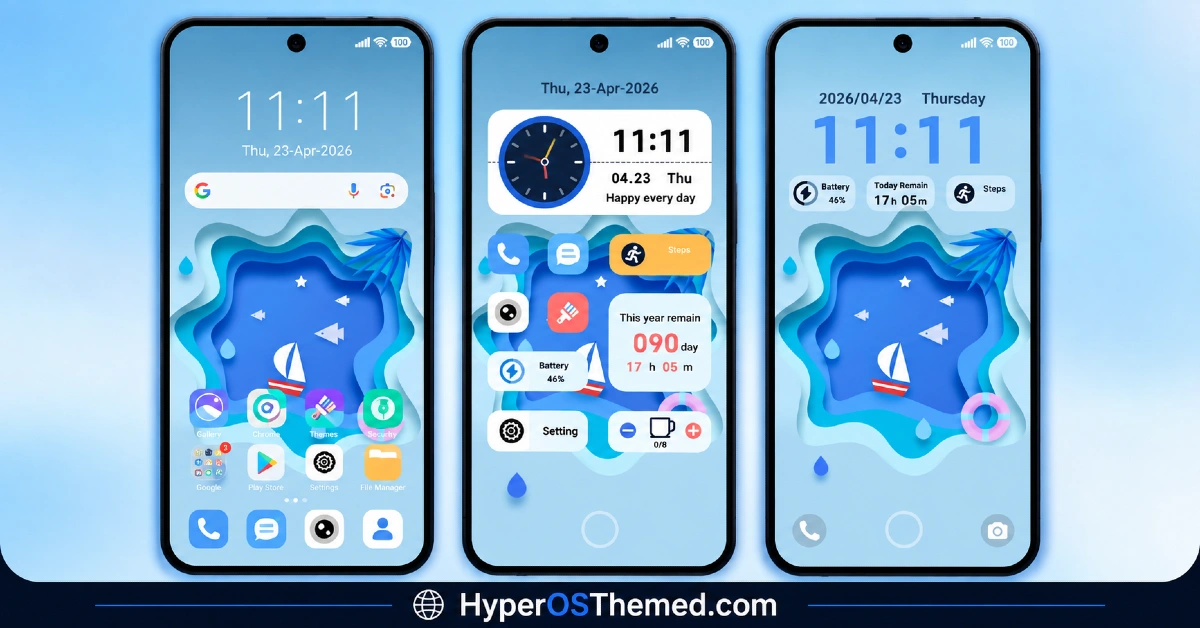
- 3D Paper-Style Widgets: The widgets carry a distinctive paper-textured visual identity rather than the flat clock and weather boxes most themes default to. That specific design choice givesPaper Sea Breeze HyperOS Theme genuine personality compared to the usual gradient or glass widget styles.
- Multiple Sea-Inspired Wallpapers: Rather than a single showcase image, the theme includes several wallpaper options built around the same sea and paper design concept, giving genuine variety to choose from.
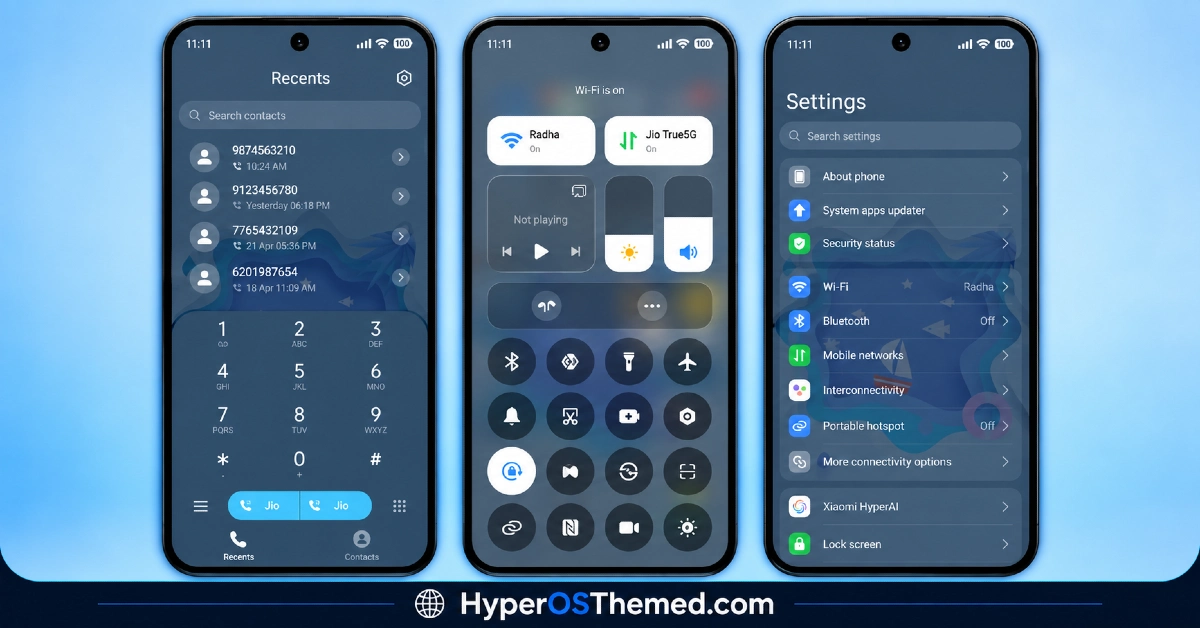
- Control Centre Redesign: The Control Centre gets its own visual overhaul, moving away from the stock HyperOS panel to something that matches the theme’s darker, elegant color scheme.
- Updated Status Bar: The status bar picks up a fresh look consistent with the rest of the theme rather than being left as an untouched default element.
- Changed Notification Bar: Notifications get their own styling pass, keeping users up to date on alerts without the panel clashing visually with the rest of the redesigned interface.
- Beautiful Icon Pack: A dedicated icon set adds a touch of elegance to the home screen, tying into the overall sleek aesthetic rather than sitting as a mismatched default grid.
- Unique Lock Screen Design: The lock screen carries its own distinct layout, helping the device stand out rather than defaulting to a generic unlock screen.
- Settings Menu Customization: Beyond the home screen, the Settings menu picks up its own visual treatment, extending the personalization deeper into the system than most icon-focused themes bother going.
- Dialer Pad Redesign: The phone dialer gets a new and improved look, a detail plenty of themes skip entirely in favor of focusing purely on the home screen and lock screen.
Paper Sea Breeze Theme Preview
The screenshots below show the 3D paper-style widgets, the sea-inspired wallpaper collection and how the redesigned Control Centre and lock screen come together once the theme is applied. Given how compact the file size is relative to how much of the system this theme touches, it’s worth browsing the preview to see just how much detail moscreen packed into so little space.
Paper Sea Breeze Theme Details
| Attribute | Details |
|---|---|
| Availability | Free, via Xiaomi Theme Store |
| Supported Devices | Xiaomi, Redmi and POCO phones running HyperOS |
| Theme Name | Paper Sea Breeze |
| Designer | moscreen |
| Region | Global |
| Compatibility OS | HyperOS, HyperOS 2.0 and HyperOS 3.0 |
| Features | 3D paper-style widgets, multiple sea-inspired wallpapers, Control Centre redesign, updated status bar and notification bar, beautiful icon pack, unique lock screen, dialer pad redesign |
| File Size | 6.22 MB |
Paper Sea Breeze Theme Compatibility
Paper Sea Breeze supports HyperOS, HyperOS 2.0 and HyperOS 3.0, giving it solid reach across Xiaomi, Redmi and POCO devices running any of those versions. Given how small the file size is relative to the number of elements it modifies, from the dialer pad to the Settings menu, there’s generally less to go wrong during installation compared to heavier, effect-laden themes.
The theme also includes slide-down access to additional customization options, so it’s worth exploring those settings after applying to get the most out of the design. As with most themes touching the lock screen and dialer, a quick restart after installation is a sensible step if anything looks slightly off on the first try.
Get Paper Sea Breeze HyperOS Theme
Download Paper Sea Breeze HyperOS Theme only through the official Theme Store link or the direct MTZ file link rather than random third-party file hosts or unofficial APK uploads. Files sourced outside verified channels are difficult to confirm as unaltered and may not reflect what moscreen actually released. Sticking to the official Theme Store link keeps the installed version consistent with the intended design and ensures any future updates remain accessible.
How to Apply Paper Sea Breeze HyperOS Theme
Follow the steps below to apply the theme:
- Open the Theme Store link given above on your Xiaomi, Redmi or POCO device.
- This will redirect you to the Theme Store.
- Download and install the theme.
- Tap on Apply.
- Customize specific elements such as icons, lock screen or status bar if needed.
- Reboot your device for the full effect, though this step is optional.
Note: If anything looks overlapped or doesn’t display correctly right after installing, restarting the device usually clears it up without further steps. Paper Sea Breeze HyperOS Theme has been checked across its supported HyperOS versions without any major issues turning up. Still, if something looks off on a specific device once it’s applied, leaving a comment with the details helps get it looked into.
Installing Paper Sea Breeze HyperOS Theme on Custom ROM Devices
Devices running a Custom ROM aren’t able to use the direct Theme Store link, so the MTZ file needs to be brought in manually through the Theme Store app instead. Here’s how that works:
- Grab the MTZ file for Paper Sea Breeze HyperOS Theme from the download section.
- Open the Theme Store app.
- Go into the Themes tab.
- Scroll down to find the Import option, then tap it.
- Use the file manager to locate the downloaded .mtz file.
- Wait for the import process to finish.
- Tap the theme once it appears in the list to apply it.
Why Choose Paper Sea Breeze HyperOS Theme?
- Distinctive 3D paper-style widgets — a textured look that stands apart from flat or glossy widget styles.
- Remarkably small file size — 6.22 MB is tiny given how much of the system this theme touches.
- Dialer pad redesign — a detail many themes overlook entirely.
- Full system coverage — Control Centre, status bar, notifications and Settings all get updated, not just the home screen.
- Distinct lock screen design — its own layout rather than a leftover default.
- Broad HyperOS compatibility — works across HyperOS, HyperOS 2.0 and HyperOS 3.0.
- Quick, effortless installation — the tiny file size means near-instant downloads.
- Free official download — no cost involved and distributed through legitimate channels.
Conclusion
Paper Sea Breeze Xiaomi Theme backs up its distinctive paper-and-sea aesthetic with genuine system-wide reach, the dialer pad, Settings menu and notification bar all get real attention rather than being left as an afterthought, and it does it all in a file size a fraction of what most comparable themes require. For Xiaomi, Redmi and POCO users who want a sleek, textured theme without a heavy download, Paper Sea Breeze is well worth trying.
Also Check These Themes:
- GIN SAND v2 HyperOS Theme for Xiaomi, POCO, Redmi
- Surge AP27 Pro HyperOS Theme with iOS-Style Depth Effect & Premium Widgets for Xiaomi, POCO, Redmi
- Regular-3 HyperOS Theme For Xiaomi, POCO, Redmi
- Original-3 HyperOS Theme with Clean iOS and Liquid Glass Blend for Xiaomi, POCO, Redmi
- Yut18 v26 HyperOS Theme – Clean iOS-Inspired Minimalism for Xiaomi, POCO, Redmi
