
Every so often you come across a theme name that gives away almost nothing about what’s inside it, and Original-3 HyperOS Theme is a good example of that. There’s no flashy color mentioned, no dramatic visual gimmick promised, just a number tacked onto a word that suggests it’s part of a series.
Designed by Eto’o, it turns out to be one of those quiet, considered themes that works by getting the fundamentals right across the whole phone rather than chasing one standout feature. It pulls in a bit of iOS-style restraint along with some abstract and liquid glass detailing, which together give it a calmer, more premium feel than the typical flat HyperOS redesign.
What really separates Original-3 HyperOS Theme from a basic icon pack, though, is how far it actually reaches. Settings, the notification panel, Control Center, the dialer, messaging, system apps that most themes just leave alone, all of it gets folded into the same visual language. That’s not a small thing.
A lot of free themes redesign the home screen and then leave you staring at default HyperOS the second you open Settings, and that inconsistency is usually what makes a theme feel cheap even when the icons themselves look fine.
Original-3 HyperOS Theme avoids that trap by treating the whole phone as one connected space rather than a home screen with some leftover stock menus attached to it. Built specifically for HyperOS 2 and HyperOS 3, it’s aimed at Xiaomi, Redmi and POCO users who want their device to feel organized and a little more polished without needing to root anything or give up any real performance to get there.
Original-3 HyperOS Key Features
- System-Wide UI Customization: Original-3 HyperOS Theme applies its changes across the entire system rather than stopping at the home screen, reaching into Settings, the notification panel, Control Center, dialer and messaging UI, and other system apps. That full coverage is really what keeps the whole experience feeling unified instead of patchy.
- Redesigned Icon Pack: The icon set uses minimalistic shapes with a balanced color palette, built to stay legible whether you’re in light mode or dark mode. It follows HyperOS’s own design guidelines closely enough that the icons feel like a natural fit rather than something bolted on from outside.
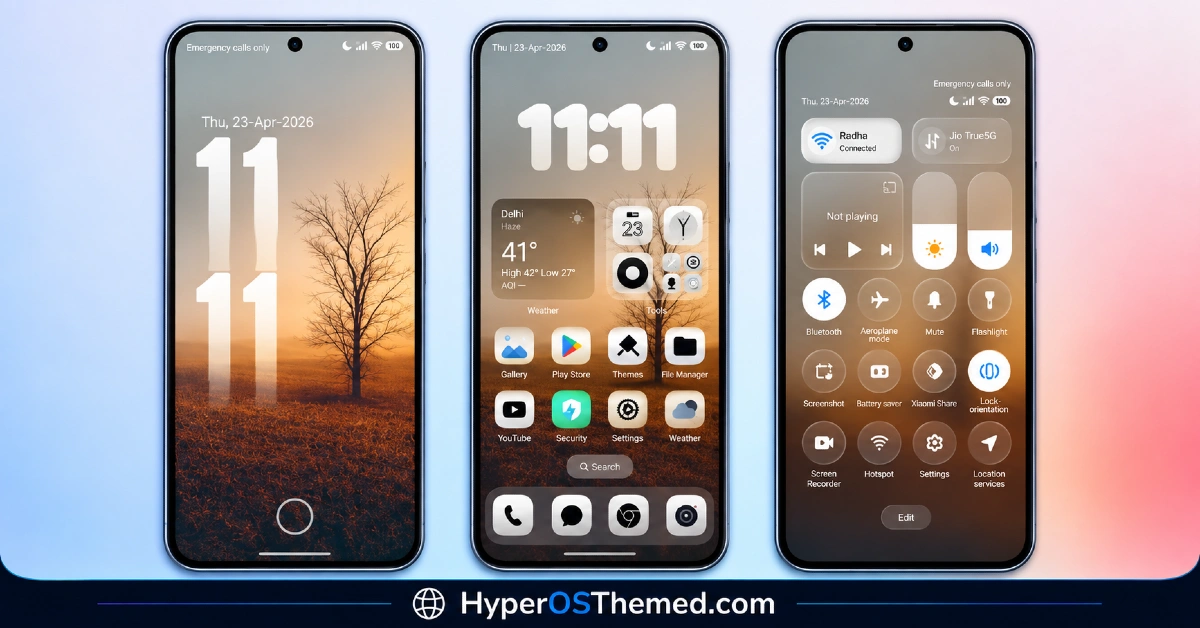
- Enhanced Status Bar and Control Center: Quick settings toggles get cleaner spacing and better readability for both icons and text compared to the stock HyperOS layout. Nothing dramatic here, just the kind of small refinement that makes the panel feel tidier every single time you pull it down.
- Lock Screen Improvements: The lock screen gets a simplified layout with clearer time and notification visibility, plus font choices picked specifically for readability rather than flash. It’s a quiet change, but one that fits the overall tone of the theme.
- Refined Settings Interface: Settings menus get better grouping of options, more consistent spacing and typography, and genuinely easier navigation. It’s the kind of detail that doesn’t show up well in a screenshot but makes a real difference once you’re actually digging through menus on a regular day.
- Smooth Animations: Subtle animation touches improve visual fluidity throughout the system without dragging on performance or system responsiveness. These stay in the background, supporting the experience rather than trying to steal attention from it.
- Liquid Glass and Abstract Detailing: True to its own tagging, Original-3 works in some liquid glass transparency and abstract visual touches rather than sticking to a completely flat look everywhere. It’s restrained enough to avoid clashing with the minimal base the theme is built on.
- Balanced Contrast Across Modes: The theme maintains solid contrast for readability and adapts properly for both light and dark modes instead of being designed around one and treating the other as an afterthought, which is a problem that shows up more often than you’d expect in free themes.
Original-3 HyperOS Theme Preview
The screenshots below show the redesigned icon pack, the simplified lock screen and how the status bar, Control Center and Settings menu look once the theme is applied. Since Original-3 leans on cumulative small details rather than one standout feature, it’s worth looking through the full preview set rather than judging it from a single image.
Original-3 HyperOS Theme Overview
| Attribute | Details |
|---|---|
| Availability | Free, via Xiaomi Theme Store |
| Supported Devices | Xiaomi, Redmi and POCO phones running HyperOS |
| Theme Name | Original-3 |
| Designer | Eto’o |
| Compatibility OS | HyperOS 2 and HyperOS 3 |
| Features | System-wide UI customization, redesigned icon pack, enhanced status bar and Control Center, simplified lock screen, refined Settings interface, liquid glass and abstract detailing |
| File Size | Not specified by designer |
Original-3 HyperOS Theme Compatibility
Original-3 supports both HyperOS 2, built on the Android 14 foundation, and HyperOS 3, part of the newer Android 15/16-based rollout, which gives it reach across a wide chunk of the current Xiaomi ecosystem, Xiaomi, Redmi and POCO devices included. Because the theme touches so many system apps at once, a few UI elements may render slightly differently depending on the exact device model and system version, so a little variation on less common hardware isn’t out of the question.
It’s also built to run without background scripts or extra services, which is part of why it manages to stay stable on both mid-range and flagship phones without any noticeable battery hit. As with any theme that changes this much of the system at once, restarting the device after installation is worth doing if something doesn’t load in correctly the first time, and availability can shift a bit by region, with some features displaying more consistently on devices already running the latest HyperOS build.
Get Original-3 HyperOS Theme
Download Original-3 Xiaomi theme only through the official Theme Store link rather than random third-party file-sharing sites. Files distributed outside the official channel are hard to verify and may not match what Eto’o actually released, so there’s genuine risk in trusting an unofficial copy to skip a step. Sticking to the Theme Store keeps the installed version consistent with the intended design and keeps future updates within reach.
How to Apply Original-3 Theme
Follow the steps below to apply the theme:
- Open the Theme Store link given above on your Xiaomi, Redmi or POCO device.
- This will redirect you to the Theme Store.
- Download and install the theme.
- Tap on Apply.
- Customize specific elements such as icons, lock screen or status bar if needed.
- Reboot your device for the full effect, though this step is optional.
Note: If part of the interface looks incomplete or doesn’t update properly right after applying the theme, a quick restart usually fixes it. Original-3 has been checked on both supported HyperOS versions without any major problems coming up during that process. If something still looks off on a specific device, leaving a comment with the details helps figure out what’s actually happening.
Installing Original-3 HyperOS Theme on Custom ROM Devices
Devices running a Custom ROM won’t be able to use the direct Theme Store link, so the MTZ file has to be added manually through the Theme Store app instead. Here’s how that works:
- Save the MTZ file for Original-3 onto the device.
- Open the Theme Store app.
- Head into the Themes section.
- Scroll to the bottom and tap the Import option once it appears.
- Use the file manager to locate the downloaded .mtz file.
- Wait for the import process to finish.
- Select the theme once it appears in the list to apply it.
Why Choose Original-3 HyperOS Theme?
- Full system coverage — Settings, dialer, messaging and the Control Center all get updated together, not just the home screen.
- Calm, iOS-leaning restraint — a considered aesthetic instead of a loud, color-heavy redesign.
- Legible icon design — minimalistic shapes and balanced colors stay clear in both light and dark modes.
- No background processes — runs without extra services, so it doesn’t add unnecessary load.
- Dual HyperOS version support — works across both HyperOS 2 and HyperOS 3.
- Liquid glass accents — just enough transparency detailing to avoid feeling flat.
- Free through the official Theme Store — no cost, distributed through a legitimate channel.
Conclusion
Original-3 HyperOS Theme doesn’t chase attention the way a lot of HyperOS themes do, and honestly, that restraint is the whole point. It’s built for people who want their phone to feel calmer and more put together without turning every screen into something to show off.
The dual support for HyperOS 2 and HyperOS 3 means most current Xiaomi, Redmi and POCO devices can run it comfortably, and the lack of background processes means you’re not trading battery life for the upgrade. If you’ve grown tired of busier themes that look great in a screenshot but feel chaotic in actual daily use, Original-3 is a solid, low-risk option worth trying.
Also Check These Themes:
- Yut18 v26 HyperOS Theme – Clean iOS-Inspired Minimalism for Xiaomi, POCO, Redmi
- OX GOLD HyperOS Theme with 3D Gold Icons, Leather Textured Wallpapers, and a Redesigned Control Center
- OPBNB HyperOS Theme with 3D Depth Overlay Effects and Translucent Control Center
- VK 26 HyperOS Theme: Redesigned Icon Pack, Cleaner Control Center, and Refined Settings Interface
- Aquora HyperOS Theme for Xiaomi, Redmi and POCO
