
OPBNB HyperOS Theme is a theme designed by maidul, built for Xiaomi, Redmi, and Poco devices running HyperOS 3. It leans into a bold, pop culture visual style, pairing superhero and anime inspired wallpaper art with RGB clock customization and a glassmorphic icon pack.
OPBNB HyperOS theme stands apart from more subdued HyperOS designs by giving users direct control over clock color, position, and scale, alongside a flexible lock screen widget system. It covers the home screen, lock screen, and Control Center as one connected visual package rather than isolated changes.
OPBNB HyperOS Theme Key Features
1. Built-in Wallpaper Gallery: The theme includes a switchable gallery covering tropical ocean nightscapes, forest paths, and pop culture inspired artwork styled after Spider-Man and Demon Slayer’s Tanjiro Kamado. Switching wallpapers is done directly from the lock screen customization menu rather than a separate gallery app.
2. RGB Color and Placement Sliders: A dedicated adjustment panel offers RGBA color sliders along with vertical positioning and scale controls for the lock screen clock. This gives more direct control over clock appearance than a simple font or color preset picker.
3. 3D Depth Overlay Effects: The clock typography is rendered to appear naturally behind wallpaper elements, creating a layered look rather than a flat text overlay. The effect changes depending on which wallpaper from the gallery is active.
4. Lock Screen Widget Customizer: You can configure up to four widget slots directly on the lock screen, including weather, sunrise and sunset times, UV index, and battery level. This lets users choose which functional information appears without being locked into a fixed layout.
5. Bottom Access Shortcuts: Quick trigger icons for camera, flashlight, and lock screen settings sit at the bottom of the screen for direct access. These shortcuts stay in place regardless of which wallpaper or widget combination is selected.
6. Glossy Glassmorphic Icon Pack: App icons use a rounded-square glass style with soft drop shadows and high contrast glyphs. The icon pack covers native system apps as well as third party apps including Telegram, Facebook, Chrome, TikTok, ChatGPT, Binance, bKash, and Discord.
7. Desktop Header Card: A calendar and weather widget card sits at the top of the home screen, displaying the day of the week alongside local forecast information. This adds a functional element to the home screen beyond the icon grid.
8. Translucent Control Center: The Control Center uses a frosted glass background with clean white toggle pill highlights for active settings. Brightness and volume sliders are shaped as pills, positioned for easier one handed adjustment.
OPBNB HyperOS Theme Preview
The visual style centers on bold, pop culture wallpaper art paired with a glossy glassmorphic icon pack and RGB accented clock typography. The Control Center and status bar stay in a minimalist frosted glass style, giving the interface a mix of vibrant wallpaper choices set against a more neutral system layer.
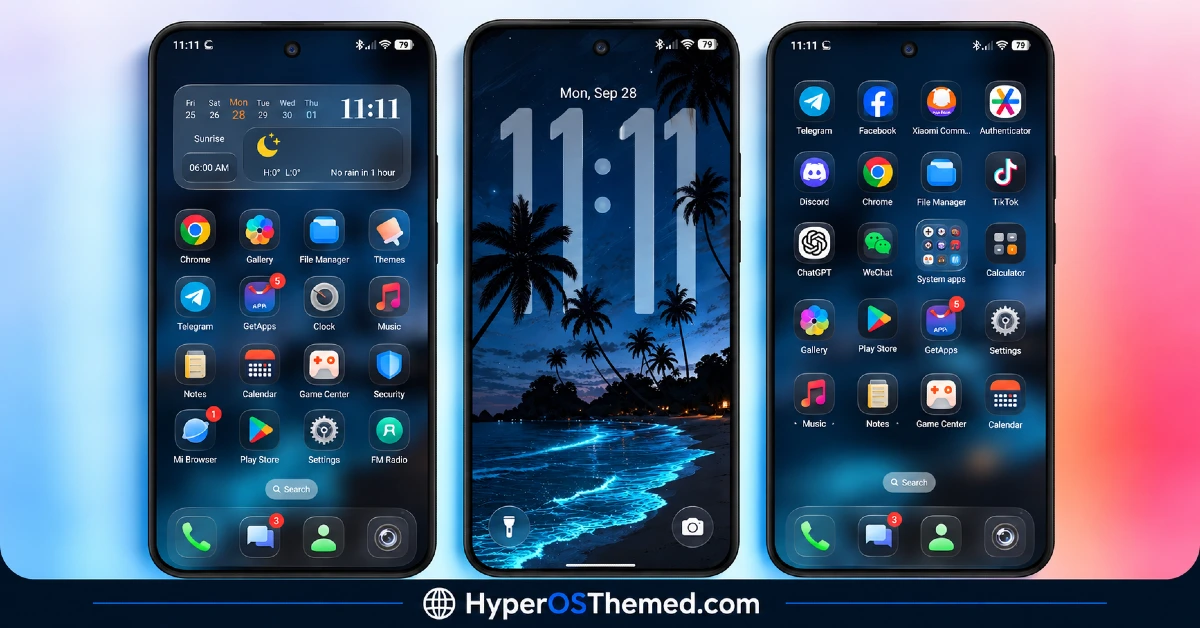
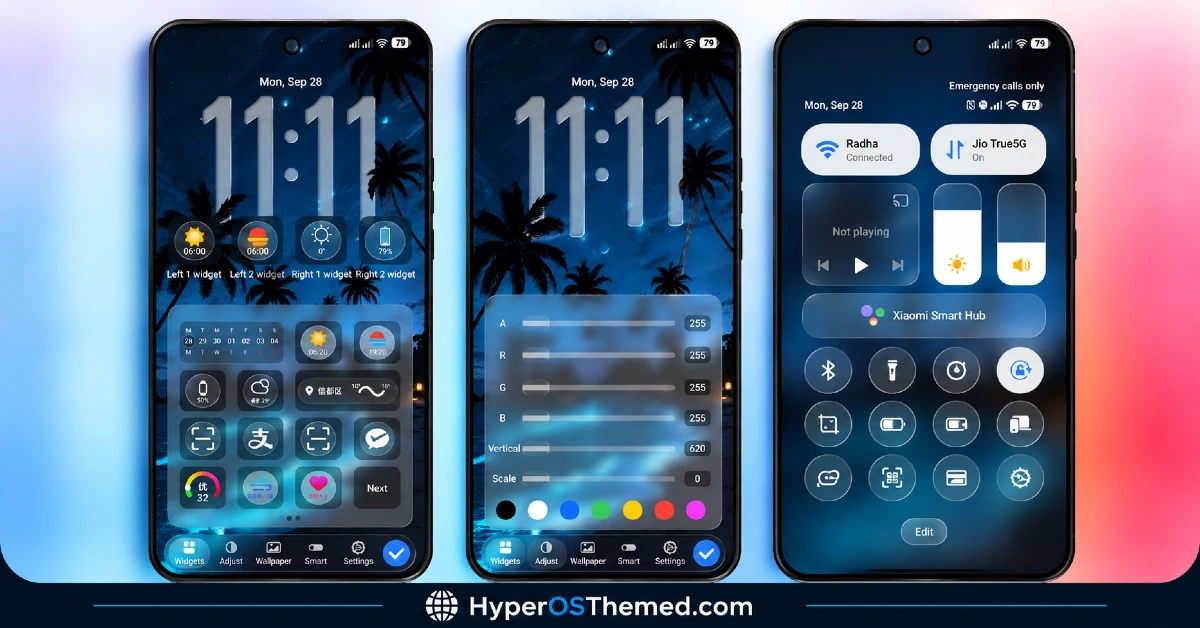
OPBNB HyperOS Theme Overview
| Attribute | Details |
|---|---|
| Availability | Free, via Xiaomi Theme Store |
| Supported Devices | Xiaomi, Redmi and POCO phones running HyperOS 3 |
| Theme Name | OPBNB |
| Designer | maidul |
| Region | Global |
| Compatibility OS | HyperOS 3 |
| Features | Wallpaper gallery, RGB clock controls, lock screen widget customizer, glassmorphic icon pack, translucent Control Center |
| File Size | Approx. 42.7 MB |
Get OPBNB HyperOS Theme
OPBNB HyperOS Theme can be downloaded directly through the official Xiaomi Theme Store link provided above. Installing through the official store keeps the RGB clock controls, widget customizer, and Control Center toggles functioning correctly, which unofficial theme files do not always guarantee.
OPBNB HyperOS Theme Compatibility
OPBNB HyperOS Theme is built for HyperOS 3 and is compatible with Xiaomi, Redmi, and Poco devices running this version. Since the RGB clock sliders and widget customizer depend on newer HyperOS 3 system components, devices still on HyperOS 1 or HyperOS 2 are not the intended target for this theme. Theme availability through the Store can vary slightly by region, since Xiaomi does not release every listing to every market at the same time.
How to Apply OPBNB HyperOS Theme
- Open the Theme Store link given above on your Xiaomi, Redmi, or Poco device.
- This will redirect you to the Theme Store.
- Download and install the theme.
- Tap on Apply.
- Customize specific elements such as wallpaper, clock color, or lock screen widgets if needed.
- Reboot your device to make sure lock screen scripts, status bar icons, and Control Center toggles function correctly, though this step is optional.
Why Choose OPBNB HyperOS Theme?
- Pop culture wallpaper gallery – switchable backgrounds ranging from tropical scenery to superhero and anime inspired artwork.
- RGB clock customization – direct control over clock color, position, and scale rather than fixed presets.
- 3D depth overlay effect – clock typography renders behind wallpaper elements for a layered look.
- Flexible lock screen widgets – up to four configurable slots for weather, UV index, sunrise and sunset, and battery.
- Wide app icon coverage – glassmorphic icons extend to major third party apps like Telegram, TikTok, and Discord.
- Bottom access shortcuts – direct camera and flashlight triggers built into the lock screen.
- Translucent Control Center – frosted glass panel with pill shaped sliders for one handed use.
- Free official download – available through the Xiaomi Theme Store at no cost.
Conclusion
OPBNB stands out mainly through its wallpaper variety and the level of direct control it gives over clock color and placement, which goes further than most HyperOS themes offer. The lock screen widget customizer and bottom access shortcuts add functional value on top of the visual style, while the glassmorphic icon pack keeps the home screen consistent across a wide range of installed apps.
Since several features rely on HyperOS 3 specific components, older HyperOS builds are not supported. For Xiaomi, Redmi, and Poco users on HyperOS 3 who want a bold, customizable lock screen paired with a clean glass-style Control Center, OPBNB is a solid option through the official Theme Store.
Also Check These Themes:
- VK 26 HyperOS Theme: Redesigned Icon Pack, Cleaner Control Center, and Refined Settings Interface
- Aquora HyperOS Theme for Xiaomi, Redmi and POCO
- Fulloful HyperOS Theme with Depth Wallpapers for Xiaomi, POCO, Redmi
- OE1 HyperOS Theme For Redmi, Xiaomi, and POCO
- Sunlit Canyon HyperOS Theme With Canyon Wallpapers and Dialer Pad Redesign for Xiaomi, POCO, Redmi
