
OX GOLD HyperOS Theme is a Premium theme designed by oxfury 0.2, built for devices running HyperOS, HyperOS 2.0, and HyperOS 3.0. It leans into a luxury visual style, pairing 3D gold embossed icons with leather textured wallpapers and a redesigned status bar and lock screen.
The theme goes beyond a simple color swap, touching the icon set, Always-on Display, Control Center, and system UI to keep the luxury look consistent across the device rather than limited to the home screen alone.
OX GOLD HyperOS Theme Features
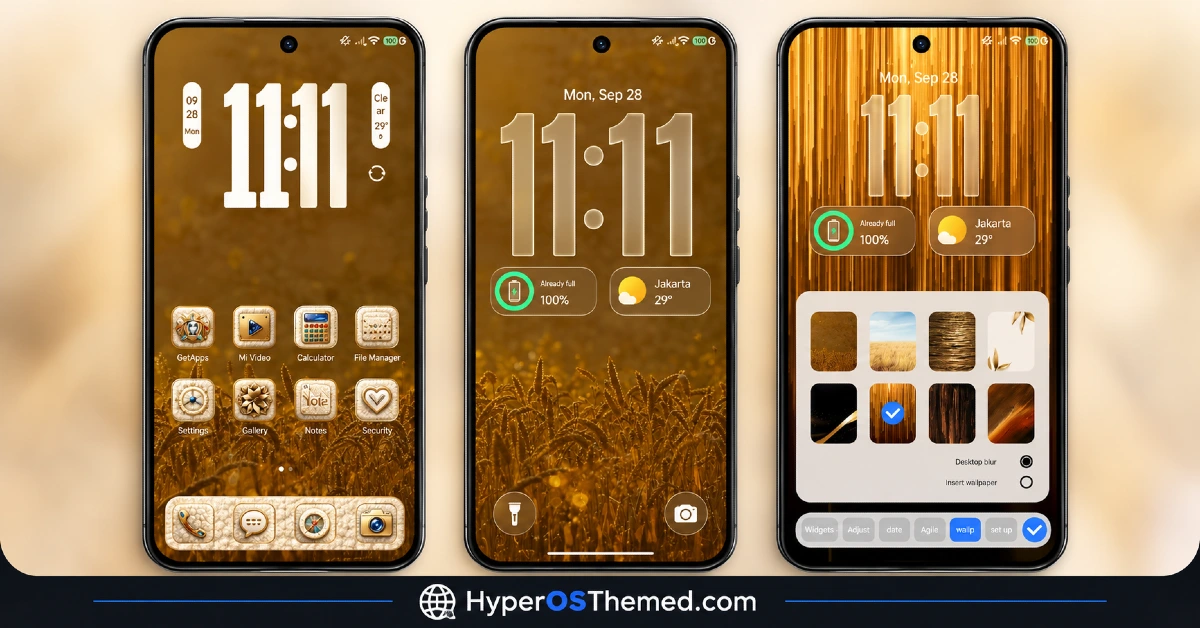
1. 3D Gold Embossed Icon Pack: App icons are rendered with a raised, embossed gold effect rather than a flat color fill, giving them a metallic, dimensional look on the home screen. The icon style is applied across core system apps to keep the visual language consistent.
2. Leather Textured Wallpapers: The wallpaper set uses a leather pattern finish paired with gold accents, reinforcing the premium look the theme is built around. This texture carries through to the lock screen background as well as the home screen.
3. Custom Gold Widgets: Home screen widgets are redesigned with the same gold and leather visual treatment as the icon pack, rather than using default HyperOS widget styling. This keeps the clock and other widget elements visually tied to the rest of the theme.
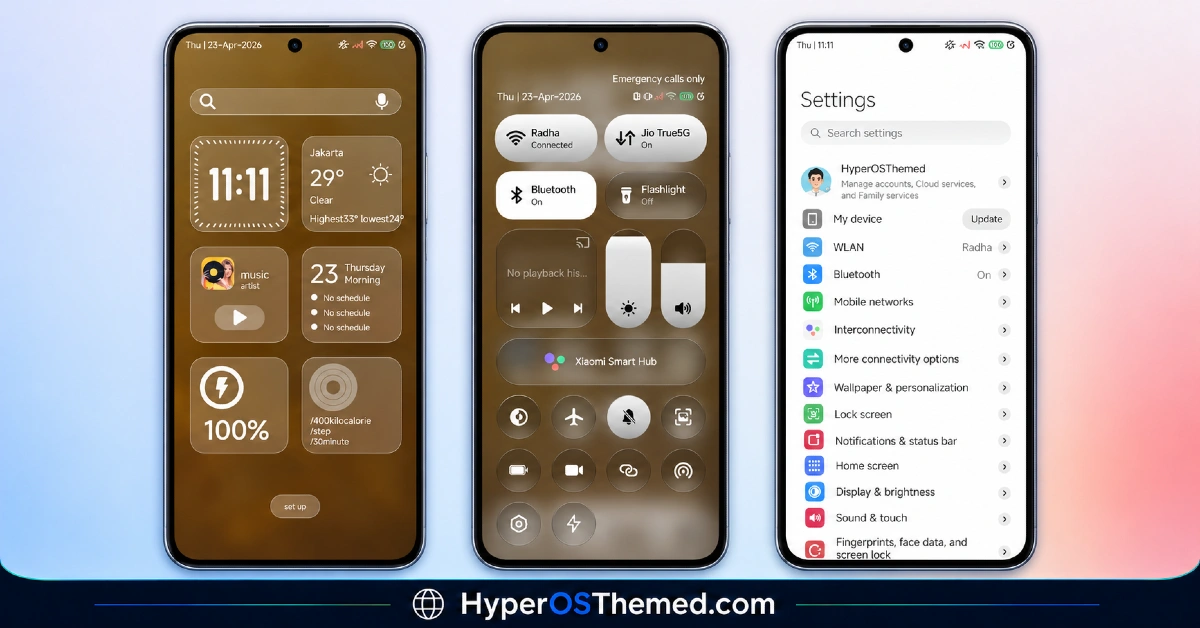
4. Redesigned Status Bar: The status bar is updated with a matching gold accented style, changing how battery, signal, and network icons are displayed compared to the stock HyperOS layout. This keeps the top of the screen visually consistent with the rest of the theme.
5. Custom Always-on Display: The Always-on Display is themed to match the gold and leather aesthetic, giving the lock screen a distinct look even when the device is idle. This extends the theme’s visual identity beyond the active lock screen.
6. Redesigned Control Center: The Control Center panel is rebuilt with a gold toned layout, changing the appearance of quick settings toggles from the default HyperOS design. This keeps the pull-down panel visually aligned with the rest of the theme.
7. Cool Lock Screen Styling: The lock screen combines the leather wallpaper texture with gold clock styling, giving it a different visual identity from the stock HyperOS lock screen. This is one of the more noticeable changes when the theme is first applied.
OX GOLD HyperOS Theme Preview
The visual style centers on a gold and leather color scheme, with embossed 3D icons and matching widgets set against leather textured wallpapers. The Control Center, status bar, and Always-on Display all carry the same gold accented tone, giving the interface a unified, premium appearance throughout.
OX GOLD HyperOS Theme Overview
| Attribute | Details |
|---|---|
| Availability | Free, via Xiaomi Theme Store or MTZ file |
| Supported Devices | Xiaomi, Redmi and POCO phones running HyperOS |
| Theme Name | OX GOLD |
| Designer | oxfury 0.2 |
| Region | Global |
| Compatibility OS | HyperOS, HyperOS 2.0 & HyperOS 3.0 |
| Features | 3D gold embossed icons, leather textured wallpapers, custom gold widgets, redesigned status bar, custom AOD, redesigned Control Center |
| File Size | 57.93 MB |
Get OX GOLD HyperOS Theme
OX GOLD HyperOS Theme can be downloaded through the official Xiaomi Theme Store link for devices on the Global stable ROM, or installed manually using the MTZ file for devices running custom ROMs. Using either official source helps avoid the icon rendering issues that can come with unverified theme files.
OX GOLD HyperOS Theme Compatibility
OX GOLD HyperOS Theme is compatible with Xiaomi, Redmi, and POCO devices running HyperOS, HyperOS 2.0, and HyperOS 3.0, making it one of the more broadly supported themes across different HyperOS builds.
Devices on the Global stable ROM can install it directly through the Theme Store, while devices running custom ROMs such as Xiaomi.eu or MIUIRoom need the MTZ file imported manually through the Theme Store app. Some elements such as the Always-on Display styling may render slightly differently depending on the exact device model and system version installed.
How to Apply OX GOLD
- Open the Theme Store link given above on your Xiaomi, Redmi, or Poco device.
- This will redirect you to the Theme Store.
- Download and install the theme.
- Tap on Apply.
- Customize specific elements such as icons, lock screen, or status bar if needed.
- Reboot your device if any elements overlap or fail to display correctly, though this step is optional.
Why Choose OX GOLD HyperOS Theme?
- 3D gold embossed icons – a raised, metallic icon style that stands apart from flat color icon packs.
- Leather textured wallpapers – a distinct wallpaper finish that reinforces the theme’s premium look.
- Custom Always-on Display – the idle lock screen carries the same gold and leather visual identity.
- Redesigned Control Center – quick settings toggles styled in gold rather than the stock HyperOS layout.
- Matching gold widgets – home screen widgets follow the same visual treatment as the icon pack.
- Broad HyperOS compatibility – works across HyperOS, HyperOS 2.0, and HyperOS 3.0.
- MTZ file available – custom ROM users can install the theme manually without the official Theme Store.
- Free official download – available through the Xiaomi Theme Store or a verified MTZ file link.
Conclusion
OX GOLD HyperOS Theme builds its entire visual identity around a gold and leather aesthetic, carrying it through the icon pack, widgets, Always-on Display, and Control Center rather than limiting it to the home screen. Its embossed 3D icons and matching AOD styling are the most distinctive parts of the package, giving it a more finished look than a basic color reskin.
Compatibility across HyperOS, HyperOS 2.0, and HyperOS 3.0 makes it accessible to a wide range of Xiaomi, Redmi, and Poco devices regardless of software version. The file size sits under 58 MB, keeping installation reasonably quick despite the amount of themed elements. For users who want a premium, gold accented look rather than a minimal or dark style, OX GOLD HyperOS Theme is a distinctive option available through both the Theme Store and MTZ file.
Also Check These Themes:
- OPBNB HyperOS Theme with 3D Depth Overlay Effects and Translucent Control Center
- VK 26 HyperOS Theme: Redesigned Icon Pack, Cleaner Control Center, and Refined Settings Interface
- Aquora HyperOS Theme for Xiaomi, Redmi and POCO
- Fulloful HyperOS Theme with Depth Wallpapers for Xiaomi, POCO, Redmi
- OE1 HyperOS Theme For Redmi, Xiaomi, and POCO
