
Most light-coloured themes look washed out once you load them onto a phone, but GIN SAND v2 HyperOS Theme avoids that by keeping a genuinely soft sand palette and clean separation lines between widgets and status icons, so nothing blurs together, even on a brighter background.
Designed by HymanL, GIN SAND v2 HyperOS Theme reworks the home screen, lock screen and system menus around that lighter tone, with a particular focus on removing the visual clutter that tends to pile up in the default HyperOS interface. At 77.62 MB, it’s built for Xiaomi, Redmi and POCO devices running HyperOS, and it’s a genuine follow-up to the original GIN SAND rather than a reskin under a new name.
GIN SAND v2 HyperOS Theme Key Features
- Rounded Icon Masks with Third-Party Coverage: Custom icons apply rounded shapes to system apps, and background masks fit third-party apps into that same consistent style instead of leaving them looking like mismatched leftovers. That masking approach is a genuinely practical way to keep the whole icon grid visually unified.
- Soft Sand Color Palette: The home screen background and system menus pick up warm, soft sand tones rather than a stark white or generic beige, giving the theme a distinct identity beyond just being “light.”
- Large Digital Lock Screen Clock: A sizable digital clock sits on the lock screen with quick shortcut buttons positioned right below it, keeping commonly used tools within easy reach without needing to unlock the device first fully.
- Clean, Simple Status Bar Icons: Battery, Wi-Fi and mobile network indicators use simple line-based icons that stay easy to read rather than competing visually with the lighter background tones.
- Translucent Control Center Tiles: Quick settings in the Control Center use translucent tile backgrounds, keeping the panel easy to read while still tying into the overall lighter aesthetic running through the rest of the theme.
- No Heavy Blur Effects: Rather than leaning on transparency and blur for visual polish, GIN SAND v2 HyperOS Theme deliberately avoids heavy blur rendering, which helps low-end and mid-range devices maintain smooth scrolling rather than introducing lag.
- Lightweight on System Memory: Despite the 77.62 MB file size, the theme is built to stay light on system memory once applied, so it shouldn’t noticeably slow down the device during daily use.
GIN SAND v2 HyperOS Theme Preview
The screenshots below show the soft sand color palette, the rounded icon masks and how the lock screen clock and translucent Control Center tiles look once the theme is applied. Since the appeal here comes down to clarity and consistency rather than one dramatic visual effect, it’s worth looking through the preview to see how the lighter tones actually read on screen.
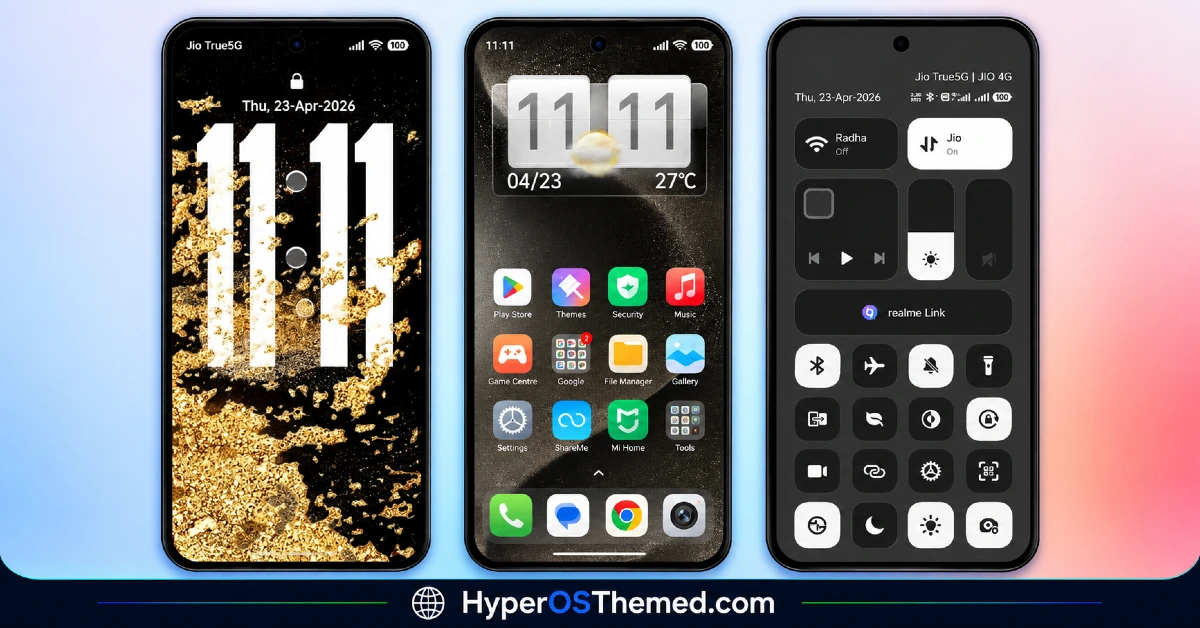
GIN SAND v2 Xiaomi Theme Overview
| Attribute | Details |
|---|---|
| Availability | Free, via Xiaomi Theme Store |
| Supported Devices | Xiaomi, Redmi and POCO phones running HyperOS |
| Theme Name | GIN SAND v2 |
| Designer | HymanL |
| Region | Global |
| Compatibility OS | HyperOS |
| Features | Rounded icon masks, soft sand color palette, large lock screen clock, clean status bar, translucent Control Center tiles |
| File Size | 77.62 MB |
GIN SAND v2 Theme Compatibility
GIN SAND v2 works across HyperOS versions on Xiaomi, Redmi and POCO devices, though visual details on the status bar may vary slightly depending on the specific Android build your device is running.
Since the theme deliberately avoids heavy blur effects, it tends to perform more consistently across a wider range of hardware, including lower-end and mid-range devices that might struggle with more transparency-heavy themes. Custom ROM users can still install it manually through the Theme Store app’s Import option, and given the restrained visual approach, compatibility issues tend to be minimal.
Get GIN SAND v2 HyperOS Theme
Download GIN SAND v2 HyperOS Theme only through the official Theme Store link or the direct MTZ file rather than random third-party file hosts or unofficial APK uploads. Files sourced outside verified channels are difficult to confirm as unaltered and may not reflect what HymanL actually released. Sticking to the official links keeps the installed version consistent with the intended design and ensures any future updates remain accessible.
How to Apply GIN SAND v2 Theme
Follow the steps below to apply the theme:
- Open the Theme Store link given above on your Xiaomi, Redmi or POCO device.
- This will redirect you to the Theme Store.
- Download and install the theme.
- Tap on Apply.
- Customize specific elements such as icons, lock screen or status bar if needed.
- Reboot your device for the full effect, this step genuinely matters here specifically to clear the old icon cache and apply the system settings properly.
Note: If anything looks overlapped or doesn’t display correctly right after installing, restarting the device usually clears it up without further steps. This theme has been checked on HyperOS without any major issues turning up. Still, if something looks off on a specific device once it’s applied, leaving a comment with the details helps get it looked into.
Installing GIN SAND v2 Theme on Custom ROM Devices
Devices running a Custom ROM aren’t able to use the direct Theme Store link, so the MTZ file needs to be brought in manually through the Theme Store app instead. Here’s how that works:
- Grab the MTZ file for GIN SAND v2 from the download section.
- Open the Theme Store app.
- Go into the Themes tab.
- Scroll down to find the Import option, then tap it.
- Use the file manager to locate the downloaded .mtz file.
- Wait for the import process to finish.
- Tap the theme once it appears in the list to apply it.
Why Choose GIN SAND v2 Theme?
- Genuinely unified icon grid — rounded masks apply to third-party apps too, not just system icons.
- Distinct soft sand identity — warmer and more considered than a generic white or beige theme.
- Functional lock screen shortcuts — quick-access buttons sit right below the large clock display.
- Clean, legible status bar — simple line icons stay easy to read against the lighter background.
- No heavy blur effects — keeps performance smooth even on low-end and mid-range devices.
- Lightweight on memory — stays efficient despite the fuller 77.62 MB file size.
- Free official download — no cost involved through a legitimate Theme Store link.
Conclusion
GIN SAND v2 backs up its clean, soft sand aesthetic with genuine attention to usability, the rounded icon masks, legible status bar and translucent Control Center tiles all work together to keep the interface feeling organized rather than just lighter in color.
Avoiding heavy blur effects is a smart call that should keep the theme running smoothly even on less powerful devices. For Xiaomi, Redmi and POCO users who want a calm, warm-toned theme that doesn’t sacrifice performance, GIN SAND v2 is well worth trying.
Also Check These Themes:
- Surge AP27 Pro HyperOS Theme with iOS-Style Depth Effect & Premium Widgets for Xiaomi, POCO, Redmi
- Regular-3 HyperOS Theme For Xiaomi, POCO, Redmi
- Original-3 HyperOS Theme with Clean iOS and Liquid Glass Blend for Xiaomi, POCO, Redmi
- Yut18 v26 HyperOS Theme – Clean iOS-Inspired Minimalism for Xiaomi, POCO, Redmi
- OX GOLD HyperOS Theme with 3D Gold Icons, Leather Textured Wallpapers, and a Redesigned Control
