
Purple is one of those colors that either gets ignored completely in theme design or gets overdone with neon gradients everywhere. Levender HyperOS Theme takes a different route. It builds its whole identity around a single wallpaper of a violet tree forest, then borrows the calm, structured feel of Samsung’s One UI to wrap that purple mood around the rest of your phone. The result is a theme that feels moody without being loud about it.
Levender HyperOS Theme Features
- A Wallpaper That Sets the Whole Mood The centerpiece here is a forest scene painted in deep violet tones, the kind of wallpaper that looks like it belongs in a fantasy film rather than a phone theme. Everything else in the theme is built to match this one image, which is part of why it feels so cohesive.
- One UI Inspired Layout If you have ever used a Samsung phone and liked how clean One UI looks, Levender borrows that same sense of structure. Menus and system screens follow a similar dark, organized layout instead of the usual HyperOS defaults.
- Black Icon Pack The icons stick to a sleek black base, which keeps the purple wallpaper and accents as the main focus instead of competing with a busy, colorful icon grid.
- Purple Accents Throughout Small touches of purple show up across the status bar, lock screen, and other UI elements, tying everything back to that same forest wallpaper without going overboard.
- Built In Weather Widget A weather widget rounds out the home screen setup, so you get a bit of function along with the look, without needing to install anything extra.
Levender HyperOS Theme Preview
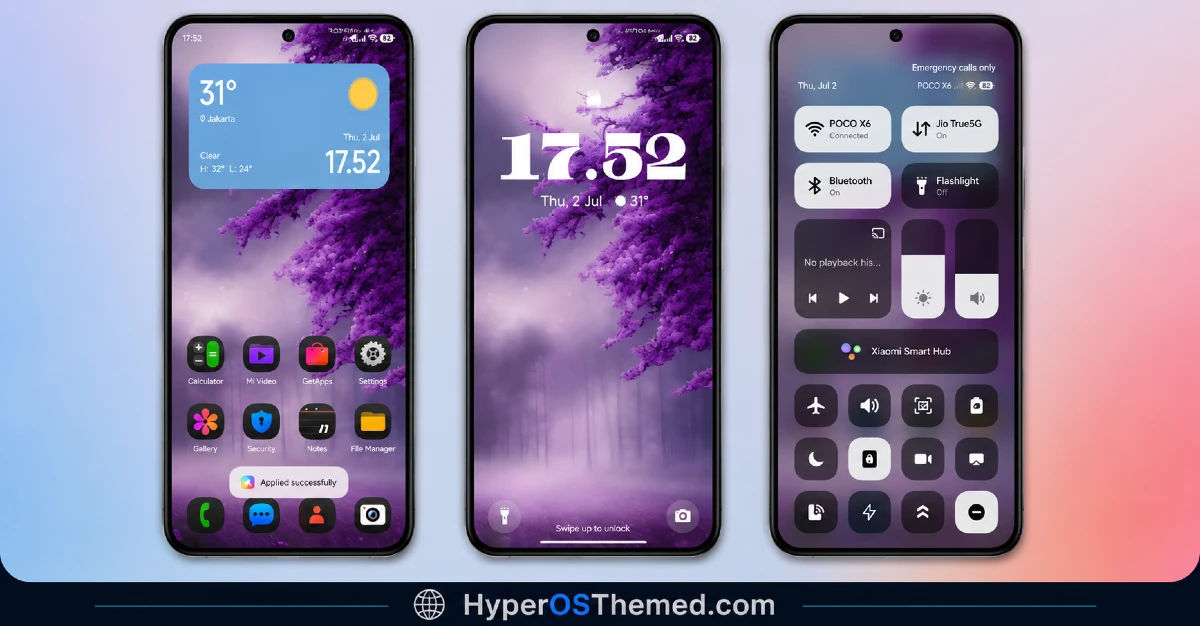
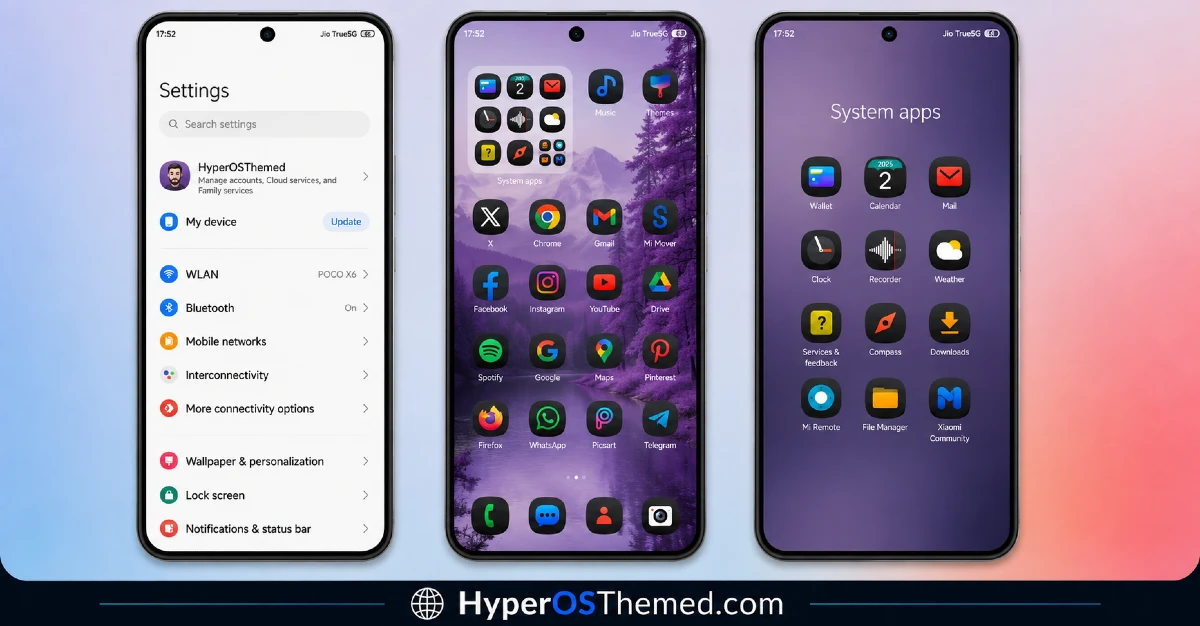
Levender HyperOS Theme Information
| Detail | Info |
|---|---|
| Theme Name | Levender HyperOS Theme |
| File Size | 42.59 MB |
| Created By | Ajay |
| Server Region | Global |
| Works With | HyperOS, HyperOS 2.0, HyperOS 3.0 |
| Style | Samsung, One UI, Black, Purple |
Download the Theme
Installing Levender HyperOS Theme on Stock HyperOS or MIUI (Official ROM Users)
If your phone is running the official Global Stable build of HyperOS or MIUI, follow these steps.
- Open this page using the Firefox browser on your phone.
- Tap the official Theme Store link in the download section above.
- You’ll land on a Xiaomi theme page written in Chinese, that’s normal. Tap the three dots in the top right corner and choose “Open in app.”
- This hands off to your Themes Store app, where the download starts automatically.
- Once it finishes downloading, tap Apply.
Heads up: If the Theme Store link doesn’t open properly, try switching to Chrome or your phone’s default Xiaomi browser. Some third party browsers block this redirect.
Installing via MTZ File (Custom ROM Users)
Running a custom build like Xiaomi.eu, MIUIRoom, or another MIUI or HyperOS based ROM? Sideload the file manually instead.
- Download the .mtz file from.
- Open the Theme Store app and go to the Themes tab.
- Scroll to the bottom and tap Import.
- Select the .mtz file you just downloaded.
- Tap Apply.
Tip: Restart your phone after applying the theme. If any icon, wallpaper, or lock screen element looks slightly off right after applying, a quick restart almost always fixes it. This theme has been tested and applies cleanly with no reported issues.
Final Thoughts
Levender works because it commits to one clear mood instead of trying to be everything at once. The purple forest wallpaper carries the whole theme, and the One UI inspired layout gives it a calm, put together feel that a lot of free themes miss. If purple has always been your color and you like your phone looking a little more atmospheric than usual, this is an easy one to recommend.
You may also like:
- Best Cyberpunk Anime Theme For MIUI & HyperOS
- Lovely HOS3 HyperOS Theme – Pink Floral Design for Xiaomi, Redmi and POCO
- GOASP HyperOS theme with Premium Design for Xiaomi, Redmi and POCO
- BrS v9 MIUI Theme For POCO, Redmi and Xiaomi Devices
- Best HyperOS 3.0 Theme AS Neon Dark Mode For POCO, Xiaomi and Redmi Devices
