
Alimun keeps proving they know how to work with restraint, and Nostoc V2 is another good example. After the true black minimalism of Covalent V2 and Homologous, this release trades that cool tone for something warmer and more emotional, a deep red floral aesthetic that feels genuinely different from the usual dark theme playbook.
What Makes Nostoc V2 HyperOS Theme Worth Trying
- Deep red flower wallpaper — Moody, elegant, and genuinely gorgeous, this wallpaper sets a romantic tone the moment you unlock your phone, without feeling overdone or excessive.
- Unique outline-style icon pack — Instead of solid filled icons, Nostoc V2 goes with a refined line-art approach that feels artistic and considered, giving the home screen a distinct, gallery-like quality.
- Battery and weather widgets — Practical, everyday information sits right on the home screen, so the theme doesn’t sacrifice usability just to look beautiful.
- Full dark UI theming — Settings, Dialer, Messages, and Control Center all carry the same red and dark identity, so the whole phone feels like one cohesive experience rather than a partial makeover.
- A genuinely warm, moody atmosphere — Between the deep red tones and the outline icons, this theme carries an emotional weight that most themes don’t even attempt..
Nostoc V2 HyperOS Theme Preview

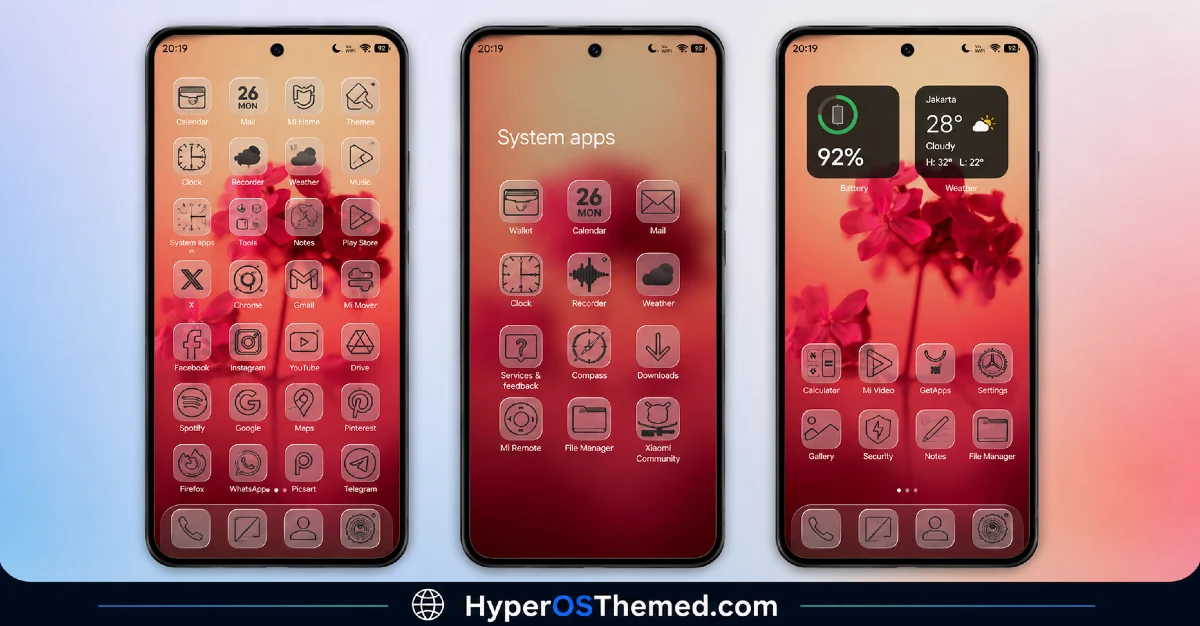
A lot of themes settle for solid, filled icons because they’re easier to make look consistent. Nostoc V2 takes the harder route with an outline-style approach, and the payoff is a home screen that genuinely looks like it belongs in an art gallery rather than a typical app drawer. It’s a small design choice, but it changes the entire feel of the interface.
The Designer’s Signature Touch
Alimun’s releases always come with that same quiet, understated note, “Probably Nothing,” alongside a Telegram handle for anyone who wants to follow more of their work. It’s become a nice little signature across their themes, and it fits the modest, no-fuss way these releases are presented despite how genuinely well designed they are.
Who Should Try Nostoc V2 HyperOS Theme
If you want your Xiaomi, Redmi, or POCO device to feel warm, elegant, and a little romantic instead of cold and minimal, Nostoc V2 is a beautiful pick. It’s compatible with HyperOS, HyperOS 2.0, and HyperOS 3.0, completely free, and light on storage at just over 11 MB.
Nostoc V2 HyperOS Theme Details
| Detail | Info |
|---|---|
| Theme Name | Nostoc V2 |
| File Size | 11.39 MB |
| Designer | Alimun |
| Region/Server | Global |
| Compatibility | HyperOS, HyperOS 2.0, HyperOS 3.0 |
| Features | Dark UI, Deep Red Aesthetic, Outline Icon Pack |
The designer left a short note with this release too, “Probably Nothing,” alongside a Telegram handle for anyone who wants to follow more of their work: @fauzone07
Getting the Theme
Installing Nostoc V2 HyperOS Theme on Global Stable ROM
If your device is running the standard HyperOS or MIUI Global stable build, here’s how to install it:
- Open this page using the Firefox browser, since it handles the redirect best.
- Tap the Official Theme Store Link above.
- The page will open in Chinese, which is expected. Tap the three dots in the top right corner and select “Open in app.”
- This opens the Theme Store app, where the download will begin.
- Once it’s downloaded, tap Apply.
If the Official Theme Store Link doesn’t open properly, switch to Chrome or your phone’s default browser. Some third party browsers don’t handle this redirect correctly.
Installing Nostoc V2 HyperOS Theme on Custom ROMs
Running a custom build like Xiaomi.eu, MIUIRoom, or similar? Here’s the manual install method using the mtz file:
- Download the Nostoc V2 mtz file from the link above.
- Open the Theme Store app and go to the Themes section.
- Scroll to the bottom and tap Import.
- Select the downloaded mtz file.
- Tap Apply.
One thing worth remembering: restart your device if anything looks slightly off after applying. A quick reboot usually clears it up right away. I tested this theme myself, and it ran smoothly with no issues at all.
Final Thoughts
Nostoc V2 HyperOS Theme proves Alimun can bring the same discipline they’ve shown in darker, cooler themes to something warmer and more emotionally driven. Between the deep red floral wallpaper and that genuinely artistic outline icon pack, this release feels intentional from top to bottom. If a moody, romantic aesthetic sounds like your kind of upgrade, this one’s absolutely worth downloading.
You may also like:
- CardM HyperOS Theme With Premium Wallpaper, Dynamic Lock Screen, Control Centre & More
- Hyper Businessman HyperOS Theme: Premium Dark Theme
- GOASP HyperOS theme with Premium Design for Xiaomi, Redmi and POCO
- OX F2 HyperOS Theme with Glass-style UI, Smart Multi-Widget Dashboard & More
- Jadol V3 Theme: Best HyperOS theme for MIUI 14
