
Hey Xiaomi lovers, if your idea of a good theme involves neon accents and a bit of cyberpunk energy, HyperV3 is built for exactly that crowd. Designed by Ali.ZR, this HyperOS theme mixes teal and purple fluid metallic layers with glossy black icons for a look that leans hard into a futuristic, cybernetic aesthetic rather than anything subtle.
It centers around giant lock screen fonts and detailed tracking cards, giving it a dashboard-like feel compared to more conventional lock screen layouts. At 33.66 MB and compatible across HyperOS, HyperOS 2.0 and HyperOS 3.0, it’s a reasonably sized download for how much visual detail is packed into the design.
HyperV3 Theme Key Features
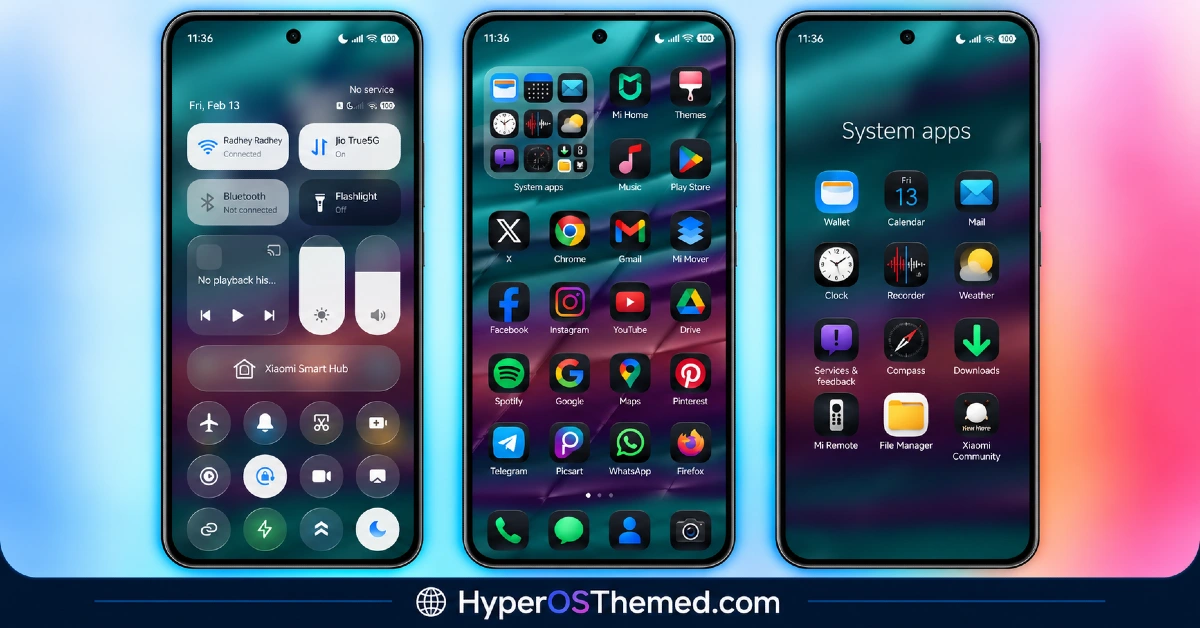
- Teal-Purple Fluid Metallic Design: HyperV3 HyperOS Theme uses a flowing, metallic-looking color blend of teal and purple throughout the interface rather than settling on a single flat accent color. This gives the theme a liquid, almost animated quality even in static screenshots.
- Glossy Black Icon Set: Icons follow a glossy black finish that contrasts sharply against the colorful metallic background elements. This combination of dark icons against vibrant backdrops helps keep the home screen legible despite the busier color palette underneath.
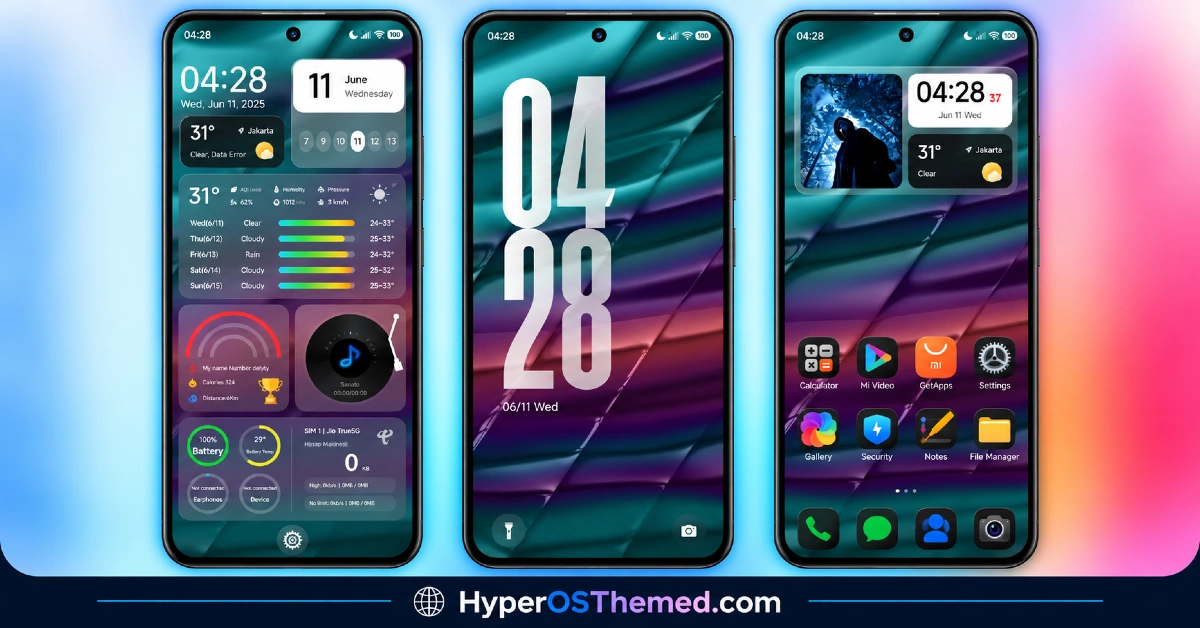
- Giant Lock Screen Typography: The lock screen features oversized clock fonts that dominate the screen rather than a modest, understated time display. It’s a bold design choice that fits with the overall high-energy, dashboard-style aesthetic of the theme.
- Rich Tracking Cards: Detailed information cards are built into the lock screen layout, giving quick access to tracked data at a glance rather than requiring a trip into a separate app. This adds a functional layer on top of the visual styling that some users will find genuinely useful day to day.
- Dynamic Lock Screen: Beyond the oversized typography, the lock screen incorporates movement and shifting visual elements rather than staying static. This ties into the overall energetic feel the theme is clearly going for.
- Neon Accent Details: Small neon-style highlights are worked into the color scheme, reinforcing the cybernetic, tech-forward look that runs through the icons and wallpaper alike. These accents help tie the whole visual package together into a cohesive theme rather than a random mix of colors.
HyperV3 HyperOS Theme Preview
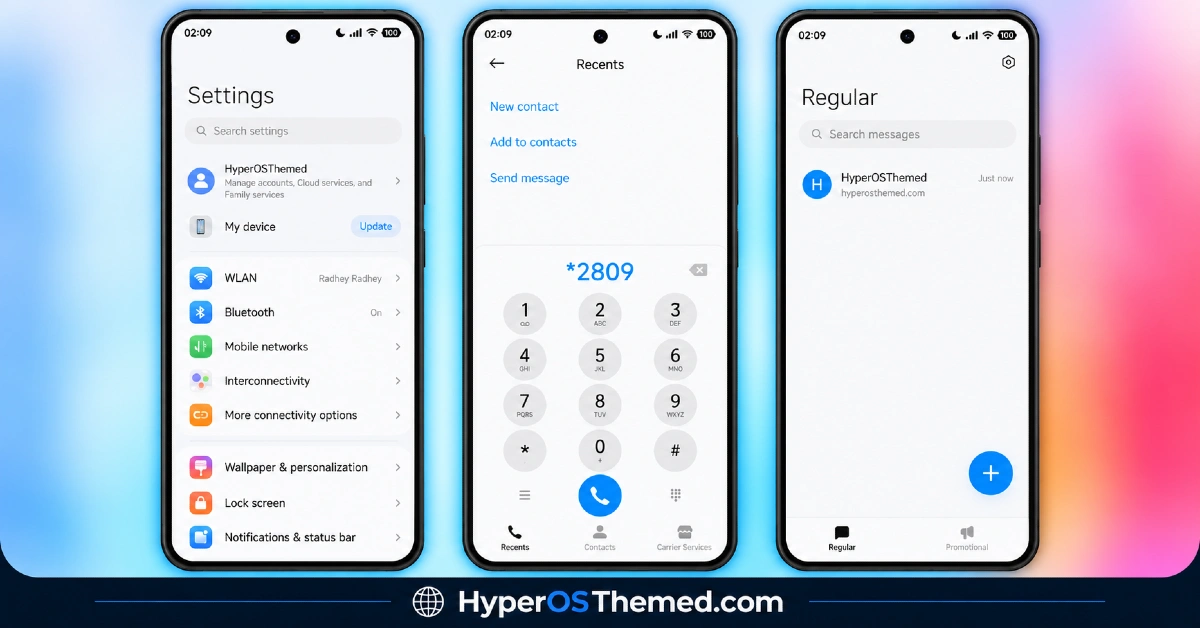
The screenshots below show the teal-purple metallic backdrop, the glossy black icon set and how the oversized lock screen typography and tracking cards look once the theme is applied. Given how bold the color combination is here, it’s worth checking the preview closely to see if this high-energy aesthetic matches your taste before downloading.
HyperV3 Theme Details
| Attribute | Details |
|---|---|
| Availability | Free, via Xiaomi Theme Store |
| Supported Devices | Xiaomi, Redmi and POCO phones running HyperOS |
| Theme Name | HyperV3 |
| Designer | Ali.ZR |
| Compatibility OS | HyperOS, HyperOS 2.0 and HyperOS 3.0 |
| Features | Teal-purple metallic design, glossy black icons, giant lock screen typography, rich tracking cards, dynamic lock screen, neon accents |
| File Size | 33.66 MB |
HyperV3 Theme Compatibility
HyperV3 HyperOS Theme supports HyperOS, HyperOS 2.0 and HyperOS 3.0, giving it solid reach across Xiaomi, Redmi and POCO devices running any of those versions. Since the theme relies on a dynamic lock screen along with detailed tracking cards, older or lower-powered devices may render these elements with slightly less smoothness compared to current flagship hardware.
Custom ROM users on setups like Xiaomi EU ROM or MIUIRoom can still install the theme manually through the MTZ file, though the fluid metallic effects and dynamic lock screen animation may behave a bit differently outside the official global stable ROM. As with most themes that modify the lock screen, restarting the device after installation is a sensible first step if anything looks overlapped or fails to display properly.
Get HyperV3 Theme
Download HyperV3 HyperOS Theme Xiaomi only through the official Theme Store link rather than random third-party file hosts or unofficial APK uploads. Files sourced outside verified channels are difficult to confirm as unaltered and may not reflect what Ali.ZR actually released. Sticking to the official Theme Store link keeps the installed version consistent with the intended design and ensures any future updates remain accessible.
How to Apply HyperV3 HyperOS Theme
Follow the steps below to apply the theme:
- Open the Theme Store link given above on your Xiaomi, Redmi or POCO device.
- This will redirect you to the Theme Store.
- Download and install the theme.
- Tap on Apply.
- Customize specific elements such as icons, lock screen or status bar if needed.
- Reboot your device for the full effect, though this step is optional.
Note: If anything looks overlapped or doesn’t display correctly right after installing, restarting the device usually clears it up without further steps. This theme has been checked across its supported HyperOS versions without any major issues turning up in that process. Still, if something looks off on a specific device once it’s applied, leaving a comment with the details helps get it looked into.
Installing HyperV3 Theme on Custom ROM Devices
Devices running MIUI 11 through 14 or HyperOS based Custom ROMs such as Xiaomi EU ROM or MIUIRoom aren’t able to use the direct Theme Store link, so the MTZ file needs to be brought in manually instead. Here’s how that works:
- Grab the MTZ file for HyperV3 from the download section.
- Open the Theme Store app.
- Go into the Themes tab.
- Scroll down to find the Import option, then tap it.
- Use the file manager to locate the downloaded .mtz file.
- Wait for the import process to finish.
- Tap the theme once it appears in the list to apply it.
Why Choose HyperV3 HyperOS Theme?
- Bold cybernetic aesthetic — teal-purple metallic tones create a genuinely distinct, high-energy look.
- Functional tracking cards — lock screen information cards add real utility beyond visual styling.
- Oversized clock typography — a striking design choice that makes a strong first impression.
- Dynamic lock screen — movement and animation add life compared to a flat, static layout.
- Glossy contrast icon design — black icons stay legible against the vibrant metallic backdrop.
- Wide HyperOS compatibility — works across HyperOS, HyperOS 2.0 and HyperOS 3.0.
- Cohesive neon detailing — accent touches tie the whole visual theme together consistently.
- Free official download — no cost involved and distributed through a legitimate Theme Store link.
Conclusion
HyperV3 HyperOS Theme goes all in on a bold, cybernetic look that won’t be for everyone, but for anyone drawn to that teal-purple metallic aesthetic paired with oversized lock screen typography, it delivers a genuinely distinctive experience. The functional tracking cards add practical value on top of the visual impact, making it more than just a flashy wallpaper swap. For Xiaomi, Redmi and POCO users who want their device to make a statement, HyperV3 is well worth trying.
You may also like:
G2redcc HyperOS Theme for Xiaomi, POCO and REDMI Phones
Starry Star UI HyperOS Theme with One UI Look for Xiaomi, POCO and Redmi Phones
Vibgyor HyperOS Theme with Depth Effect Wallpapers for Xiaomi, POCO and REDMI
TNV-4 Theme with Transparent White Icons and a Clean, Minimal Design for HyperOS
Vibria HyperOS Theme: Customizable Glass Clock, Nature Wallpapers, Liquid Glass UI
