
Hey Xiaomi Lovers, sometimes the best theme isn’t the one with the most effects, it’s the one that gets out of your way. TNV-4 takes that approach, stripping things down to fully transparent white icons that let whatever wallpaper you choose actually take center stage instead of competing with a busy icon grid.
Designed by SabriTN, it adds a switchable analog clock widget for a slightly classic touch alongside a clean date display, all wrapped in a light, minimal aesthetic. At 47.20 MB and compatible across HyperOS, HyperOS 2.0 and HyperOS 3.0, it’s built for Xiaomi, Redmi and POCO users who’d rather their home screen feel calm than crowded.
TNV-4 HyperOS Theme Key Features
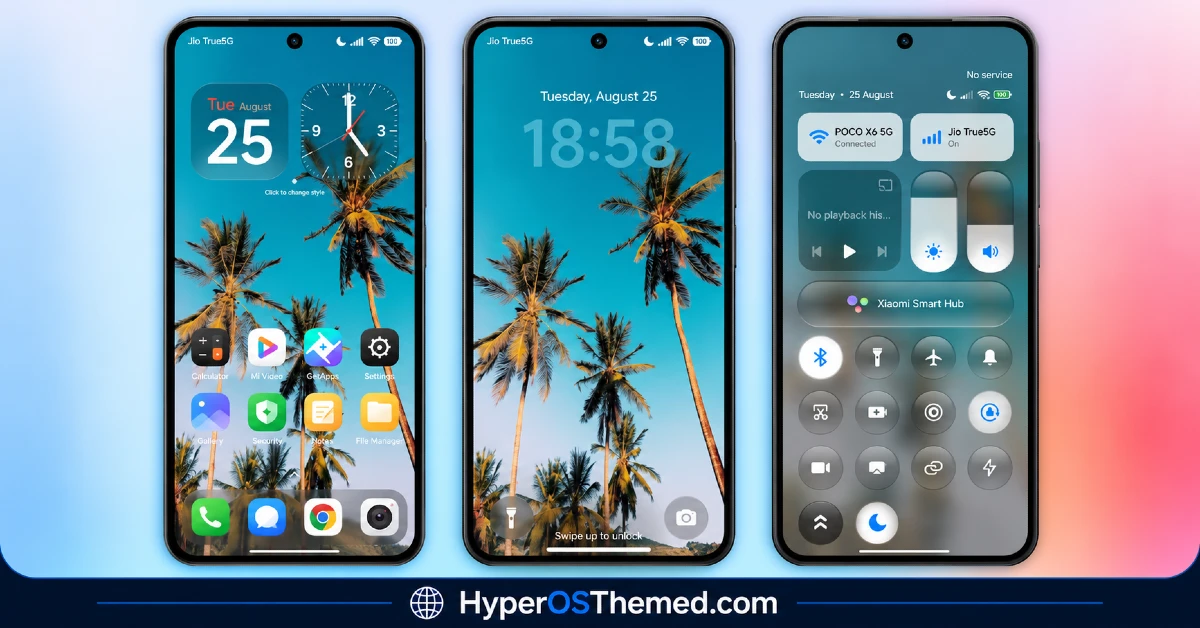
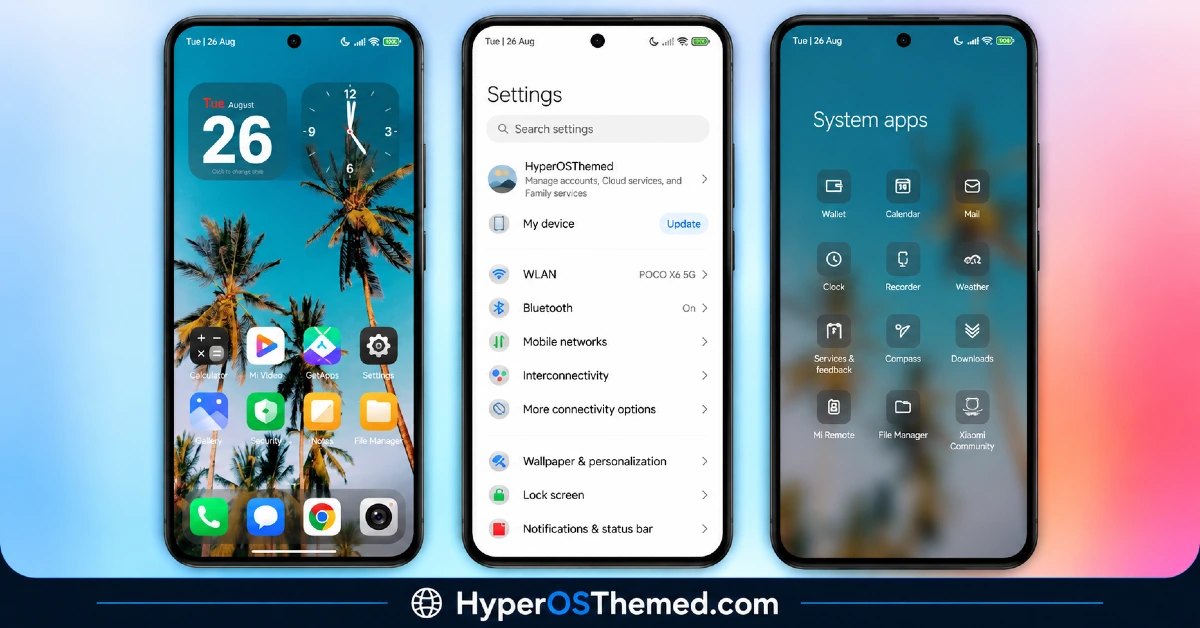
- Fully Transparent White Icons: The standout feature here is the icon set itself, using a fully transparent white outline style that lets the wallpaper show through rather than sitting on a solid background. This creates a genuinely different look compared to most themes that just recolor icons while keeping a filled shape.
- Switchable Analog Clock Widget: TNV-4 includes an analog clock option that can be swapped in for a more classic look instead of the usual digital display. It’s a small detail, but one that adds a bit of personality for anyone who prefers analog styling over standard digital widgets.
- Clean Date Display: The date widget follows the same minimal design philosophy as the rest of the theme, staying simple and unobtrusive rather than competing for attention on the home screen. It pairs naturally with the transparent icon style without adding visual clutter.
- Light, Minimal Aesthetic: Every element of TNV-4 leans toward simplicity, avoiding heavy colors, gradients or decorative effects in favor of a lighter overall feel. This makes it a good fit for anyone who’s tried busier themes before and found them distracting rather than enjoyable.
- Wallpaper-Forward Design: Because the icons are transparent, the theme is essentially built to showcase whatever wallpaper is chosen rather than overlay it with a heavy icon pack. This gives more visual freedom to personalize the look further just by swapping wallpapers.
- Broad HyperOS Version Support: TNV-4 works across HyperOS, HyperOS 2.0 and HyperOS 3.0 rather than being tied to a single release. This gives it decent reach across both newer and slightly older Xiaomi, Redmi and POCO devices.
TNV-4 Theme Preview
The screenshots below show the transparent white icon set, the analog clock widget option and how the overall minimal layout looks once the theme is applied. Since the whole appeal here depends on how the icons interact with different wallpapers, it’s worth looking through the preview to see how the transparency effect plays out in practice.
TNV-4 Theme Details
| Attribute | Details |
|---|---|
| Availability | Free, via Xiaomi Theme Store |
| Supported Devices | Xiaomi, Redmi and POCO phones running HyperOS |
| Theme Name | TNV-4 |
| Designer | SabriTN |
| Compatibility OS | HyperOS, HyperOS 2.0 and HyperOS 3.0 |
| Features | Transparent white icons, switchable analog clock, clean date display, minimal design |
| File Size | 47.20 MB |
TNV-4 Theme Compatibility
TNV-4 supports HyperOS, HyperOS 2.0 and HyperOS 3.0, giving it solid reach across Xiaomi, Redmi and POCO devices running any of those versions. Since the theme relies on transparent icons, its overall look can vary quite a bit depending on the wallpaper chosen, so busier or high-contrast wallpapers may make the icons a little harder to distinguish compared to simpler backgrounds.
Custom ROM users on setups like Xiaomi EU ROM or MIUIRoom can still install the theme manually through the MTZ file, though the analog clock widget and transparency rendering may look slightly different outside the official global stable ROM. As with most themes, restarting the device after installation is a sensible first step if anything looks overlapped or fails to display properly.
Get TNV-4 Theme
Download TNV-4 only through the official Theme Store link rather than random third-party file hosts or unofficial APK uploads. Files sourced outside verified channels are difficult to confirm as unaltered and may not reflect what SabriTN actually released. Sticking to the official Theme Store link keeps the installed version consistent with the intended design and ensures any future updates remain accessible.
How to Apply TNV-4 Theme
Follow the steps below to apply the theme:
- Open the Theme Store link given above on your Xiaomi, Redmi or POCO device.
- This will redirect you to the Theme Store.
- Download and install the theme.
- Tap on Apply.
- Customize specific elements such as icons, lock screen or status bar if needed.
- Reboot your device for the full effect, though this step is optional.
Note: If anything looks overlapped or doesn’t display correctly right after installing, restarting the device usually clears it up without further steps. This theme has been checked across its supported HyperOS versions without any major issues turning up in that process. Still, if something looks off on a specific device once it’s applied, leaving a comment with the details helps get it looked into.
Installing TNV-4 on Custom ROM Devices
Devices running MIUI 11 through 14 or HyperOS based Custom ROMs such as Xiaomi EU ROM or MIUIRoom aren’t able to use the direct Theme Store link, so the MTZ file needs to be brought in manually instead. Here’s how that works:
- Grab the MTZ file for TNV-4 from the download section.
- Open the Theme Store app.
- Go into the Themes tab.
- Scroll down to find the Import option, then tap it.
- Use the file manager to locate the downloaded .mtz file.
- Wait for the import process to finish.
- Tap the theme once it appears in the list to apply it.
Why Choose TNV-4 Theme?
- Genuinely transparent icons — a rare fully see-through white icon style, not just a light recolor.
- Wallpaper-forward design — puts the focus on your chosen wallpaper instead of a heavy icon overlay.
- Switchable analog clock — a classic touch for anyone tired of standard digital widgets.
- Clean, minimal layout — every element avoids unnecessary decoration or clutter.
- Wide HyperOS compatibility — works across HyperOS, HyperOS 2.0 and HyperOS 3.0.
- Distraction-free daily use — the light aesthetic keeps the interface calm rather than visually busy.
- Free official download — no cost involved and distributed through a legitimate Theme Store link.
- Straightforward installation — a simple transparency-based design tends to mean fewer setup quirks.
Conclusion
TNV-4 proves that a theme doesn’t need heavy effects or bold colors to stand out, using fully transparent icons and a minimal layout to let your own wallpaper choice do most of the visual work. The broad HyperOS version support and the analog clock option add just enough personality without breaking from the clean, clutter-free approach. For Xiaomi, Redmi and POCO users who want a refreshing, distraction-free home screen, TNV-4 is well worth trying.
You may also like:
Vibria HyperOS Theme: Customizable Glass Clock, Nature Wallpapers, Liquid Glass UI
Poo-Black HyperOS Theme with Premium Dynamic 3D Lock Screen for Xiaomi, POCO and REDMI Phones
LIUI Extreme HyperOS Theme for Xiaomi, POCO and REDMI Phones
Translucent HyperOS Theme with iOS-Inspired Glass Effect for Xiaomi, POCO and REDMI Phones
