
Translucent HyperOS Theme is a HyperOS 3.0 theme for Xiaomi, Redmi and POCO devices designed by Maidul Islam, built around a glass-style visual effect that runs across icons, panels and the lock screen. Instead of solid backgrounds and flat colors, this one leans into layered transparency to give the interface a sense of depth that most default HyperOS themes don’t attempt.
It reworks the lock screen, control center, icons and several core system apps into one connected glass-themed package. At 66.4 MB, it’s on the heavier side for a HyperOS theme, which lines up with how much detail typically goes into rendering transparency and blur effects properly.
Translucent HyperOS Theme Key Features
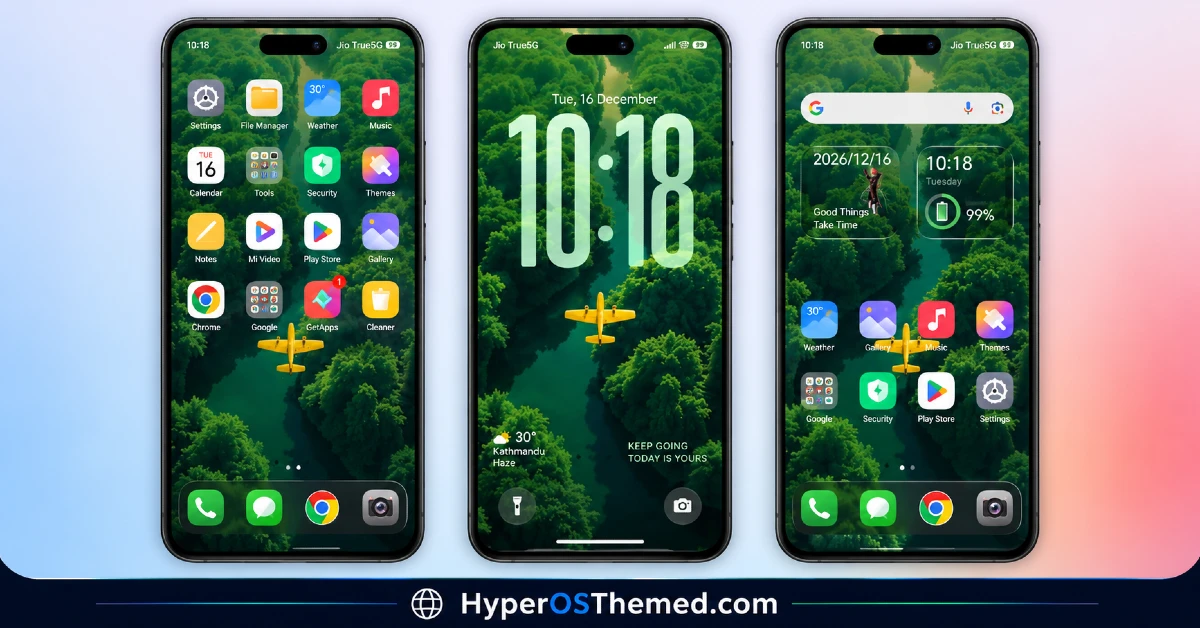
- Glass Effect UI Elements: Translucent HyperOS Theme applies a frosted glass look across panels and menus rather than relying on solid, opaque backgrounds. This creates a layered visual depth throughout the system, though transparency effects can occasionally make text a little harder to read against busier wallpapers.
- Custom Glass-Style Icon Pack System and popular third-party app icons are redesigned with a translucent finish that ties into the overall glass aesthetic. As with most icon packs, coverage tends to focus on commonly used apps, so a handful of less popular ones may keep their default look.
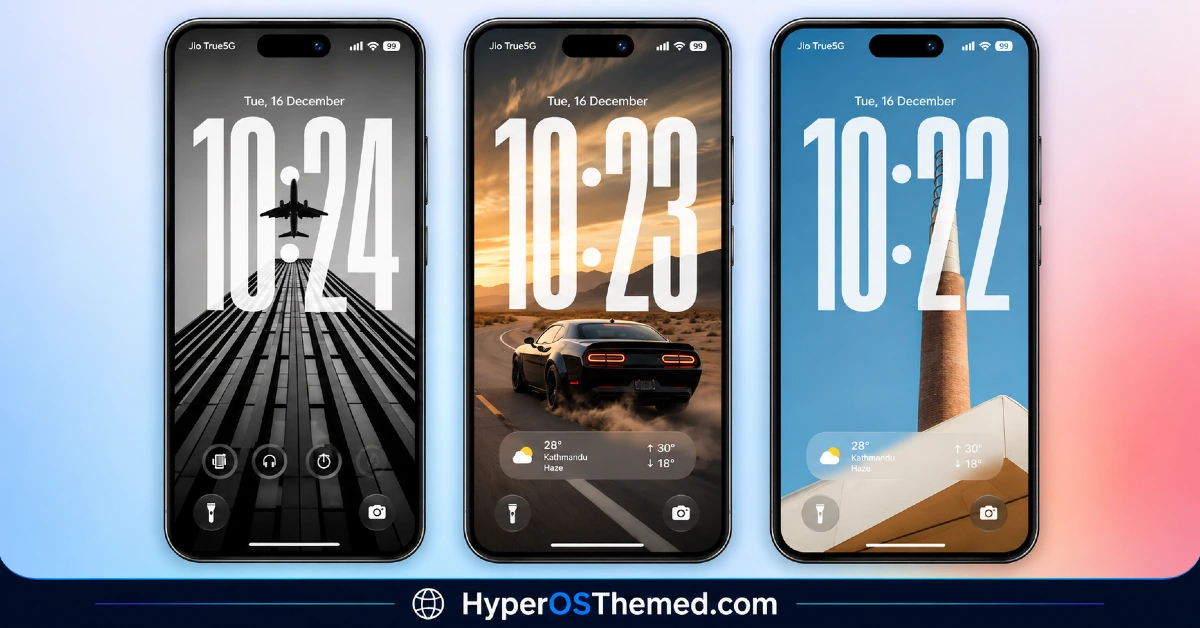
- Redesigned Lock Screen: The lock screen gets restructured spacing and layout changes to better showcase the glass effect against the wallpaper underneath. This is one of the more visually distinct areas compared to the stock HyperOS lock screen.
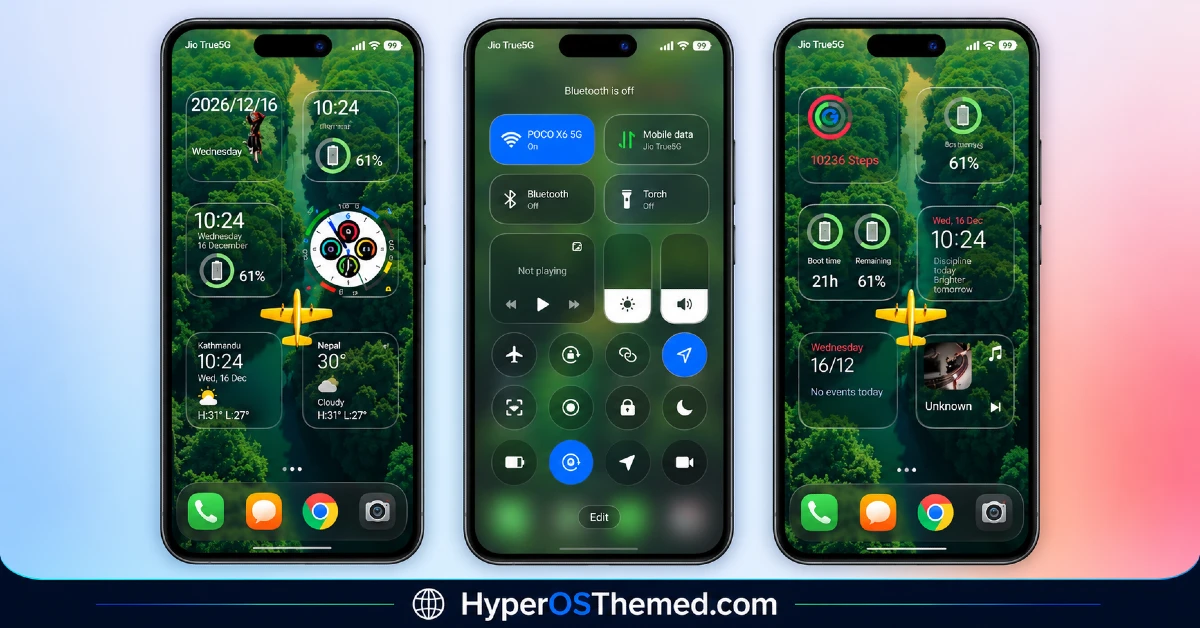
- Translucent Control Center Quick settings toggles and the panel background pick up the same frosted glass treatment seen elsewhere in the theme. The core toggle layout stays close to stock, so it’s more of a styling pass than a rearrangement of functionality.
- System App Styling: Dialer, Settings and Messages all receive matching visual updates so the glass effect carries through daily-use apps instead of stopping at the home screen. This keeps the experience from feeling split between a themed launcher and untouched system menus.
- Larger File Size for Detailed Rendering: At 66.4 MB, Translucent HyperOS Theme is heavier than many icon-only or flat-color themes, largely due to the layered assets needed to render glass and blur effects convincingly. It’s worth factoring this into available storage before downloading, particularly on devices already running low on space.
Translucent HyperOS Theme Preview
The screenshots below show the frosted glass panels, the translucent icon set and how the redesigned lock screen and control center look once the theme is applied. Since glass and blur effects are far easier to judge visually than to describe, it’s worth looking through the preview before deciding if the style fits your taste.
Translucent HyperOS Theme Details
| Attribute | Details |
|---|---|
| Availability | Free, via Xiaomi Theme Store |
| Supported Devices | Xiaomi, Redmi and POCO phones running HyperOS |
| Theme Name | Translucent |
| Designer | Maidul Islam |
| Compatibility OS | HyperOS 3.0 |
| Features | Glass effect UI, translucent icon pack, redesigned lock screen, glass-style control center, system app styling |
| File Size | 66.4 MB |
Translucent HyperOS Theme Compatibility
Translucent Xiaomi Theme is built specifically for HyperOS 3.0 and works across Xiaomi, Redmi and POCO devices running that version. Since the theme relies heavily on transparency and blur rendering, older HyperOS builds will likely display these effects with noticeably less polish, so sticking to HyperOS 3.0 is the safer choice.
Custom ROM users on builds such as Xiaomi.eu, MIUIRoom or HyperOS CN can still import the MTZ file manually, though the glass effects may render a bit less cleanly outside the official global stable ROM. Given the larger file size, it’s worth checking available storage beforehand, and as with most lock-screen-modifying themes, a restart after installation is a sensible first step if anything looks visually off.
Get Translucent HyperOS Theme
Download Translucent HyperOS Theme only through the official Theme Store link rather than random third-party file-sharing sites or unofficial APK sources. Files circulating outside official channels are difficult to verify and may not match the version Maidul Islam actually released, sometimes with unwanted changes baked in. Sticking to the official Theme Store keeps the installed version consistent with the intended design and ensures future updates remain accessible.
How to Apply Translucent HyperOS Theme
Follow the steps below to apply the theme:
- Open the Theme Store link given above on your Xiaomi, Redmi or POCO device.
- This will redirect you to the Theme Store.
- Download and install the theme.
- Tap on Apply.
- Customize specific elements such as icons, lock screen or status bar if needed.
- Reboot your device for the full effect, though this step is optional.
Note: If anything looks overlapped or fails to display correctly right after installing, restarting the device usually clears it up without further steps. This theme has gone through careful checks on HyperOS 3.0 without any major issues turning up in that process. Still, if something looks off on a specific device once it’s applied, leaving a comment with the details helps get it looked into.
Installing Translucent HyperOS Theme on Custom ROM Devices
Devices running a Custom ROM such as Xiaomi.eu, MIUIRoom, MIUI SR or HyperOS CN aren’t able to use the direct Theme Store link, so the MTZ file needs to be brought in manually through the Theme Store app. Here’s how that works:
- Grab the MTZ file for Translucent from the download section.
- Open the Theme Store app.
- Go into the Themes tab.
- Scroll down to find the Import option, then tap it.
- Use the file manager to locate the downloaded .mtz file.
- Wait for the import process to finish.
- Tap the theme once it appears in the list to apply it.
Why Choose Translucent HyperOS Theme?
- Genuine glass effect design — layered transparency sets it apart from flat, solid-color theme options.
- Full system coverage — Dialer, Settings and Messages all carry the same glass aesthetic as the home screen.
- Coordinated icon and panel styling — translucent finish stays consistent across icons, lock screen and control center.
- Built specifically for HyperOS 3.0 — designed with the latest version in mind for better visual accuracy.
- Detailed visual rendering — larger file size reflects the extra assets needed for convincing blur and glass effects.
- Distinct lock screen redesign — layout changes noticeably from the stock HyperOS lock screen.
- Free through the official Theme Store — no cost involved and distributed through a legitimate channel.
- Consistent control center styling — toggles and panel background match the rest of the theme’s glass motif.
Conclusion
Translucent xiaomi Theme stands out through its commitment to a genuine glass and transparency aesthetic rather than a token blur effect tacked onto a flat design, and building it specifically for HyperOS 3.0 helps the visuals render as intended. The larger file size is worth planning around, but the payoff is a more detailed, layered look across the whole system rather than just the home screen. For Xiaomi, Redmi and POCO users on HyperOS 3.0 wanting a more dimensional interface, Translucent is worth trying.
You may also like:
Equinox HyperOS Theme for Xiaomi, POCO and REDMI Phones
OX S1 HyperOS Theme for Xiaomi, POCO and REDMI Phones Designed By OXFURY
Pooxel HyperOS Theme With Google Pixel Inspired Theme for Xiaomi, POCO and REDMI Phones
