
Hey HyperOS Users, if you’ve been chasing a theme that actually feels premium rather than just claiming to be, Vibria HyperOS Theme is worth a closer look. Designed by Maidul Islam, it pairs a vibrant nature-inspired wallpaper collection with a liquid glass UI style, built around an oversized transparent lock screen clock that’s genuinely one of the more detailed customization features I’ve seen in a HyperOS theme.
Beyond the visuals, it packs in an unusual amount of user control, from font styles to lock-screen widgets, making it feel less like a fixed design and more like a customization toolkit. At 81.1 MB and compatible with HyperOS and HyperOS 3, it’s a sizable download that reflects just how much is included.
Key Features of Vibria HyperOS Theme
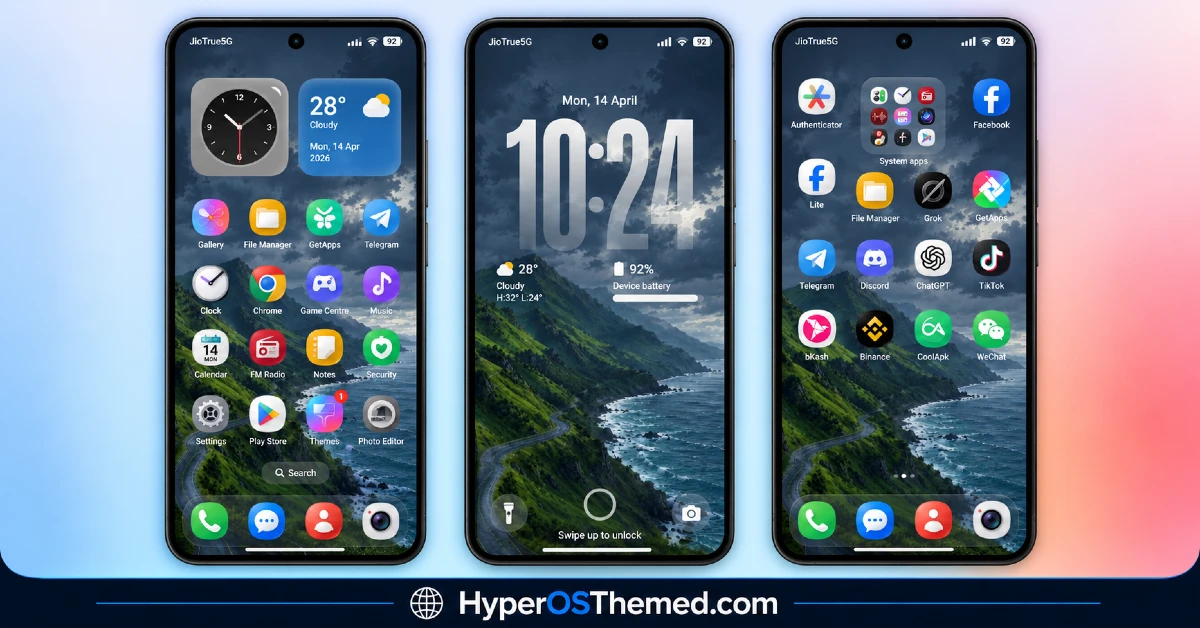
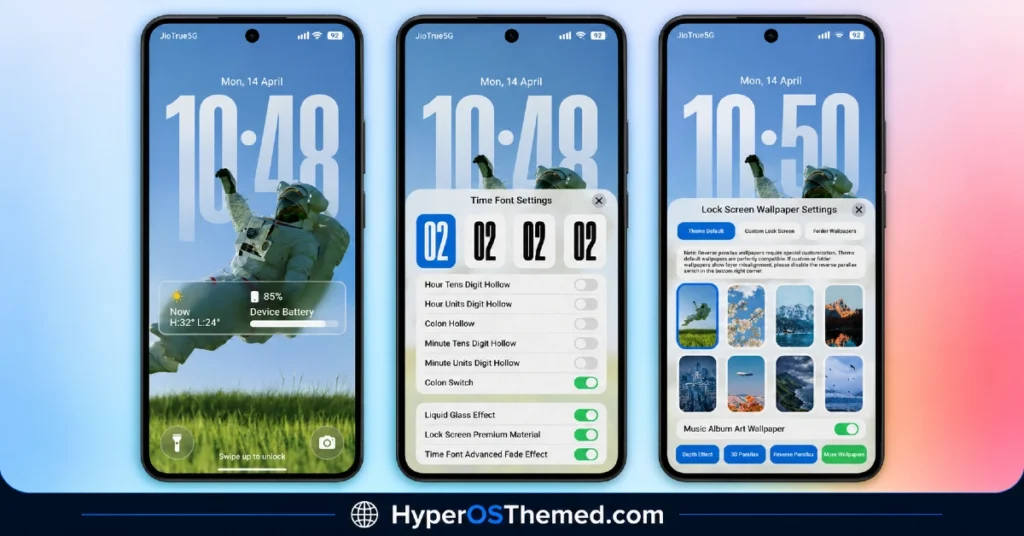
- Large Transparent Glass Clock: The lock screen centers around an oversized clock with a genuine glass effect rather than a simple transparent overlay. Multiple font styles and hollow-digit customization options are available, giving a level of control over the clock’s look that most themes don’t offer.
- Nature and Landscape Wallpaper Collection: Vibria HyperOS Theme includes a solid range of built-in wallpapers featuring mountains, oceans and even an astronaut-themed design. Having this variety packed directly into the theme means less time spent hunting for a separate wallpaper that matches the aesthetic.
- Liquid Glass Effect Throughout: The translucent, glassy styling extends beyond just the clock into icons, widgets and system UI elements for a cohesive look. This kind of layered transparency effect is part of what gives the theme its premium feel rather than looking like a flat color swap.
- Customizable Lock-Screen Widgets: Widgets for weather, battery, AQI, humidity and temperature can all be added and adjusted directly on the lock screen. This turns the lock screen into something genuinely functional rather than just decorative, which is a nice departure from themes that treat it purely as a visual space.
- 3D Parallax and Depth Effect Wallpapers: Several of the included lock-screen wallpapers support parallax and depth effects that respond to device motion. It’s a small but effective touch that adds a sense of dimension without needing a separate app to enable it.
- Glossy Rounded Icon Set: Icons follow a colorful, rounded and glossy style that matches the vibrant aesthetic running through the rest of the theme. Coverage extends to widgets and the dock as well, keeping the whole visual package feeling connected rather than icons looking separate from everything else.
Vibria HyperOS Theme Preview
The screenshots below show the oversized glass clock, the nature wallpaper collection and how the glossy icon set and widgets look once the theme is applied. Given how much customization is baked into this one, from clock fonts to lock-screen widgets, it’s worth spending a bit of extra time with the preview to appreciate the range of options available.
Vibria HyperOS Theme Details
| Attribute | Details |
|---|---|
| Availability | Free, via Xiaomi Theme Store |
| Supported Devices | Xiaomi, Redmi and POCO phones running HyperOS |
| Theme Name | Vibria |
| Designer | Maidul Islam |
| Compatibility OS | HyperOS and HyperOS 3 |
| Features | Transparent glass clock, nature wallpaper collection, liquid glass UI, customizable lock-screen widgets, 3D parallax wallpapers, glossy rounded icons |
| File Size | 81.1 MB |
Vibria HyperOS Theme Compatibility
Vibria HyperOS Theme is built for HyperOS and HyperOS 3, covering a solid range of Xiaomi, Redmi and POCO devices running either version. Since the theme leans heavily on glass and parallax effects, older or less powerful devices may render some of the depth effects with slightly less smoothness compared to newer flagship hardware.
Given the larger file size, it’s worth checking available storage before downloading, particularly since the wallpaper and widget variety adds up quickly. Custom ROM users can still bring the theme in manually through the MTZ file, though the liquid glass rendering and 3D parallax effects may look a touch less polished outside the official global stable ROM.
Get Vibria HyperOS Theme
Download Vibria only through the official Theme Store link rather than random third-party file hosts or unofficial APK uploads. Files sourced outside verified channels are difficult to confirm as unaltered and may not match what Maidul Islam actually released. Sticking to the official Theme Store link keeps the installed version consistent with the intended design and ensures future updates remain accessible.
How to Apply Vibria HyperOS Theme
Follow the steps below to apply the theme:
- Open the Theme Store link given above on your Xiaomi, Redmi or POCO device.
- This will redirect you to the Theme Store.
- Download and install the theme.
- Tap on Apply.
- Customize specific elements such as icons, lock screen or status bar if needed.
- Reboot your device for the full effect, though this step is optional.
Note: If any part of the interface looks overlapped or doesn’t display properly right after installing, restarting the device usually clears it up. This theme has been checked for smooth performance on its supported HyperOS versions without any major issues turning up. Still, if something looks off on a specific device once it’s applied, leaving a comment with the details helps get it looked into.
Installing Vibria HyperOS Theme on Custom ROM Devices
Devices running a Custom ROM aren’t able to use the direct Theme Store link, so the MTZ file needs to be brought in manually through the Theme Store app instead. Here’s how that works:
- Grab the MTZ file for Vibria HyperOS Theme from the official Theme Store link above
- Open the Theme Store app.
- Go into the Themes tab.
- Scroll down to find the Import option, then tap it.
- Use the file manager to locate the downloaded .mtz file.
- Wait for the import process to finish.
- Tap the theme once it appears in the list to apply it.
Why Choose Vibria HyperOS Theme?
- Oversized customizable clock — genuine glass effect with multiple font and digit style options.
- Rich wallpaper variety — mountains, oceans and an astronaut design all included without needing separate downloads.
- Functional lock-screen widgets — weather, AQI, battery and more can be added directly to the lock screen.
- True liquid glass styling — transparency runs consistently through icons, widgets and system UI, not just the clock.
- 3D parallax wallpaper support — adds motion-based depth for a more dynamic lock screen experience.
- Music album art wallpaper option — a nice personalized touch tied to whatever’s currently playing.
- Flexible lock-screen interaction — supports both double tap and single tap customization.
- Free official download — no cost involved and distributed through a legitimate Theme Store link.
Conclusion
Vibria Xiaomi Theme earns its premium feel honestly, packing genuine customization depth into the clock, wallpapers and lock-screen widgets rather than relying on a single flashy gimmick. The larger file size is a fair trade-off for how much control and visual variety comes bundled in, and the liquid glass styling carrying through icons and system UI keeps everything feeling connected. For Xiaomi, Redmi and POCO users who want a colorful, highly customizable theme with real substance behind the polish, Vibria is well worth trying.
You may also like:
Poo-Black HyperOS Theme with Premium Dynamic 3D Lock Screen for Xiaomi, POCO and REDMI Phones
LIUI Extreme HyperOS Theme for Xiaomi, POCO and REDMI Phones
Translucent HyperOS Theme with iOS-Inspired Glass Effect for Xiaomi, POCO and REDMI Phones
Equinox HyperOS Theme for Xiaomi, POCO and REDMI Phones
OX S1 HyperOS Theme for Xiaomi, POCO and REDMI Phones Designed By OXFURY
