
Hey Tech Enthusiasts, if you’ve ever used a Samsung phone and missed that particular One UI polish after switching to Xiaomi, Starry Star UI HyperOS Theme might scratch that exact itch. Designed by 星小星, this HyperOS theme borrows heavily from Samsung’s One UI visual language, bringing that rounded, premium look over to Xiaomi, Redmi and POCO devices along with a dynamic lock screen for good measure.
At just 16.21 MB, it’s on the lighter end of the theme spectrum, making it an easy download even on a slower connection. Compatible across HyperOS, HyperOS 2.0 and HyperOS 3.0, it covers a solid range of devices for anyone curious about trying a Samsung-inspired look without switching phones.
Starry Star UI Theme Key Features
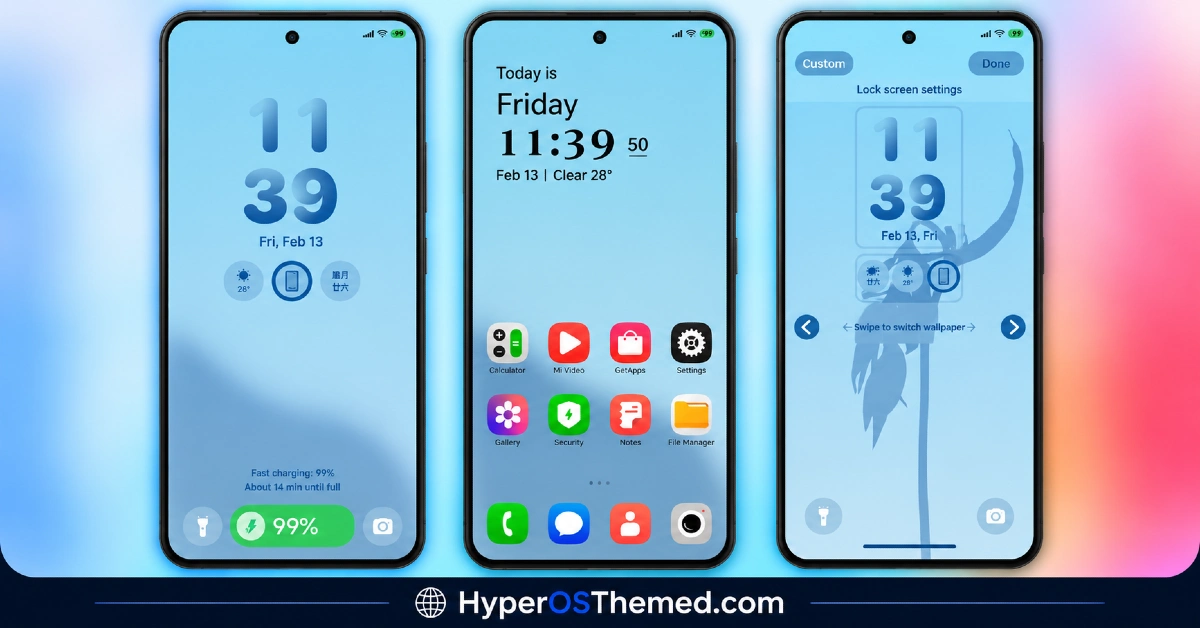
- One UI Inspired Design Language: Starry Star UI borrows the rounded shapes, generous spacing and overall visual rhythm associated with Samsung’s One UI rather than sticking to typical HyperOS styling. This gives the interface a distinctly different feel from most Xiaomi themes, closer to what Galaxy device owners are used to seeing.
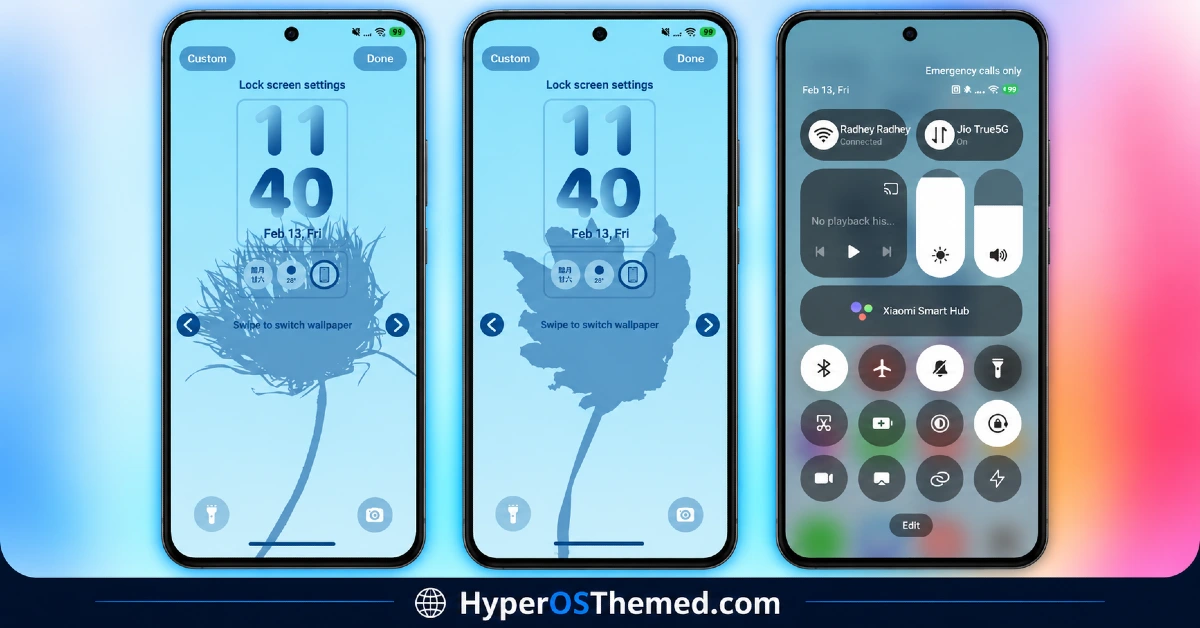
- Dynamic Lock Screen: The lock screen incorporates movement and shifting visual elements instead of a static, fixed layout. It’s one of the more noticeable features once applied and adds a bit of extra polish beyond the icon and layout changes.
- Premium Visual Finish: Icons and system elements are designed with a more refined, premium look rather than flat or basic styling. This tracks with the general One UI aesthetic, which tends to favor a slightly glossy, considered finish over minimal flat design.
- Samsung-Style Layout Elements: Beyond just icons, several layout choices echo Samsung’s design patterns, including spacing and element grouping that feels distinct from stock HyperOS. This is likely to stand out most to anyone who’s spent time on a Galaxy device before.
- Compact File Size: At 16.21 MB, Starry Star UI is considerably lighter than many HyperOS themes that push past 30 or 50 MB. This makes it quick to download and apply, which is a nice bonus for anyone just wanting to try the look without a lengthy install.
- Multiple Download Options The theme is available as a standard MTZ file alongside a separate backup file, giving users more than one path to install depending on preference. This flexibility isn’t something every theme offers, particularly at this smaller file size.
Starry Star UI HyperOS Theme Preview
The screenshots below show the One UI inspired icon design, the dynamic lock screen and how the overall Samsung-style layout looks once applied. Since the appeal here comes down to how closely it captures that particular aesthetic, it’s worth looking through the preview closely if you’re familiar with Samsung’s interface and want to compare directly.
Starry Star UI Theme Details
| Attribute | Details |
|---|---|
| Availability | Free, via Xiaomi Theme Store |
| Supported Devices | Xiaomi, Redmi and POCO phones running HyperOS |
| Theme Name | Starry Star UI |
| Designer | 星小星 |
| Compatibility OS | HyperOS, HyperOS 2.0 and HyperOS 3.0 |
| Features | One UI inspired design, dynamic lock screen, premium visual finish, Samsung-style layout elements |
| File Size | 16.21 MB |
Starry Star UI Theme Compatibility
Starry Star UI supports HyperOS, HyperOS 2.0 and HyperOS 3.0, giving it solid reach across Xiaomi, Redmi and POCO devices running any of those versions. Since the theme originates from a Chinese region listing, some elements of the Theme Store page itself may initially display in Chinese before the theme is downloaded and applied, so it’s worth being ready to navigate that during installation.
Custom ROM users on setups like Xiaomi EU ROM or MIUIRoom can still install the theme manually through the MTZ file, though the dynamic lock screen animation may behave slightly differently outside the official global stable ROM. As with most themes touching the lock screen, restarting the device after installation is a sensible first step if anything looks overlapped or fails to display properly.
Get Starry Star UI Theme
Download Starry Star UI only through the official Theme Store link rather than random third-party file hosts or unofficial APK uploads. Files sourced outside verified channels are difficult to confirm as unaltered and may not reflect what the designer actually released. Sticking to the official Theme Store link keeps the installed version consistent with the intended design and ensures any future updates remain accessible.
How to Apply Starry Star UI Theme
Follow the steps below to apply the theme:
- Open the Theme Store link given above on your Xiaomi, Redmi or POCO device.
- This will redirect you to the Theme Store.
- Download and install the theme.
- Tap on Apply.
- Customize specific elements such as icons, lock screen or status bar if needed.
- Reboot your device for the full effect, though this step is optional.
Note: If anything looks overlapped or doesn’t display correctly right after installing, restarting the device usually clears it up without further steps. This theme has been checked across its supported HyperOS versions without any major issues turning up in that process. Still, if something looks off on a specific device once it’s applied, leaving a comment with the details helps get it looked into.
Installing Starry Star UI on Custom ROM Devices
Devices running MIUI 11 through 14 or HyperOS based Custom ROMs such as Xiaomi EU ROM or MIUIRoom aren’t able to use the direct Theme Store link, so the MTZ file needs to be brought in manually instead. Here’s how that works:
- Grab the MTZ file for Starry Star UI from the download section.
- Open the Theme Store app.
- Go into the Themes tab.
- Scroll down to find the Import option, then tap it.
- Use the file manager to locate the downloaded .mtz file.
- Wait for the import process to finish.
- Tap the theme once it appears in the list to apply it.
Why Choose Starry Star UI Theme?
- Authentic One UI look — captures Samsung’s rounded, premium design language on a Xiaomi device.
- Dynamic lock screen — adds movement and personality rather than a flat, static layout.
- Extremely compact size — at 16.21 MB, it’s one of the lightest full themes available.
- Multiple install options — both MTZ and backup file formats are offered for flexibility.
- Broad HyperOS compatibility — works across HyperOS, HyperOS 2.0 and HyperOS 3.0.
- Refined, premium finish — icons and elements avoid a flat, generic look.
- Quick installation — the small file size means a faster download and setup process.
- Free official download — no cost involved and distributed through a legitimate Theme Store link.
Conclusion
Starry Star UI stands out by successfully translating Samsung’s One UI aesthetic onto a Xiaomi device, giving Galaxy fans or anyone curious about that look a way to try it without switching hardware. The dynamic lock screen adds a nice touch of personality on top of the visual redesign, and the small file size makes it an easy, low-commitment theme to test out. For Xiaomi, Redmi and POCO users drawn to that particular premium, rounded aesthetic, Starry Star UI is well worth trying.
You may also like:
Vibgyor HyperOS Theme with Depth Effect Wallpapers for Xiaomi, POCO and REDMI
TNV-4 Theme with Transparent White Icons and a Clean, Minimal Design for HyperOS
Vibria HyperOS Theme: Customizable Glass Clock, Nature Wallpapers, Liquid Glass UI
Poo-Black HyperOS Theme with Premium Dynamic 3D Lock Screen for Xiaomi, POCO and REDMI Phones
