
Gray V3 HyperOS Theme is a Xiaomi theme designed by Kartalbey for Xiaomi, Redmi and POCO devices. It combines a dark textured background with oversized digital clock typography, rounded interface elements and customised system panels.
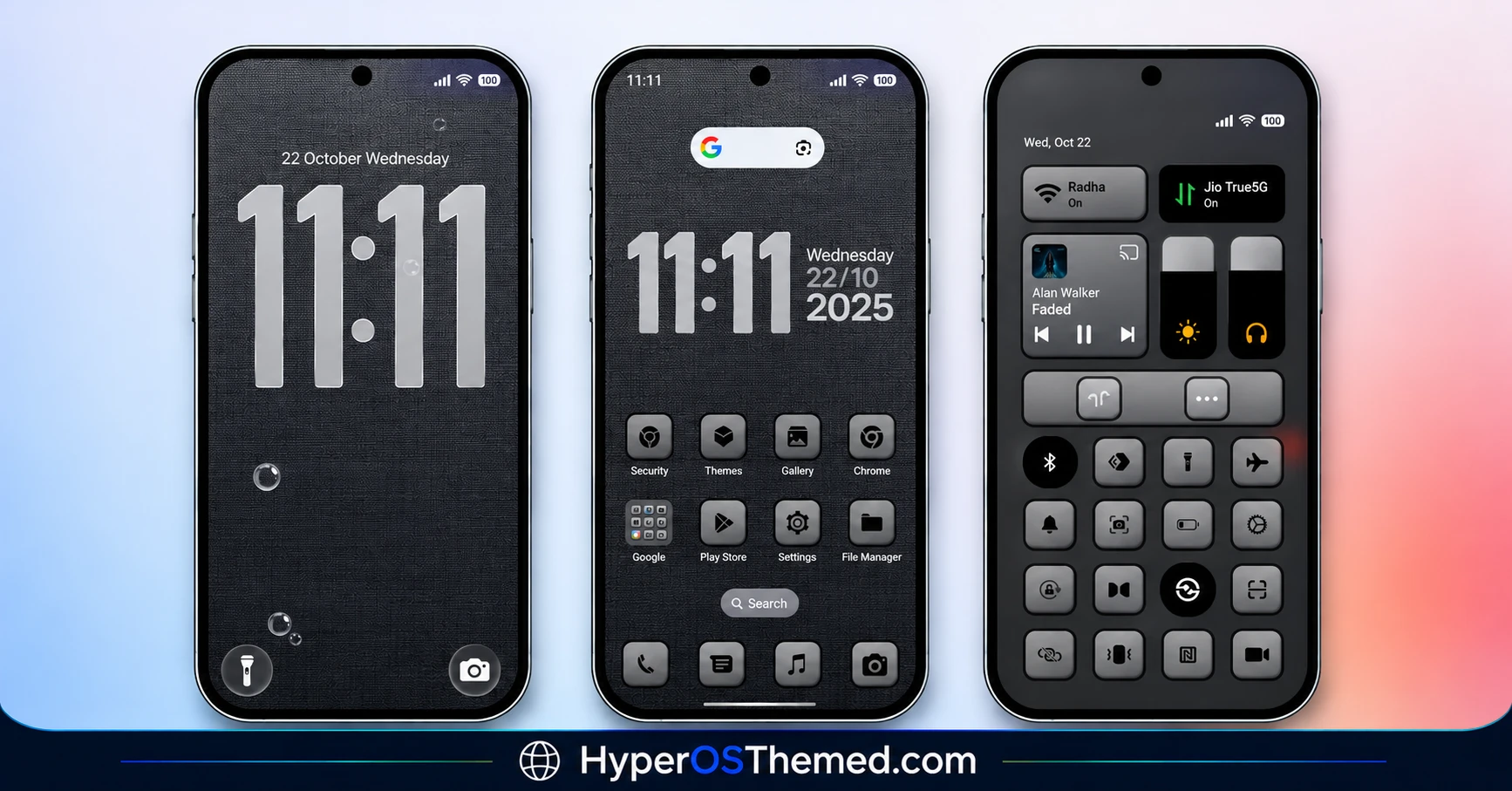
The screenshots show a consistent dark grey design across the lock screen, home screen, Control Centre and Settings interface. The theme also changes the dialler and other system elements, making it a broader interface customisation package rather than a wallpaper-only theme.
Gray V3 HyperOS Theme Key Features
- Dark Textured Wallpapers: Gray V3 HyperOS Theme uses a dark grey background with a fine textured appearance, visible across the lock screen, home screen and Settings preview. This creates a consistent backdrop for the lighter text and interface elements. The restrained colour palette gives the theme a darker appearance without relying entirely on a plain black background.
- Oversized Digital Lock Screen Clock: The lock screen features a large digital clock displaying the time in tall, narrow numerals. Its light grey lettering stands out against the dark textured wallpaper, making the time the main visual element. Smaller date and status information appears around the clock, keeping the layout focused on the time display.
- Customised Home Screen Layout: The home screen preview combines a digital clock and date information with a Google search bar and rounded app icons. The icons sit directly against the dark background, while their lighter surfaces create contrast with the wallpaper. This arrangement keeps key shortcuts visible without introducing a bright, multicoloured home screen.
- Redesigned Control Centre: Gray V3 changes the appearance of the Control Centre with rounded rectangular controls, compact quick-setting buttons and dark backgrounds. The supplied preview shows brightness and volume sliders alongside several system toggles. Their compact arrangement gives the panel a distinct appearance compared with the standard interface.
- Custom Volume and Brightness Controls: The screenshots show slider-based controls with light grey surfaces and darker surrounding panels. These elements follow the theme’s overall colour scheme, helping the control interface match the lock screen and home screen. The images demonstrate the visual styling, but do not establish any changes to the underlying behaviour of these controls.
- Modified Settings Interface: The Settings preview uses a dark background, a search field and a vertically arranged list of system options. Light text and simple icons distinguish the individual entries from the surrounding interface. This extends Gray V3’s dark styling beyond the home screen and quick settings into the system menus.
- Customised System Information Screen: One screenshot displays a device information page with the heading “Xiaomi HyperOS” against the dark textured background. System information is arranged below it in separate rows, maintaining the same dark appearance as the other screens. This shows that the theme’s styling also reaches parts of the device’s system interface.
- Updated Dialler and System Elements: The reference lists a changed dialler pad among Gray V3’s features, along with modifications to the notification area and status bar. These changes are intended to extend the theme across additional parts of the interface. The supplied screenshots do not show the dialler or a detailed notification view, so their exact layouts cannot be confirmed from the previews alone.
- Additional Theme Customisation: The theme listing states that users can access customisation by swiping down. This provides an additional gesture-based route to the available options. The precise controls shown after the gesture are not documented in the supplied material and may depend on the theme implementation.
Gray V3 HyperOS Theme Preview
The previews highlight Gray V3 HyperOS Theme’s dark, textured design across several parts of HyperOS. The lock screen uses an oversized digital clock, while the home screen combines compact icons with time and date information. Additional screenshots show the redesigned Control Centre, slider controls, dark Settings menu and Xiaomi HyperOS information page. Together, these screens demonstrate how the theme carries its grey styling throughout the interface.
Gray V3 Overview
| Attribute | Details |
|---|---|
| Availability | Theme Store listing and MTZ download are referenced |
| Supported Devices | Xiaomi, Redmi and POCO devices running compatible HyperOS versions |
| Theme Name | Gray V3 |
| Designer | Kartalbey |
| Region | Global |
| Compatibility OS | HyperOS, HyperOS 2.0 and HyperOS 3.0 |
| Features | Dark textured backgrounds, digital clock, customised Control Centre, dark Settings interface and modified system elements |
| File Size | 29.35 MB |
| Format | MTZ |
Get Gray V3 HyperOS Theme
Gray V3 HyperOS Theme Compatibility
Gray V3 HyperOS Theme is listed as compatible with HyperOS, HyperOS 2.0 and HyperOS 3.0, with Global region availability. It is intended for compatible Xiaomi, Redmi and POCO devices. However, the appearance and availability of individual theme components may vary depending on the device model, software version and installed Themes app. The reference mentions additional customisation through a swipe-down gesture, but does not specify how this option behaves across different devices. Check your software version and theme import support before installation.
How to Install Gray V3 on Global Stable ROM
If your smartphone runs Global Stable HyperOS, follow the steps below to install Gray V3 through the official Xiaomi Theme Store.
- Click the OFFICIAL THEME STORE LINK button above.
- When prompted to choose an application, select the Themes app to open the link.
- You will be redirected to the Gray V3 theme page in the Xiaomi Theme Store.
- Tap Download and wait for the download to finish.
- Tap Apply to activate the theme on your device.
Important Note: If you notice any issues after applying the theme, restart your device and check whether the problem persists. If you continue to experience difficulties, leave a comment below describing the issue, and we’ll do our best to help you.
Why Choose Gray V3?
- Dark grey textured backgrounds across the showcased interface.
- Oversized digital clock with tall, narrow numerals.
- Home screen layout combining clock information, search and app shortcuts.
- Redesigned Control Centre with rounded controls and sliders.
- Dark Settings interface with a search field and organised menu items.
- Matching styling on the Xiaomi HyperOS information screen.
- Additional theme customisation mentioned in the supplied listing.
- A 29.35 MB MTZ package for compatible manual installations.
Conclusion
Gray V3 is a dark HyperOS theme by Kartalbey that focuses on a consistent grey interface rather than bright colours or elaborate visual effects. Its most distinctive visible feature is the oversized digital lock screen clock, supported by textured backgrounds and coordinated system panels.
The supplied screenshots also show a redesigned Control Centre, compact home screen icons, dark Settings menus and a customised system information page. The theme is listed for HyperOS, HyperOS 2.0 and HyperOS 3.0, with a 29.35 MB MTZ package available for compatible installations. Users who prefer dark, understated interfaces can review the previews and confirm device compatibility before applying it.
Also Check These Themes:
- Anime-Inspired Cold Heart HyperOS Theme For Xiaomi, Redmi & POCO
- Grade H3 HyperOS 3.0 Theme For Xiaomi, Redmi & POCO
- Aquora HyperOS Theme with 18 Wallpapers, Glass Icons for Xiaomi, Redmi and POCO
- Snow Peak HyperOS Theme with Dynamic Lock Screen, GIF Effects and Custom Widgets
- Cool OS Raster Wallpaper HyperOS Theme For Xiaomi, Redmi and POCO
- ColorV16 HyperOS Theme with Dark AMOLED UI, Neon Clock and Circular Icons
