
Orange isn’t a color most HyperOS themes touch, most designers reach for blue, purple, or plain black when they want something that reads as “premium,” so TronM’s commitment to a full neon-orange identity stood out enough to grab my attention on the Theme Store listing. I installed TronM HyperOS Theme on a POCO X6 mainly curious whether that circuit-line, Tron-inspired framing would actually come through visually or end up as just another dark theme with an orange accent slapped on top.
TronM HyperOS Theme Features
- Orange-and-Black Neon Aesthetic: Rather than orange used as a small accent color, it’s the dominant visual identity throughout the theme, glowing against deep black backgrounds in a way that genuinely evokes the circuit-line inspiration behind the name. Icons, system menus, and wallpaper tones all pull from the same saturated orange palette instead of diluting it with secondary colors.
- Uniquely Styled Clock Font: The lock screen clock uses a distinctive, angular typeface unlike the standard rounded or geometric fonts most HyperOS themes default to. It reads as deliberately futuristic rather than decorative, tying directly into the circuit and energy theme running through the rest of the design.
- High-Contrast Visual Design: The pairing of vivid orange against near-black backgrounds creates strong contrast throughout the interface, making icons and text easy to pick out at a glance. This isn’t a subtle theme by design, and the contrast work backs up the “vibrant” and “colorful” tags rather than just claiming them.
- Full Icon Set Redesign: Icons pick up the orange-and-black treatment consistently across the home screen, app drawer, and folders rather than reverting to default colors partway through. Coverage extended well across commonly used apps, keeping that circuit-inspired identity intact throughout normal navigation.
- Compact File Size: At just over 23 MB, TronM stays lightweight despite the amount of custom color and font work packed into the design. Installation on the POCO X6 was quick, without the longer install times heavier wallpaper-gallery themes typically require.
TronM HyperOS Theme Preview
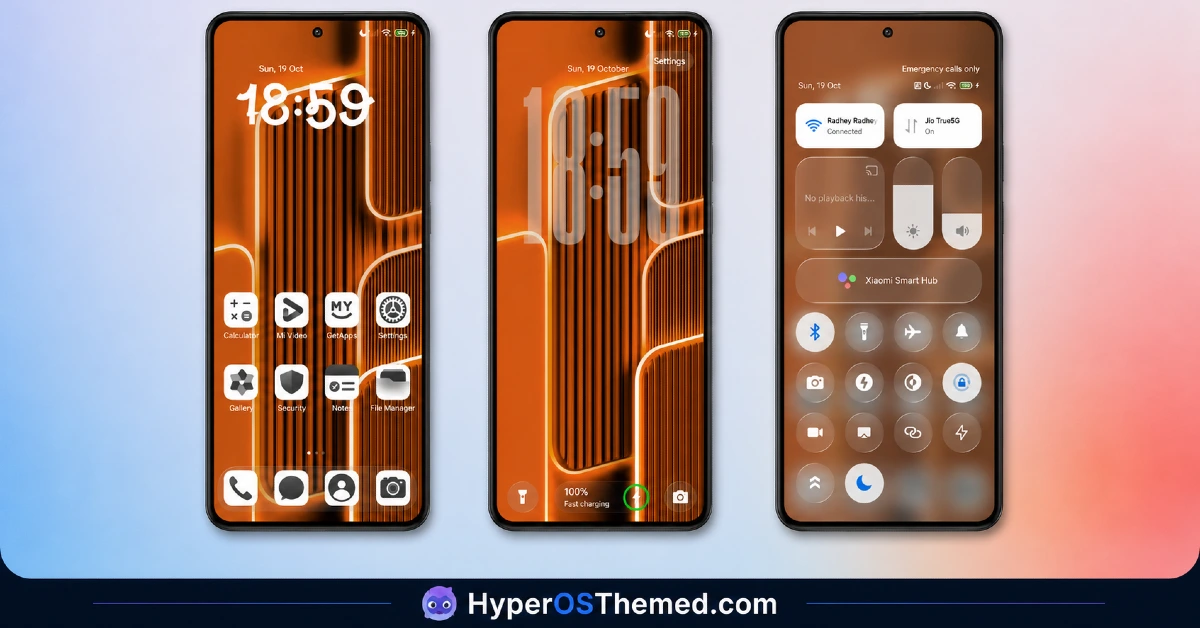
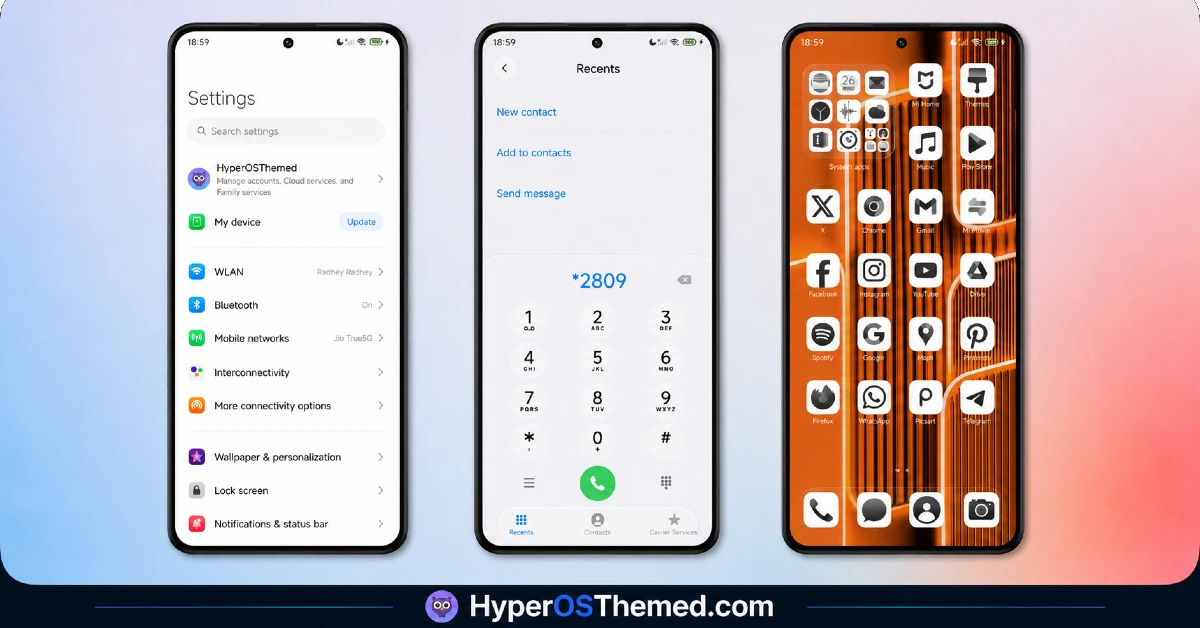
Neon orange against deep black carries the entire visual identity here, with the glowing circuit-line inspiration coming through most clearly in how the color practically vibrates against the darker backdrop rather than sitting flat. The angular clock font reinforces that futuristic energy theme, giving the lock screen a distinct personality instead of blending into the wallpaper the way default fonts often do. It’s a genuinely bold aesthetic choice, closer to a gaming rig’s RGB lighting than a typical phone theme’s restrained color palette.
TronM HyperOS Theme Details
| Detail | Info |
|---|---|
| Theme Name | TronM |
| Designer | Maidul Islam |
| Compatibility | HyperOS, HyperOS 2.0, HyperOS 3.0 |
| Region | Global |
| Features | Colorful, Orange, White, Black, Neon |
| File Size | 23.14 MB |
Note: if you find any issues with this theme, please contact us, and we will fix them soon.
Feedback
Telegram: https://t.me/HyperosSignals
Telegram: https://t.me/CNThemes
Theme Collaboration by
https://t.me/HuwiCenter
新テーマ近日公開.
TronM HyperOS Theme Performance
Given how saturated and high-contrast the color work is throughout, I expected the icon rendering might strain a bit on smaller details, but everything stayed crisp on the POCO X6 across the home screen and app drawer. Battery drain during normal use, messaging, browsing, and some gaming stayed close to my usual baseline, with nothing suggesting the color-heavy design was pulling extra resources. Switching between home screens and opening the app drawer showed no lag or stutter, and the distinctive clock font stayed fully legible even glancing at it quickly outdoors.
TronM HyperOS Theme’s Compatibility
TronM supports HyperOS, HyperOS 2.0, and HyperOS 3.0, covering the current range of Xiaomi, Redmi, and POCO devices, and the POCO X6 handled it without stability issues throughout testing. MIUI 14 users get a separate video guide linked in the installation instructions if needed.
MIUI 11 through 13 fall outside official support here. Custom ROM users on Xiaomi.eu or similar HyperOS-based builds should be able to import the MTZ file without major friction given the compact file size.
Downloading TronM HyperOS Theme Safely
Use the Official Theme Store to download the TronM HyperOS Theme Link rather than a third-party mirror claiming to host the same file. The designer maintains active feedback channels through Telegram for bug reports, which is worth checking directly rather than trusting a repost that may not reflect the latest fixed version.
Note: If the Official Theme Store Link doesn’t redirect properly, try opening the page in Chrome or the default Xiaomi browser, since other browsers may not handle the redirect correctly.
Steps to Apply the TronM HyperOS Theme
- Open the Theme Store Link given above on your Xiaomi / REDMI / POCO device
- This will redirect you to Theme Store.
- Download and install the theme
- Tap on Apply
- Customize specific elements (icons, lock screen, status bar) if needed
- Reboot your device (optional for full effect)
What Makes TronM HyperOS Theme Worth Considering
- Genuine full-orange neon identity rather than orange used as a minor accent color
- Distinctive angular clock font that ties directly into the circuit-inspired aesthetic
- High-contrast design keeps icons and text easy to read at a glance
- Compact 23.14 MB file size keeps downloads and installs fast
- Active designer support through Telegram for bug reports and fixes
Final Verdict
TronM HyperOS Theme commits fully to a color most theme designers avoid, and that commitment is exactly what makes it stand out on a POCO X6 home screen next to the usual dark, minimal, or blue-toned options. It won’t suit anyone wanting something understated, this is a theme built to be noticed, but for that specific vibrant, high-energy aesthetic, the orange-and-black execution and distinctive clock font deliver more personality than most themes in its file-size class manage.
You may also like:
Super26i HyperOS Theme with Premium Colourful, Dynamic Lock Screen for Xiaomi, POCO & Redmi
Rat V HyperOS Theme with 3D Anime Style Meets Dynamic Island for Xiaomi & Redmi
Super Surge HyperOS Theme With iOS-Inspired Dynamic Island for Xiaomi, POCO & Redmi
Pure Blue HyperOS Theme with Deep Space Vortex Design for Xiaomi, POCO & Redmi
HyperBlack HyperOS Theme with Pitch-Black Minimalism for Xiaomi, POCO & Redmi
